The SQL Agent project is an AI-powered tool that allows users to interact with SQL databases using natural language. Instead of writing complex SQL queries, users can simply ask questions in plain English, and the AI will handle the query processing. The project leverages a multi-agent system to intelligently route queries to the appropriate processing agent, either SQL or RAG (Retrieval Augmented Generation).
- Natural Language Queries: Users can ask questions about their data in plain English.
- SQL Transparency: View the generated SQL queries for each response.
- Database Schema Understanding: The AI automatically analyzes your database structure.
- Intelligent Query Routing: Uses a Supervisor Agent to determine the best way to answer your questions.
- Upload your SQLite Database File: Users start by uploading their SQLite database file through the web interface.
- Ask Questions in Natural Language: Users input queries in natural language via the chat interface.
- Supervisor Agent Decision: The Supervisor Agent analyzes the query to decide whether to use SQL or RAG to answer the question.
- Query Processing:
- SQL Agent: If the query is straightforward and can be directly translated into SQL, the SQL Agent handles it.
- RAG Agent: For queries requiring contextual understanding or complex reasoning, the RAG Agent is used.
- Get Comprehensive Answers: The system provides comprehensive answers with the option to view the underlying SQL queries.
Below is a flowchart illustrating the decision logic of the Supervisor Agent:

-
Clone the Repository:
git clone <repository-url>
cd Sql_Agent
-
Run the Setup Script: Execute the
run.shscript to set up the environment and start the application../run.sh
Watch the demo video to see SQL Agent in action:
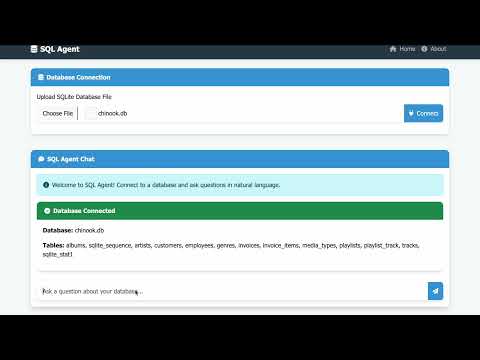

- Running the Application: The application is started by executing the
run.shscript, which sets up the environment and runs the main application scriptrun.py. - Environment Variables: Ensure that the
.envfile is updated with your actual Google API key.
run.sh: Bash script to set up the environment and run the application.templates/: Directory for storing HTML templates.uploads/: Directory for file uploads.agents/: Directory containing agent-related scripts.database/: Directory for database files.
- .env File: Contains environment variables such as API keys. Ensure this file is not tracked by Git by adding it to
.gitignore.
Contributions are welcome! Please fork the repository and submit a pull request for any enhancements or bug fixes.
This project is licensed under the MIT License.
For any questions or issues, please contact diptarupchakravorty794@gmail.com].