
The visualization of atomic orbitals and orbital information is an important enough topic in chemistry and physics to warrant specific attention. Contour plots and surface plots are two popular ways of visualizing a function of two variables, Matplotlib, NumPy, and SymPy that creates these types of plots, used some atomic orbital wavefunctions as reference.
- Quantum numbers (
$$n(principal), l(angular/momentum), ml(magnetic), ms(spin)$$ ) - Electron wavefunctions (Atomic orbitals)
- Radial and Angular contributions to the wavefunctions
Atomic orbitals are describe by a wavefuntion,
The wavefunctions (
The wavefunction for 2s and 2p orbitals. In polar coordinates:
Where,
Practically, we evaluate the wavefunctions for polar angles in the range
-
np.meshgrid: the coordinate arrays for function -
plt.contour: to make contour plot of the radial distribution function,$r^{2}|\Psi|^{2}$ -
plt.axis('square'): forces the plot's aspect ratio to be equal, useful for geometric plots -
plt.axis('off'): turns off the axis lines, tick, and labels (clean visualizations) -
linestyleandlinewidth: control the pattern and thick of the line -
plt.contourf: creates filled contour plots, commonly used for visualizing scalar fields (probability densities, electron orbitals).
# use NumPy and Matplotlib
import numpy as np
import matplotlib.pyplot as plt

r = np.linspace(0, 12, 100)
theta = np.linspace (-np.pi, np.pi, 100)
R, theta = np.meshgrid(r, theta)

def psi_2s(r, theta):
    """ Return the value of the 2s orbital wavefunction.

    This orbital is spherically-symmetric so does not depend on the angular coordinates theta or phi. The returned wavefunction is not normalized.

    """
    return (2-r) * np.exp(-r/2)

# To make a contour plot of the radial distribution we can use plt.contour
X, Y = R * np.cos(theta), R * np.sin(theta)
Z_2s = R **2 * psi_2s(R, theta)**2

# Matplotlib will not necessarily set the aspect ratio
plt.contour(X, Y, Z_2s, cmap='jet') # use popular 'jet' colormaps
plt.title(r'$\mathbb{R}\;[\Psi_{2s}]$')
plt.axis('square')
plt.axis()
plt.xlabel(r'$x$-position [a.u.]')
plt.ylabel(r'$y$-position [a.u.]')
plt.savefig('Radial Wavefunctions 2s orbital.svg', bbox_inches='tight')
plt.show()
# use NumPy and Matplotlib
import numpy as np
import matplotlib.pyplot as plt

r = np.linspace(0, 12, 100)
theta = np.linspace (-np.pi, np.pi, 100)
R, theta = np.meshgrid(r, theta)

def psi_2pz(r, theta):
    """ Return the value of the 2pz orbital wavefunction.

    This orbital is cylindrically-symmetric so does not depend on the angular coordinate phi. The returned wavefunction is not normalized.

    """
    return r * np.exp(-r/2) * np.cos(theta)

Z_2pz = R **2 * psi_2pz(R, theta)**2

plt.contour(X, Y, Z_2pz, cmap='jet')
plt.title(r'$\mathbb{R}\;[\Psi_{2p}]$')
plt.axis('square')
plt.xlabel(r'$x$-position [a.u.]')
plt.ylabel(r'$y$-position [a.u.]')
plt.savefig('Radial Wavefunctions 2p orbital.svg', bbox_inches='tight')
plt.show()
The radial wavefunctions (SymPy library includes a funtion R_nl(), this function takes the principal quantum number (n), angular momentum number (
R_nl(n, l, m, r, Z=1)We can calculate the radial wavefunction for any hydrogen-like atomic orbital such as the 2p orbitals (n = 3, and l = 1) at 4.0 Bohrs. To get a float answer, SymPy prefer use the evalf() method.
import sympy
from sympy.physics.hydrogen import R_nl

R_nl(3, 1, 4.0, Z=1).evalf()
0.0425138097805085
We can convert lambdify() method.
-
Radial wavefunction,
$R_{n, \ l} (r)$ The radial part of the wavefunction,
$R_{n, l}(r)$ gives the radial variation of$\Psi$ .$R_{n, l}(r)$ defines how the wavefunction depends on the distance of the electron from the nucleus (the radius). -
Probability density,
$R^{2} r^{2}$ The electron probability density can be found by calculating
$R^{2}$ where$R$ is the radial wavefunction, and the radial probability is$R^{2} r^{2}$ where$r$ is the distance from the nucleus. Just like in the particle-in-a-box model, the square of the wavefunction is proportional to the probability of finding a particle (electron) at some point in space. The square of the radial part of the wavefunction is called the radial distribution function$4\pi^{2}(R_{n, l}(r))^{2}$ , and its describes the probability of locating the electron at some distance$r$ away from the nucleus.Conclude, that
$R^{2}r^{2}$ gives the probability per unit volume, while$4\pi^{2}(R_{n, l}(r))^{2}$ gives the total probability of finding the electron within a spherical sheel of thickness$dr$ at distance$R$ .The radial probability is
$R^{2}r{2}$ . The reason we multyply the probability density by the square of the radial wavefunction,$r^{2}$ , is to account for the greater surface area of a sphere ($A_{sphere} = 4\pi r^{2}$ ) the larger the radius. We are effectively carrying out the calculation depicted below. We divide the sphere surface area by$4\pi$ to normalize the integration, making the probability over all space total to 1.
import numpy as np
import matplotlib.pyplot as plt
import sympy
from sympy.physics.hydrogen import R_nl
import math

r = sympy.symbols('r')
R_3p = sympy.lambdify(r, R_nl(3, 1, r, Z=1), modules='numpy') # use lambdify() method
radii = np.linspace(0, 30, 200)

fig = plt.figure(figsize=(28, 6))

ax1 = fig.add_subplot(1, 4, 1)
ax1.plot(radii, R_3p(radii), color='C0')
ax1.set_xlabel(r'$r/a_{0}\;(Bohrs)$')
ax1.set_ylabel(r'The Radial Wavefunction, $R(r)$')
ax1.set_title('3p Radial function')
ax1.hlines(0, 0, 30, color='r', linestyle='dashed')

ax2 = fig.add_subplot(1, 4, 2)
ax2.plot(radii, R_3p(radii)**2 * radii**2, color='C2')
ax2.set_xlabel(r'$r/a_{0}\;(Bohrs)$')
ax2.set_ylabel(r'Radial Probability, $R^{2}\;r^{2}$')
ax2.set_title('3p Radial probability')

ax3 = fig.add_subplot(1, 4, 3)
ax3.plot(radii, 4 * sympy.pi * radii**2 * R_3p(radii)**2 * radii**2, color='C1')
ax3.set_xlabel(r'$r/a_{0}\;(Bohrs)$')
ax3.set_ylabel(r'Radial Probability, $4\pi r^{2}R^{2}\;(r)$')
ax3.set_title('3p Radial probability distribution')

ax4 = fig.add_subplot(1, 4, 4)
ax4.plot(radii, 4 * sympy.pi * radii**2, color='C3')
ax4.set_xlabel(r'$r/a_{0}\;(Bohrs)$')
ax4.set_ylabel(r'Surface Area / $4\pi r^{2}$')
ax4.set_title(r'Sphere Surface Area Over $4\pi$')
plt.savefig('Probability density 3p orbital.svg', bbox_inches='tight')
plt.show()
We can use the radial plots to compare the radial probability of multiple different orbitals on the same axes. For example create the radial probability use the valence electron configurations of Cr and Cu.
import sympy as sp
import numpy as np
import matplotlib.pyplot as plt

import sympy
from sympy.physics.hydrogen import R_nl

# Use lambdyfy and SymPy
# create SymPy sumbol
r = sympy.symbols('r')

# Create a numpy function to define radial function (R_nl)
R_3s = sympy.lambdify(r, R_nl(4, 0, r, Z=1), modules='numpy')
R_3p = sympy.lambdify(r, R_nl(4, 1, r, Z=1), modules='numpy')
R_3d = sympy.lambdify(r, R_nl(3, 2, r, Z=1), modules='numpy')

radii = np.linspace(0, 45, 200)

# create plot
plt.plot(radii, R_3s(radii)**2 * radii**2, label = '4s')
plt.plot(radii, R_3p(radii)**2 * radii**2, label = '4p')
plt.plot(radii, R_3d(radii)**2 * radii**2, label = '3d')
plt.xlabel(r'$r/a_{0}\;(Bohrs)$')
plt.ylabel(r'Radial Probability, $R^{2}\;r^{2}$')
plt.title('Multiple plots of 4s, 4p, 3d orbitals')
plt.savefig('Multiple plots of 4s, 4p, and 3d orbitals.svg', bbox_inches='tight')
plt.legend();
The angular contribution to the wavefunction,
Where
There are multiple conventions for spherical coordinates. We will use the SciPy/SymPy convention of using theta (
we try to plot the
Step 1: create a mesh grid of angles
-
theta: polar angle (0 to$\pi$ ), measured from the z-axis. -
phi: azimuthal angle (0 to$\pi$ ), measured around the xy-plane. -
np.meshgrid: create a grid of all possible ($\theta,;\pi$ ) pairs, so we can evaluate functions across the whole.
Step 2: convert spherical coordinates to Cartesian
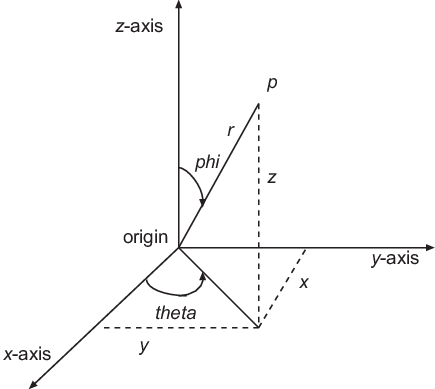
These are the standard spherical to Cartesian transformations with radius
- x = r x sin (phi) x cos (theta)
- y = r x sin (phi) x sin (theta)
- z = r x cos (phi)
Step 3: Define the angular wavefunction
Refererence: Table of Spherical Harmonics
Formula for complex spherical harmonics (
Step 4: Scale the sphere by the wavefunction
- The sphere coordinates are multiplied by the wavefunction value.
- This "inflates" or "deflates" the sphere depending on the angular probability distribution.
- The result is a 3D shape that represents the orbital's angular dependence.
Step 5: Plot the surface
ax.plot_surface: Creates a 3D plot of the orbital surfacecmap: applied a color gradient
import numpy as np
import matplotlib.pyplot as plt

import sympy
from sympy.physics.hydrogen import R_nl

# generate mesh grid of theta and phi values
theta, phi = np.meshgrid(np.linspace(0, np.pi, 51),
                         np.linspace(0, 2*np.pi, 101))

# convert angles to xyz values of a sphere, r = 1
x = np.sin(theta) * np.sin(phi)
y = np.sin(theta) * np.cos(phi)
z = np.cos(theta)

# multipy xyz values by angular wavefunction
dz2 = np.sqrt((5/16) * np.pi) * (3 *np.cos(theta)**2 - 1)
X, Y, Z = x * dz2, y * dz2, z * dz2

# Plot the surface
fig = plt.figure(figsize = (10, 8))
ax = fig.add_subplot(1, 1, 1, projection='3d')
ax.plot_surface(X, Y, Z, cmap='jet')
ax.set_title(r'$Spherical\;Harmonics\;d_{z^{2}}\;orbital\;/\;Y_{2}^{0}\;(\theta,\;\phi)$')
ax.set_xlabel(r'$x$-axis [a.u.]')
ax.set_ylabel(r'$y$-axis [a.u.]')
ax.set_aspect('equal')
plt.savefig('Angular Spherical Harmonic dz^2 .svg', bbox_inches='tight')
plt.show()
We can visualize the angular component of wavefunction in 2D using polar plot, but we can only visualize one angle at a time. We will visualize theta and leave phi fixed, because we are only visualizing in 2D and not sweaping around the phi angles.
The Laplace spherical harmonics
Step 1: Quantum numbers setup
l and m: l is orbital angular momentum quantum number, m is magnetic quantum number.
Step 2: Symboliz variables
-
azmuth: correspond to the azimuthal angle$\phi$ . -
polar: correspond to the polar angle$\theta$ .
Step 3: Spherical harmonic function
-
Z_lm(l, m, polar, azmuth): the spherical harmonic function ($Y_{l}^{m}(\theta, \phi)$). -
sympy.lambdify: converts the symbolic expression into a numerical functionfthat can be evaluated with NumPy arrays. -
f(theta, phi): gives numerical values of the spherical harmonic.
Step 4: Angle sampling
- These represent aimuthal angles
- Creates 200 evenly spaced values between 0 and
$2\pi$ .
Step 5: Polar plot setup
polar=True: means the axes are circular, with angles radiating outward.
Step 6: Plotting the spherical harmonic slice
th: sweeps through azimuthal anglesnp.abs: plots the absolute value of the spherical harmonic.
Step 7: Orienting the plot
- Sets the zero angle (0 radians) to point north (up) instead of the default east (right).
import numpy as np
import matplotlib.pyplot as plt

import sympy
# delete this cell and replace with actual Z_lm after next SymPy release
from sympy.functions.special.spherical_harmonics import Znm
def Z_lm(l, m, phi, theta):
    return Znm(l, m, theta, phi).expand(func=True)

# Quantum numbers
l, m = 2, 0

# Define symbolic variables
azmuth, polar = sympy.symbols('azmuth polar')

# Use SimPy spherical harmonics function
# Z_lm(l, m, theta, phi) gives the spherical harmonics
f = sympy.lambdify((polar, azmuth), Z_lm(l, m, polar, azmuth), modules='numpy')

# Sample Azimuthal angles
th = np.linspace(0, 2 * np.pi, 200)

# Polar plot
fig = plt.figure()
ax = fig.add_subplot(111, polar=True)

# Evaluate spherical harmonic at polar angle = 0
ax.plot(th, np.abs(f(0, th)))
ax.set_title(r'$d_{z^{2}}\;orbital\;/\;Y_{l}^{m}(\theta)$')

# Orient 0 degress to north
ax.set_theta_zero_location('N')
plt.savefig('Angular polar 3d^2 orbital.svg', bbox_inches='tight')
Before we knew about quantum physics, humans tought that if we had a system two small objects,
Orbitals have no edge, so there are multiple ways of representing orbitals, including:
- contour plots
- isosurfaces
- surface plots
- scatter plots
- translucent 3D plots.
To visualize the orbitals we need the probability density, P, of the atomic orbital, which is proportional to the product of a wavefunction,
Strategy: we use the SymPy Psi_nlm() function.
-
lambdify: converts the symbolic expression into a fast numerical function. -
wf_sym: a symbolic expression for the hydrogenic wavefunction. -
theta_vals: a NumPy array of sampled polar angles$\theta$ . -
np.arccos: the inverse cosine function, because the orbital plot would be biased (too many points near the polar or equator). -
prob_dens: the probability density at each sampled point -
wf(): evaluates the wavefunction numerically at each sampled ($r,;\theta,;\phi$ ) -
norm_prob: normalized probability density. -
mask: a boolean selecting which points to keep. -
is_pos: a boolean array indicating the sign of the wavefunction, positive values = one lobe (red), and negative value (blue). Used for coloring lobes.
Quantum number and angular and spherical coordinates n = 3(principal), l = 2 (d-orbital), m = 0 (aligned along z)
-
polaris the polar angle$\theta$ , then multiplying by sin(0) in the Cartesian conversion. That effectively sets x = 0 always, collapsing visualization into the yz-plane. - for spherical coordinates, we need both,
$\theta$ (polar angle, 0 to$\pi$ ),$\phi$ (azhimutal angle, 0 to 2$\pi$).
  # 3d orbital
import numpy as np
import matplotlib.pyplot as plt

import sympy
from sympy.physics.hydrogen import Psi_nlm

# Define symbols
r, polar = sympy.symbols('r, polar')

# 3d orbital wavefunction (n=3, l=2, m=0)
wf_sym = Psi_nlm(3, 2, 0, r, 0, polar)
wf = sympy.lambdify((r, polar), wf_sym, modules='numpy')

# generate random coordinates
rng = np.random.default_rng(seed=21)
n_points = 500000
r = 30 * rng.random(size=(n_points))
polar = 2 * np.pi * rng.random(size=(n_points))

x = r * np.sin(polar) * np.sin(0)
y = r * np.sin(polar) * np.cos(0)
z = r * np.cos(polar)

# normalize and create mask
prob_dens = np.abs(wf(r, polar))**2
norm_prob = prob_dens / prob_dens.max()
mask = norm_prob > rng.random(n_points)

# plt.plot (x[max], y[max])
fig = plt.figure(figsize = (5, 5))
ax = fig.add_subplot(1, 1, 1)
is_pos = wf(r, polar)[mask] > 0
ax.scatter(y[mask], z[mask], s=0.5, c=is_pos, cmap='coolwarm')
ax.set_xlabel(r'$r/a_{0}\;(Bohrs)$')
ax.set_ylabel(r'$r/a_{0}\;(Bohrs)$')
ax.set_title(r'$3d\;Scatter\;orbital\;(\psi)$')
plt.savefig('Scatter 3d orbital.svg', bbox_inches='tight')
A second way to visualize orbitals is through a contour plot. Here we calculate the probability in a mesh of locations and provide the plt.contour function with the location and probabilities. We use spherical conversion:
The key arguments:
-
YandZ: are 2D arrays representing coordinates (200 x 200 points spanning -20 to 20 Bohr radii) -
r: radial distance from nucleus. -
polar: polar angle$\theta$ (angle from z-axis). -
f(r, polar): computes probility density numerically. -
r = np.sqrt(Y^2 + Z^2): radial distance from origin. -
polar = arctan(Y / Z): polar angle approximation. -
plt.contour: draw contour lines of constant probability density.
# 3d orbital
import numpy as np
import matplotlib.pyplot as plt

import sympy
from sympy.physics.hydrogen import Psi_nlm

# Create a grid of points
Y, Z = np.meshgrid(np.linspace(-20, 20, 200),
                    np.linspace(-20, 20, 200))

# Define symbolic variables
r, polar = sympy.symbols('r polar')

# Build the wavefunction
wf = Psi_nlm(3, 2, 0, r, 0, polar)

# Convert to numerical function
f = sympy.lambdify((r, polar), wf * sympy.conjugate(wf), modules='numpy')

# Convert grid coordinates to spherical
polar = np.arctan(Y / Z)

# calculate probability density
r = np.sqrt(Y**2 + Z**2)
prob = np.abs(f(r, polar))**2

# plot contours
plt.contour(Y, Z, prob, levels=[1e-9, 3e-9, 5e-9, 1e-8, 5e-8, 1e-7, 3e-7, 5e-7], cmap='jet')
plt.colorbar()
plt.xlabel(r'$r/a_{0}\;(Bohrs)$')
plt.ylabel(r'$r/a_{0}\;(Bohrs)$')
plt.title(r'$3d\;Contour\;orbital\;(\psi)$')
plt.savefig('Contour 3d orbital.svg', bbox_inches='tight')