
- 2025-11-24 : Update to a single html file with chinese and English version.
- 2025-11-12 : Support .NET10
Introduction [中文版]
Blazor WASM Packager can package all Blazor WebAssembly program files, including js,wasm,dll,json,dat and other files, into a single JS file after GZIP compression. It greatly simplifies the deployment process, optimizes application loading performance, and enables cross-origin calls for Blazor WASM.
For example, for the Blazor WASM application [DCWriterApp], there are contains 61 files totaling 36.5MB. After packaging, a single JS file is generated with a size of only 15.2MB, achieving a compression ratio of 41%. Additionally, deploying with this single JS file improves the application's loading speed and avoids cross-origin resource call issues.
| Inconveniences of standard Blazor WASM | After packaging |
|---|---|
| 61 files, totaling 36.5MB, including various types such as dll, js, wasm, dat, etc. | Single JS file, 15MB |
| Does not support cross-domain calls | Supports cross-domain calls |
| Does not support "file://" local file system calls | Supported |
| Does not support Election front-end file packaging technology | Supported |
| Inconvenient for customer deployment, version updates and rollbacks | Convenient |
| Contains DLL files (sensitive file type), which may conflict with customer security policies | None |
- https://dcsoft-yyf.github.io/BlazorWASMPackager/demoFiles/BlazorSample
- https://dcsoft-yyf.github.io/DCWriterApp/index.html
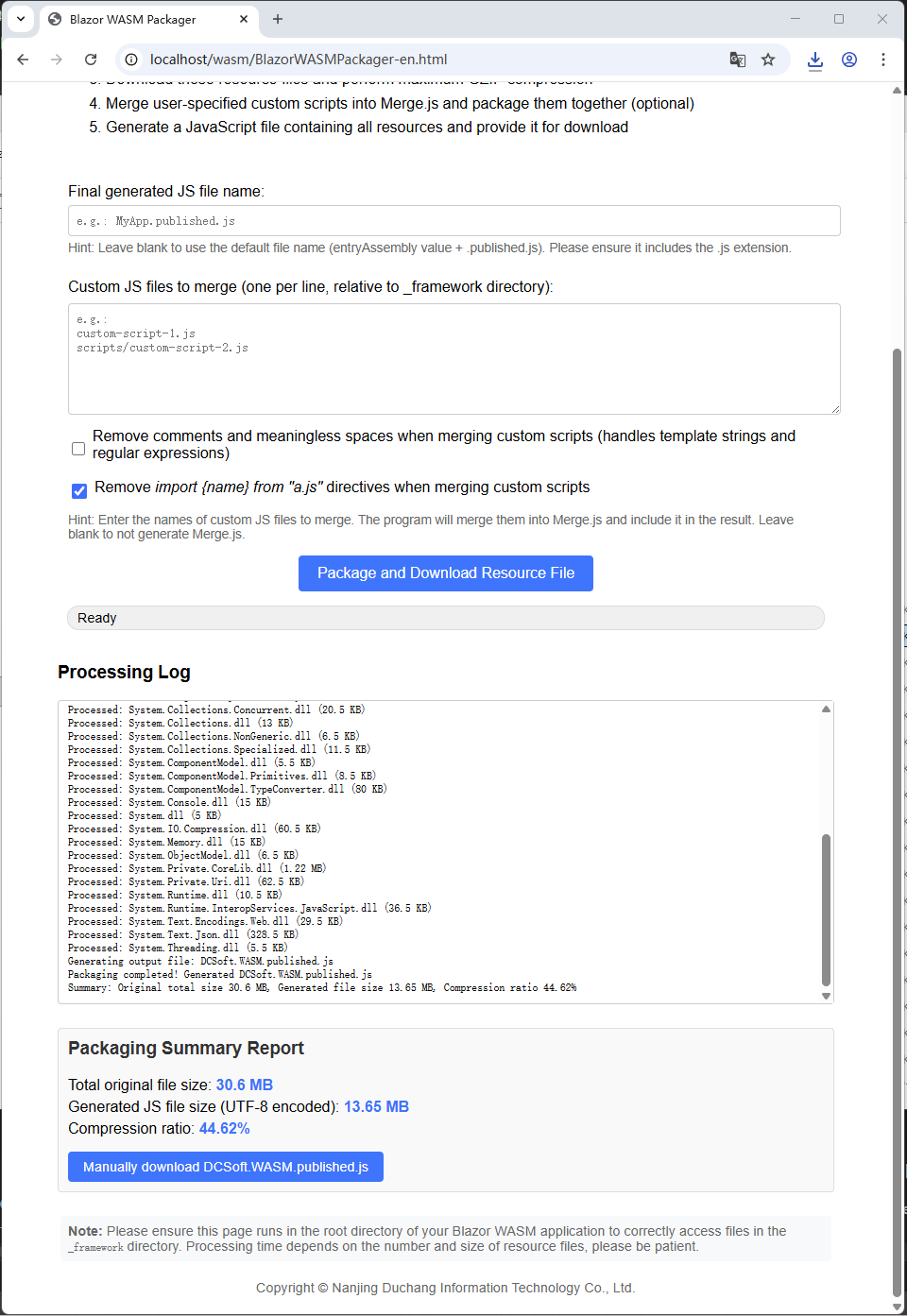
-
Ease of Use
- This software contains only one file:
BlazorWASMPackager.html. That's right, just one HTML file! - This HTML file is directly placed in the root folder of the published Blazor WebAssembly program (usually the
wwwrootfolder) and can be used by opening it with a mainstream browser, without relying on any third-party software. - Provides visual progress feedback and detailed processing logs
- Supports custom output file names and script merging rules
- This software contains only one file:
-
Overcoming Cross-Origin and Local Execution Restrictions
- Resolves cross-origin resource calling issues (CORS) in traditional Blazor WASM applications, avoiding cross-origin requests through resource embedding
- Supports direct application launch from the local file system (
file://protocol) without relying on a web server - Can be used in offline scenarios or local demonstration environments without the need to configure server CORS policies
-
Simplified Deployment Process
- Merges dozens or even hundreds of scattered resource files into a single JS file, reducing the number of deployment files
- Simplifies software file deployment, network caching, version upgrade and rollback work
- Reduces network request overhead during multi-file transmission
- Reduces the risk of network firewalls or proxies restricting multi-file requests
-
Improved Loading Performance
- Applies maximum-level GZIP compression to all resources, significantly reducing transmission size
- Reduces the number of HTTP requests and lowers the impact of network latency
- Supports custom script minification to remove redundant code
-
Enhanced Deployment Flexibility
- The generated single file can be easily integrated into various static resource hosting services
- Supports environment adaptation for micro-frontend architectures (MicroApp/ QianKun)
- Facilitates version management and implementation of caching strategies
I developed this software with the help of Doubao AI ( www.doubao.com ). First, I used the following prompts to create the main body of this HTML file step by step:
-
Generate an HTML page with JS code to implement the following functions: 1.Parse the
_framework/blazor.boot.jsonfile in the current path, and parse the attribute names under theresources/runtime|assembly|runtimeAssets|pdbnodes in it. 2.Use this attribute name as the file name, then download these files, obtain the binary content, compress it using GZIP, and convert it to a Base64 string. Wrap the Base64 string, with 128 characters per line. 3.Create a new string in JavaScript format. Then define "window.__DCFileContents = { "file name": "Base64 string" }" 4.Provide a "Download" button on the interface to load the generated JS string using the JS MIME type. -
Do not use pako; use the browser's built-in GZIP module directly.
-
This is a Blazor WASM program packager; modify the text description of the HTML.
-
The Base64 string should not be too long; it should wrap automatically after 128 characters, and the output text should be automatically appended and displayed at the bottom. Clear the interface of the debug output text before each generation, then start appending and displaying the debug output text.
-
Do not output a preview of the Base64 content; remove the current debug text from it, and only keep the debug text appending method at the bottom for output.
-
The width of the debug output text box is 100%, and a progress bar is added below it. Remove the status element in the middle.
-
The debug output text box has a fixed initial width; the progress bar displays progress text prompts in the middle. Add copyright information: "Copyright © Nanjing Duchang Information Technology Co., Ltd."
-
The final generated Base64 string in JS does not wrap automatically after 128 characters. 2. Program error: BlazorWASMPackage.html:260 Error processing file dotnet.wasm: Maximum call stack size exceeded, this file will be skipped processAndDownload @ BlazorWASMPackage.html:260 BlazorWASMPackage.html:260 Error processing file icudt_CJK.dat: Maximum call stack size exceeded, this file will be skipped The width of debugOutput should be 100%, and the Base64 string in the finally generated JS must wrap automatically after 128 characters. It has nothing to do with .csproj; modify the JS in the HTML to ensure that the Base64 string in the finally generated JS wraps automatically after 128 characters.
-
Modify
uint8ArrayToBase64(), convert every 32 bytes here, then add a line break and carriage return character, and directly generate a BASE64 string with line breaks here. The progress bar text is left-aligned. -
In
uint8ArrayToBase64(), each group of bytes is 129 to avoid mismatched Base64 conversion lengths. -
Do not use JSON intermediate format conversion; directly concatenate to generate JS strings.
-
For Base64 string output, use the ` ` format to avoid
\nescape characters, and output the Base64 string with line breaks directly in JS. -
All byte lengths here are formatted for output, using KB and MB units according to the size. Accurate to two decimal places. Include
blazor.boot.jsonin the packaging. Use the maximum compression ratio for GZIP. Add a manual click download link in the summary report. Reset the progress bar after processing is completed. Adjust the color of the progress bar; the blue background with black text is unclear. -
The generated JS file name uses the
entryAssemblyvalue under bool.json plus the suffix ".published.js". -
Files with empty hashes cannot be skipped; all files must be processed unconditionally.
-
Add a multi-line text box to allow users to enter several JS file names, then during packaging, read these JS files in the
_frameworkfolder, merge them into oneMerge.js, and participate in the packaging. If not specified by the user,Merge.jswill not be generated. -
The JS listed in boot.json must be packaged compulsorily and not merged into merge.js. The text box is for users to enter custom script .js file names. In addition, the first line of the finally generated js file must display the current date and time.
-
Add a checkbox to allow users to choose whether to delete comments and meaningless spaces in mergs.js.
-
Add a single-line text box for entering a custom final JS file name; if empty, the default file name is used.
-
Simplify the debug output text; by default, do not minify merge.js spaces and comments. Ensure that the merge.js minification result is correct.
-
For strings in JS, take into account multi-line strings like ` `, and regular expressions that may appear in JS code; they must not be damaged.
In this way, I used AI to create the initial version, then made subsequent modifications manually. Finally, the current version was formed.
-
Page Loading Preparation
- Initializes DOM element references (progress bar, log area, buttons and other interactive components)
- Resets the progress bar status to "Ready" (0%)
- Clears the log output area
- Disables the download button to prevent duplicate clicks
-
User Parameter Collection
- Reads the content from the output file name input box (uses default naming rules when empty)
- Parses the custom JS file list (one path per line, relative to the
_frameworkfolder) - Checks the status of the "Minify custom scripts" checkbox (determines whether to remove comments and redundant spaces)
- Detects whether the current browser supports the
CompressionStreamAPI (used for GZIP compression) - Terminates the process and prompts: "Please use the latest version of Chrome, Edge or Firefox browser" if not supported
-
Download Configuration File
- Sends a request to obtain
_framework/blazor.boot.json(the core configuration of the Blazor application) - Records the original size of the configuration file and includes it in the total statistics
- Terminates the process and displays a specific error message in the log if the download fails (e.g., 404 error)
- Sends a request to obtain
-
Parse Configuration Content
- Parses the configuration data in JSON format
- Extracts all resource paths from the
resourcesfield (including types such as runtime, assembly, jsModule) - Extracts the
entryAssemblyvalue (used to generate the default output file name) - Updates the progress bar to 10% and logs "Configuration file parsing completed"
-
Task Preparation
- Collects the list of resource files to be processed (including core files such as
blazor.webassembly.js) - Calculates the progress proportion of each file based on the total number of files (75% of the total progress is divided equally)
- Collects the list of resource files to be processed (including core files such as
-
Process Resources One by One
- Processes each resource file in a loop:
- Constructs the complete URL:
_framework/[file name] - Downloads the file and converts it to Uint8Array format
- Records the original file size (accumulates to the total original size)
- Uses the
gzipCompress()function for maximum-level (level:9) compression - Converts the compressed data to Base64 encoding (processed in 129-byte chunks)
- Generates an entry containing the file name and Base64 content
- Constructs the complete URL:
- Updates the progress bar in real time (e.g., "Processing 3/20: dotnet.wasm")
- Logs and skips individual file processing failures without terminating the entire process
- Processes each resource file in a loop:
-
Input Parsing
- Filters empty lines and invalid paths to obtain a valid list of custom JS files
- Logs "No custom JS files specified, not generating Merge.js" and skips if the list is empty
-
Merging and Processing
- Downloads each specified custom JS file:
- Records the original size of each file
- Applies
minifyJs()processing when minification is enabled (preserves template strings and regular expressions) - Merges the content (adds source comments unless minification is enabled)
- Applies GZIP compression to the merged content and converts it to Base64 encoding
- Generates a
Merge.jsentry and adds it to the resource list
- Downloads each specified custom JS file:
-
Content Construction
- Adds a generation time comment on the first line (format:
// Generated on: YYYY-MM-DD HH:MM:SS) - Creates a JavaScript object containing all resources (keys are file names, values are Base64 content)
- Generates a self-executing function, including:
- Resource decompression logic (uses
DecompressionStreamto process GZIP data) - Blazor startup configuration (overrides the
loadBootResourcemethod to inject local resources) - Temporary URL cleanup logic (releases memory usage)
- Resource decompression logic (uses
- Adds a generation time comment on the first line (format:
-
File Name Processing
- Prioritizes the user-specified file name (must include the
.jsextension) - Uses the rule:
[entryAssembly].published.jswhen not specified - Uses
blazor-resources.published.jsby default whenentryAssemblyis unavailable
- Prioritizes the user-specified file name (must include the
-
Statistical Information Calculation
- Total original size: the sum of the original sizes of all resources + configuration files + custom scripts
- Generated file size: the number of UTF-8 encoded bytes of the final JS file
- Compression ratio:
(Generated file size / Total original size) × 100%
-
Create Download
- Converts the JS content to a Blob object (MIME type:
application/javascript) - Generates a temporary download URL (
URL.createObjectURL) - Automatically triggers the download and displays a summary report (including size statistics and compression ratio)
- Provides a manual download link (for scenarios where automatic download fails)
- Converts the JS content to a Blob object (MIME type:
-
Error Handling Mechanism
- Single resource download failure: logs and skips (continues processing other files)
- Critical file (e.g.,
blazor.boot.json) failure: terminates the process and displays an error - Cleans up temporary resource links when the page is unloaded (
URL.revokeObjectURL)
-
Performance Optimization Details
- Uses streaming compression for large files to reduce memory usage
- Processes Base64 encoding in chunks to avoid excessively long lines
- Adapts to .NET 8/9 runtime versions
- Preserves key syntax structures during custom JS minification (template strings, regular expressions)
This software is copyrighted by Nanjing Duchang Information Technology Co., Ltd.
Blazor WASM 程序打包器能将 Blazor WebAssembly 所有的程序文件,包括js,wasm,dll,json等文件经GZIP压缩打包成单个JS文件,大幅简化部署流程并优化应用加载性能,而且能让Blazor WASM能跨域调用。
例如,对于Blazor WASM程序[DCWriterApp],原始程序文件有61个共36.5MB,打包后生成单个JS文件大小仅为15.2MB,压缩比为41%。而且使用这个单个JS文件部署后,提高程序加载速度,还避免了跨域资源调用问题。
| 标准Blazor WASM的不便之处 | 打包后 |
|---|---|
| 61个文件,共36.5MB,有dll、js、wasm、dat等多种类型 | 1个JS文件,15MB |
| 不可跨域调用 | 支持跨域调用 |
| 不支持"file://"本地文件系统调用 | 支持 |
| 不支持Election前端文件打包技术 | 支持 |
| 客户部署、版本更新和回滚不方便 | 方便 |
| 存在DLL文件,敏感文件类型,容易和客户安全策略冲突 | 无 |
-
使用简单
- 本软件只有一个
BlazorWASMPackager.html文件。没错!就一个HTML文件。 - 这个HTML文件直接放在Blazor WebAssembly程序发布后的根目录下(一般为
wwwroot目录下),用主流浏览器打开即可使用,不依赖任何第三方软件。 - 提供可视化进度反馈和详细处理日志
- 支持自定义输出文件名和脚本合并规则
- 本软件只有一个
-
突破跨域与本地运行限制
- 解决传统 Blazor WASM 应用的跨域资源调用问题(CORS),通过资源内嵌避免跨域请求
- 支持直接从本地文件系统启动应用(
file://协议),无需依赖 Web 服务器 - 能用于离线场景或本地演示环境,无需配置服务器跨域策略
-
简化部署流程
- 将数十甚至上百个分散的资源文件合并为单个 JS 文件,减少部署文件数量
- 简化软件文件部署、网络缓存、版本升级和回滚等工作
- 降低多文件传输时的网络请求开销
- 减少网络防火墙或代理对多文件请求的限制风险
-
提升加载性能
- 对所有资源进行最大级别 GZIP 压缩,显著减小传输体积
- 减少 HTTP 请求次数,降低网络延迟影响
- 支持自定义脚本精简,移除冗余代码
-
增强部署灵活性
- 生成的单一文件可轻松集成到各种静态资源托管服务
- 支持微前端架构(MicroApp/ QianKun)的环境适配
- 便于版本管理和缓存策略实施
我是借助于豆包AI( www.doubao.com )开发的,首先我使用了以下提示词一步步的创建这个HTML文件的主体:
- 生成一个HTML页面,包含JS代码,实现以下功能: 1.解析当前路径下的 _framework/blazor.boot.json 文件,解析其中的 resources/runtime|assembly|runtimeAssets|pdb节点下的属性名。 2.以这个属性名来当做文件名,然后下载这些文件,获得二进制内容,使用GZIP压缩,然后转换为base64字符串。base64字符串换行,每行128个字符。 3.创建一个新字符串,采用JavaScript格式。然后定义“window.__DCFileContents = {"文件名":"base64字符串"}” 4.界面上提供一个“下载”按钮,以js的minitype加载生成的js字符串。
- 不要使用pako,直接使用浏览器内置的GZIP模块
- 这是一个blazor wasm的程序打包器,修改HTML的文字说明
- base64字符串不能太长,128个字符就自动换行,而且输出文本时自动追加显示的最下面的。每次生成前先清空调试输出文本的界面,然后调试输出文本开始追加显示。
- 不要输出base64 的内容预览,去掉中的当前调试文本,只保留下方的调试文本追加方式输出。
- 调试输出文本框宽度为100%,下方添加一个进度条。中间的 status元素去掉。
- 调试输出文本框有个初始化的固定宽度,进度条中间显示进度文本提示信息。添加版权信息“南京都昌信息科技有限公司版权所有".
- 最终生成的base64字符串没有128个字符自动换行,2.程序报错 BlazorWASMPackage.html:260 处理文件 dotnet.wasm 时出错: Maximum call stack size exceeded,将跳过该文件 processAndDownload @ BlazorWASMPackage.html:260 BlazorWASMPackage.html:260 处理文件 icudt_CJK.dat 时出错: Maximum call stack size exceeded,将跳过该文件 debugOutput的宽度要100%,最终生成的JS中的base64字符串没有128个字符自动换行 和.csproj没有关系,修改HTML中的JS,确保最终生成的js中的base64字符串是128个字符自动换行
- 修改uint8ArrayToBase64(),在这里每32个字节进行一次转换,然后添加换行回车符,在这里面直接生成带换行的BASE64字符串,进度条文本左对齐。
- uint8ArrayToBase64()里面,每组字节是129个,避免base64转换长度不匹配
- 不要使用json中间格式转换,直接拼接生成JS字符串。
- 对于base64字符串输出采用 ` ` 格式,避免\n转移字符,JS中直接输出换行的BASE64字符串。
- 这里的字节长度都格式化输出,按照大小输出KB,MB单位。精确到小数点后2位。 打包时把 blazor.boot.json也包含进去。GZIP采用最大压缩比率。总结报告中添加手动点击下载链接。处理完成后进度条重置。进度条颜色调整一下,蓝色背景黑字看不清楚。
- 生成的JS文件名采用 bool.json下面的 entryAssembly数值加上 ".published.js"后缀。
- 不能跳过hash为空的文件,要无条件处理所有的文件。
- 放一个多行文本框,让用户输入几个JS文件名,然后打包时,将_framework目录下这些JS文件读取出来,合并成一个Merge.js,并参与打包。如果用户未指定,则不生成Merge.js
- boot.json里面列出的js是要强制打包的,不是合并到merge.js中。文本框中是让用户输入自定义脚本.js文件名。另外最终生成的js文件第一行要显示当前日期和时间。
- 添加一个勾选框,让用户选择是否删除mergs.js中的注释和无意义的空格。
- 放一个单行文本框,用于输入自定义的最终JS文件名,如果为空则采用默认的文件名。
- 简化调试输出文本,默认不精简merge.js空格和注释。要确保merge.js精简结果是正确的。
- JS中的字符串要考虑到 ` ` 这种多行字符串,还有JS代码中会出现正则表达式,也不能破坏掉。
这样我用AI创建了初步版本,然后我手动进行后续修改。最终形成了现在的版本。
-
页面加载准备
- 初始化 DOM 元素引用(进度条、日志区、按钮等交互组件)
- 重置进度条状态为"准备就绪"(0%)
- 清空日志输出区域
- 禁用下载按钮防止重复点击
-
用户参数收集
- 读取输出文件名输入框内容(为空时将使用默认命名规则)
- 解析自定义 JS 文件列表(每行一个路径,相对
_framework目录) - 检查"精简自定义脚本"复选框状态(决定是否移除注释和冗余空格)
- 检测当前浏览器是否支持
CompressionStreamAPI(用于 GZIP 压缩) - 不支持时终止流程并提示:"请使用最新版 Chrome、Edge 或 Firefox 浏览器"
-
下载配置文件
- 发送请求获取
_framework/blazor.boot.json(Blazor 应用的核心配置) - 记录配置文件原始大小并计入总统计
- 下载失败(如 404 错误)时终止流程,日志显示具体错误信息
- 发送请求获取
-
解析配置内容
- 解析 JSON 格式的配置数据
- 提取
resources字段中所有资源路径(包括 runtime、assembly、jsModule 等类型) - 提取
entryAssembly值(用于生成默认输出文件名) - 进度条更新至 10%,日志显示"配置文件解析完成"
-
任务准备
- 收集需处理的资源文件列表(包含
blazor.webassembly.js等核心文件) - 根据文件数量计算单个文件的进度占比(总进度 75% 平分)
- 收集需处理的资源文件列表(包含
-
逐个处理资源
- 循环处理每个资源文件:
- 构造完整 URL:
_framework/[文件名] - 下载文件并转换为 Uint8Array 格式
- 记录原始文件大小(累加至总原始大小)
- 使用
gzipCompress()函数进行最大级别(level:9)压缩 - 将压缩后的数据转换为 Base64 编码(按 129 字节分块处理)
- 生成包含文件名和 Base64 内容的条目
- 构造完整 URL:
- 实时更新进度条(如"处理 3/20:dotnet.wasm")
- 单个文件处理失败时记录日志并跳过(不终止整体流程)
- 循环处理每个资源文件:
-
输入解析
- 过滤空行和无效路径,获取有效自定义 JS 文件列表
- 列表为空时日志显示"未指定自定义 JS 文件,不生成 Merge.js"并跳过
-
合并与处理
- 逐个下载指定的自定义 JS 文件:
- 记录每个文件原始大小
- 启用精简时使用
minifyJs()处理(保留模板字符串和正则表达式) - 合并内容(添加来源注释,除非启用精简)
- 对合并内容进行 GZIP 压缩并转换为 Base64 编码
- 生成
Merge.js条目并添加到资源列表
- 逐个下载指定的自定义 JS 文件:
-
内容构建
- 首行添加生成时间注释(格式:
// Generated on: YYYY-MM-DD HH:MM:SS) - 创建包含所有资源的 JavaScript 对象(键为文件名,值为 Base64 内容)
- 生成自执行函数,包含:
- 资源解压逻辑(使用
DecompressionStream处理 GZIP 数据) - Blazor 启动配置(覆盖
loadBootResource方法注入本地资源) - 临时 URL 清理逻辑(释放内存占用)
- 资源解压逻辑(使用
- 首行添加生成时间注释(格式:
-
文件名处理
- 优先使用用户指定文件名(需包含
.js扩展名) - 未指定时使用规则:
[entryAssembly].published.js - 无
entryAssembly时默认使用blazor-resources.published.js
- 优先使用用户指定文件名(需包含
-
统计信息计算
- 原始总大小:所有资源+配置文件+自定义脚本的原始大小总和
- 生成文件大小:最终 JS 文件的 UTF-8 编码字节数
- 压缩比率:
(生成文件大小 / 原始总大小) × 100%
-
创建下载
- 将 JS 内容转换为 Blob 对象(MIME 类型:
application/javascript) - 生成临时下载 URL(
URL.createObjectURL) - 自动触发下载并显示总结报告(含大小统计和压缩比率)
- 提供手动下载链接(应对自动下载失败场景)
- 将 JS 内容转换为 Blob 对象(MIME 类型:
-
错误处理机制
- 单个资源下载失败:记录日志并跳过(继续处理其他文件)
- 关键文件(如
blazor.boot.json)失败:终止流程并显示错误 - 页面卸载时清理临时资源链接(
URL.revokeObjectURL)
-
性能优化细节
- 大文件采用流式压缩,降低内存占用
- Base64 编码分块处理,避免单行过长
- 针对 .NET 8/9 版本的 runtime 做适配处理
- 自定义 JS 精简保留关键语法结构(模板字符串、正则表达式)
本软件版权归南京都昌信息科技有限公司所有。