A modern, responsive Hugo theme designed specifically for book landing pages. Perfect for authors, publishers, and self-publishers who want a professional single-page site to showcase and sell their books.
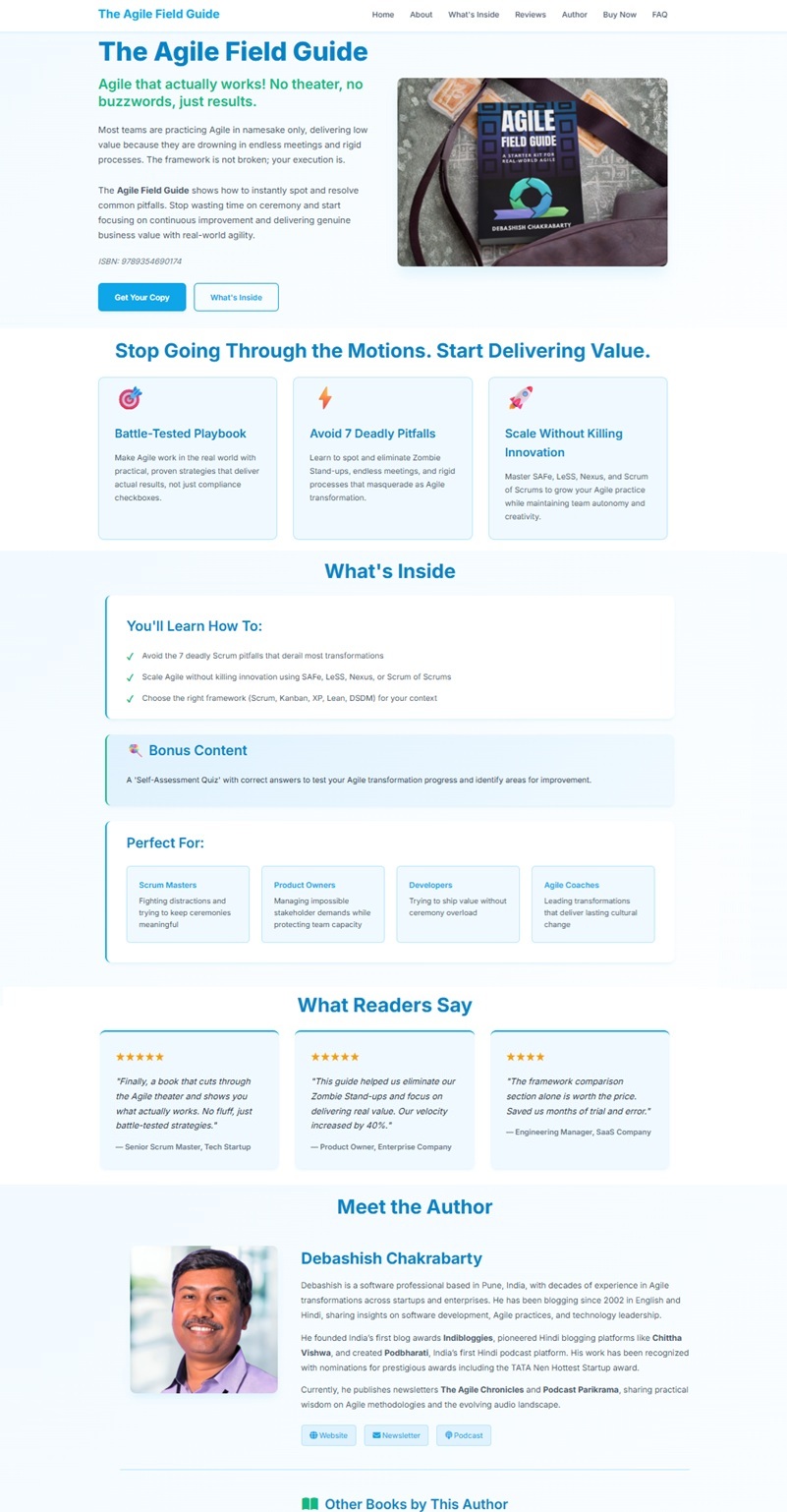
- 📱 Fully Responsive - Looks great on mobile, tablet, and desktop
- 🎨 Blue/Green Color Scheme - Professional and modern (easily customizable)
- 📚 Book Carousel - Showcase your other books with a horizontal scrolling carousel
- 🎯 Content-Driven - All content in Markdown and data files (no code changes needed)
- ⚡ Fast & Lightweight - Minimal JavaScript, optimized CSS
- 🔧 Modular Design - Each section is a separate partial for easy customization
- 💳 Multiple Buy Options - Support for multiple retailers (Amazon, Kindle, PDF, etc.)
- ⭐ Testimonials Section - Display reader reviews with star ratings
- ❓ FAQ Section - Answer common reader questions
- 📧 Newsletter Integration - Optional newsletter signup section
- 🎭 Font Awesome Icons - Beautiful icons throughout
- 🌐 SEO Optimized - Proper meta tags and semantic HTML
- Fiction and non-fiction authors
- Self-published authors
- eBook launches
- Book pre-orders
- Author portfolios
- Publishing houses
Live Demo: View Demo
Example Site: See exampleSite/ directory for a complete working example.
- Hugo Extended v0.80.0 or higher
- Git
# From your Hugo site root
git submodule add https://github.com/dchucks/book-landing-hugo-theme.git themes/book-landing-hugo-theme

# Copy example site files
cp themes/book-landing-hugo-theme/exampleSite/config.toml .
cp -r themes/book-landing-hugo-theme/exampleSite/content .
cp -r themes/book-landing-hugo-theme/exampleSite/data .

# Create images directory
mkdir -p static/images/other-books

# Run Hugo
hugo server -D# Clone the theme
git clone https://github.com/dchucks/book-landing-hugo-theme.git themes/book-landing-hugo-theme
# Copy example files
cp themes/book-landing-hugo-theme/exampleSite/config.toml .
cp -r themes/book-landing-hugo-theme/exampleSite/content .
cp -r themes/book-landing-hugo-theme/exampleSite/data .
# Run Hugo
hugo server -DbaseURL = "https://yourbook.com/"
languageCode = "en-us"
title = "Your Book Title"
theme = "book-landing-hugo-theme"
[params]
description = "Your book description"
[params.author]
name = "Your Name"
image = "/images/author-photo.jpg"
bio = "Short bio"
[params.author.social]
website = "https://yourwebsite.com"
newsletter = "https://yournewsletter.com"---
title: "Your Book Title"
subtitle: "Compelling subtitle"
bookPrice: "$19"
originalPrice: "$29"
buyLinks:
- name: "Buy on Amazon"
url: "https://amazon.com/your-book"
icon: "fa-brands fa-amazon"
category: "ebook"
newsletter:
enabled: true
title: "Stay Updated"
url: "https://newsletter.com"
heroImage: "/images/book-cover.png"
---
Your book description here...Customize these data files:
features.toml- Main feature cardstestimonials.toml- Reader reviewsfaq.toml- Frequently asked questionswhatsinside.toml- Benefits and target audienceotherbooks.toml- Your other books in carouselbuyoptions.toml- Format comparisonauthor.toml- Extended author bio (optional)
Edit themes/book-landing-hugo-theme/static/css/style.css:
:root {
    --primary-color: #0ea5e9;      /* Main blue */
    --primary-dark: #0284c7;       /* Dark blue */
    --secondary-color: #10b981;    /* Green accent */
    --accent-color: #6ee7b7;       /* Light green */
}All sections are modular partials in layouts/partials/:
hero.html- Hero sectionfeatures.html- Feature cardswhats-inside.html- Benefitstestimonials.html- Reviewsauthor.html- Author bioauthor-books-carousel.html- Book carouselbuy-now.html- Purchase optionsfaq.html- FAQnewsletter.html- Newsletter signup
Remove or rearrange sections by editing layouts/index.html.
Edit data/otherbooks.toml:
[[books]]
title = "Your Other Book"
description = "Brief description"
cover = "/images/other-books/book-cover.jpg"
buyUrl = "https://amazon.com/your-book"
price = "$19"
Image recommendations:
- Size: 400×600px (2:3 aspect ratio)
- Format: JPG, optimized to <150KB
- Consistent dimensions for all books
- Size: 400×600px (2:3 ratio)
- Format: PNG or JPG
- Quality: High resolution for hero section
- Size: 500×500px minimum
- Format: JPG
- Style: Professional headshot
- Size: 400×600px each
- Format: JPG
- Naming:
book-name-cover.jpg
- Hero - Book title, subtitle, description, and cover
- Features - Key benefits and features (6 cards)
- What's Inside - Benefits, bonus content, target audience
- Testimonials - Reader reviews with ratings
- Author - Bio with social links and book carousel
- Buy Now - Purchase options for ebook and paperback
- FAQ - Common questions
- Newsletter - Optional signup section
- Footer - Links and copyright
- Chrome (latest)
- Firefox (latest)
- Safari (latest)
- Edge (latest)
- Mobile browsers (iOS Safari, Chrome Mobile)
book-landing-hugo-theme/
├── layouts/
│   ├── index.html              # Homepage template
│   ├── _default/
│   │   └── baseof.html        # Base template
│   └── partials/
│       ├── hero.html
│       ├── features.html
│       ├── testimonials.html
│       ├── author.html
│       ├── author-books-carousel.html
│       ├── buy-now.html
│       ├── faq.html
│       └── ...
├── static/
│   ├── css/
│   │   └── style.css          # Theme styles
│   └── js/
│       └── main.js            # Theme JavaScript
├── exampleSite/               # Complete working example
└── theme.toml                 # Theme metadata
- Push to GitHub
- Connect repo to Netlify
- Build command:
hugo - Publish directory:
public
- Import GitHub repository
- Vercel auto-detects Hugo
- Deploy!
Use Hugo's GitHub Actions workflow. See Hugo documentation.
Contributions are welcome! Please feel free to submit a Pull Request.
- Fork the repository
- Create your feature branch (
git checkout -b feature/AmazingFeature) - Commit your changes (
git commit -m 'Add some AmazingFeature') - Push to the branch (
git push origin feature/AmazingFeature) - Open a Pull Request
This theme is released under the GPL-3.0 License. See LICENSE file for details.
- Built with Hugo
- Icons by Font Awesome
- Fonts by Google Fonts
- Documentation: GitHub Wiki
- Issues: GitHub Issues
- Dark mode support
- Multiple color scheme presets
- Video section for book trailers
- Blog integration
- Multilingual support
- Audio sample player
If you found this theme helpful, please give it a star on GitHub!
 Buy me a Coffee ;)
Made with ❤️ for authors by an author

