The switch from AWS to Digital Ocean was made due to budget constraints. Additionally, an affordable domain was purchased to enable SSL and use it with the website. https://www.bookstore-api.store/api/v1
This repository contains the backend API for an online store, developed using NestJS and Prisma. It provides robust and scalable endpoints for managing products, orders, and payments. The API integrates with a payment gateway to ensure secure transaction processing.
src/
├── application/    # Application layer - Use cases and application services
├── domain/        # Domain layer - Business logic and entities
├── infrastructure/# Infrastructure layer - Framework and external services
└── shared/        # Shared resources - Utils, constants, and common code
- NestJS v10
- Prisma
- PostgreSQL
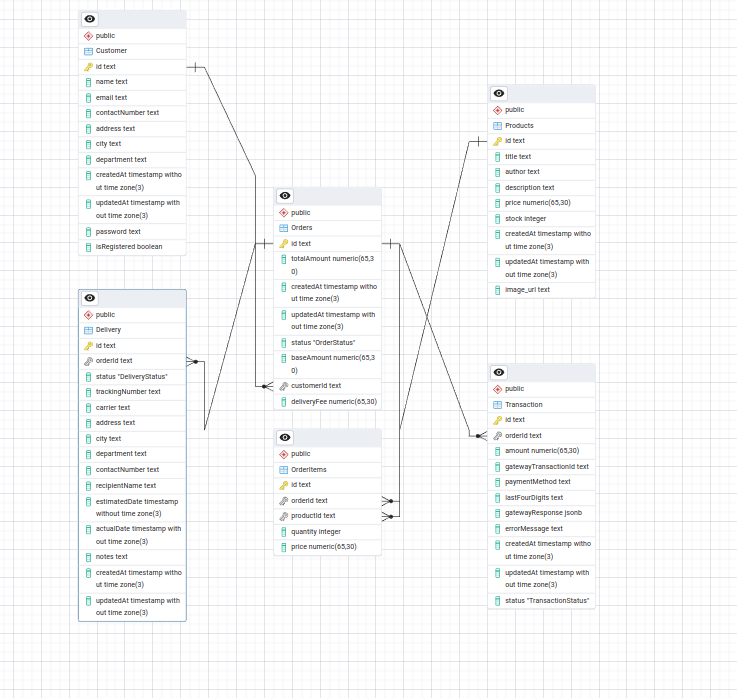
- Inventory management (title, price, stock)
- Connected to orders via OrderItems
- Supports guest checkout
- Optional registration (isRegistered flag)
- Stores contact & delivery info
Central entity that connects:
- Customer (buyer)
- OrderItems (products purchased)
- Delivery (shipping info)
- Transaction (payment)
- Links Products to Orders
- Tracks quantity and price
- Shipping information
- Tracking details
- Status updates
- Payment processing info
- Gateway responses
- Payment status tracking
- Customer → Orders (1:N)
- Order → OrderItems → Products (N:N)
- Order → Delivery (1:1)
- Order → Transaction (1:1)
- Postgres Database
- Node.js (v18+)
- Docker (Optional)
# Install dependencies
npm install

# Setting environment variables
cp .env.example .env

# Docker (Optional)
docker compose up -d

# Setting Database
npm run prisma:generate
npm run prisma:migrate:dev

# Seeding
npm run prisma:seed

# Start in development mode
npm run start:dev

# Build for production
npm run buildPORT=8000
NODE_ENV=development
POSTGRES_USER_DOCKER=admin
POSTGRES_PASSWORD_DOCKER=admin
POSTGRES_DB_DOCKER=bookstore
DATABASE_URL=postgresql://admin:admin@localhost:5433/bookstore
API_KEY=tu_clave_secreta
WOMPI_API_URL=
WOMPI_PUBLIC_KEY=
WOMPI_PRIVATE_KEY=
WOMPI_INTEGRITY_KEY=
WOMPI_EVENTS_KEY=This project includes an interactive API documentation built with Swagger. You can explore all the available endpoints, test requests, and view responses directly from the browser.

- URL: http://localhost:8000/api/v1/docs
- The Swagger interface provides:
- 📄 Endpoint descriptions
- 📊 Request/Response schemas
Replace
http://localhost:8000/api/v1/docswith your live or development API URL.
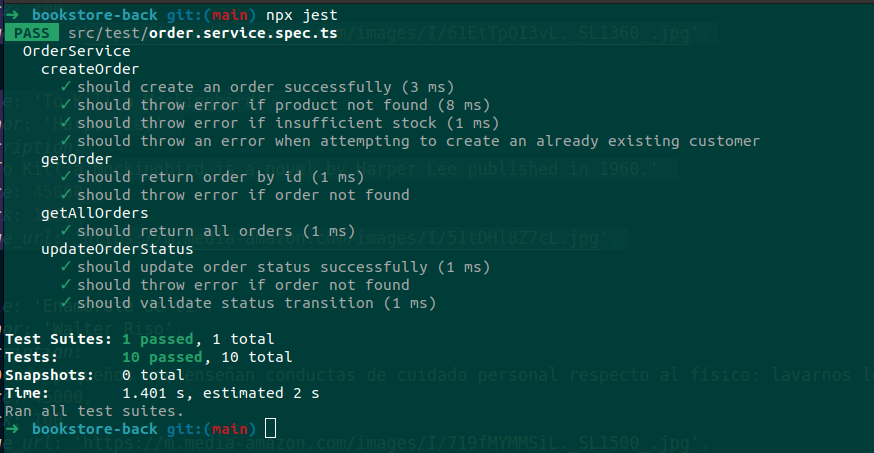
# Running tests
npx jest