A professional web-based tool for removing sensitive data from code before sharing with AI services like Claude, ChatGPT, or GitHub Copilot. Features a clean, minimal interface with GitHub-style diff visualization to show exactly what changes were made.
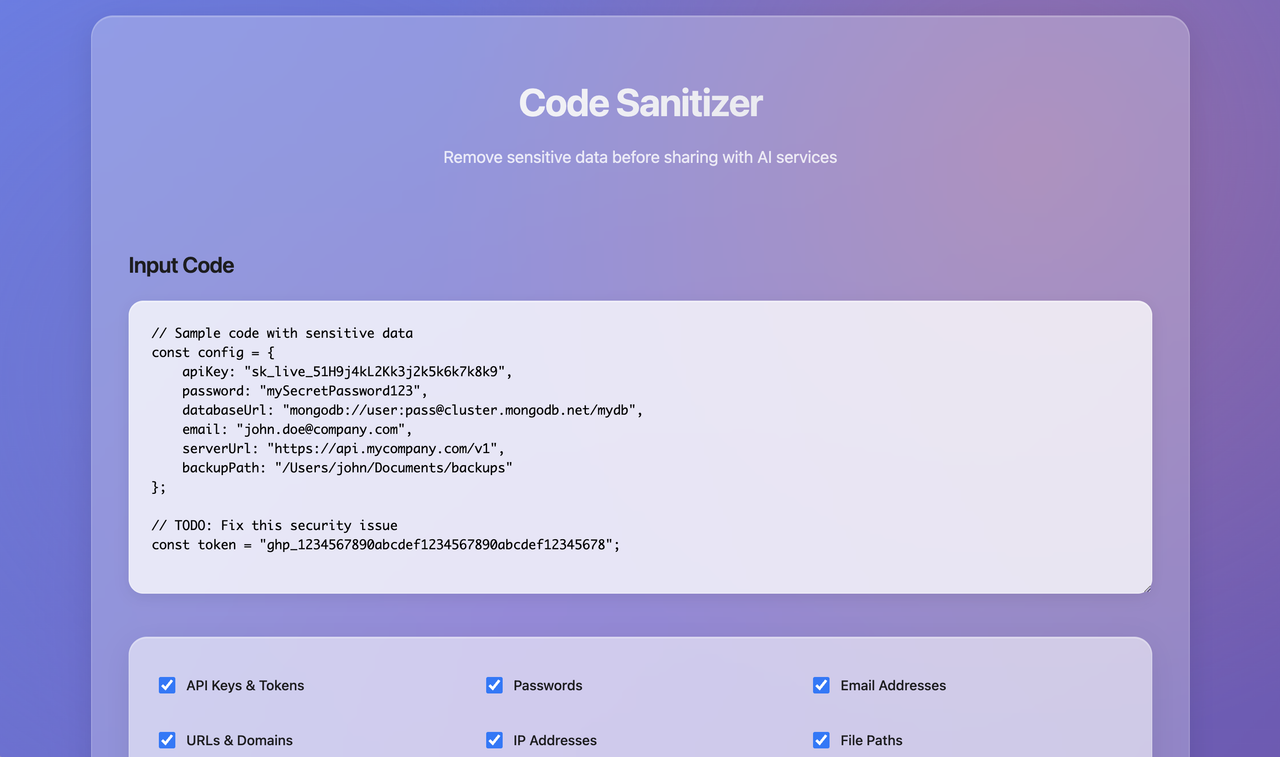
When working with AI coding assistants, you often need to share code that contains:
- API keys and tokens
- Database credentials
- Personal email addresses
- Internal URLs and IP addresses
- File system paths
- Sensitive comments
This tool automatically detects and replaces sensitive information with safe placeholders while preserving your code's structure and functionality.
- API Keys: AWS, GitHub, Google, Stripe, JWT tokens
- Database Strings: MongoDB, PostgreSQL, Redis, MySQL connections
- Personal Information: Email addresses, phone numbers
- Network Data: URLs, IP addresses, domain names
- System Paths: Windows, macOS, and Linux file paths
- Comments: TODO, FIXME, and personal notes
- Visual before/after comparison
- Line-by-line change highlighting
- Red highlighting for removed sensitive data
- Green highlighting for safe replacements
- Toggle between diff and clean output views
- Clean, minimal black & white design
- Monospace fonts for code readability
- Responsive design for all devices
- Real-time statistics and feedback
- Detects already-sanitized code
- Preserves code structure and syntax
- Configurable detection options
- Safe placeholder replacements
- Open the Code Sanitizer in your web browser
- Paste your code into the input area
- Select which types of data to sanitize (all enabled by default)
- Click "Sanitize Code"
- Review changes in the diff view
- Copy the clean output to share safely
Before Sanitization:
const config = {
  apiKey: 'sk_live_51H9j4kL2Kk3j2k5k6k7k8k9',
  email: 'john.doe@company.com',
  dbUrl: 'mongodb://user:pass@cluster.mongodb.net/db',
};
After Sanitization:
const config = {
  apiKey: 'API_KEY_REDACTED',
  email: 'user@example.com',
  dbUrl: 'database://connection_redacted',
};| Option | Description | Default |
|---|---|---|
| API Keys & Tokens | AWS, GitHub, Google, Stripe, JWT | ✅ Enabled |
| Passwords | Password fields and secrets | ✅ Enabled |
| Email Addresses | Personal and business emails | ✅ Enabled |
| URLs & Domains | Web addresses and domains | ✅ Enabled |
| IP Addresses | IPv4 and IPv6 addresses | ✅ Enabled |
| File Paths | System file and directory paths | ✅ Enabled |
| Database Strings | Connection strings and credentials | ✅ Enabled |
| Personal Comments | TODO, FIXME, personal notes | ❌ Disabled |
- Generic API keys (20+ characters)
- AWS access keys (
AKIA...) - GitHub tokens (
ghp_...,github_pat_...) - Google API keys (
AIza...) - Stripe keys (
sk_live_...,pk_live_...) - JWT tokens (
eyJ...)
- MongoDB connection strings
- PostgreSQL connection strings
- Redis connection strings
- MySQL connection strings
- Generic database URLs
- HTTP/HTTPS URLs
- Domain names
- IPv4 addresses
- IPv6 addresses
- Internal network addresses
- Windows paths (
C:\Users\...) - Unix/Linux paths (
/home/...,/var/...) - macOS paths (
/Users/...) - Relative paths (
~/...)
- No data transmission: All processing happens in your browser
- No server uploads: Your code never leaves your device
- No logging: No sensitive data is stored or tracked
- Offline capable: Works without internet connection
- Maintains code structure and syntax
- Uses recognizable placeholder values
- Preserves variable names and logic
- Ensures code remains functional
- Pure HTML, CSS, and JavaScript
- No external dependencies
- Modern browser features
- Responsive CSS Grid and Flexbox
- Chrome 88+
- Firefox 85+
- Safari 14+
- Edge 88+
- HTML: ~15KB
- No external resources required
- Loads instantly
The diff view provides GitHub-style visualization of changes:
- Line numbers with +/- indicators
- Red highlighting for removed sensitive data
- Green highlighting for added safe replacements
- Unchanged lines shown in normal styling
- Scrollable container for long files
- Toggle between views (diff vs clean output)
- ChatGPT code assistance
- Claude code review
- GitHub Copilot prompts
- Stack Overflow questions
- Internal team reviews
- Open source contributions
- Documentation examples
- Tutorial content
- Client presentations
- Conference talks
- Video tutorials
- Blog posts
- Instant processing for files up to 10MB
- Real-time stats showing replacements made
- Memory efficient client-side processing
- No network latency concerns
Perfect for automation, CI/CD pipelines, and batch processing entire projects.
- 🚀 Batch process multiple files and directories
- 🔄 Recursive directory scanning
- 🎯 Custom filename prefixes
- ⚙️ Selective sanitization (skip certain types)
- 📊 Detailed reporting with verbose mode
- 🌍 Multi-encoding support (UTF-8, Latin-1, etc.)
- 📁 40+ file extensions supported
# Download the CLI tool
wget <download-url>/code_sanitizer.py
# or
curl -O <download-url>/code_sanitizer.py

# Make it executable (optional)
chmod +x code_sanitizer.py# Sanitize a single file
python3 code_sanitizer.py app.py
# Sanitize with custom prefix
python3 code_sanitizer.py config.js --prefix "clean_"
# Process entire directory
python3 code_sanitizer.py src/ --recursive
# Multiple file patterns
python3 code_sanitizer.py "*.js" "*.html" "*.css"# Skip certain types of sanitization
python3 code_sanitizer.py app.py --skip-comments --skip-emails
# Quiet mode (only show errors)
python3 code_sanitizer.py *.js --quiet
# Verbose mode (detailed output)
python3 code_sanitizer.py project/ --recursive --verbose
# Process specific file types
python3 code_sanitizer.py "*.jsx" "*.tsx" --prefix "safe_"🚀 Processing 15 file(s)...
============================================================
📄 CODE SANITIZER RESULTS
============================================================
✅ Successfully processed: 15 files
🔧 Total replacements made: 47
============================================================
| Option | Short | Description |
|---|---|---|
--prefix |
-p |
Custom prefix for output files (default: sanitized_) |
--recursive |
-r |
Process directories recursively |
--skip-api-keys |
Skip API keys and tokens | |
--skip-passwords |
Skip passwords | |
--skip-emails |
Skip email addresses | |
--skip-urls |
Skip URLs and domains | |
--skip-ips |
Skip IP addresses | |
--skip-paths |
Skip file paths | |
--skip-db-strings |
Skip database connection strings | |
--skip-comments |
Skip personal comments | |
--quiet |
-q |
Suppress output except errors |
--verbose |
-v |
Show detailed output |