Python script to automate your booking sessions in aimharder.com platform. The docker container is ready to run in Raspberry Pi 3b+
Having docker installed you only need to do the following command:
docker run -it --rm -v $(pwd)/logs:/usr/src/app/logs \
      --name aimharderbot aimharderbot:v1 \
      --email='mail@mail.com' \
      --password='password' \
      --booking-goals='{"1": {"time":"1730", "name":"NAME"},"2": {"time":"1730", "name":"NAME"},"4": {"time":"1730", "name":"NAME"}}' \
      --box-name='boxname' \
      --box-id=1234 \
      --hours-in-advance=48
      --notify-on-telegram \
      --telegram-bot-token='your_telegram_bot_token' \
      --telegram-chat-id='chat_id'
Explanation about the fields:
-v: this parameter binds a folder from the host machine to another folder in the container. It is used to access the rolling logs and being able to debug in case of error.
email: self-explanatory
password: self-explanatory
booking_goals: expects a string formatted in json where the keys are:
day: the day of the week as integer from 0 to 6 (Monday to Friday)
time: the time at which the class takes place. It must be formatted like 'HHMM'
name: the name of the class you are trying to book.
Here you have an example:
Mondays at 18:15 and the class name is WOD Wednesdays at 18:15 and the class name is WOD2
{
  "0": {"time":"1800", "name":"WOD"},
  "2": {"time":"1900", "name":"WOD2"}
}box-name: this is the sub-domain you will find in the url when accessing the booking list from a browser, something like https://lahuellacrossfit.aimharder.com/schedule
box-id: it's always the same one for your gym, you can find it inspecting the request made while booking a class from the browser:
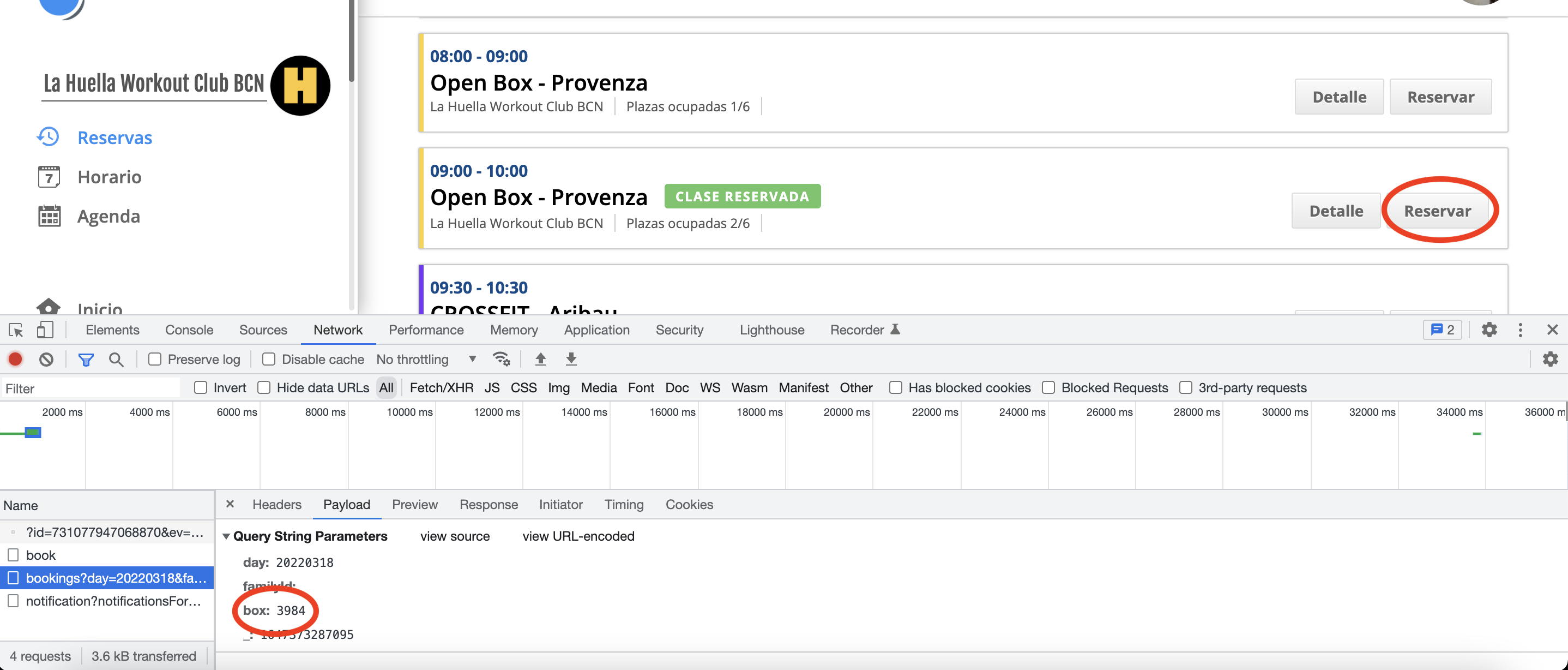

hours-in-advance: this is how many hours in advance the script should try to book classes from, so for example, if this script is being run on a Monday and this field is set to 48 it's going to try book Wednesday class from booking_goals. It will also take into account the booking goal time
notify-on-telegram: set this parameter if you want the app to notify on a chat group about the bookings and exceptions of the app. If you do not want the notifications, you have to delete this parameter from the run command.
telegram-bot-token: if the previous parameter is set to true, write here your bot token. There are plenty of tutorials out there in case you do not know how to do your bot in Telegram.
telegram-chat-id: specify the chat id where you expect the notifications to be sent to.
Enjoy!