

Slash commands for the Design Driven Development workflow in Claude Code.
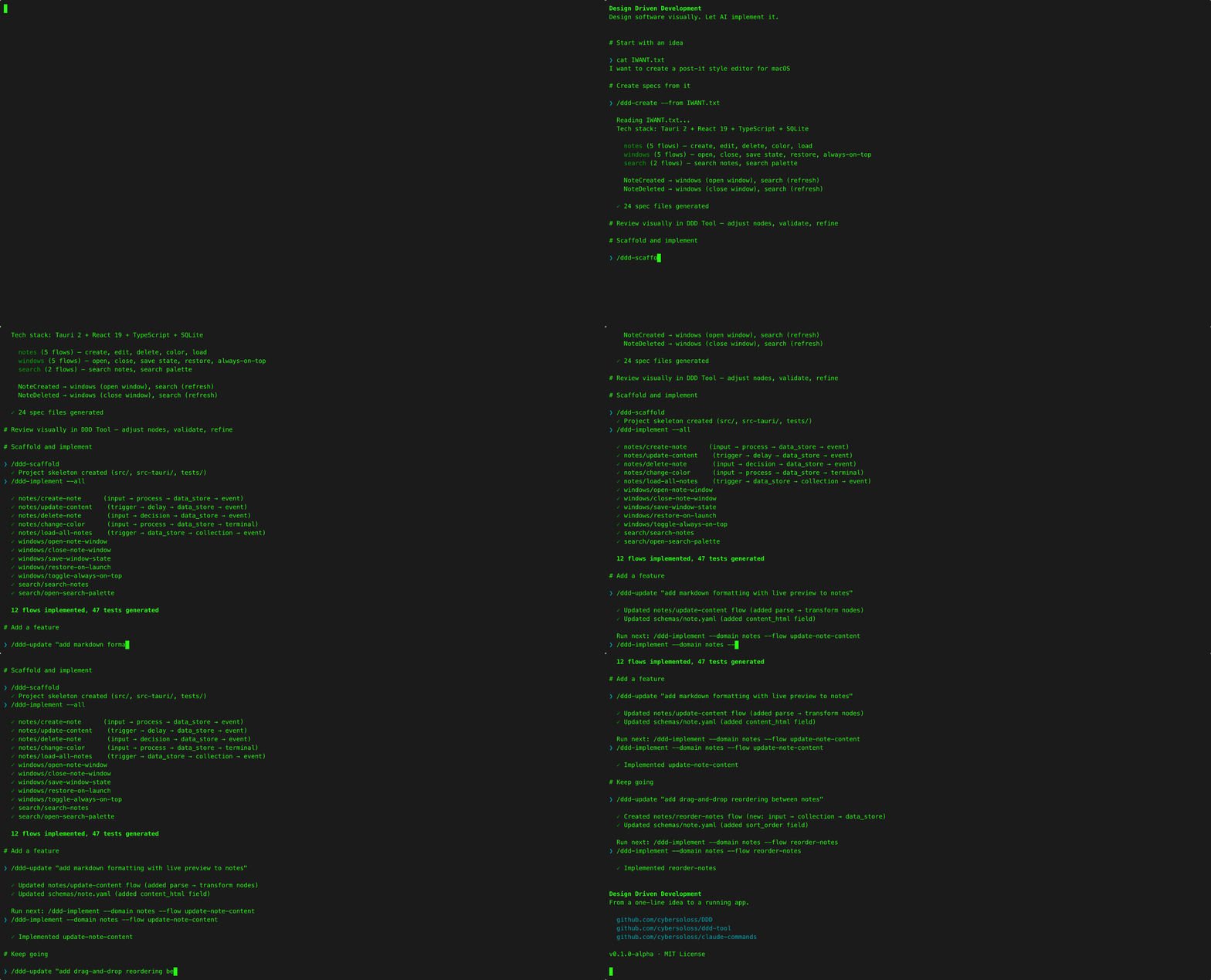
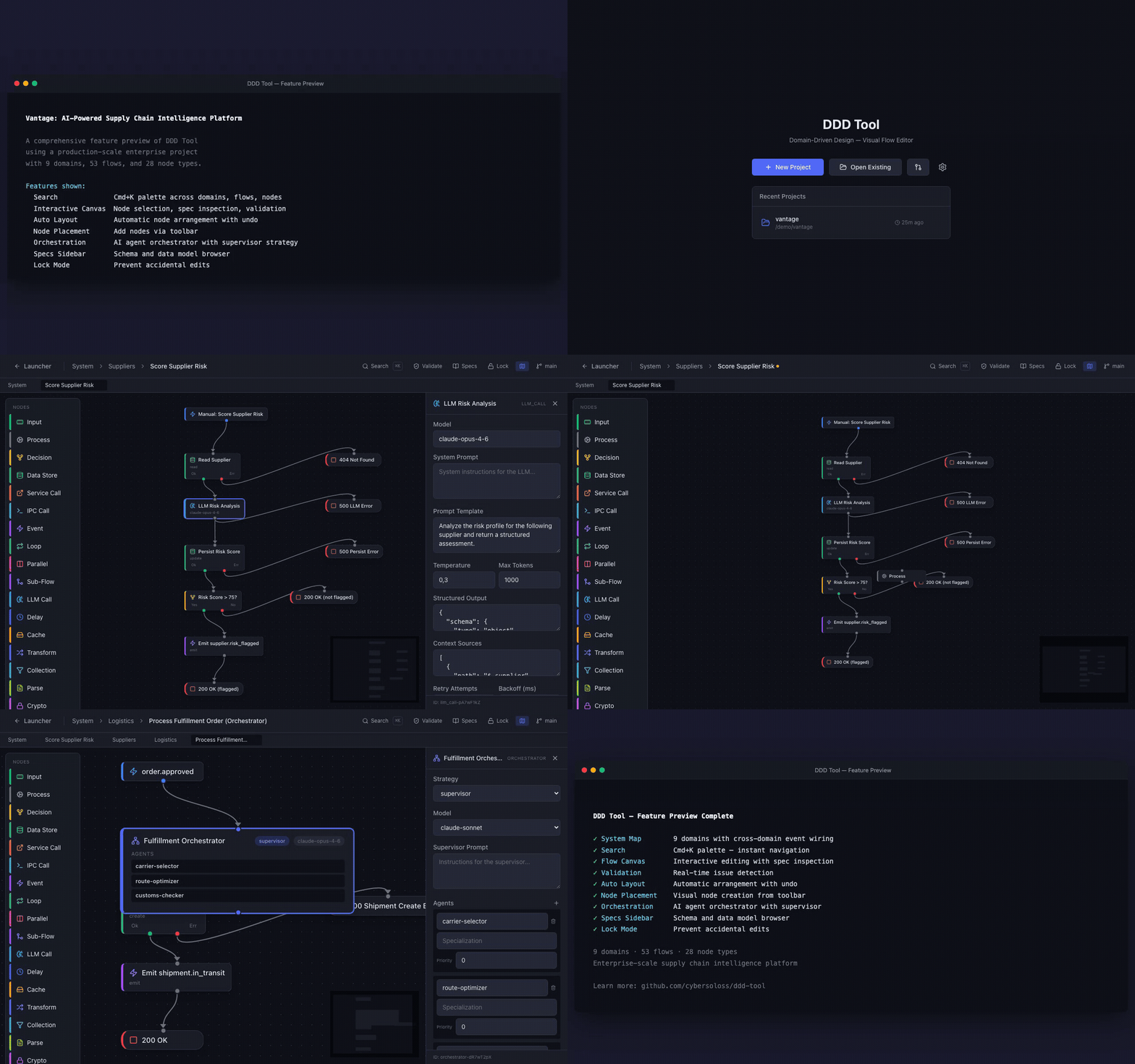
Full Feature Preview — 9 domains, 53 flows, 28 of 30 node types (Vantage supply chain project):
Note: The abbreviation "DDD" is used in command names for brevity. This is not related to Eric Evans' Domain-Driven Design, which is an entirely separate methodology.
- Claude Code installed
- GitHub CLI (
gh) — authenticated withgh auth login jq— install viabrew install jq(macOS) orapt install jq(Linux)
Commands fetch the DDD Usage Guide from GitHub at runtime via gh api, so network access and gh auth are required.
git clone https://github.com/cybersoloss/claude-commands.git
cd claude-commands && ./install.sh
Or manually:
git clone https://github.com/cybersoloss/claude-commands.git
mkdir -p ~/.claude/commands
cp claude-commands/ddd-*.md claude-commands/DDD-commands.md ~/.claude/commands/
This copies the 11 DDD command files into ~/.claude/commands/. Safe to run if you already have other commands there — it won't overwrite non-DDD files.
Restart Claude Code to load the commands.
Update: Run update.sh to pull and apply only changed commands:
cd claude-commands && ./update.shOnly changed files are copied. Output shows which commands were updated and the new version. Changes take effect immediately — no restart needed.
Uninstall:
rm ~/.claude/commands/ddd-*.md ~/.claude/commands/DDD-commands.md/ddd-create <description> [--from <path-or-url>] [--shortfalls]
Generate a complete spec structure from a project description. Covers all four pillars — Logic (flows), Data (schemas), Interface (UI pages), Infrastructure (services). Includes a pillar coverage check that detects input bias (e.g., backend-heavy with no frontend detail) and proactively asks for missing context.
| Option | Purpose |
|---|---|
--from <path-or-url> |
Use a design file as input — images (PNG, JPG), PDFs, markdown, YAML, or URLs (Figma, Miro, web pages) |
--shortfalls |
Generate specs/shortfalls.yaml documenting framework gaps encountered during design |
/ddd-create A SaaS platform for restaurant orders. Node.js, Express, PostgreSQL.
/ddd-create --from ~/designs/wireframes.png E-commerce platform
/ddd-create --from https://figma.com/file/abc123 Social media dashboard --shortfalls/ddd-scaffold
Set up project skeleton and shared infrastructure from specs. No arguments — reads system.yaml, architecture.yaml, schemas, and generates package config, directory structure, database models, error classes, config loader, test setup.
/ddd-implement [scope]
Generate working code and tests from specs.
| Scope | Example |
|---|---|
--all |
/ddd-implement --all — all domains, all flows |
<domain> |
/ddd-implement users — all flows in a domain |
<domain/flow> |
/ddd-implement users/user-register — single flow |
--schema |
/ddd-implement --schema — regenerate data layer from schemas |
--infra |
/ddd-implement --infra — regenerate infrastructure from specs |
| (empty) | Interactive — shows flows and asks |
/ddd-test [scope] [--coverage]
Run tests for implemented flows.
| Scope | Example |
|---|---|
--all |
/ddd-test --all |
<domain> |
/ddd-test users |
<domain/flow> |
/ddd-test users/user-register |
--ui |
/ddd-test --ui — test all UI pages |
--ui <page-id> |
/ddd-test --ui dashboard — test single page |
--schema |
/ddd-test --schema — run schema tests |
--infra |
/ddd-test --infra — run infrastructure tests |
--coverage |
/ddd-test --all --coverage — include coverage report |
/ddd-reverse <project-path> [flags]
Reverse-engineer existing code into specs. Auto-selects strategy by codebase size.
| Flag | Purpose | Default |
|---|---|---|
--output <path> |
Where to write specs | Same as project path |
--domains <d1,d2> |
Only reverse specific domains | All |
--merge |
Merge with existing specs instead of overwriting | Overwrite |
--strategy <name> |
Override strategy: baseline (<30 files), index (30–80), swap (80–150), bottom-up (150–300), compiler (300–500), codex (500+) |
Auto by file count |
--flows |
Only reverse specific flows by scope (e.g., --flows users/login,users/register). Implies --merge. |
All pillars |
--connections-only |
Only reconstruct connections arrays — preserve all node definitions. Requires --flows. |
Full flow generation |
/ddd-sync [flags]
Keep specs and implementation aligned.
| Flag | What it does |
|---|---|
| (none) | Sync .ddd/mapping.yaml with current implementation state |
--discover |
Scan for untracked code, suggest new flow specs |
--fix-drift |
Re-implement drifted flows from updated specs |
--full |
All of the above |
--verify |
Behavioral conformance — node-by-node check that code implements spec intent (read-only). Not included in --full. |
/ddd-reflect [scope]
Capture implementation wisdom — patterns code has that specs don't describe. Writes annotations to .ddd/annotations/.
| Scope | Example |
|---|---|
--all |
/ddd-reflect --all |
<domain> |
/ddd-reflect monitoring |
<domain/flow> |
/ddd-reflect monitoring/check-social-sources |
--ui |
/ddd-reflect --ui — capture UI implementation patterns |
--ui <page-id> |
/ddd-reflect --ui dashboard — single page patterns |
--schema |
/ddd-reflect --schema — capture schema patterns |
--infra |
/ddd-reflect --infra — capture infrastructure patterns |
/ddd-promote [scope]
Move approved annotations into permanent specs.
| Scope | Example |
|---|---|
--review |
/ddd-promote --review — interactive review of each candidate |
--all |
/ddd-promote --all — promote all approved annotations |
--schema |
/ddd-promote --schema — promote schema-related annotations |
--infra |
/ddd-promote --infra — promote infrastructure-related annotations |
<domain/flow> |
/ddd-promote monitoring/check-social-sources |
/ddd-update [scope] <change description>
Update specs from natural language.
| Scope | Example |
|---|---|
<domain/flow> |
/ddd-update users/user-register add rate limiting |
<domain> |
/ddd-update users add email verification flow |
--add-flow <domain> |
/ddd-update --add-flow orders add refund-order flow |
--add-domain |
/ddd-update --add-domain add notifications domain with email and push flows |
--ui <page-id> |
/ddd-update --ui dashboard add a filter bar |
--add-page |
/ddd-update --add-page add an analytics page |
--schema <model> |
/ddd-update --schema User add avatar_url field |
--infra |
/ddd-update --infra add Redis service |
/ddd-status [--json]
Read-only overview showing each flow's status (up to date, drifted, stale, not implemented). Use --json for machine-readable output.
/ddd-evolve
Analyze shortfall reports and produce prioritized evolution plans.
| Mode | Usage |
|---|---|
| Analyze | /ddd-evolve specs/shortfalls.yaml or /ddd-evolve --dir ~/code/proj-a --dir ~/code/proj-b |
| Review | /ddd-evolve --review ddd-evolution-plan.yaml — interactive approve/defer/reject |
| Apply | /ddd-evolve --apply ddd-evolution-plan.yaml — execute approved changes |
See DDD-commands.md for detailed documentation including what each command does step-by-step, output formats, and extended examples.
# New project from scratch
/ddd-create A task management app with users, projects, and tasks
# Review in Design Driven Development Tool, adjust flows
/ddd-scaffold
/ddd-implement --all
/ddd-test --all

# Existing codebase, no specs
/ddd-reverse ~/code/my-existing-app
/ddd-sync                # link specs to existing files — do NOT /ddd-implement
/ddd-reflect --all       # capture what reverse missed

# Add a feature
/ddd-update users/user-register "add email verification step"
/ddd-implement users/user-register

# Capture implementation wisdom
/ddd-reflect --all
/ddd-promote --review| Repo | What |
|---|---|
| Design Driven Development | Methodology, Usage Guide, spec format reference, templates |
| Design Driven Development Tool | Desktop app for visual flow design |
See CONTRIBUTING.md for guidelines.
MIT — Copyright (c) 2025 Murat Hüseyin Candan
Significant portions of these commands were developed with Claude (Anthropic).