✨ Log like a pro with emoji icons, syntax highlighting, custom log levels, and support for console, file, RabbitMQ, Kafka, ZeroMQ, Syslog, and databases — all in one package!




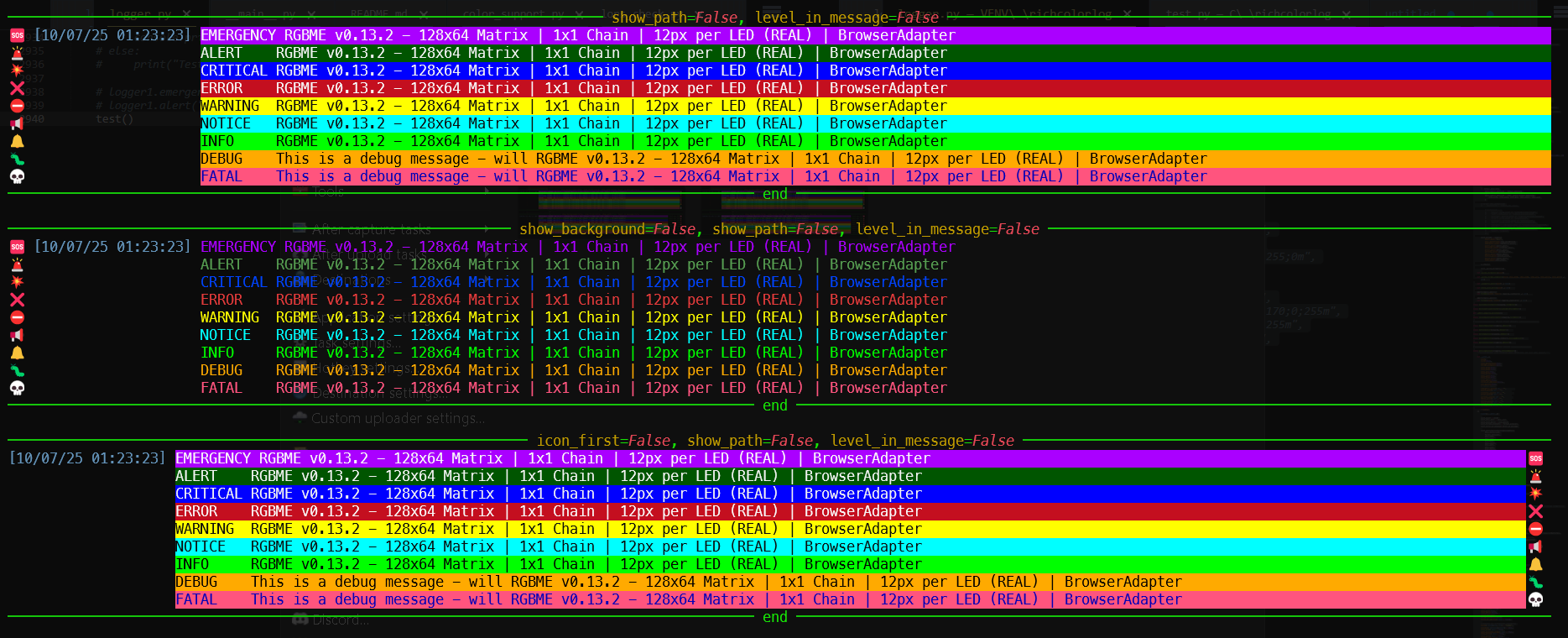
-
✅ Rich Console Output with colors, backgrounds, and emoji icons per log level
-
🎨 Syntax Highlighting for code snippets (Python, SQL, JSON, etc.) via
lexer='python' -
🎯 Custom Log Levels:
EMERGENCY,ALERT,NOTICE,FATAL(Syslog-compliant) -
📦 Multi-Handler Support:
- 🖥️ Console (Rich + ANSI fallback)
- 📄 File (with level-based formatting)
- 🐇 RabbitMQ
- 📡 Kafka
- 📡 ZeroMQ
- 📡 Syslog
- 🗄️ PostgreSQL / MySQL / MariaDB / SQLite
-
🧪 Jupyter/IPython Friendly (no async warnings!)
-
🧩 Full LogRecord Template Support:
%(asctime)s,%(funcName)s,%(threadName)s,%(icon)s, etc. -
🔁 Smart Timestamp: Repeated timestamps are hidden (like
RichHandleroriginal) -
🎨 Custom Colors: Set color per level (
info_color,error_color, etc.) -
⚙️ Highly Configurable:
icon_first,level_in_message,show_background, etc. -
🚀 Easy to use - Simple setup with sensible defaults
-
⚡ Zero required dependencies (only
richfor Rich mode; brokers optional) -
🎨 Support any terminal - with ansi color Fallback
Install from PyPI:
pip install richcolorlog💡 Optional: Install extras for message brokers:
pip install richcolorlog[rabbitmq,kafka,zmq,db]
Or install from source:
git clone https://github.com/cumulus13/richcolorlog
cd richcolorlog
pip install -e .>>> from richcolorlog import setup_logging
>>> logger = setup_logging(
name="myapp",
show_background=True,
show_icon=True,
icon_first=True
)
>>> logger.emergency("This is an emergency message")
logger.alert("This is an alert message")
logger.critical("This is a critical message")
logger.error("This is an error message")
logger.warning("This is a warning message")
logger.notice("This is a notice message")
logger.info("This is an info message")
logger.debug("This is a debug message")
>>> # output
🆘 [10/04/25 14:12:07] EMERGENCY This is an emergency message
🚨 [10/04/25 14:12:07] ALERT This is an alert message
💥 [10/04/25 14:12:07] CRITICAL This is a critical message
❌ [10/04/25 14:12:07] ERROR This is an error message
⛔ [10/04/25 14:12:07] WARNING This is a warning message
📢 [10/04/25 14:12:07] NOTICE This is a notice message
🔔 [10/04/25 14:12:07] INFO This is an info message
🪲 [10/04/25 14:12:07] DEBUG This is a debug message
>>> FORMAT = "%(icon)s %(asctime)s - %(name)s - %(process)d - %(levelname)s - %(message)s (%(filename)s:%(lineno)d)"
>>> logger = setup_logging(show_background=True, format_template=FORMAT, name="TEST")
>>> code = """
def hello():
print("Hello World")
"""
>>> logger.info(code, lexer='python')
>>> #output
🔔 [10/04/25 15:12:34] TEST 15448 INFO
def hello():
print("Hello World")
>>> logger.debug("SELECT * FROM users", lexer="sql") # Syntax highlighted!
>>> #output
🪲 [10/04/25 15:12:35] TEST 15448 DEBUG
SELECT * FROM userstemplate = "%(asctime)s | %(levelname)s | %(name)s | %(funcName)s() | %(message)s"
logger = setup_logging(
name="api",
format_template=template,
show_background=False
)
logger.notice("User logged in successfully 🔑")FORMAT = "%(icon)s %(asctime)s - %(levelname)s - %(message)s (%(filename)s:%(lineno)d)"
logger = setup_logging(
name="TEST",
format_template=FORMAT,
icon_first=True, # Icon always at start (overrides template position)
omit_repeated_times=True # Hide repeated timestamps
)
logger.info("Hello world")
# Output:
# 🔔 [10/06/25 15:30:00] INFO - Hello world (test.py:10)
# 🔔 INFO - Another message (test.py:11)logger = setup_logging(level_in_message=True)
logger.info("This is a message")
# Output: INFO - This is a messagefrom richcolorlog import setup_logging_custom
logger = setup_logging_custom(
name="notebook",
show_icon=True,
icon_first=False,
show_background=False
)
logger.info("Running analysis in Jupyter 📊")logger = setup_logging(
name="producer",
log_file=True,
log_file_name="app.log",
kafka=True,
kafka_host="localhost",
kafka_port=9092,
kafka_topic="app-logs",
level="DEBUG"
)
logger.alert("Critical system event! 🚨")logger = setup_logging(
db=True,
db_type="postgresql",
db_host="localhost",
db_name="logs",
db_user="admin",
db_password="secret"
)
logger.emergency("Database connection lost!")logger = setup_logging(
info_color="#00FFAA",
error_color="bold red on #111111",
warning_color="yellow",
show_background=True
)
logger.info("Custom color!")
logger.error("Custom background!")logger.notice("New user registered 📢") # Custom level 25
logger.fatal("Fatal error — shutting down 💀") # Level 55
logger.alert("Immediate action required! 🚨") # Level 59# File: test.py
logger = setup_logging(name="test")
logger.emergency("System down!") # Shows: test.py:5 (not logger.py!)import logging
logger = logging.getLogger("INHERITANCE")
from richcolorlog import RichColorLogHandler
handler = RichColorLogHandler()
logger.handlers.clear()
logger.addHandler(handler)
logger.propagate = False
logger.emergency("RGBME v0.13.2 - 128x64 Matrix | 1x1 Chain | 12px per LED (REAL) | BrowserAdapter")
logger.alert("RGBME v0.13.2 - 128x64 Matrix | 1x1 Chain | 12px per LED (REAL) | BrowserAdapter")
logger.critical("RGBME v0.13.2 - 128x64 Matrix | 1x1 Chain | 12px per LED (REAL) | BrowserAdapter")
logger.error("RGBME v0.13.2 - 128x64 Matrix | 1x1 Chain | 12px per LED (REAL) | BrowserAdapter")
logger.warning("RGBME v0.13.2 - 128x64 Matrix | 1x1 Chain | 12px per LED (REAL) | BrowserAdapter")
logger.notice("RGBME v0.13.2 - 128x64 Matrix | 1x1 Chain | 12px per LED (REAL) | BrowserAdapter")
logger.debug("RGBME v0.13.2 - 128x64 Matrix | 1x1 Chain | 12px per LED (REAL) | BrowserAdapter")
| Parameter | Description | Default |
|---|---|---|
show_icon |
Show emoji icons | True |
icon_first |
Icon before timestamp | True |
format_template |
Log format (supports %(icon)s) |
None |
level_in_message |
Prefix message with "LEVEL - " |
False |
omit_repeated_times |
Hide repeated timestamps | True |
show_background |
Enable background colors | True |
..._color |
Custom color per level (info_color, error_color, etc.) |
Default |
All RichHandler args |
tracebacks_show_locals, keywords, highlighter, etc. |
Fully supported |
✅ If
format_templatecontains%(icon)s, the icon is still controlled byicon_first— no duplicates.
You can use any lexer supported by Pygments for syntax highlighting:
"python"- Python code"javascript"- JavaScript code"sql"- SQL queries"json"- JSON data"yaml"- YAML configuration"bash"- Shell scripts- And many more...
richcolorlog adds several custom log levels above the standard CRITICAL level:
| Level | Numeric Value | Description |
|---|---|---|
| NOTICE | 55 | Informational messages |
| ALERT | 60 | Alert conditions |
| CRITICAL | 65 | Critical conditions |
| FATAL | 70 | Fatal errors |
| EMERGENCY | 75 | System is unusable |
You can use any standard LogRecord field in your format_template:
%(asctime)s       → 2025-10-03 14:30:00
%(name)s          → myapp
%(levelname)s     → INFO
%(message)s       → Your log message
%(filename)s      → app.py
%(lineno)d        → 42
%(funcName)s      → main
%(process)d       → 12345
%(thread)d        → 67890
%(module)s        → app
%(pathname)s      → /path/to/app.py
%(created)f       → 1728000000.123
%(msecs)d         → 123
%(relativeCreated)d → 456
%(processName)s   → MainProcess
%(threadName)s    → Thread-1
%(icon)s          → 🐞 (auto-injected)
✅ Custom fields from
extra={}are also supported!
- ✅ Python 3.8+
- ✅ Jupyter Notebook / IPython (auto-detects and disables async features)
- ✅ Terminals (Windows, macOS, Linux)
- ✅ Docker / CI Environments (falls back to ANSI if needed)
| Feature | Standard logging |
rich |
richcolorlog |
|---|---|---|---|
| Emoji Icons | ❌ | ❌ | ✅ |
Custom Levels (NOTICE, ALERT) |
❌ | ❌ | ✅ |
| Syntax Highlighting | ❌ | ❌ | ✅ |
| Multi-Output (File + Kafka + DB) | Manual | ❌ | ✅ |
| Template + Icon | ❌ | Limited | ✅ |
| Accurate File/Line | ✅ | ❌ | ✅ |
| Jupyter Safe | ❌ | ✅ | |
| Repeated Timestamps | ❌ | ✅ | ✅ |
| Custom Format Templates | ✅ | Limited | ✅ + icon support |
- Built on top of
richby Will McGugan with ansi color Fallback if no rich installed - Icons from EmojiOne
This project is licensed under the MIT License - see the LICENSE file for details.
MIT © Hadi Cahyadi
- 📦 PyPI: https://pypi.org/project/richcolorlog/
- 💻 GitHub: https://github.com/cumulus13/richcolorlog
- 📧 Author: cumulus13@gmail.com
💬 Made with ❤️ for developers who love beautiful, informative logs!
⭐ Star the repo if you find it useful!


