alterego is an HTTP/HTTPS MITM proxy that clones TLS fingerprints to help automated clients evade anti-bot systems. It captures the ClientHello from a real browser and replays it for scripted traffic, while maintaining a shared cookie jar so authentication state flows transparently between human-operated browsers and automation tools.
Read the blog post: Cloning Real Browser TLS Identities
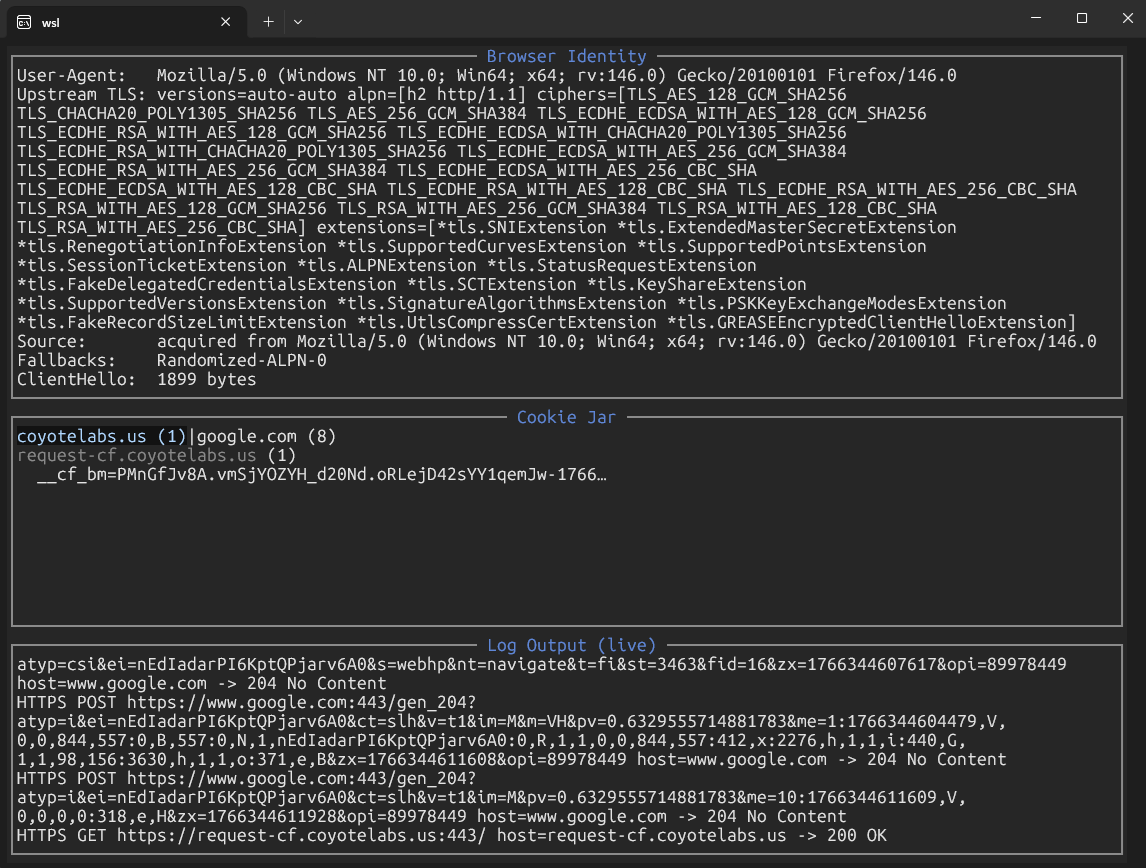
- TLS Fingerprint Cloning: Automatically learns the ClientHello from downstream connections and replays it upstream using uTLS, or accepts a base64-encoded ClientHello for precise control.
- Preset Fingerprint Library: ~50 built-in browser profiles (Chrome, Firefox, Safari, Edge, iOS, Android) with
-list-fingerprintsto enumerate all options. - Shared Cookie Jar: All proxy clients (browser + automation) share the same cookie store. Cookies set by the server during browser challenges automatically appear in subsequent automated requests.
- User-Agent Inheritance: The proxy captures the User-Agent from the first downstream request and applies it to all upstream traffic, ensuring consistent client identification.
- Automatic CA Management: Omit
-ca-cert/-ca-keyto auto-generate a persistent MITM root CA (alterego-ca.crt/alterego-ca.key) that survives restarts. - JSON Configuration: Persist settings in
config.json(or use-config path); CLI flags override config values for quick experimentation. - WebSocket Support: Proxies WebSocket connections over HTTP/1.1 or HTTP/2 extended CONNECT (RFC 8441), with automatic fallback when the origin doesn't support HTTP/2 settings.
- SOCKS5 Upstream Proxy: Route upstream connections through Tor or another SOCKS5 proxy with
-upstream-socksand optional authentication. - Interactive TUI: Real-time dashboard (enabled by default) displays captured identity (fingerprint, User-Agent) and live request logs. Pass
-no-tuito revert to plain stdout logging. - Upstream TLS Verification: Uses system root CAs by default; disable with
-insecure-skip-upstream-cert-verifyfor testing only.
- Go 1.24.0+ to build from source (specified in
go.mod) - MITM CA trust: Clients must trust the generated
alterego-ca.crtfor HTTPS interception (see Trust the MITM CA)
No additional system dependencies. All Go dependencies (including uTLS v1.8.1) are fetched automatically via go mod.
# Auto-generate a CA and start the proxy on 127.0.0.1:8888
go run ./cmd/alterego

# Use an existing CA and specify listen address
go run ./cmd/alterego -ca-cert /path/to/root.crt -ca-key /path/to/root.key -listen 0.0.0.0:8080

# Pin a specific upstream fingerprint
go run ./cmd/alterego -upstream-fingerprint HelloChrome_120 -debug

# Route upstream through Tor
go run ./cmd/alterego -upstream-socks 127.0.0.1:9050

# List all available fingerprint profiles
go run ./cmd/alterego -list-fingerprints
For HTTPS interception to work, clients must trust alterego-ca.crt:
# macOS
sudo security add-trusted-cert -d -r trustRoot -k /Library/Keychains/System.keychain alterego-ca.crt

# Linux (Debian/Ubuntu)
sudo cp alterego-ca.crt /usr/local/share/ca-certificates/
sudo update-ca-certificates

# Firefox: Preferences → Privacy & Security → View Certificates → Import
For testing with curl, use -k to skip verification:
curl -k -x http://127.0.0.1:8888 https://example.com
| Flag | Default | Description |
|---|---|---|
-listen |
127.0.0.1:8888 |
Full listen address (overrides -listen-ip/-listen-port) |
-listen-ip |
127.0.0.1 |
Listen IP (used when -listen is unset) |
-listen-port |
8888 |
Listen port (used when -listen is unset) |
-ca-cert |
(auto-generated) | Path to PEM root CA certificate |
-ca-key |
(auto-generated) | Path to PEM private key for root CA |
-upstream-fingerprint |
(learned) | uTLS profile name (see -list-fingerprints) |
-upstream-fingerprint-base64 |
Base64-encoded ClientHello (overrides -upstream-fingerprint) |
|
-fallback-fingerprint |
HelloRandomizedALPN |
Fallback profile if primary handshake fails |
-fingerprint-allow-blunt-mimicry |
false |
Allow unknown extensions when parsing captured ClientHello |
-fingerprint-add-padding |
false |
Force padding extension in captured ClientHello |
-fingerprint-real-psk |
false |
Treat PSK extensions as real (default: fake PSK) |
-upstream-socks |
SOCKS5 proxy for upstream connections (host:port) |
|
-upstream-socks-user |
SOCKS5 username (optional) | |
-upstream-socks-pass |
SOCKS5 password (optional) | |
-har |
Write proxied HTTP/HTTPS traffic to a HAR file | |
-insecure-skip-upstream-cert-verify |
false |
Disable upstream TLS verification (testing only) |
-debug |
false |
Enable verbose logging for troubleshooting |
-no-tui |
false |
Disable interactive TUI and log to stdout |
-config |
config.json (if exists) |
Path to JSON config file |
-list-fingerprints |
Print all available fingerprint profiles and exit |
Create config.json in the working directory (or use -config path) to persist settings:
{
  "listen": "127.0.0.1:8080",
  "ca_cert": "/path/to/alterego-ca.crt",
  "ca_key": "/path/to/alterego-ca.key",
  "upstream_fingerprint": "HelloChrome_120",
  "fallback_fingerprint": "HelloRandomizedALPN",
  "upstream_socks": "127.0.0.1:9050",
  "har_path": "captures/traffic.har",
  "debug": false,
  "disable_tui": false
}
CLI flags always override config file values. See config.example.json for a commented template.
When a client connects over HTTPS, the initial ClientHello advertises its "personality": cipher suites, supported groups, extensions, ALPN protocols, and their ordering. Modern anti-bot systems use this shape as a classification signal.
alterego solves this in three ways using uTLS:
- Automatic Learning (default): Captures the first downstream ClientHello and replays it for all upstream connections. The browser teaches the proxy what "normal" looks like.
- Preset Profiles: Pin a specific uTLS profile (
HelloChrome_120,HelloFirefox_Auto, etc.) via-upstream-fingerprint. - Raw ClientHello Cloning: Provide a base64-encoded ClientHello (captured from Wireshark or browser devtools) via
-upstream-fingerprint-base64for exact duplication.
All clients connected to the proxy share a single cookie jar. When a browser clears a Cloudflare challenge and receives a cf_clearance cookie, the next automated request automatically includes it. Similarly, the proxy captures the User-Agent from the first downstream request and injects it into all upstream traffic.
This dual-identity model (one TLS fingerprint + one User-Agent + one cookie jar) alters requests from other tools to be consistent with the real browser that cleared the challenge.
If the primary fingerprint fails during the TLS handshake (e.g., invalid server key share, handshake failure), the proxy automatically retries with the fallback profile(s). This is useful when a captured ClientHello targets a specific TLS 1.3 key exchange that the origin doesn't support.
Disable fallback by omitting -fallback-fingerprint entirely.
WebSocket requests are detected after the downstream TLS handshake. The proxy attempts HTTP/2 extended CONNECT (RFC 8441) first and falls back to HTTP/1.1 if the origin declines SETTINGS_ENABLE_CONNECT_PROTOCOL. Once the upgrade succeeds, frames are relayed verbatim with no post-handshake meddling.
# Terminal 1: Start the proxy
go run ./cmd/alterego -debug

# Terminal 2: Configure browser to use proxy 127.0.0.1:8888 and visit a Cloudflare-protected site
# The browser clears the challenge; cookies are stored in the proxy's jar

# Terminal 3: Automated client inherits the session
curl -x http://127.0.0.1:8888 https://protected-site.example.com/api/data
# Route through Tor with a specific Chrome fingerprint
go run ./cmd/alterego \
  -upstream-fingerprint HelloChrome_131 \
  -fallback-fingerprint HelloChrome_120 \
  -upstream-socks 127.0.0.1:9050 \
  -debug
The codebase is organized into modules:
cmd/alterego/main.go: CLI flag parsing, configuration loading, server wiring.internal/config/: JSON config file parsing.internal/proxy/: Core HTTP/HTTPS/CONNECT handling, cookie jar, upstream dialing.internal/tls/: MITM CA management, leaf certificate generation and caching (512-entry LRU cache, 24h TTL).internal/fingerprint/: uTLS ClientHello spec parsing, ALPN override, fingerprint cloning.internal/websocketproxy/: WebSocket detection, HTTP/2 extended CONNECT, bidirectional tunneling.cmd/alterego/tui.go: Interactive TUI powered by tview.
# Format code
gofmt -w .

# Run tests
go test ./...

# Build a static binary
go build -o alterego ./cmd/alterego

# Cross-compile
GOOS=linux GOARCH=amd64 go build -o alterego-linux ./cmd/alterego
When bumping github.com/refraction-networking/utls, review u_common.go in that module for new Hello* constants and update the clientHelloProfiles table in cmd/alterego/main.go. The list is currently hand-maintained; a code generator is planned for future versions.