Contrubution Guidelines
This project is very open to contributions! If you have a feature request, or bug report, please open an issue with the applicable tag. If you would like to simply create a feature, fork the repository and add in your changes. Then submit a pull request which will be reviewed and eventually merged if it meets all contribution requirements.
Use the steps below to clone the repository and get the project running on your local machine.
-
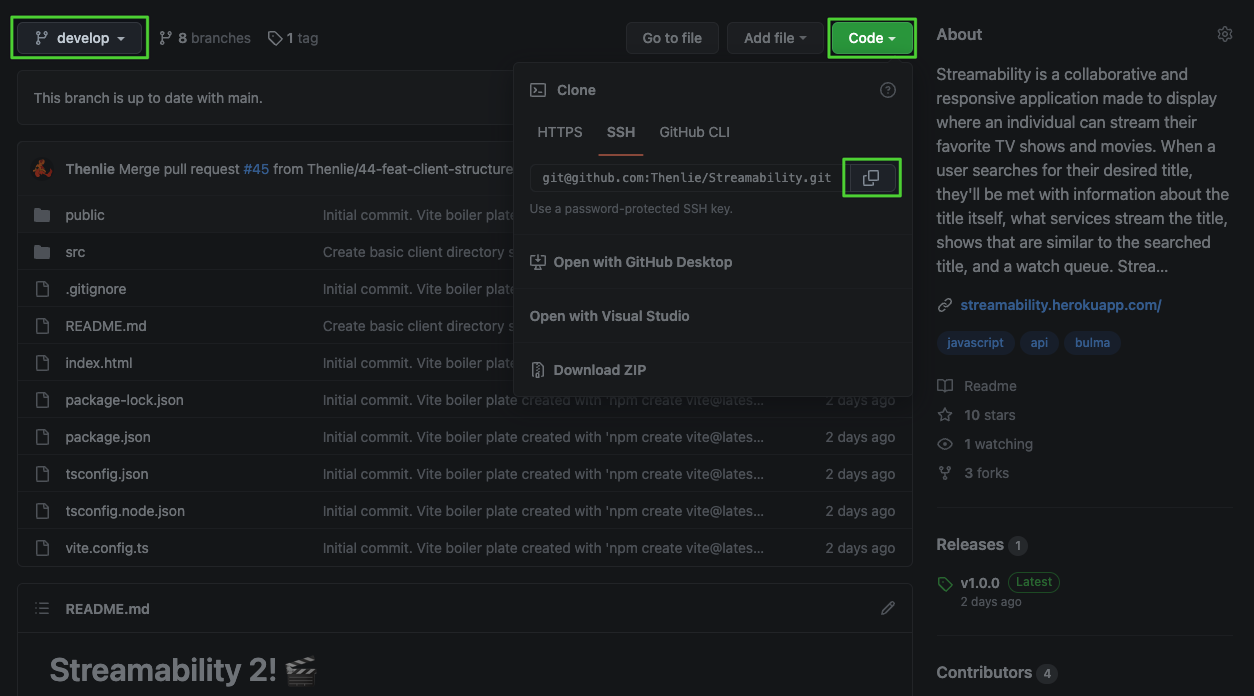
Navigate to the develop branch of the repository and click the green "Code" button. Then copy the repository URL with the method of your choosing. We suggest SSH which can be setup be following these docs.
-
Go to your terminal program of choice and navigate the the folder you want the project to live in. Then run the command below to clone the repository:
git clone <repository_url>
-
Now that the repository is cloned you can navigate into it with the command
cd <project_name>. -
Once you are in the project you will need to install the node modules with the command
npm install.
This project is attempting to have a linear commit history on main as well as develop. You can read more about the benefits of linear commit histories here.
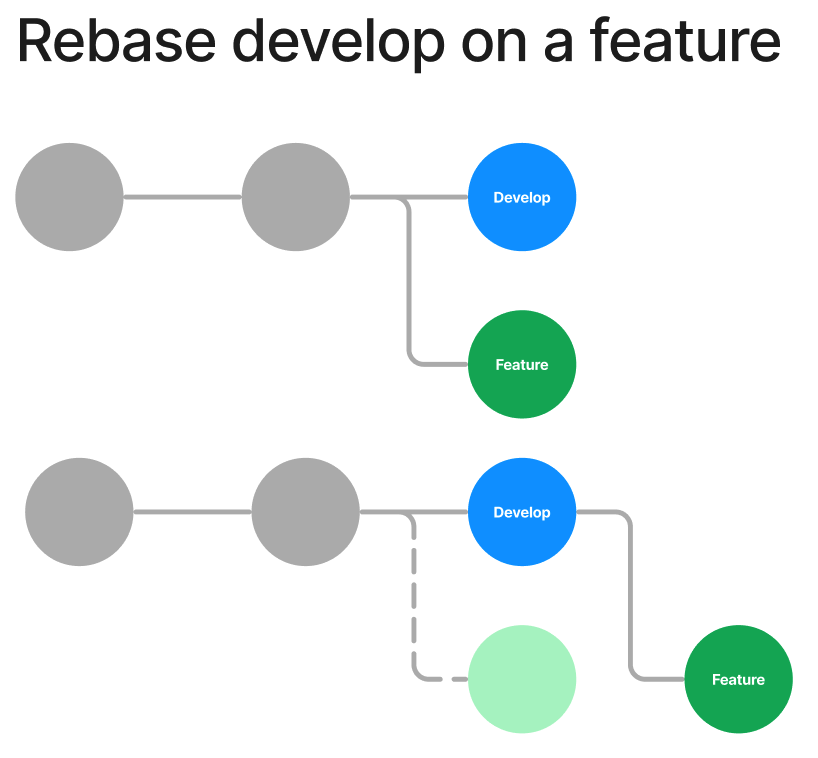
One common issue when learning to work with linear histories is avoiding merge commits. As an example, if you are on feature and another developer merges a pull request to develop, using the command git merge develop will create a merge commit on the feature branch log. Assuming the code added to develop is unrelated to the feature,this is an unnecessary commit on the feature branch. To avoid this, git rebase develop should be used instead.
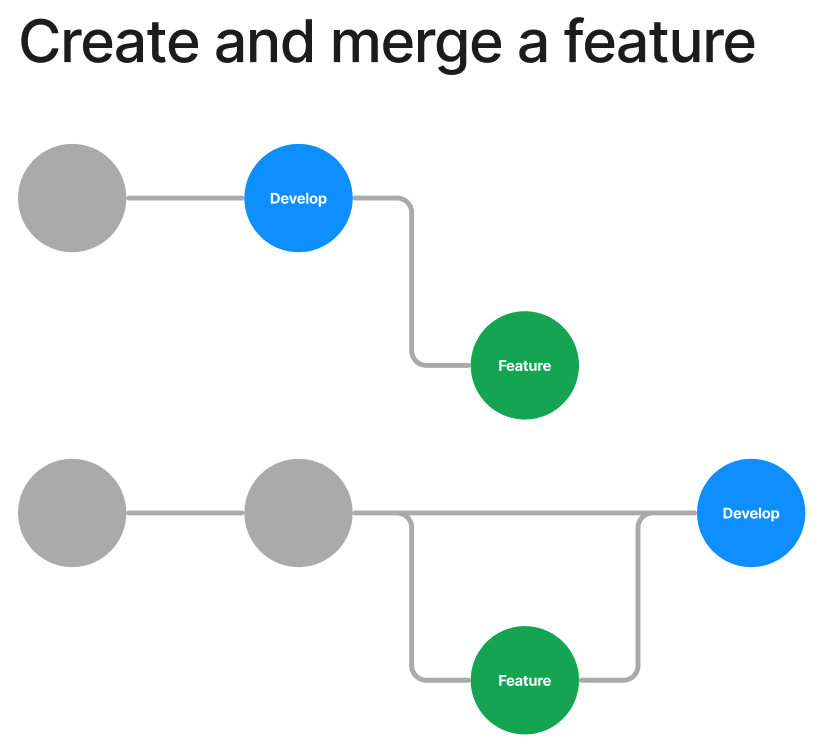
Creating and pushing a new feature branch is quite simple. Follow the steps below:
- Checkout to
developand pull the most recent changes.
git checkout develop
git pull origin develop
- Create a new feature branch using the proper naming convention.
git checkout -b <issue_#>-<issue_type>-<branch_name>
NOTE: If you do not have an issue number or type,
NA-0, should be used instead followed by the branch name.The branch name is whatever the developer thinks fits best but should be descriptive, lowercase, and hyphen separated.
- Add you changes to the branch and create a new commit. The commit should contain a descriptive message of the changes or additions you have made
git add -A
git commit -m "<descriptive message>"
If develop gets new changes after you have made a commit, be sure to follow the process in Git Workflows to get those changes reflected in your branch.
- Push your branch to the remote repository
git push origin <branch name>
NOTE: This assumes you named the remote
origin.
- If you need to make changes to your code after the PR review, you can do so and add, then commit as normal. After you have done this use an interactive rebase to squash the commits into as few as possible. You will then need to force push your branch back to the remote.
git rebase -i HEAD~2
...
git push -f origin <branch_name>
NOTE:
HEAD~2would pick the current HEAD and on commit previous for the rebase. Change this number as needed depending on the number of commits you have. You can read more about rebasing here.
- Once the branch is on the remote repository, a pull request can be made.
The pull request documentation will be the best reference for creating PR's. There are a few specifics to the project that are worth mentioning however.
-
The
developbranch is protected by a few rules. PR's must be approved by a number of memeber before being merged. There are also some automated actions that run on each PR. If they fail, they will block the PR from being merged. -
Be sure to leave a detailed description of what you changed or added. If you added something that renders on screen, attach screenshots of it. If you changed something related to a test, post screenshot of those tests passing.
-
If the PR is not approved of any of the automation tests fail, you should not delete the PR. Instead, make changes to your branch, rebase if necessary, and then push back to the remote. The pull request will be automatically updated.
-
Make sure to assign yourself to the PR, apply the appropriate labels, and assign to the correct milestone or project.
-
As the creator of the PR, you are responsible for merging the code. Once all checks have passed and approvals have been given, merge the code into
develop. Be sure to delete the branch after this to reduce stale branches.
-
When reviewing code, don't be afraid to ask for clarification or changes!
-
If you do not understand what the PR changes or how the code works, don't approve it! Approvals should be actual code reviews, not to just unblock a PR.
-
If there is a preview deployment, always check it and click around. If there are changes to the front end application, test them out specifically.
-
If changes are significant, pull the code down and test it out yourself. This is a great way to understand how others develop and give things an in depth test.