Launchers
Launchers are used to generate, host, and download binaries, scripts, and one-liners to launch new Grunts.
Once a listener has been started, you'll want to generate a launcher to use in kicking off Grunts. To get started, navigate to the Launchers navigation page:
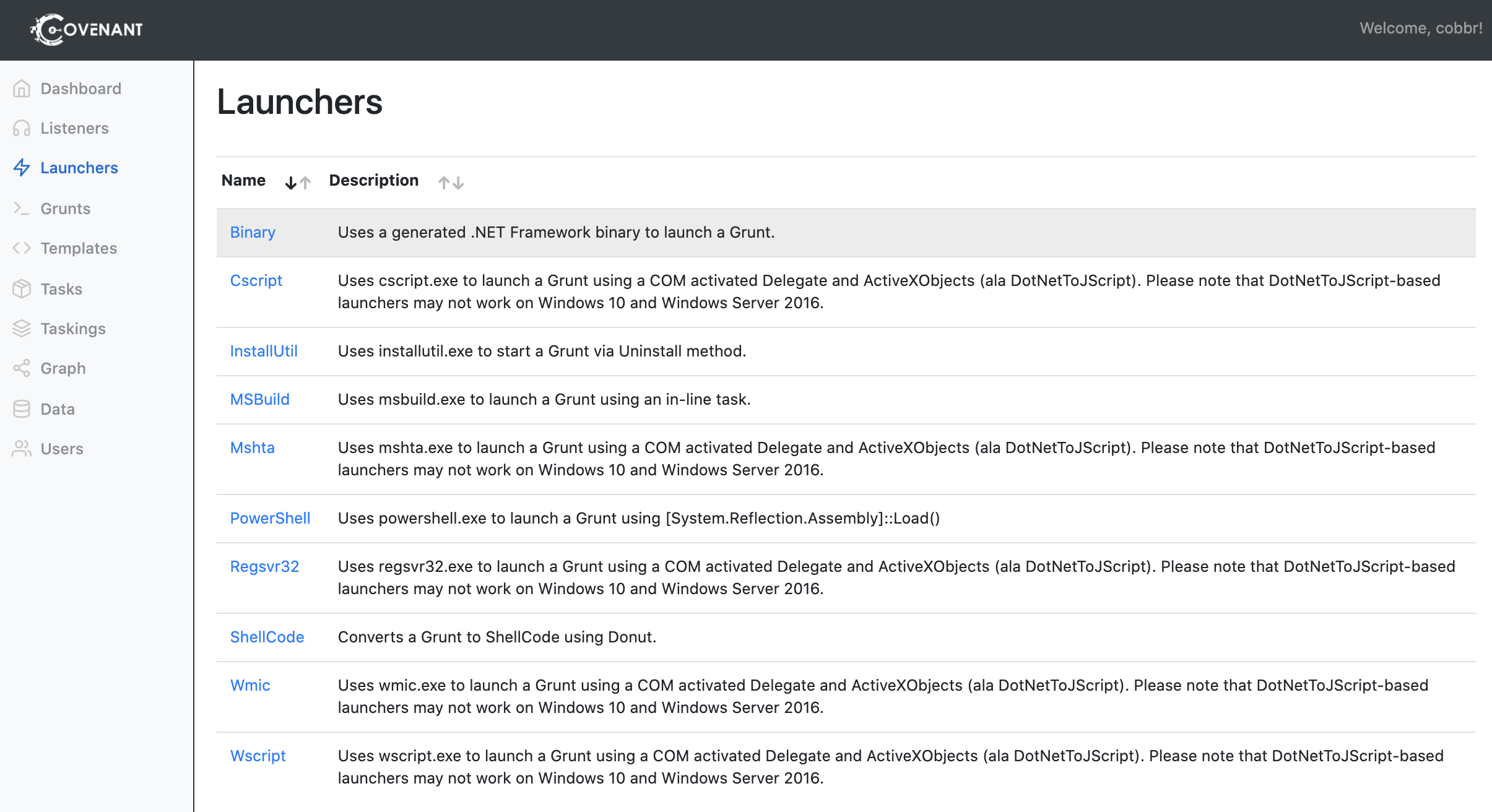
Launchers are named roughly by the system binary that will be used to execute the launcher. Currently, Covenant supports the following launchers:
-
Binary - The
Binarylauncher is used to generate custom binaries that launch a Grunt. This is currently the only launcher that does not rely on a system binary. -
ShellCode - The
ShellCodelauncher converts a Grunt binary to ShellCode using Donut. -
PowerShell - The
PowerShelllauncher is used to generate PowerShell code and/or a PowerShell one-liner that launches a Grunt usingpowershell.exe. -
MSBuild - The
MSBuildlauncher is used to generate an MSBuild XML file that launches a Grunt usingmsbuild.exe. -
InstallUtil - The
InstallUtillauncher is used to generate an InstallUtil XML file that launches a Grunt usinginstallutil.exe. -
Mshta - The
Mshtalauncher is used to generate an HTA file and/or a mshta one-liner that launches a Grunt usingmshta.exethat relies on DotNetToJScript. -
Regsvr32 - The
Regsvr32launcher is used to generate an SCT file and/or regsvr32 one-liner that launches a Grunt usingregsvr32.exethat relies on DotNetToJScript. -
Wmic - The
Wmiclauncher is used to generate an xsl file and/or wmic one-liner that launches a Grunt usingwmic.exethat relies on DotNetToJScript. -
Cscript - The
Cscriptlauncher is used to generate a JScript file a Grunt usingcscript.exethat relies on DotNetToJScript. -
Wscript - The
Wscriptlauncher is used to generate a JScript file a Grunt usingwscript.exethat relies on DotNetToJScript.
Please keep in mind that any of the launchers that rely on DotNetToJScript may not work on some of the latest versions of Windows 10 and Windows Server 2016 and/or may be signatured by some AMSI providers.
To generate a binary launcher, click on the "Binary" link within the launchers table. This will reveal some configuration options to consider before you generate the launcher:

Other launchers may have some additional configuration options, but these options are common to all launcher types. The configuration options to consider are:
-
Listener - The
Listeneris the name of the listener that this Grunt should communicate with. If you have multiple active listeners, be sure to select the correct listener. -
ImplantTemplate - The
ImplantTemplateis the type of implant that the launcher will generate. -
DotNetVersion - The
DotNetVersionof the implant that will be generated. You'll be limited to a choice of theDotNetVersions compatible with the chosenImplantTemplate. -
Delay - The
Delayis the time that the Grunt will sleep in-between each poll of the server. A largerDelayvalue will result in stealthier communication, but increase the time it takes to task a Grunt. -
JitterPercent - The
JitterPercentis the percentage of variability in theDelayvalue. -
ConnectAttempts - The
ConnectAttemptsis the number of consective times a Grunt will attempt to poll the listener before quitting. If a Grunt cannot reach the listener and fails to successfully poll the listener more times than theConnectAttemptsvalue, it will quit. -
KillDate - The
KillDateis the date at which a Grunt will quit and stop calling back to the listener.
Some other options may be displayed based upon the ImplantTemplate that has been selected. If you select an ImplantTemplate with an HTTP CommType:
-
ValidateCert - The
ValidateCertoption determines if the Grunt will validate the listener's SSL certificate to prevent MiTM attacks. There are scenarios where target network proxies can interfere with certificate validation, and it's preferrable to not validate the certificate. This option is only relavent when using the HTTPCommType, and will only be displayed if you have selected the HTTPCommType. -
UseCertPinning - The
UseCertPinningoption determines if the Grunt will use cert pinning of the listener's SSL certificate to prevent MiTM attacks. There are scenarios where target network proxies can interfere with certificate pinning, and it's preferrable to not perform cert pinning. This option is only relavent when using the HTTPCommType, and will only be displayed if you have selected the HTTPCommType.
If you select an ImplantTemplate with an SMB CommType:
-
SMBPipeName - The
SMBPipeNameis the name of the named pipe that the Grunt will bind to and listen on. This option is only relavent when using the SMBCommType, and will only be displayed if you have selected the SMBCommType.
Once the options are configured as desired, click the "Generate" button to generate the launcher. Now that the launcher is generated, you can choose to download the launcher to a local file or host the launcher on the listener. You must generate the launcher prior to downloading or hosting.
To download the launcher to a local file, click the "Download" button.
To host the launcher, click on the "Host" tab. This will provide a Url option:

Choose a URL at which you would like to host the launcher and click the "Host" button to host.
You may wish to view the source code of the launcher's GruntStager. To view the code click on the "Code" tab:

You can use this code to create a custom Grunt that does not utilize any of the built-in launchers. Click the "Copy" button to copy the code to the clipboard.