


Transform your music collection into a powerful streaming server with beautiful web UI, automatic CD ripping, Last.fm integration, and comprehensive system management.
Features • Quick Start • 📹 Video Tour • Screenshots • Documentation

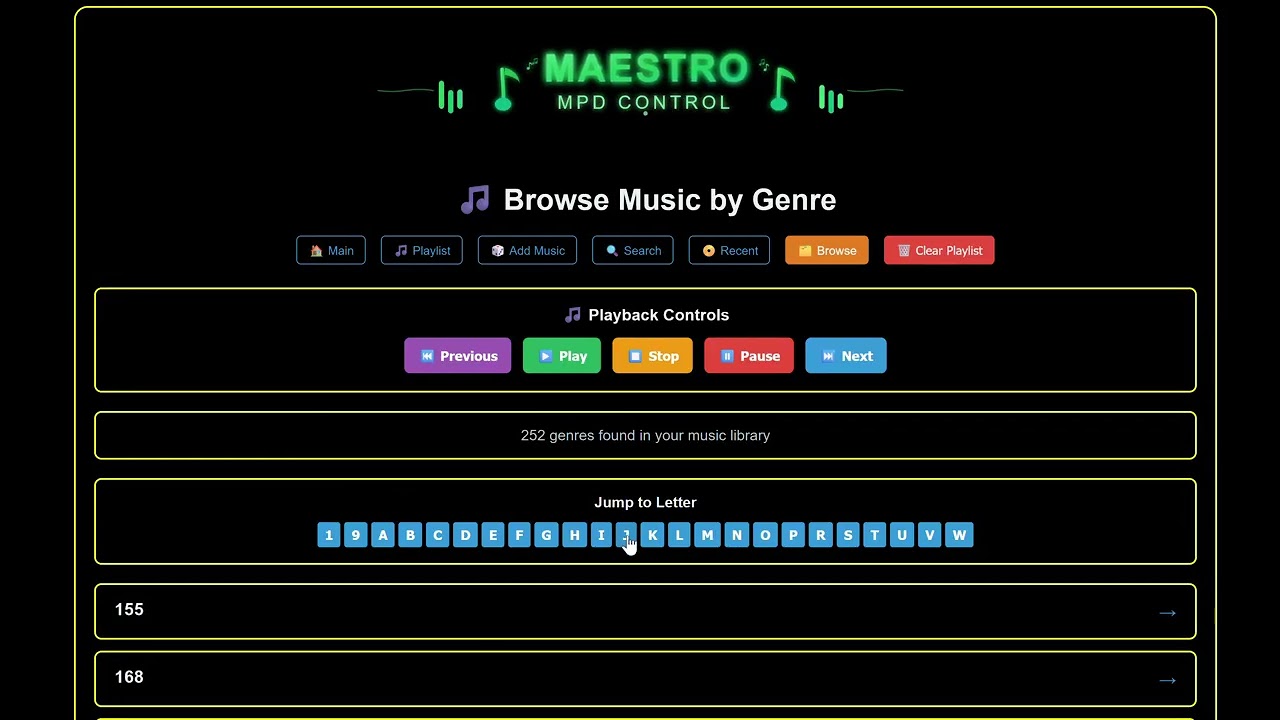
Silent walkthrough demonstrating the web interface, admin panel, and all major features
Maestro is not just another MPD web interface - it's a complete music server ecosystem designed for audiophiles, self-hosters, and music enthusiasts who demand:
✨ Elite-grade features - Bandcamp streaming, internet radio, CD ripping, Last.fm scrobbling
🎨 Beautiful UI - 8 gorgeous themes, album art collage view, mobile-responsive
🔧 Full system control - NFS/SMB mounts, audio configuration, OS updates, real-time monitoring
🚀 Zero-hassle setup - One-command installation, automatic MPD detection, smart defaults
🎵 Audiophile-ready - Bit-perfect playback up to DSD512/384kHz, all formats supported
📡 Multi-room audio - Stream to Squeezebox/LMS players throughout your home
📀 Smart features - Search autocomplete, client-side filtering, interactive album discovery
Click to expand full feature list
- 🎵 Full MPD control (play, pause, stop, next, previous)
- 🔊 Volume control with visual feedback
- 📊 Real-time playback progress
- 🔀 Shuffle and repeat modes
- 📻 HTTP audio streaming
- ⏱️ Track time display and seek
- 📀 Album browsing with album art and interactive collage view
- 🎤 Artist browsing with smart letter jump navigation (shows when >50 artists)
- 🎼 Genre filtering with letter jump navigation
- 🆕 Recent albums page (tracks newly added/ripped music)
- 🔍 Smart search with instant autocomplete suggestions
- 💿 Multi-disc detection with proper disc organization
- 🖼️ Album art collage - Click album art to see 3x3 grid of artist's albums
- 🎲 Random album selection - Discover 8 random albums from your collection
- ⚡ Client-side filtering - Lightning fast search with keyboard navigation
- 📝 Current playlist view
- ➕ Add albums/tracks to queue
- 🗑️ Clear playlist
- 🎯 Play from queue position
- � Internet Radio - Stream from 22 countries via Radio Browser API with station logos
- 🎵 Bandcamp Integration - Stream Bandcamp purchases directly in Maestro
- 📡 Multi-room Audio - Stream to Squeezebox/LMS players for whole-home audio
- 📈 Playback charts - Track your listening stats with Last.fm
- 🎨 8 beautiful themes - Dark, Light, High Contrast, Desert, Terminal, Sunset, Forest, Midnight
- 📱 Mobile-responsive design with touch-optimized controls
- 🎵 Last.fm integration - Scrobbling with on-screen toast notifications
- 🔔 Smart toasts - Real-time feedback for all actions
- 🎯 Auto-fill playlists - Radio mode with genre-based smart selection from 30 similar artists
Click to expand admin features
- 📊 Real-time stats: CPU, RAM, disk usage, network traffic
- 📈 Live graphs updating every 2 seconds
- 💾 Disk space monitoring with mount point details
- 🌡️ System health at a glance
- 📂 NFS/SMB mount management
- Add network shares through web UI
- Mount/unmount operations
- Mount status monitoring
- 📚 MPD library structure view with mount indicators
- 🔄 Smart library updates with verification
- 📊 Optimized file counting for network shares
- 🎚️ Audio device selection with hardware scanning
- 🎛️ Bit-perfect playback configuration
- 🔊 Buffer size optimization (2048-16384)
- 🎵 Resampling quality settings
- 🎼 DSD playback mode configuration
- 🔧 System audio optimizations (CPU governor, swappiness)
- � Maestro update checker - see available updates and commits behind
- �📦 OS package updates with real-time progress
- 🔄 Service management (MPD, Web UI, Admin)
- 🖥️ System reboot with countdown
- 📋 System logs viewer
- 🔐 Secure sudo configuration
- 📀 Automatic CD detection via udev rules
- 🎵 Automatic ripping to FLAC with FreeDB metadata
- 📝 Configurable rip settings (format, quality, behavior)
- 📊 Rip status monitoring
- 🗂️ Organized output to /media/music/ripped/
Install:
git clone https://github.com/coacharnold1/Maestro-Server.git
cd Maestro-Server
./install-maestro.sh
Italian users / Utenti italiani:
./install-maestro-it.sh # Installer in italianoUpdate:
cd ~/Maestro-Server
./update-maestro.sh
Installation: The installer will:
- ✅ Detect existing MPD or install new
- ✅ Configure music directories
- ✅ Set up Web UI (port 5003) and Admin API (port 5004)
- ✅ Create systemd services
- ✅ Configure permissions and audio settings
⏱️ Installation time: ~5 minutes
Access your new music server:
- 🌐 Web Player:
http://YOUR_IP:5003 - ⚙️ Admin Panel:
http://YOUR_IP:5004 - 🎵 MPD Port:
YOUR_IP:6600
Beautiful player interface with album art, queue management, and playback controls
 Choose from 8 beautiful themes to match your style
 Grid view of your album collection with cover art
 Intuitive browsing with multiple view options
 Keep track of newly added albums to your library
 Manage your current playlist with drag-and-drop
 Random playback and user-created custom genre stations
 Powerful search across your entire music library
 View your Last.fm listening charts and statistics
 Comprehensive settings for customization and Last.fm integration
 Powerful admin interface with system monitoring and library management
 System administration panel for updates, service management, and system control
 Advanced audio configuration - select hardware devices, configure bit-perfect playback, and optimize audio settings
 Real-time system logs viewer for troubleshooting and monitoring
 Automatic CD ripping interface with MusicBrainz metadata lookup, album art, and track listing
 Configure ripping format (FLAC/MP3/WAV/OGG), quality settings, output location, and automatic ripping behavior


 Fully responsive design that works beautifully on mobile devices
Perfect for:
- 🏠 Home music servers - Central music hub for whole house audio
- 🎧 Audiophiles - Bit-perfect playback with DSD support
- 💿 CD collectors - Automatic ripping with metadata lookup
- 🖥️ Raspberry Pi - Lightweight, efficient music server
- 🌐 Remote access - Stream your collection from anywhere
- 📚 Large libraries - Handles 100,000+ tracks with ease
- 🎵 Multi-room - MPD's network architecture for zone control
- OS: Ubuntu 20.04+, Debian 11+, or Arch Linux
- RAM: 1GB (2GB+ recommended)
- Storage: 1GB + your music library
- Network: Ethernet or WiFi
- Audio: Any ALSA-compatible device (optional for headless)
- Raspberry Pi 4 (4GB RAM) - Perfect balance
- Intel NUC - More power for large libraries
- Dedicated Linux server - Ultimate performance
- ✅ Ubuntu Server 22.04 LTS
- ✅ Debian 12 (Bookworm)
- ✅ Raspberry Pi OS (64-bit)
- ✅ Arch Linux
~/maestro/
├── web/                      # Web UI (Port 5003)
│   ├── venv/                # Python virtual environment
│   ├── app.py               # Flask web server
│   ├── templates/           # HTML templates
│   └── static/              # CSS, JS, images
├── admin/                    # Admin API (Port 5004)
│   ├── venv/                # Python virtual environment
│   ├── admin_api.py         # Flask admin server
│   └── templates/           # Admin HTML
├── scripts/                  # Automation scripts
│   └── cd-inserted.sh       # CD auto-rip handler
└── logs/                     # Application logs

/etc/systemd/system/
├── maestro-web.service      # Web UI service
└── maestro-admin.service    # Admin API service

/etc/udev/rules.d/
└── 99-maestro-cd.rules      # CD detection rules

/media/music/                 # Music library (configurable)
└── ripped/                   # Auto-ripped CDs
All settings accessible through web interfaces - no config file editing needed!
Web UI Settings (http://YOUR_IP:5003/settings):
- Choose from 8 themes
- Configure Last.fm integration
- Set scrobbling preferences
Admin Settings (http://YOUR_IP:5004):
- Add NFS/SMB network shares
- Configure audio hardware
- Optimize playback settings
- Manage system updates
Click for advanced config options
Edit during installation or modify /etc/mpd.conf:
music_directory "/your/custom/path"Restrict to localhost only:
sudo systemctl edit maestro-web
# Add: Environment="FLASK_RUN_HOST=127.0.0.1"# Web UI (default 5003)
sudo systemctl edit maestro-web
# Add: Environment="FLASK_RUN_PORT=8080"
# Admin API (default 5004)
sudo systemctl edit maestro-admin
# Add: Environment="FLASK_RUN_PORT=8081"Insert a CD and Maestro automatically:
- Detects disc via udev rule
- Queries FreeDB for metadata
- Rips to FLAC (configurable format)
- Organizes into Artist/Album structure
- Updates MPD library
- Shows in "Recent Albums"
Configure via: Admin → CD Ripper Settings
Full scrobbling support with visual feedback:
- "Now Playing" updates on track start
- Scrobbles after 50% playback or 4 minutes
- On-screen toast notifications (optional)
- Detailed setup wizard in Settings
Browse large libraries efficiently:
- Automatically appears for artists/genres with >50 entries
- Click letter to jump instantly
- Visual highlight of current position
- Mobile-optimized buttons
Smart handling of box sets and multi-disc albums:
- Automatic disc detection
- Organized disc structure in UI
- Proper track ordering
- Maintains metadata integrity
- FEATURES.md - Comprehensive feature documentation
- ADMIN_INTEGRATION.md - Admin API integration guide
- CD_RIPPING_INTEGRATION.md - CD ripper setup guide
- Admin README - Admin API endpoints
- MPD Documentation - Official MPD docs
git clone https://github.com/coacharnold1/Maestro-Server.git
cd Maestro-Server
./install-maestro.shOption A: Local Files
cp -r /path/to/your/music/* /media/music/
sudo systemctl restart mpd
Option B: Network Share
- Open
http://YOUR_IP:5004 - Go to Library Management
- Click Add Mount
- Enter NFS/SMB details
- Click Mount and Update MPD Library
- Open
http://YOUR_IP:5004 - Go to Audio Tweaks
- Select your audio device
- Configure bit-perfect playback
- Save and restart MPD
- Open
http://YOUR_IP:5003 - Browse your library
- Add songs to queue
- Press play! 🎵
Maestro configures limited passwordless sudo in /etc/sudoers.d/maestro for:
- System updates
- Service management
- Mount operations
- Audio device access
Both services bind to 0.0.0.0 by default for easy access. To restrict:
# Restrict to localhost
sudo systemctl edit maestro-web
# Add: Environment="FLASK_RUN_HOST=127.0.0.1"Recommended: Use nginx/apache reverse proxy with authentication for public exposure.
Web UI won't start
# Check status
sudo systemctl status maestro-web

# View logs
journalctl -u maestro-web -n 50

# Test manually
cd ~/maestro/web
source venv/bin/activate
python3 app.py
MPD connection failed
# Check MPD status
sudo systemctl status mpd

# Test connection
mpc status

# Verify port
sudo netstat -tlnp | grep 6600
No audio output
# List audio devices
aplay -l

# Test playback
speaker-test -c2 -t wav

# Check MPD audio output
sudo vim /etc/mpd.conf
# Ensure audio_output section is correct
Network mount failed
# Test mount manually
sudo mount -t nfs server:/path /media/music/test

# Check connectivity
ping server_ip

# Verify NFS tools
which mount.nfsThe Admin → System Admin page shows:
- Current Maestro version (git commit)
- Latest available version from GitHub
- Number of commits behind
- SSH instructions for manual update
Keep Maestro up to date:
cd ~/Maestro-Server
./update-maestro.sh
The updater:
- ✅ Pulls latest code from GitHub
- ✅ Preserves your settings
- ✅ Updates dependencies
- ✅ Restarts services
- ✅ Migrates configuration if needed
⚠️ Note for v2.8.0 Update: If updating from v2.7.1 or earlier, the update script needs to update itself first. Run the update script twice, or dogit pull origin mainbefore running./update-maestro.sh. This is a one-time requirement for the LMS integration feature.
Want to display album art on a physical screen connected to your Maestro server?
mpd-framebuffer-display - A companion service that displays real-time album artwork on framebuffer devices (TFT screens, monitors, etc.)
Features:
- 🖼️ Real-time album art on framebuffer/TTY displays
- 🔄 Automatic updates on track changes
- 🌐 HTTP API for remote access
- 📺 Perfect for Raspberry Pi with small TFT screens
- 🔌 Integrates seamlessly with Maestro MPD Server
Quick Install:
git clone https://github.com/coacharnold1/mpd-framebuffer-display
cd mpd-framebuffer-display
sudo ./install.sh
Use Cases:
- Mini music player with album art display
- Kiosk mode music station
- Desktop album art visualizer
- Multi-room audio with visual feedback
Contributions are welcome! Please:
- Fork the repository
- Create a feature branch (
git checkout -b feature/amazing-feature) - Commit your changes (
git commit -m 'Add amazing feature') - Push to the branch (
git push origin feature/amazing-feature) - Open a Pull Request
This project is licensed under the MIT License - see the LICENSE file for details.
Built with love and these amazing technologies:
- Music Player Daemon (MPD) - The core audio engine
- Flask - Web framework
- python-mpd2 - Python MPD client
- psutil - System monitoring
- abcde - CD ripping
- pylast - Last.fm integration
- 🐛 Bug Reports: GitHub Issues
- 💡 Feature Requests: GitHub Discussions
- 📧 Contact: [Your Email/Contact]
If you find Maestro useful, please consider:
- ⭐ Starring the repository
- 🐦 Sharing on social media
- 📝 Writing a blog post about your setup
- 🤝 Contributing code or documentation
Made with ❤️ for the music community