A browser extension that filters low-quality AI/LLM hype posts from your LinkedIn feed using local AI classification via Ollama.
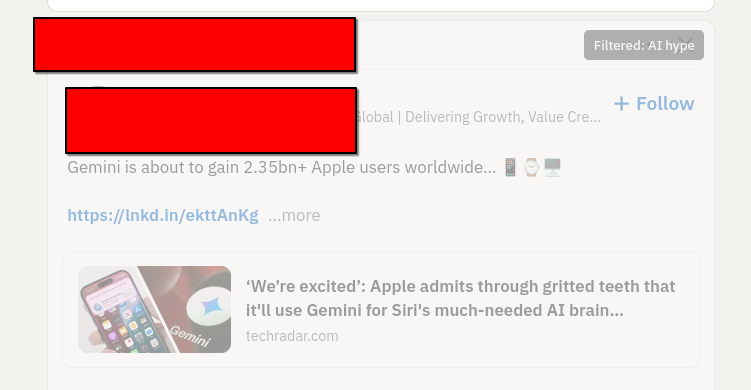
- The extension monitors your LinkedIn feed for new posts
- Post content is sent to a local Ollama instance for classification
- Posts identified as low-quality AI hype are dimmed (opacity: 0.4)
- Filtered posts show a subtle "Filtered: AI hype" overlay
- Hover over filtered posts to see them more clearly
Posts are classified against these criteria
- Primarily about AI/LLMs (not just mentioning them)
- Makes broad claims about AI or LLMs without evidence or specifics
- Makes future predictions about disruptive changes coming from AI or LLMs
I'm not going to provide inline ollama instructions. It's not too hard to install. You'll need GPU acceleration to make this run convincingly in realtime. I only have a Radeon card though, and it's not that fancy (RX 7600 XT) Verify it's running:
curl http://localhost:11434/api/tagsYou will also have to authorize ollama to serve to the origin domain of your browser extension, once you've installed it. By default ollama will not allow random origin requests.
# Clone or download this repository
cd linkedin-silencer

# Install dependencies
npm install

# Build the extension
npm run build- Make sure Ollama is running with the gemma2 model
- Navigate to linkedin.com/feed
- Posts will be analyzed as they load
- Click the extension icon to:
- Toggle filtering on/off
- Check Ollama connection status
- Clear the classification cache
To adjust what gets filtered, modify the classification prompt in src/background/service-worker.ts. Look for the CLASSIFICATION_PROMPT constant.
You can make filtering more aggressive by:
- Adding more specific patterns to the FILTER list
- Removing items from the KEEP list
Or less aggressive by:
- Being more specific about what should be filtered
- Adding more items to the KEEP list
After changes, rebuild with npm run build and reload the extension.
Demonstration code only - All rights reserved