
The Circle is a lightweight online chat website that randomly matches two people from a closed group together to have a one-on-one chat. These groups can exist for an organization, a collective shared interest, or just about anything else. Our vision is to strengthen communities by fostering relationships between members of a circle who wouldn't normally take the time to chat and connect with each other.
The Circle is committed to privacy. Groups auto expire after a certain time frame and no private user information is ever stored.
The live version of the full project is available at: https://circle-fe-jcg5wby7mq-uc.a.run.app/
The decision to use the Flask framework for Python came from the challenge of learning new language in a set amount of time. Flask and its many libraries are very well documented which allowed for rapid development on the backend. Flask and Pytest also work seamlessly together which enable near 100% test coverage.
Socket.io was fundamental in this app due to the design of a real-time, bi-directional, and event based communication between the client and server.
MongoDB was used for this application due its ease in fast and agile development when working with non-relational data. MongoDB is a document style NoSQL database which makes indexing, searching, and calling data extremely fast from both frontend and backend.
Circle CI is a very user friendly Continuous Intergration platform that uses a simple config file and is able to connect with github to make sure each Pull Request is tested prior to merging with the Production Branch
Docker made managing the different contributors local setups with the many versions of Python and its libraries painless. It also enabled very quick intergrated of new features and bug fixes to the deployed production server.
Google Cloud Platform and its CloudRun service for its ease of use in deploying Docker containers. It also has built in security with automatic SSL and TLS. Additionally, it allows for serverless deployment and is available to the end user very quickly.

- Clone this repo to your local machine with:
git@github.com:circle-chat/cc-be.git - CD into the directory
- Install Poetry (instructions available at https://python-poetry.org/docs/)
- Alternatively use your favorite python package manager like pip (a requirements.txt file is included)
- Start a Python Virtual Environment with
poetry shell - RUN
poetry install - Install MongoDB - Community 4.2 Edition (instructions available at https://docs.mongodb.com/manual/installation/)
- Make sure the Mongo service is running
brew services start mongodb-community@4.2 - To start the server in development use
flask run - This hosts the server at
localhost:5000
- Follow above directions for MongoDB
- Pull down the Docker image
docker pull iev0lv3/circle:the_one - Run the docker image
docker run -dp 8080:8080 iev0lv3/circle:the_one - This hosts the server at
localhost:8080
The back-end server has two ways to interact with it. First, through common API endpoints.
The POST method to /groups should contain json information for the following:
- Name - Title for the group. (*)
- Description - A short discription for the group. (*)
- Rules - A single string of rules for the group.
This is return the following JSON object if done correctly
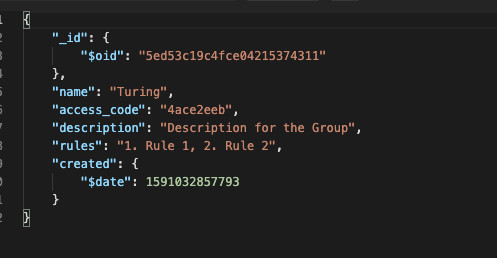
The GET method to /groups will return all the current groups in the database in the above formating
The second way to interact with the server is through websocket events.
The join_group event handles opening a websocket from client to server as well as giving the client access to a specific group. The event should emit a json payload with the following key values:
access_code- This is the access code for the group. This is used almost as a password into the group.name- The name the user has input.
When a user joins a group they wait in a lobby for another client to connect to the same group. This information is briefly stored in the database for use in matchmaking. When there is another connection (or more then 2) the users are randomly assigned into chat rooms. This is done through the server emitting a join_room event.
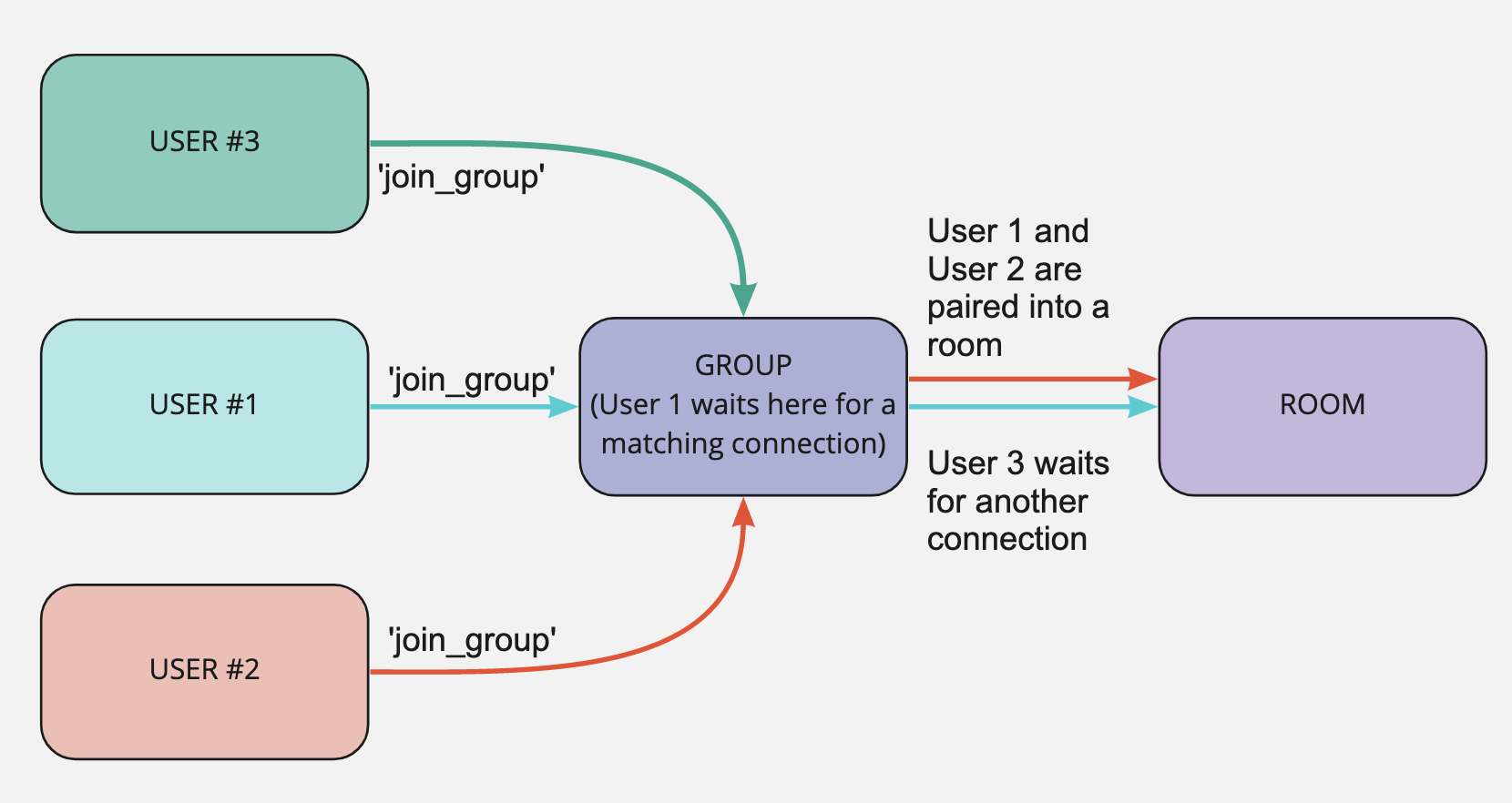
Users are randomly paired with others in the same group. The last socket client a user matched with is stored so that they aren't matched with the same person twice in a row.
The emitted join_room event has this following data:
room- This is the room they are connecting too. (Stored in the client)user- Their usernamematch- This data has two pieces. The first is the second user's name and the second piece is that users socket id.
The message event handles the sending of messages to the server and back out to the connected sockets in that room. The payload that comes through only has one requirement but more key values can be send as needed by the client.
room- This is the room that the message is to be emitted to. (Recieved from above)
Any additional key value pairs are passed back to the two clients connected to that room.
When this event is triggered the connection is severed and the connection is removed from the database.
The Database used for this application is MongoDB due its ease in fast and agile development when working with none relational data.
There are two collections in the Database: Groups and Connections
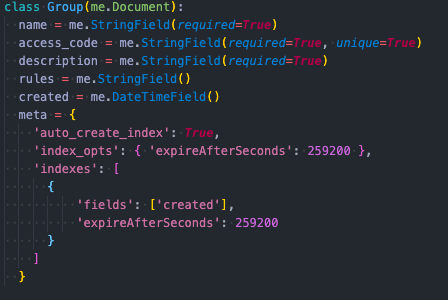
Groups are set to expire automatically after three days.
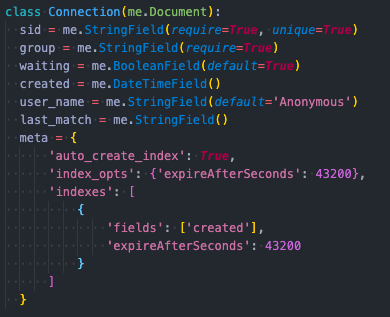
Connections are deleted automatically when a client disconnects but a fail safe is also in place that they delete after a set period of time as well.
- Implement a series of never before used technologies against a tight deadline.
- Develop using Agile work practices include Asana Project Board, Scrum Standups, User Story Grooming, etc.
- Maintain developer empathy when working across frontend and backend teams.
- David Atkins - https://github.com/d-atkins
- Jordan Williams - https://github.com/iEv0lv3
- Ryan Allen - https://github.com/rcallen89
- Kyle Barnett - https://github.com/KmBarnett
- Ezekiel Clark - https://github.com/Yetidancer