mcp-gitlab-workflow is an MCP server for issue-driven GitLab development.
It can take a requirement or an existing GitLab issue and drive a standardized delivery flow: requirement analysis, issue creation, branching, coding, merge request creation, and issue updates. It also provides a set of atomic GitLab API tools for custom orchestration and fine-grained control.
workflow_*: higher-level tools that package common requirement-to-delivery flows into a single tool callgitlab_*: atomic GitLab API tools for custom orchestration and fine-grained control
Target projects for issues and code delivery are configured with WORKFLOW_ISSUE_PROJECT_ID and WORKFLOW_CODE_PROJECT_ID. See the environment variable section below for the full configuration matrix.
workflow_requirement_to_issue: analyze a requirement and create a GitLab issueworkflow_review_mr_post_comment: review a target merge request and post a review commentworkflow_issue_to_delivery: start from an existing issue and complete branch -> code change -> MR -> issue comment -> issue logworkflow_requirement_to_delivery: run the full end-to-end flow from a requirement
Issue tools fall back to WORKFLOW_ISSUE_PROJECT_ID by default, while code and merge request tools fall back to WORKFLOW_CODE_PROJECT_ID.
- Users and labels:
gitlab_get_current_user,gitlab_list_labels,gitlab_create_label,gitlab_update_label,gitlab_delete_label - Issues:
gitlab_create_issue,gitlab_get_issue,gitlab_get_issue_notes,gitlab_add_issue_comment,gitlab_get_issue_images - Repository:
gitlab_create_branch,gitlab_get_file,gitlab_commit_files,gitlab_upload_project_file - Merge requests:
gitlab_get_merge_request,gitlab_get_mr_notes,gitlab_create_merge_request,gitlab_create_mr_note,gitlab_get_mr_changes,gitlab_approve_mr,gitlab_unapprove_mr
Using workflow_requirement_to_delivery as an example, it is best to explicitly name the tool in your prompt or wrap it in a higher-level custom instruction / skill so the LLM can reliably choose the intended workflow.
Use workflow_requirement_to_delivery to add a forum interaction feature
The workflow can automatically complete the flow below:
requirement analysis -> issue creation -> branch -> code change -> MR -> issue update
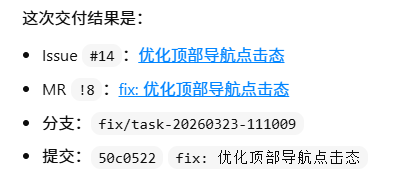
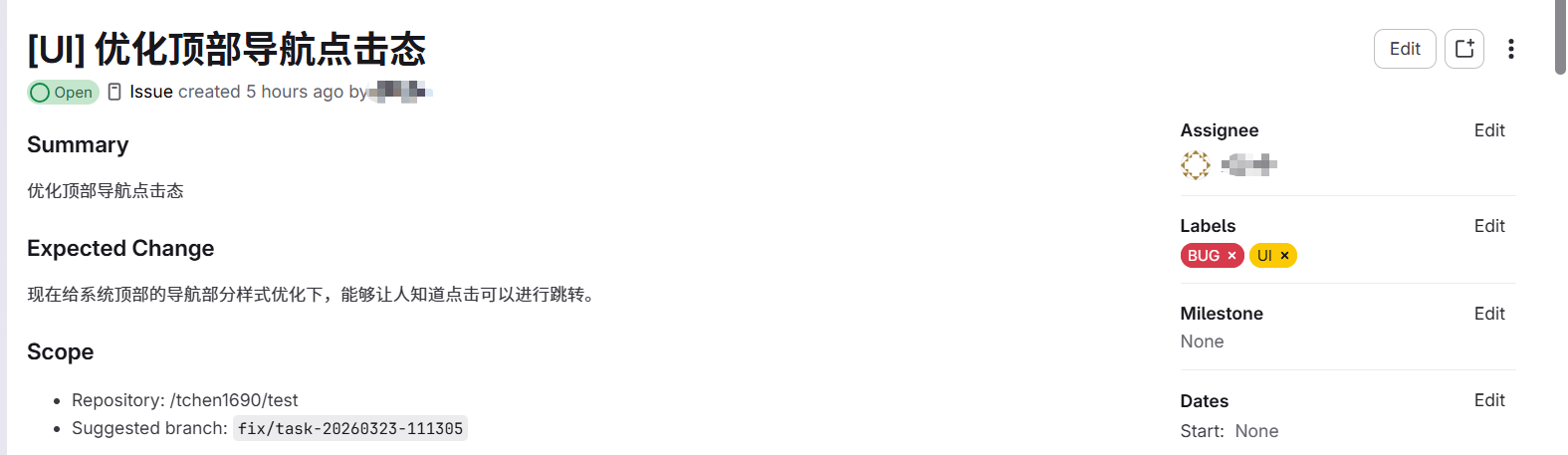
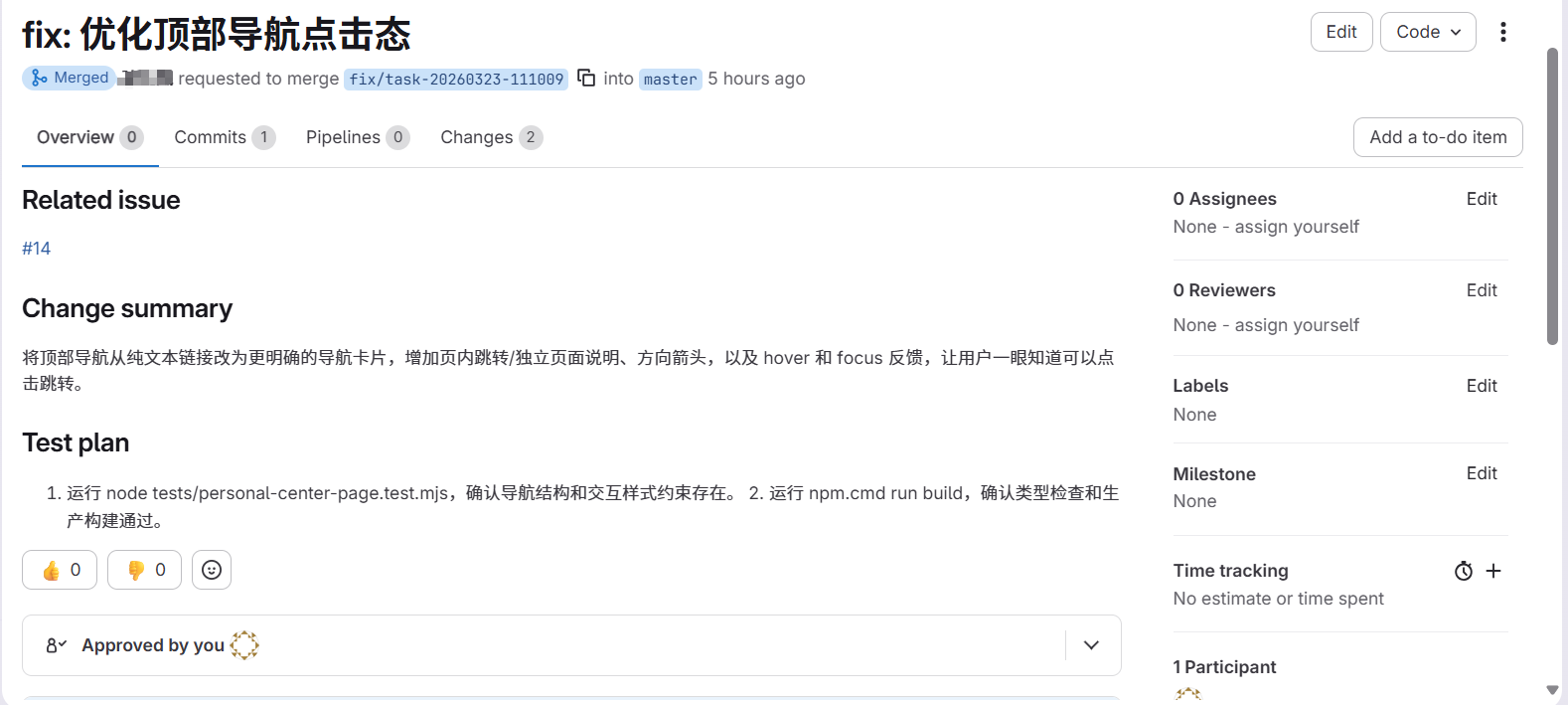
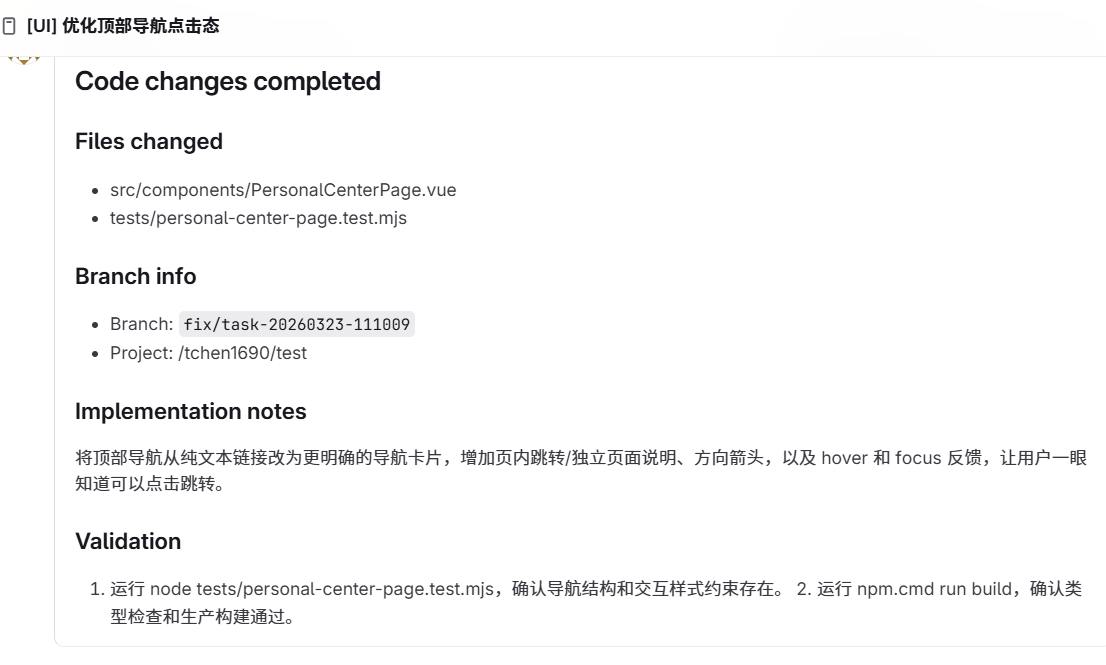
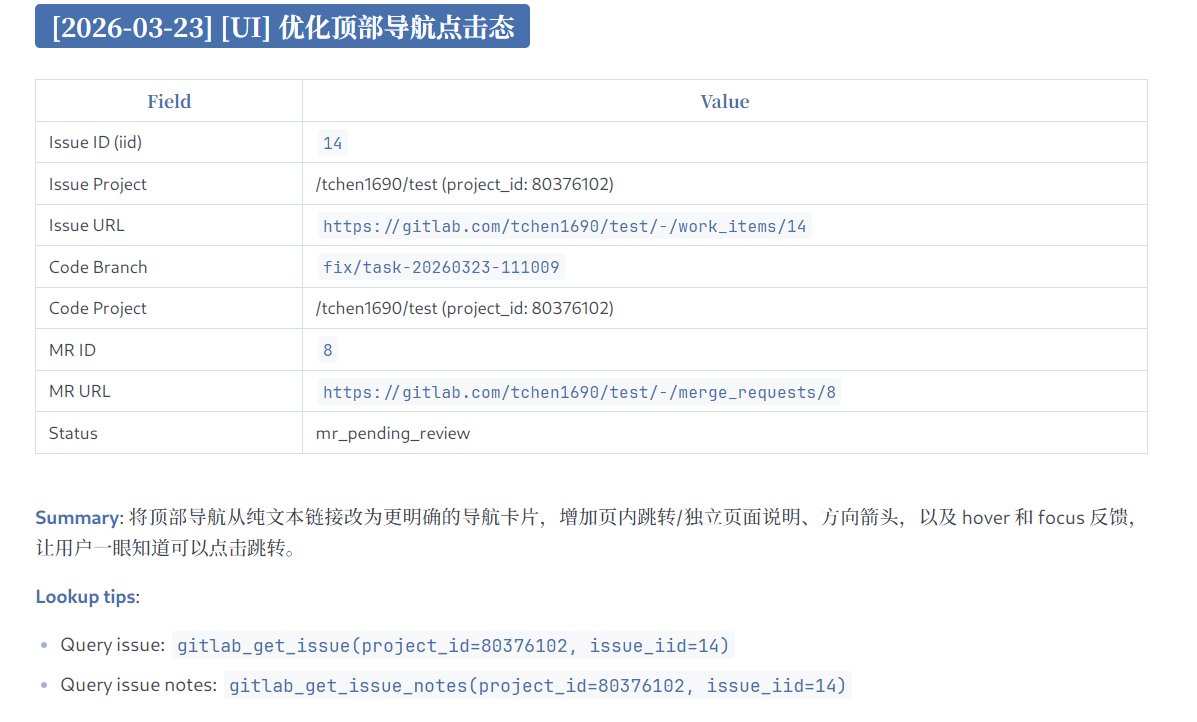
With this workflow, a developer can hand a requirement or an assigned issue directly to an agent and let it complete the full development flow in an issue-driven way.
{
  "mcpServers": {
    "gitlab-workflow": {
      "command": "npx",
      "args": ["-y", "@chntif/mcp-gitlab-workflow"],
      "env": {
        "GITLAB_TOKEN": "YOUR_TOKEN",
        "GITLAB_API_BASE_URL": "https://gitlab.com/api/v4",
        "WORKFLOW_ISSUE_PROJECT_ID": "82346102",
        "WORKFLOW_ISSUE_PROJECT_PATH": "tchen1690/test",
        "WORKFLOW_CODE_PROJECT_ID": "82346102",
        "WORKFLOW_CODE_PROJECT_PATH": "tchen1690/test",
        "WORKFLOW_BASE_BRANCH": "develop",
        "WORKFLOW_TARGET_BRANCH": "develop",
        "WORKFLOW_LOCAL_REMOTE_NAME": "origin"
      }
    }
  }
}codex mcp add gitlab-workflow \
--env GITLAB_TOKEN=YOUR_TOKEN \
--env GITLAB_API_BASE_URL=https://gitlab.com/api/v4 \
--env WORKFLOW_ISSUE_PROJECT_ID=80376102 \
--env WORKFLOW_ISSUE_PROJECT_PATH=tchen1690/test \
--env WORKFLOW_CODE_PROJECT_ID=80376102 \
--env WORKFLOW_CODE_PROJECT_PATH=tchen1690/test \
--env WORKFLOW_BASE_BRANCH=develop \
--env WORKFLOW_TARGET_BRANCH=develop \
--env WORKFLOW_LOCAL_REMOTE_NAME=origin \
-- npx -y @chntif/mcp-gitlab-workflow[mcp_servers.gitlab-workflow]
command = "npx"
args = ["-y", "@chntif/mcp-gitlab-workflow"]
[mcp_servers.gitlab-workflow.env]
GITLAB_TOKEN = "YOUR_TOKEN"
GITLAB_API_BASE_URL = "https://gitlab.com/api/v4"
WORKFLOW_ISSUE_PROJECT_ID = "80376102"
WORKFLOW_ISSUE_PROJECT_PATH = "tchen1690/test"
WORKFLOW_CODE_PROJECT_ID = "80376102"
WORKFLOW_CODE_PROJECT_PATH = "tchen1690/test"
WORKFLOW_BASE_BRANCH = "develop"
WORKFLOW_TARGET_BRANCH = "develop"
WORKFLOW_LOCAL_REMOTE_NAME = "origin"claude mcp add gitlab-workflow \
-e GITLAB_TOKEN=YOUR_TOKEN \
-e GITLAB_API_BASE_URL=https://gitlab.com/api/v4 \
-e WORKFLOW_ISSUE_PROJECT_ID=80376102 \
-e WORKFLOW_ISSUE_PROJECT_PATH=tchen1690/test \
-e WORKFLOW_CODE_PROJECT_ID=80376102 \
-e WORKFLOW_CODE_PROJECT_PATH=tchen1690/test \
-e WORKFLOW_BASE_BRANCH=develop \
-e WORKFLOW_TARGET_BRANCH=develop \
-e WORKFLOW_LOCAL_REMOTE_NAME=origin \
-- npx -y @chntif/mcp-gitlab-workflowYou can also directly write the configuration in 3.1 into Claude Code's configuration file.
{
  "mcpServers": {
    "gitlab-workflow": {
      "command": "node",
      "args": ["/gitlab-workflow-server/dist/src/server.js"],
      "env": {
        "GITLAB_TOKEN": "YOUR_TOKEN",
        "GITLAB_API_BASE_URL": "https://gitlab.com/api/v4",
        "WORKFLOW_ISSUE_PROJECT_ID": "82346102",
        "WORKFLOW_ISSUE_PROJECT_PATH": "tchen1690/test",
        "WORKFLOW_CODE_PROJECT_ID": "82346102",
        "WORKFLOW_CODE_PROJECT_PATH": "tchen1690/test",
        "WORKFLOW_BASE_BRANCH": "develop",
        "WORKFLOW_TARGET_BRANCH": "develop",
        "WORKFLOW_LOCAL_REMOTE_NAME": "origin"
      }
    }
  }
}This project is a Node.js package. npx is the recommended way to run it.
Parameter resolution order:
tool args -> user-provided env -> built-in defaults
If the user does not explicitly pass a parameter such as project_id, the tool can use runtime configuration from environment variables. Some variables also have built-in defaults.
| Environment Variable | Purpose | Default | Required |
|---|---|---|---|
GITLAB_TOKEN |
GitLab API access token used by the server and all GitLab operations | None | Yes |
GITLAB_API_BASE_URL |
Base URL for the GitLab API | https://gitlab.com/api/v4 |
No |
WORKFLOW_ISSUE_PROJECT_ID |
Default target project ID for issue-related tools | None | No |
WORKFLOW_ISSUE_PROJECT_PATH |
Default issue project path used in templates and references | None | No |
WORKFLOW_CODE_PROJECT_ID |
Default target project ID for repository, branch, commit, and MR tools | None | No |
WORKFLOW_CODE_PROJECT_PATH |
Default code project path used in templates, logs, and output | None | No |
WORKFLOW_BASE_BRANCH |
Default base branch used before creating a new delivery branch | develop |
No |
WORKFLOW_TARGET_BRANCH |
Default merge request target branch | develop |
No |
WORKFLOW_LOCAL_REMOTE_NAME |
Default git remote used by local git workflows | origin |
No |
WORKFLOW_LABEL |
Default issue title prefix and fallback label | None | No |
WORKFLOW_ASSIGNEE_USERNAME |
Default assignee username for issues and merge requests | None | No |
WORKFLOW_ISSUE_LOG_PATH |
Path of the local issue log file | issue-log.md |
No |
WORKFLOW_UPDATE_ISSUE_LOG |
Whether delivery workflows update the local issue log by default | true |
No |
WORKFLOW_DELIVERY_METHOD |
Default delivery mode, supports local_git and remote_api |
local_git |
No |
WORKFLOW_CHECKOUT_LOCAL_BRANCH |
Whether remote_api delivery should sync and checkout the created branch locally |
false |
No |
WORKFLOW_LOCK_ISSUE_PROJECT_ID |
Restrict issue operations to a fixed issue project ID | None | No |
WORKFLOW_LOCK_CODE_PROJECT_ID |
Restrict code and MR operations to a fixed code project ID | None | No |
GITLAB_TOKEN,GITLAB_API_BASE_URL: required to connect to GitLabWORKFLOW_ISSUE_PROJECT_ID,WORKFLOW_CODE_PROJECT_ID: define the issue project and code project, and can point to the same projectWORKFLOW_ISSUE_PROJECT_PATH,WORKFLOW_CODE_PROJECT_PATH: improve rendered references and display output, but are optionalWORKFLOW_BASE_BRANCH,WORKFLOW_TARGET_BRANCH: should follow your team branching strategyWORKFLOW_LOCAL_REMOTE_NAME: usuallyorigin
If a specific operation should target values different from your default environment configuration, passing explicit tool arguments will override the configured values.
MIT