




Markdown(*.md) component plugin for umi.
Create your website with umi and markdown only. Convenient and powerful for blog, documentation site and GitBook.
- Convert markdown into component: loaded by
markdown-itand translate into React component. - Auto routes create: auto create markdown routes from dir.
- Auto anchor: auto create anchor for
h1,h2andh3. - XSS protect: by xss.
- Support: umi@2.x only
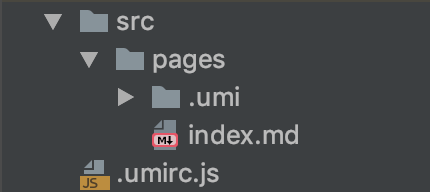
npm install umi-plugin-md
https://chiaweilee.github.io/umi-plugin-md/
// .umirc.js
export default {
  plugins: ['umi-plugin-md'],
};| option | intro | type | default |
|---|---|---|---|
| anchor | Auto Anchor ^0.2.0 |
string[], falsy to disable | ['h1', 'h2', 'h3'] |
| wrapper | HTMLElementTagName | string | section |
| className | React className | string | |
| style | React style | object | |
| html | markdown-it option | boolean | true |
| xhtmlOut | markdown-it option | boolean | true |
| breaks | markdown-it option | boolean | true |
| linkify | markdown-it option | boolean | true |
| typographer | markdown-it option | boolean | true |
| highlight | markdown-it option | function | highlight.js |
| render | wrapper render | (rawHtml: string) => string; | see src/render.ts |
tips: route of markdown will have higher priority, so route might be covered.
e.g, index.md will cover index.jsx.

import { slug } from 'umi-plugin-md';

var text = $('h2').text();
var id = slug(text);
Or copy umi-plugin-md/lib/helpers/slug.js to your repo.
// global.css
@import "~umi-plugin-md/anchor.css";
Or, write yourself.
tips: we do not support scroll to anchor on 'componentDidMount' this moment.
// global.css
@import "~github-markdown-css/github-markdown.css";
@import "~highlight.js/styles/github.css";
// .umirc.js
export default {
plugins: [['umi-plugin-md', { className: 'markdown-body' }]],
};index.md have higher priority than index.jsx.