Open Source Pentesting Engagement Manager with AI-Powered Vulnerability Hunting
PenPeeper is an open source pentesting engagement management system built for security professionals. It optionally combines local and external LLM integrations with automated scanning tools to streamline your entire workflow from reconnaissance to final report delivery.
- AI-powered vulnerability hunting with support for LM Studio, Ollama, OpenRouter, Claude, Gemini, ChatGPT, and custom providers
- Automated tool integration for Nmap, Nikto, SearchSploit, WhatWeb, Enum4Linux, FFUF, and SNMP with intelligent scan parsing
- NVD integration to automatically pull CVE information and populate vulnerability details
- Advanced search and organization with powerful filtering, tagging, and multi-project management
- Professional reporting with AI-generated executive summaries and customizable templates
Available for Windows, Mac, and Linux
PenPeeper eliminates the tedious parts of penetration testing so you can focus on what matters: finding and exploiting vulnerabilities.
Built around a logical, left-to-right workflow that mirrors the natural lifecycle of a pentest:
Gather → Search → Findings → Report
No more juggling multiple tools, manually parsing scan outputs, or wrestling with report formatting. PenPeeper handles the busywork while you concentrate on the security assessment.
- LLM Integration: Configure local or cloud AI providers for intelligent vulnerability analysis
- Automated Vulnerability Hunting: Scan devices with AI-powered detection and configurable confidence/severity levels
- Evidence Examination: AI searches device information and scans for existing proof of vulnerabilities
- Smart Recommendations: Get best practice remediation guidance tailored to your findings
- Executive Summary Generation: AI creates professional summaries based on all confirmed findings
- The "Magic Button": Automatically discover devices and run all built-in scans with a single click
- Tool Integration: Built-in automation for Nmap, Nikto, SearchSploit, WhatWeb, Enum4Linux, FFUF, and SNMP
- Intelligent Parsing: Scans are automatically analyzed and summarized—no manual parsing required
- NVD Integration: Direct connection to the National Vulnerability Database for automatic CVE population
- Import Your Own: Easily import scans from external tools, screenshots, and custom notes
- Intuitive Tab Navigation:
- Gather: Add networks/devices, run scans, import evidence, and tag assets (e.g., Camera, Server, DMZ)
- Search: Hunt vulnerabilities by service, port, protocol, vendor, banner, or custom tags
- Findings: Track incomplete vs complete findings, assign categories with keyword filtering
- Report: Generate polished PDF reports with AI-assisted executive summaries
- Multi-Project Management: Handle multiple engagements and clients simultaneously
- Tag System: Organize by location, department, device type, or custom criteria for targeted reporting
- Encrypted Export: Securely share entire projects with team members
- AI Executive Summaries: Generate custom summaries based on severity and categories
- Smart Category Assignment: Keyword filtering helps quickly classify vulnerabilities
- Custom Graphics: Choose from multiple professional chart styles for vulnerability visualization
- Guided Templates: Built-in help with descriptions and examples for every report section
- Rich Text Editor: Professional formatting with custom vulnerability classifications
- Concurrent Scanning: Configure simultaneous scan limits to balance speed with network impact
- Built-in Telnet Client: Connect directly to devices for verification without switching tools
- Customizable Themes: Multiple dark and light themes for your preference
- Scan Tracking: Visual indicators prevent accidental scan reruns
- Multi-Platform: Native support for Windows, Mac, and Linux
- Download the latest release from the Releases page...


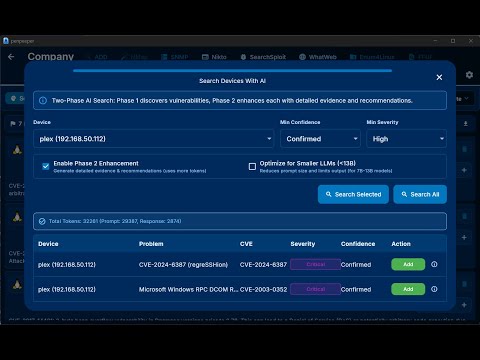

Click the image above to watch the tutorial on how to use PenPeeper.
./penpeeper --termThen (Navigate to web page at http://YOUR_LINUX_IP:8808/ from another computer.
Start by adding your scope.
- Magic Button: Perfect for single network ranges. Adds and scans everything automatically.
- Manual Control: Add devices individually or "Add Device(s)" to populate the list, then scan selected targets at your pace.
- Drill down into device Details or view raw Scan results.
- Import external evidence (screenshots, logs) directly into the device record.
- Found something? Click the red "Add Flag" button.
- This creates an entry in your Findings tab for later review.
- Use the Search tab to hunt for specific vendors, outdated services, or forgotten endpoints.
- Use the Findings tab to complete the details for every flagged item.
- Once findings are complete, head to the Report tab.
- Select a summary graphic, fill in the executive summary using the built-in helper text, and export your polished PDF.
Full flutter project build instructions
Contributions, issues, and feature requests are welcome!
License: Apache 2.0 with Commons Clause What this means:
- ✅ You can use this for free for personal or professional work.
- ✅ You can modify the code and share those modifications for free.
- ❌ You cannot sell this software, or a modified version of it, without explicit permission.
- ❌ You cannot host this as a paid service (SaaS).
pentesting, penetration testing, cybersecurity, infosec, ethical hacking, AI security, vulnerability management, pentest reporting, LLM integration, open-source security tools