- Develop a distributed file storage system that can handle concurrent client requests using Java Sockets.
- For simplicity reasons, the processes all occur on the same machine, running on different ports.
- The Distributed File Storage System is made-up of three components:
- Controller : The server within the system - takes requests from clients and handles them accordingly.
- Dstore : A data store unit that is connected to the system via the controller. Dstores recieve commands from the controller and store files accordingly.
- Client : A client that makes use of the system. The client sends requests to the Controller which are handeled accordingly.

-
The system has one Controller and N Data Stores (Dstores) that can connect and leave at any time.
-
Clients can join the system by connecting to the Controller, and send in requests to manage the stored files.
-
The system supports multiple concurrent Clients sending STORE, LOAD, LIST and REMOVE requests.
STORE: Used to store a new file onto the system.LOAD: Used to gather a file stored on the system.LIST: Used to gather a list of all files stored on the system.REMOVE: Used to remove a file from the system.
-
When storing files, the Controller selects R (run-time parameter) of the N connected Dstores to replicate the file across. The Controller will select the R Dstores such that all files are spread evenly across all Dstores (i.e., the same R Dstores are not chosen every time).
- In order to service any client request,, at least R Dstores must be connected to the Controller.
-
The client sends/recieves files directly to/from Dstores - which makes the system very scalable.
-
The system is able to adapt to new Dstores joining and old Dstores leaving using Reblancing.
-
Files in the system are not organised in folders and/or sub-folders and filenames do not contain spaces.
- Refer to
specification.pdffor a detailed description of the network protocol used within the system (i.e., information on how operations are handeled and what messages are sent between processes). - Concepts not detailed in the specification but present in this system (personal additions):
- Client's connect to Controllers and Dstores with
CLIENT_JOINmessages, and wait for aJOIN_ACKto be recieved before proceeding. This was done so that the Controller and Dstores could keep track of active Client connections. - The system will log the transfer of file content in addition to control messages that are sent (see Logging: Messages). This was done for convenience.
- The Client maintains a secondary connection to the Controller called the Client Heartbeat. This was done so that the Client is able to detect the Controller disconnecting/terminating.
- The system records the occurance of Events and Errors (see Logging).This was done for convenience.
- Client's connect to Controllers and Dstores with
- The system uses Rebalancing to ensure that all files are evenly replicated over R Dstores despite new Dstores joining the system and old Dstores failing.
- Periodically, the Controller will audit the connected Dstores to acquire the list of files they are storing.
- Dstores are audited every rebalance period (run-time parameter) of time, and whenever new Dstores join the system, or current Dstores leave/fail.
- From these lists, the Controller will calculate if, and how fiiles need to be redistributed across the Dstores such that every file is replicated R times, and that files are evenly spread.
- In the case where rebalancing is required, the Controller will send control messages to the Dstores informing them of the files they must remove/where they should send files to such that the system becomes balanced.
- After a rebalance has completed, it is true that all files will be replicated across the Dstores R times, and that all files are evenly spread across Dstores.
- Rebalancing means that:
- The system can handle new Dstores joining and active Dstores failing, as the Controller will alter the system to ensure all known files are evenly stored across R Dstores.
- The system can handle the Controller failing. If the Controller fails but is re-started, the next rebalance operation will bring the system back to the state it was in before the Controller failed.
- Dstores are able to join with files already in their store. As the Controller audits the system whenever new Dstores join, when a Dstore joins with files in it's store, the Controller will become aware of these files during this initial audit (and will re-distribute them if required).
- Detailed information on the Rebalancing process is provided in
specification.pdf.
- Contained in
/buildare executable.jarfiles which can be used to run each system component.
NOTE:
- The Controller must be started first (as Client and Dstore must be able to connect to the Controller to start).
- If the Controller is closed, all Clients and Dstores that were connected to it will also close (as they canont function without an active Controller).
-
When in the same directory as
Controller.jar, use the following command to start a Controller process:-
java -jar Controller.jar <CPORT> <R> <TIMEOUT> <RPERIOD>
-
-
Where:
CPORT: The port that the Controller will be run on (the port it will listen for requests on).R: The replication factor - the number of Dstores across which all files will be replicated onto.- The controller will not serve requests from clients unless at least
RDstores are currently connected.
- The controller will not serve requests from clients unless at least
TIMEOUT: The timeout period for requests sent by the Controller to Clients/Dstores.RPERIOD: The rebalance period - the length of time between rebalancing operations.

-
When in the same directory as
Dstore.jar, use the following command to start a Dstore process:-
java -jar Dstore.jar <PORT> <CPORT> <TIMEOUT> <PATH>
-
-
Where:
PORT: The port the Dstore will listen for communication on (the port it will listen for requests on).CPORT: The port the Controller is running on.TIMEOUT: The timeout period for requests sent by the Dstore to the Controller/Clients.PATH: The path (relative or absolute) for where the Dstore will store the files it recieves from clients (new directory created if one does not exist).
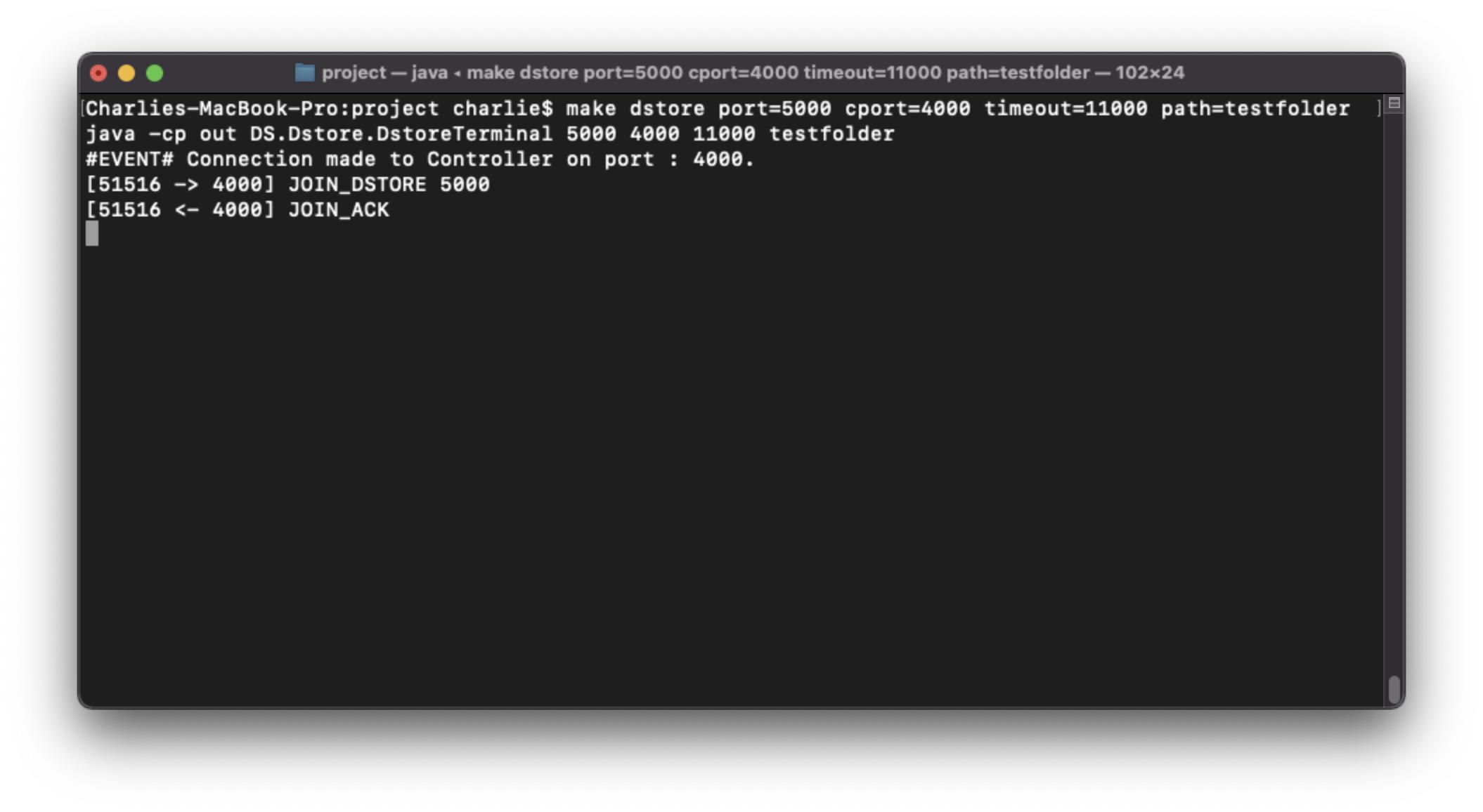
-
When in the same directory as
DSClient.jar, use the following command to start a DSClient process:-
java -jar DSClient.jar <CPORT> <TIMEOUT>
-
-
Where:
CPORT: The port the Controller is running on.TIMEOUT: The timeout period for requests sent by the Client to the Controller/Dstores.
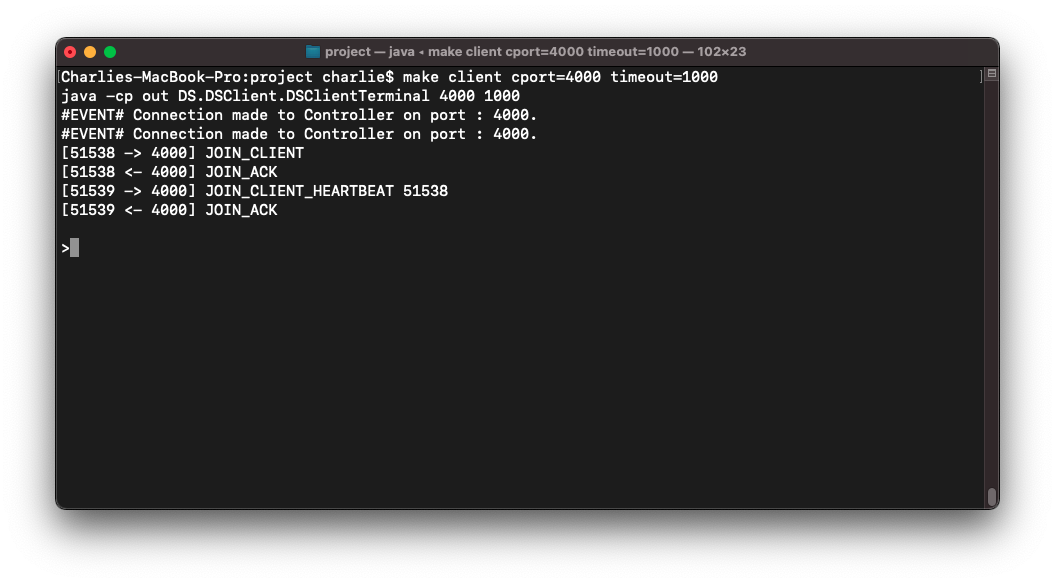
- Commands are input via the command line interface on the Client process.
- Any file can be referenced as a relative or absolute path, and must include the file extension.
- The STORE command has the following syntax:
STORE <filename> <filesize>- Where:
filename: The path to the file to be stored.filesize: The size of the file in bytes.

- The LOAD command has the following syntax:
LOAD <filename>- Where:
filename: The name of the file being loaded.

- The LIST command has the following syntax:
LIST
- The REMOVE command has the following syntax:
REMOVE <filename>- Where:
filename: The name of the file to be removed.

- Various information will be logged in the terminal of each component (Controller, Client, Dstore) whilst the system is in operation and requests are being served.
- Controllers, Clients and Dstores will log messages they send/recieve to/from other processes.
- The structure of a Message Log is as follows:
[ <currentPort> -> / <- <otherPort>] <content>
-
Where:
currentPort: The port of the process runing in the terminal.-> / <-: Indicates if the message in question was sent or receieved respectivley.otherPort: The port of the other process involved in the communication (where the message was sent to/receieved from).content: The content within the message that was sent/receieved.
-
Examples:
-
[4000 <- 5000] STORE sampleFile.txt 30- Means that the message
STORE sampleFile.txt 30was sent from a process received by a process on port4000from a process on port5000.
- Means that the message
-
[4000 -> 5000] STORE_COMPLETE- Means that the message
STORE_COMPLETEwas sent from a process on port4000to a process on port5000.
- Means that the message
-
-
Sample output:

- Controllers, Clients and Dstores will log the occurance of pre-defined events within the system.
- The structure of an Event Log is as follows:
#EVENT# <content>
-
Where:
content: A description of the event.
-
The types of event that can occur are as follows:
-
Operation Completion Event : Displayed when an system operation (e.g., storing a file) has been completed.
-
Example:
-
#EVENT# 'STORE' operation complete for file : 'Makefile' of size : 520 bytes.
-
-
-
Client Connection Event: The event of a network client (i.e., Client or Dstore) connecting to a server (i.e., Controller or Dstore).
-
Example:
-
#EVENT# Connection made to Controller on port : 4000.
-
-
-
Server Connection Event: The event of a server (i.e., Contrroller or Dstore) receieving a connectio from a client (i.e., Client or Dstore).
-
Example:
-
#EVENT# New Client connected on port : 49691.
-
-
-
- Controllers, Clients and Dstores will log the occurance of errors during the systems operation.
- Errors are output with an error message (detailing what error has occured) and a cause trace (detailing why the error has occured).
- The structure of an Error Log is as follows:
*ERROR* <Error Message>
	|-CAUSE : <Cause Message>
	|-CAUSE : <Cause Message>
	...
-
Where:
Error Content: A description of the error that has occured.Cause Content: A reason for why the error (or cause) has occured.
-
The system will report on wide variety of errors - examples include:
-
Not Enough Dstores Connected Error : Occurs when the Controller is not able to process a Client request as not enough Dstores are connected to the system.
-
*ERROR* Unable to handle request 'LIST'.
  |-CAUSE : Not enough Dstores are present in the system.
-
-
File Already Exists : Occurs when the Client requests to store a file which is already stored in the system.
-
*ERROR* Unable to handle request 'STORE Makefile 520'.
  |-CAUSE : A file with the name 'Makefile' already exists.
-
-
File Does Not Exist : Occurs when the Client requests to load/remove a file that does not exist in the system.
-
*ERROR* Unable to handle request 'LOAD testfile'.
  |-CAUSE : The file 'testfile' does not exist.
-
-
-
One of the system errors is for a connection disconnection.
-
This error occurs when the communication channel between two processes is terminated.
-
For example:
-
*ERROR* The connection to Client on port : 51297 was terminated.
  |-CAUSE : Unable to receive message from port : 51297
  |-CAUSE : The connector on port : 51297 disconnected.
-
-
This error occurs when a process (e.g., Client or Dstore) disconnects from another process.
-
Due to the workflow of the network, there are two instances where this error will naturally occur.
- First:
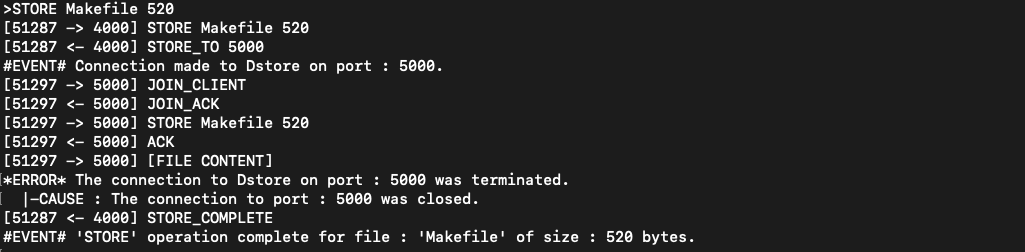
- When storing a file, the Client will connect to R Dstores, send the file, and disconnect from them (as the communication channel is no longer required once the file has been sent).
- As such, the Dstores will log the error that the Client has disconnected, and the Client will log the error that the Dstore has disconnected.
- While these are technically errors, this is expected behaviour provided the disconnect occured after the operation had completed.
- Sample output:
- First:
-
Second:
- When reblanacig is being carried out, Dstores will connect to other Dstores, share files, and disconnect from eachother.
- As such, Dstores will log the error that the Dstores that were connected to them have disconnected.
- While these are technically errors, this is expected behaviour provided the disconnect occured after the operation had completed.
-
Alterenativley, instances such as the Controller reporting that a Client/Dstore has disconnected or a Client disconnecting from a Dstore mid-transfer are errornous - this behaviour should not occur during the standard workflow of the system.
- The provided
Makefilecan be used for compilation of the application.
-
Recompile the application with:
-
make compile
-
The compiled
.classfiles will be placed into a directory calledout.
-
- Use the following commands to run a Controller process (after compiling):
make run-controller cport=<CPORT> r=<R> timeout=<TIMEOUT> rperiod=<RPERIOD>- Where:
CPORT: The port that the Controller will be run on (the port it will listen for requests on).R: The replication factor - the number of Dstores across which all files will be replicated onto.- The controller will not serve requests from clients unless at least
RDstores are currently connected.
- The controller will not serve requests from clients unless at least
TIMEOUT: The timeout period for requests sent by the Controller to Clients/Dstores.RPERIOD: The rebalance period - the length of time between rebalancing operations.
-
Use the following command to build
Controller.jar:-
make build-controller
-
The
Controller.jarfile will be placed intobuild.
-
- Use the following commands to run a Dstore process (after compiling):
make dstore port=<PORT> cport=<CPORT> <TIMEOUT> path=<PATH>- Where:
PORT: The port the Dstore will listen for communication on (the port it will listen for requests on).CPORT: The port the Controller is running on.TIMEOUT: The timeout period for requests sent by the Dstore to the Controller/Clients.PATH: The path (relative or absolute) for where the Dstore will store the files it recieves from clients (new directory created if one does not exist).
-
Use the following command to build
Dstore.jar:-
make build-dstore
-
The
Dstore.jarfile will be placed intobuild.
-
- Use the following commands to run a Dstore process (after compiling):
make client cport=<CPORT> timeout=<TIMEOUT>-
- Where:
CPORT: The port the Controller is running on.TIMEOUT: The timeout period for requests sent by the Client to the Controller/Dstores.
- Where:
- Requests are input into the Client terminal after the
>.
-
Use the following command to build
Dsclient.jar:-
make build-client
-
The
DSClient.jarfile will be placed intobuild.
-