A DataJoint extension that integrates hashes and other features. Requires DataJoint version 0.12.9.
Minimal examples for using DataJointPlus. Documentation to be added.
pip3 install datajoint-plusimport datajoint_plus as djp
schema = djp.schema("project_schema")Set flag enable_hashing=True in any DataJoint User class (djp.Lookup, djp.Manual, djp.Computed, djp.Imported, djp.Part) to enable automatic hashing.
This will require two additional properties to be defined:
hash_name: (string) The attribute that will contain the hash values.
- The hash_name must be added to the definition as a
varchartype and can be added as aprimaryorsecondarykey attribute - The hashing mechanism is
md5and has a maximum of32characters. Specify how many characters from[1, 32]of the hash should be stored.- E.g. a
12character hash should be added to the definition asvarchar(12)
- E.g. a
hashed_attrs: (string, or list/ tuple of strings) One or more primary and/or secondary attributes that should be hashed upon insertion.
The following lookup table named Exclusion when created will automatically add two entries under reason, "no data" and "incorrect data", with corresponding hashes under the primary key: exclusion_hash.
@schema
class Exclusion(djp.Lookup):
    enable_hashing = True
    hash_name = 'exclusion_hash'
    hashed_attrs = 'reason'

    definition = f"""
    # reasons for excluding imported data entries
    exclusion_hash : varchar(6)
    ---
    reason : varchar(48) # reason for exclusion
    """

    contents = [
        {'reason': 'no data'},
        {'reason': 'incorrect data'}
    ]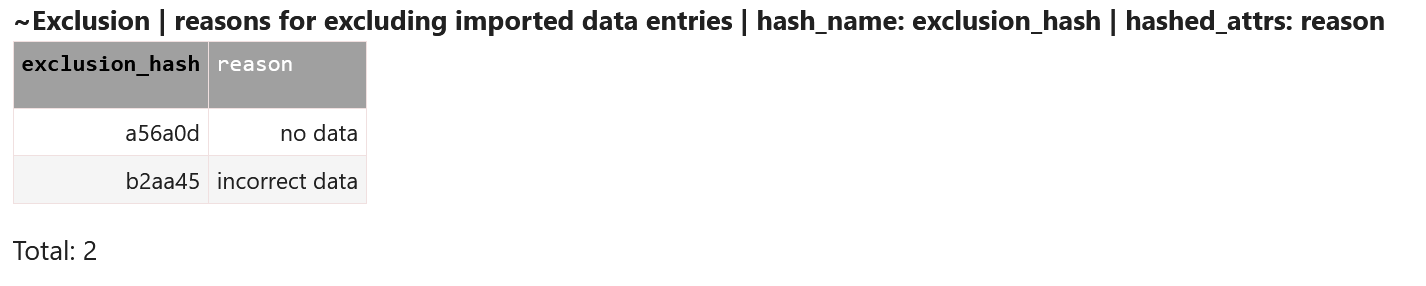
Note: The table name is automatically added to the header next to the special character ~ that is used for parsing. In addition, the hash_name and hashed_attrs are also added to the header. This can be turned off, but is useful because it allows virtual modules to parse the header and reproduce the hashing configuration, even in the absence of the code that defined the original table.
New entries can be added to this table with direct insertion. Direct insertions must use named datatypes. Supported types include:
- pandas dataframe
- DataJoint expression
- Python dictionary (or list of dictionaries for multiple rows)
E.g.
Exclusion.insert1(
    {'reason': 'requires manual review'}
)
or
Exclusion.insert(
    [
        {'reason': 'requires manual review'},
        {'reason': 'some other reason'}
    ]
)This example uses the master table as an aggregator for hashes.
Each part table represents a unique method type with a pre-defined set of parameters. Every row in the part table is one method with specific parameter values.
If a new method type is desired with a new set of parameters, a new part table can added for it at anytime.
When individual methods are added to part tables, they recieve a hash that is also automatically added to the master table.
For maximum flexibility, downstream tables would depend on the master table.
@schema
class ImportMethod(djp.Lookup):
    hash_name = 'import_method_hash' # we define a hash_name for the master even though the hashing happens in the parts
    hash_part_table_names = True # this is already True by default and need not be included but shown for clarity. With this enabled, every method will generate a unique hash across all part tables

    definition = """
    # method for importing data
    import_method_hash : varchar(12) # method hash
    """

    class FromCSV(djp.Part):
        enable_hashing = True # the part table does the hashing
        hash_name = 'import_method_hash'
        hashed_attrs = 'param1', 'param2' # these values generate the hash

        definition = """
        # methods for loading data from a CSV
        -> master
        ---
        param1 : int # some parameter
        param2 : varchar(48) # some other parameter
        ts_inserted=CURRENT_TIMESTAMP : timestamp
        """

        def run(self):
            return self.fetch1()

    class FromAPI(djp.Part):
        enable_hashing = True
        hash_name = 'import_method_hash'
        hashed_attrs = 'param1', 'param2', 'param3'

        definition = """
        # methods for importing data using some api
        -> master
        ---
        param1 : varchar(12) #
        param2 : Decimal(3,2) #
        param3 : int #
        ts_inserted=CURRENT_TIMESTAMP : timestamp
        """

        def run(self):
            return self.fetch1()
To insert new methods, we insert to the Part table directly and use insert_to_master=True. The order of events is:
- The hash is generated by the part table
- The hash is inserted to the master table
- The hash and params are inserted to the part table.
Importantly, these steps occur in one transaction, so if any of them fail, no insertions will occur.
Inserting some methods:
ImportMethod.FromCSV.insert1({'param1': 1, 'param2': 'some parameter'}, insert_to_master=True)
ImportMethod.FromCSV.insert1({'param1': 32, 'param2': 'some other parameter'}, insert_to_master=True)ImportMethod.FromAPI.insert1({'param1': 'a param', 'param2': 4.2, 'param3': 38}, insert_to_master=True)
ImportMethod.FromAPI.insert1({'param1': 'another param', 'param2': 6.9, 'param3': 99}, insert_to_master=True)
Now, to get to a single method we can use the master table: ImportMethod and the import_method_hash as such:
ImportMethod.restrict_one_part({'import_method_hash': '902421e75df6'})
ImportMethod.r1p({'import_method_hash': '902421e75df6'}) # alias for restrict_one_part
or
ImportMethod.restrict_one_part_with_hash('902421e75df6')
ImportMethod.r1pwh('902421e75df6') # alias for restrict_one_part_with_hash
Output:

By default, the restricted part table object is returned so we can call the run method directly:
ImportMethod.r1pwh('902421e75df6').run()Here, the run method calls fetch1 on the restricted table to ensure that only one row remains after the restriction. Then it returns the parameters.
Output:
{'import_method_hash': '902421e75df6',
 'param1': 'alt',
 'param2': 6.9,
 'param3': 99,
 'ts_inserted': datetime.datetime(2022, 5, 10, 6, 19, 38)}
We can also recover the original hash with the hash1 method by rehashing the parameters:
ImportMethod.FromAPI.hash1(
    { 'param1': 'alt',
     'param2': 6.9,
     'param3': 99}
)

Output:
'902421e75df6'
Example to be added: Multiple hashes (master table performs hashing and part table performs hashing)
Descriptions will be expanded in the future.
djp.schema()- same function as DataJoint schemadjp.create_djp_module()- DataJointPlus virtual module. can be used to add DataJointPlus functionality to all DataJoint tables in an imported module that did not originally have DataJointPlus, or can create a virtual module with DataJointPlus functionality from an existing schema.schema.load_dependencies()- Loads (or reloads) DataJoint networkx graph. Runs by default when schema is instantiated for bothdjp.schemaanddjp.create_djp_module. If graph is not loaded (it's not loaded by default in DataJoint 0.12.9), thenTable.parts()returns empty list even if it has part tables.schema.tables- a DataJoint table created automatically for every schema (similar to~log) that logs all tables in the schema and keeps track if they currently exist (schema.tables.exists) or if they were deleted (schema.tables.deleted).
These flags must be set during table definition and are constant once a table is defined. To change these features after the table is instantiated, the best practice is to delete and remake the table.
enable_hashing- (bool) defaultFalse. IfTrue,hash_nameandhashed_attrsmust be defined.hash_name- (str) The name of the primary or secondary DataJoint attribute that contains the hasheshashed_attrs- (strorlist/tupleofstr) The DataJoint primary and/or secondary key attributes that will hashed upon insertionhash_group- (bool) defaultFalse. IfTrue, multiple rows inserted simultaneously are hashed together and given the same hashhash_table_name- (bool) defaultFalse. IfTrue, all hashes made in the table will also include the name of the tablehash_part_table_names- (bool) defaultTrue. Property of a master table. IfTrue, enforces that all hashes made in its part tables will always include the part table name in the hash (therefore, hashes will always be unique across parts)
Methods and properties common to all DJP user classes (djp.Lookup, djp.Manual, djp.Computed, djp.Imported, djp.Part) after they are defined.
Table.Log- Log record manager and logger. To create log:Table.Log('info', msg), To view logs:Table.Log.head()orTable.Log.tail(). Directory to save logs controlled bydjp.config['log_base_dir']orENVvariable:DJ_LOG_BASE_DIR. Default logging level set with globally withdjp.config['loglevel']orENVvariableDJ_LOGLEVELor for specific tables withTable.loglevelTable.class_name- Name of class that generated table. Part tables formatted like'Master.Part'Table.table_id- Unique hash for every table based onfull_table_nameTable.get_earliest_entries()- If theTablehas a timestamp attribute, returns theTablerestricted to the entry (or entries) that was (were) inserted earliestTable.get_latest_entries()- If theTablehas a timestamp attribute, returns theTablerestricted to the entry (or entries) that was (were) inserted latestTable.aggr_max()- Given an attribute name, returns theTablerestricted to the row with the max value of that attributeTable.aggr_min()- Given an attribute name, returns theTablerestricted to the row with the min value of that attributeTable.aggr_nunique()- Given an attribute name, returns the number of unique values inTablefor that attributeTable.include_attrs()- returns a proj ofTablewith only provided attributes (Not guaranteed to have unique rows)Table.exclude_attrs()- returns a proj ofTablewithout the provided attributes (Not guaranteed to have unique rows)Table.is_master()-TrueifTableis master typeTable.is_part()-TrueifTableis part table typeTable.comment- Just the user added portion of the table headerTable.hash_name- name of attribute containing hash (None if nohash_namewas defined)Table.hashed_attrs- list of attributes that get hashed upon insertion (None ifenable_hashingisFalse)Table.hash_len- number of characters in hashTable.hash_group-Trueifhash_groupis enabled forTableTable.hash_table_name-Trueifhash_table_nameis enabled forTable
Methods and properties common to DJP master user classes (djp.Lookup, djp.Manual, djp.Computed, djp.Imported) after they are defined.
Table.parts()- returns a list of part tables (option to return full table names, dj.FreeTable, or class)Table.has_parts()-Trueif master has any part tables in the graphTable.number_of_parts()- Number of part tables found in graphTable.restrict_parts()- restrict all part tables with provided restriction.Table.restrict_one_part()or aliasTable.r1p- enforces that only one part table can be restricted successfully and returns restricted part tableTable.restrict_with_hash()- pass a hash and returnTablerestricted by the hash (Table.hash_namemust be defined orhash_namecan be provided.)Table.restrict_part_with_hash()- pass a hash and return a list of part tables restricted with hash. Tries to return the part table class by default.Table.restrict_one_part_with_hash()or aliasTable.r1pwh- Same asrestrict_part_with_hashbut errors if more than one part table contains hash. If successful returns the part table.Table.hash()- provide one or more rows and generate the same hash thatTablewould generate if those rows were insertedTable.hash1()- same asTable.hash()but enforces that only one hash is returned.Table.join_parts()- join all part tables according to specific methodsTable.union_parts()- union across all part tablesTable.hash_part_table_names-Trueifhash_part_table_nameswas enabled forTableTable.part_table_names_with_hash()- returns names of all part tables that contain an entry matching provided hashTable.hashes_not_in_parts()- returnsTablerestricted to hashes that are not found in any of its part tables
Methods and properties common to DJP part table classes (djp.Part) after they are defined.
Table.class_name_valid_id- returnsTable.class_namewith'.'replace with'xx'. Useful when usingclass_nameas an identifier where'.'characters are not allowed.
Documentation of special cases and considerations
In general decimals can be hashed, however depending on your use case they can pose a problem.
Below is an example table that has one value in hashed_attrs called param that is mapped to Decimal(4,2) in SQL:
from decimal import Decimal

@schema
class DecimalExample(djp.Lookup):
    enable_hashing = True
    hash_name = 'hash'
    hashed_attrs = 'param'

    definition = """
    hash : varchar(20)
    ---
    param: Decimal(4,2) # decimal type
    """
First point to note is that the following inserts give two distinct hashes, even though value of param is identical in SQL:
DecimalExample.insert1({'param': 8.9})
DecimalExample.insert1({'param': Decimal(8.9)})
Secondly, because of how SQL outputs the Decimal, neither entry can reproduce their original hash, and instead both give another hash.
DecimalExample.hash1(DecimalExample.restrict_with_hash('01a86da7f62a5f33f613'))
DecimalExample.hash1(DecimalExample.restrict_with_hash('36bf4f8d74d683f345d2'))

Output:
> 'db01069f5c8ad563c10f'
Therefore, if hash reproducibility is required, float should be considered over Decimal.
Example with float:
@schema
class FloatExample(djp.Lookup):
    enable_hashing = True
    hash_name = 'hash'
    hashed_attrs = 'param'

    definition = """
    hash : varchar(20)
    ---
    param: float # float type
    """

# insert
FloatExample.insert1({'param': 8.9})
# recover hash
FloatExample.hash1(FloatExample.restrict_with_hash('01a86da7f62a5f33f613'))

Output:
> '01a86da7f62a5f33f613'