
Important note: if you're getting a "not allowed to send keystrokes" error, simply add Force Paste.app to System Preferences > Security & Privacy > Accessibility. If Force Paste doesn't work in macOS Big Sur, try removing it from System Preferences > Security & Privacy > Accessibility and adding it again. See issue #7 and issue #12 about Big Sur.
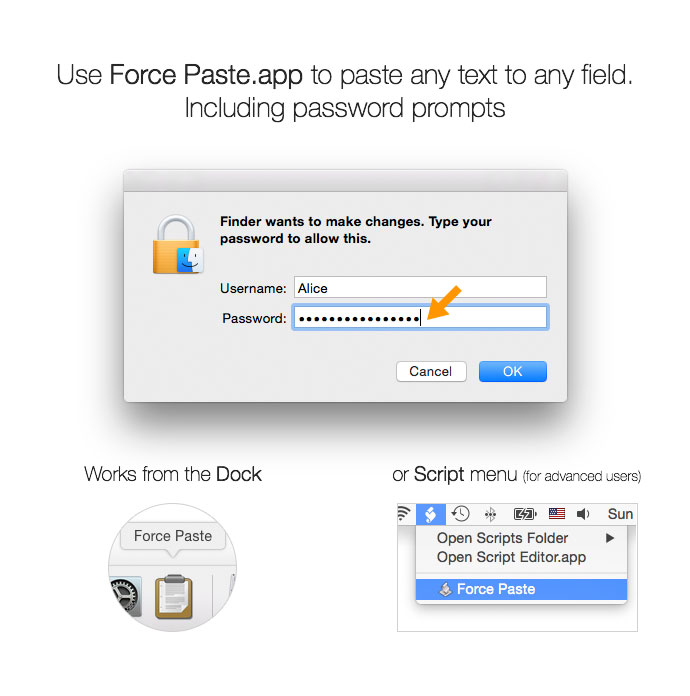
Little AppleScript application for macOS which allows pasting text even when it’s not allowed (password dialogs etc). It uses virtual keyboard to type in the text from your clipboard. In other words, it tricks the program that asks for your input into thinking that you’re actually typing on your keyboard. See also the blog post with discussion.
Alternatively, you can install it through Homebrew:
brew cask install force-pasteAfter installation, make sure to put the app in the Dock. Advanced users familiar with the Scripts menu can put it there to save space in the Dock.
Copy the text you want to paste, then open the app from the Dock to have it immediately pasted.
cd Force-Paste/
./build.sh
Pull requests are welcome.
Icons by Tango Project and Alexandre Moore.
License (for code): WTFPL (Do What the Fuck You Want to) or MIT if you like.