


There are many search or search components for Flutter, however this one comes to perform search in Offline List,
or HTTP Search and more, it already comes with nice default layout and many customizations,
and we can focus more on writing amazing applications.
- Getting Started
- Important configuration
- How to use Offline list (Local)
- How to use From Server (HTTP Request)
- Important About Models
- Roadmap
In pubspec.yaml:
dependencies:
easy_search: any-
If you want to use the Offline List or Local list, do not implement the OnSearch method
-
If you want to fetch data from a web server or an API, do not implement the Offline List or Local List
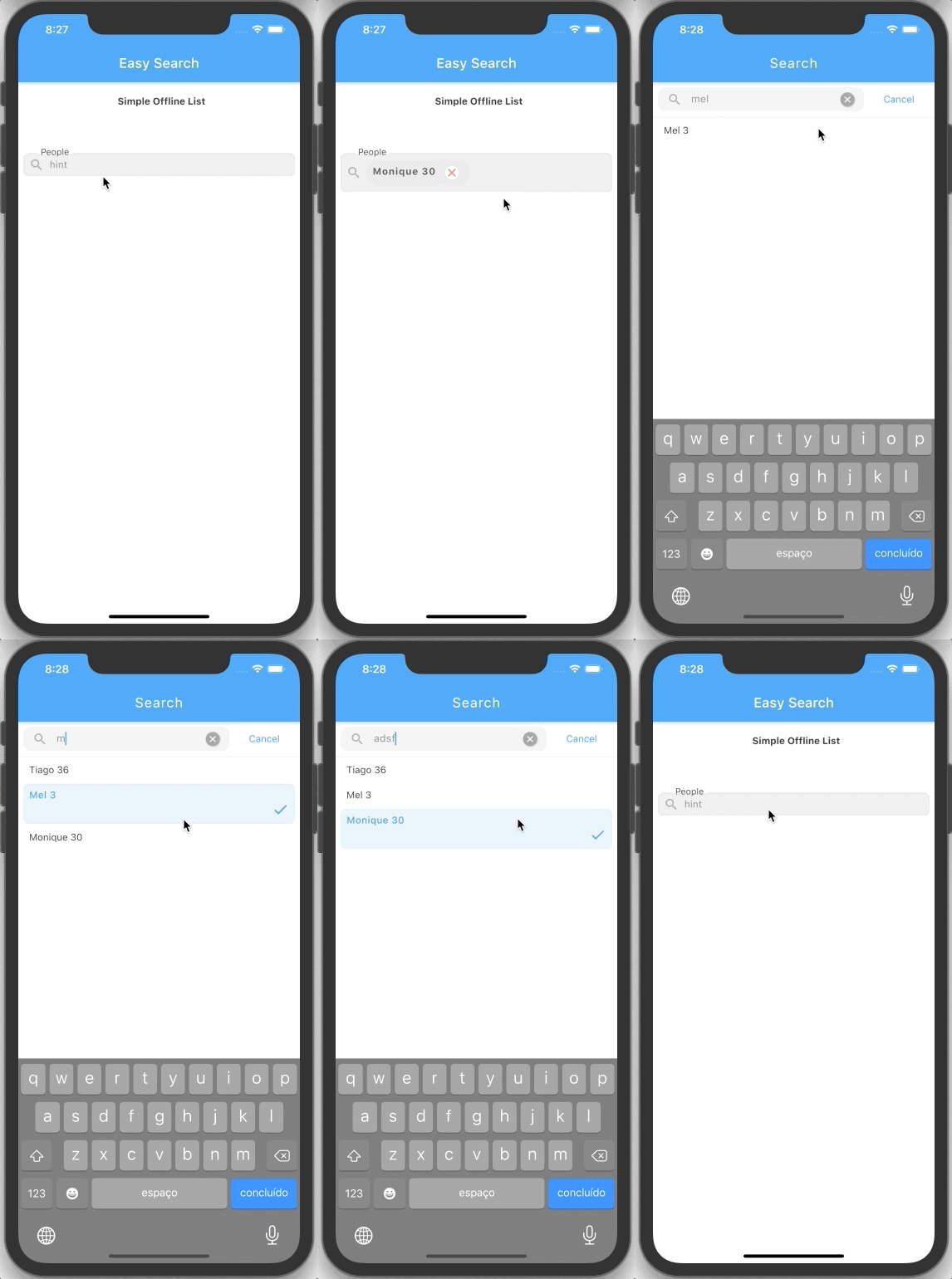
import 'package:easy_search/easy_search.dart';

EasySearch(
  searchResultSettings: SearchResultSettings(
    padding: EdgeInsets.only(left: 8.0, top: 8.0, right: 8.0),
  ),
  controller: SearchItem(
    items: [
      Item(ModelExample(name: 'Tiago', age: 36), false),
      Item(ModelExample(name: 'Mel', age: 3), false),
      Item(ModelExample(name: 'Monique', age: 30), false),
    ],
  ),
),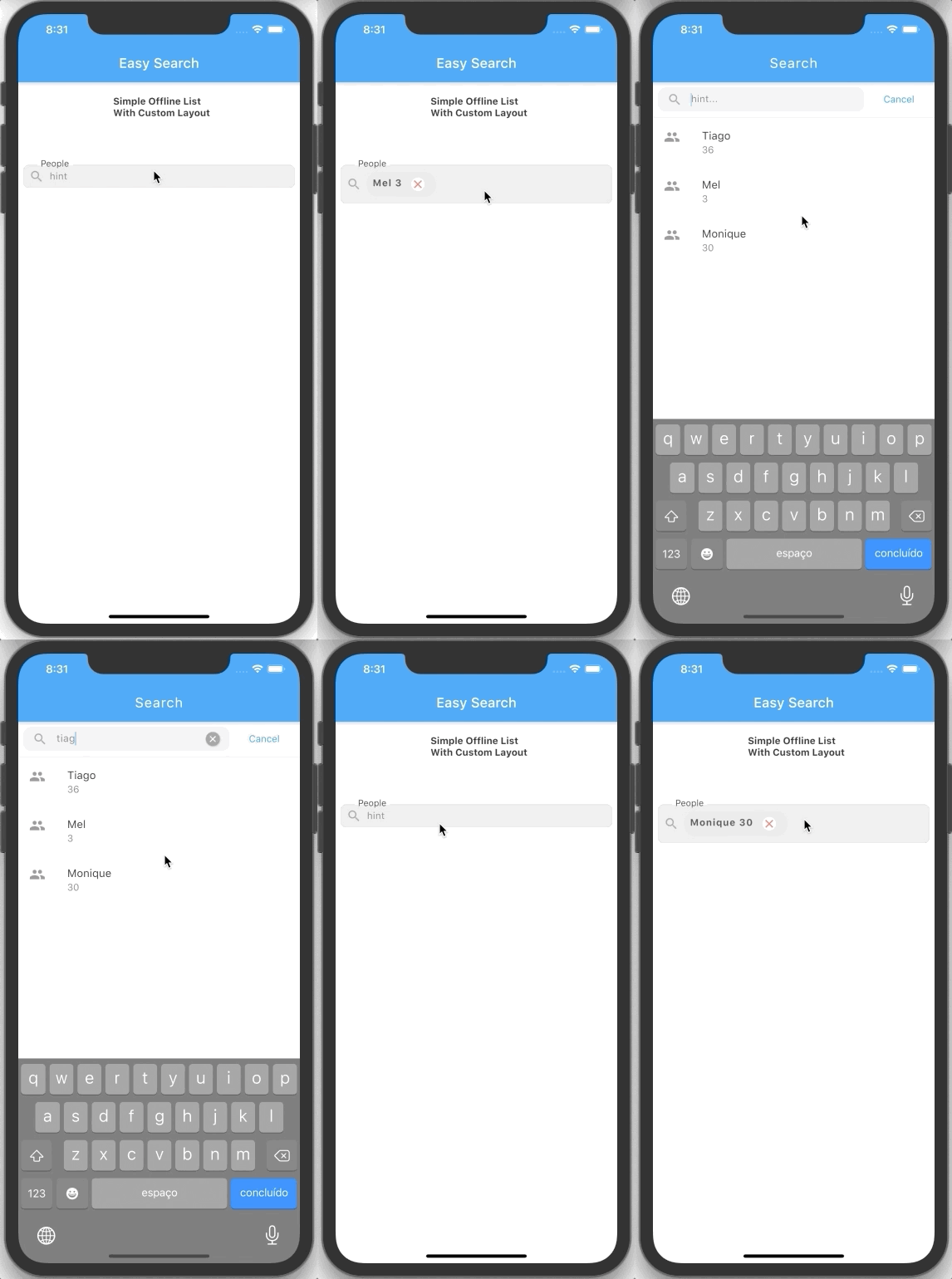
import 'package:easy_search/easy_search.dart';

EasySearch(
  searchResultSettings: SearchResultSettings(
    padding: EdgeInsets.only(left: 8.0, top: 8.0, right: 8.0),
  ),
  controller: SearchItem(
    items: [
      Item(ModelExample(name: 'Tiago', age: 36), false),
      Item(ModelExample(name: 'Mel', age: 3), false),
      Item(ModelExample(name: 'Monique', age: 30), false),
    ],
  ),
  customItemBuilder: (BuildContext context, ModelExample item, bool isSelected) {
    return Container(
      decoration: !isSelected
          ? null
          : BoxDecoration(
              border: Border.all(color: Theme.of(context).primaryColor),
              borderRadius: BorderRadius.circular(7),
              color: Colors.white,
            ),
      child: ListTile(
        selected: isSelected,
        title: Text(item.name),
        subtitle: Text(
          item.age.toString(),
        ),
        leading: Icon(Icons.people),
      ),
    );
  },
),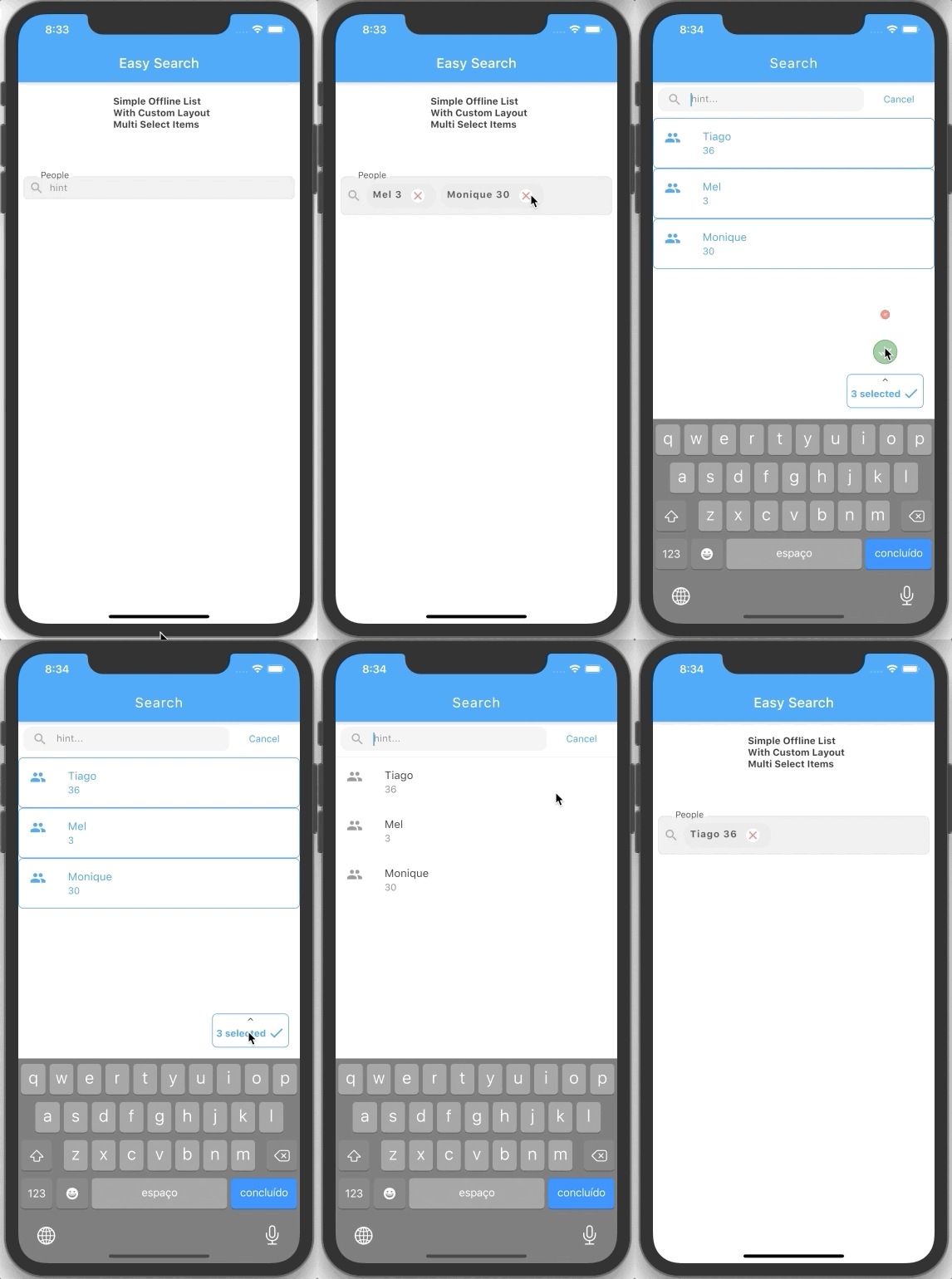
import 'package:easy_search/easy_search.dart';

EasySearch(
  multipleSelect: true,
  searchResultSettings: SearchResultSettings(padding: EdgeInsets.only(left: 8.0, top: 8.0, right: 8.0)),
  controller: SearchItem(
    items: [
      Item(ModelExample(name: 'Tiago', age: 36), false),
      Item(ModelExample(name: 'Mel', age: 3), false),
      Item(ModelExample(name: 'Monique', age: 30), false),
    ],
  ),
  customItemBuilder: (BuildContext context, ModelExample item, bool isSelected) {
    return Container(
      decoration: !isSelected
          ? null
          : BoxDecoration(
              border: Border.all(color: Theme.of(context).primaryColor),
              borderRadius: BorderRadius.circular(7),
              color: Colors.white,
            ),
      child: ListTile(
        selected: isSelected,
        title: Text(item.name),
        subtitle: Text(item.age.toString()),
        leading: Icon(Icons.people),
      ),
    );
  },
),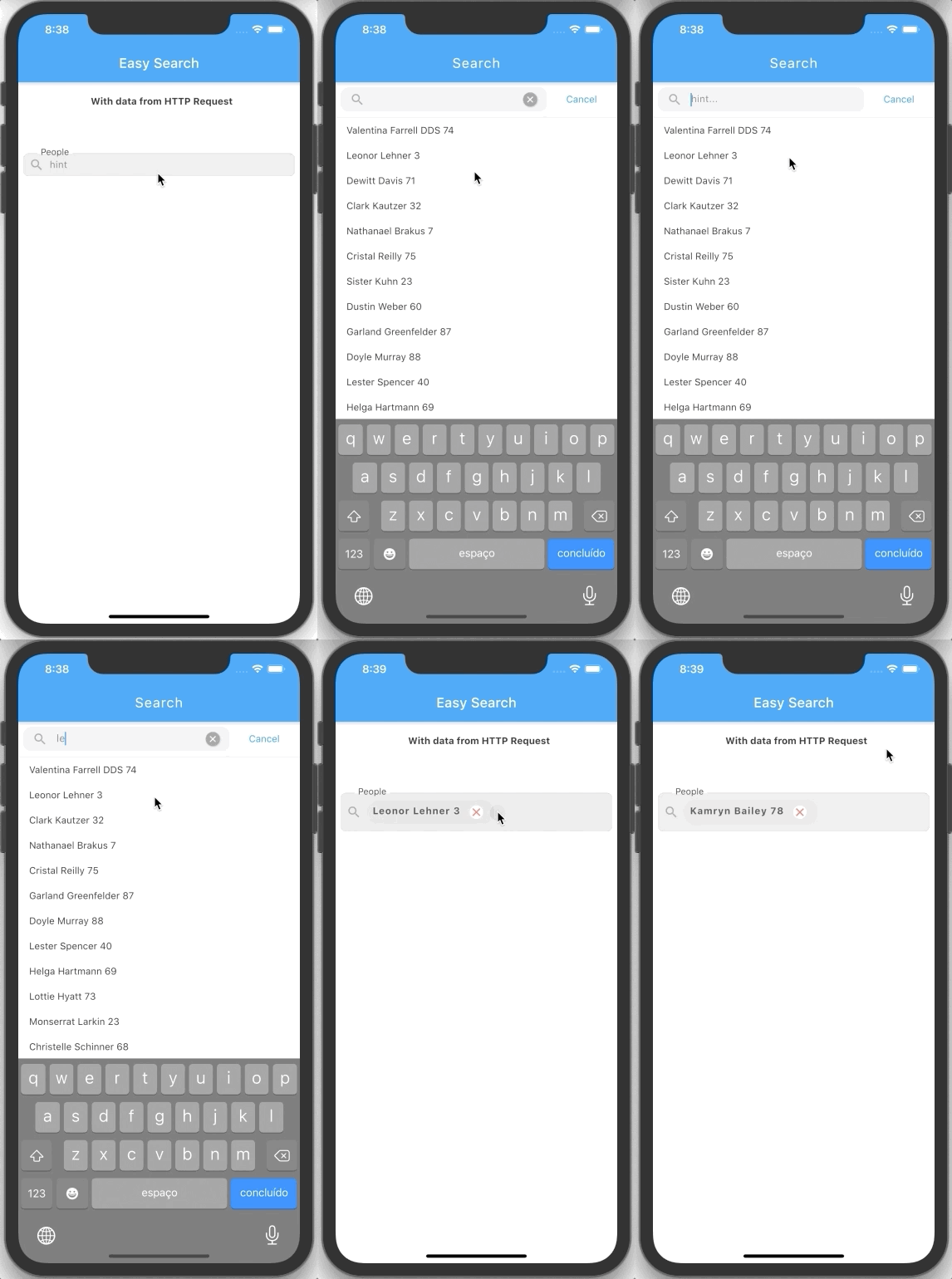
import 'package:easy_search/easy_search.dart';

EasySearch(
  onSearch: (text) {
    print('Filter Query: $text');
    return getData(name: text);
  },
  searchResultSettings: SearchResultSettings(
    padding: EdgeInsets.only(left: 8.0, top: 8.0, right: 8.0),
  ),
),

.
.
.

//HTTP request Example
Future<List<ModelExample>> getData({name}) async {
  var response = await Dio().get(
    "https://5f24717b3b9d35001620456b.mockapi.io/user",
    queryParameters: {"name": name},
  );

  var result = ModelExample.fromJsonList(response.data);
  return result;
}
import 'package:easy_search/easy_search.dart';

EasySearch(
onSearch: (text) {
  print('Filter Query: $text');
  return getData(name: text);
},
searchResultSettings: SearchResultSettings(
  padding: EdgeInsets.only(left: 8.0, top: 8.0, right: 8.0),
),
customItemBuilder: (BuildContext context, ModelExample item, bool isSelected) {
  return Container(
    decoration: !isSelected
        ? null
        : BoxDecoration(
            border: Border.all(color: Theme.of(context).primaryColor),
            borderRadius: BorderRadius.circular(7),
            color: Colors.white,
          ),
    child: ListTile(
      selected: isSelected,
      title: Text(item.name),
      subtitle: Text(item.age.toString()),
      leading: Icon(Icons.people),
    ),
  );
},
),

.
.
.

//HTTP request Example
Future<List<ModelExample>> getData({name}) async {
  var response = await Dio().get(
    "https://5f24717b3b9d35001620456b.mockapi.io/user",
    queryParameters: {"name": name},
  );

  var result = ModelExample.fromJsonList(response.data);
  return result;
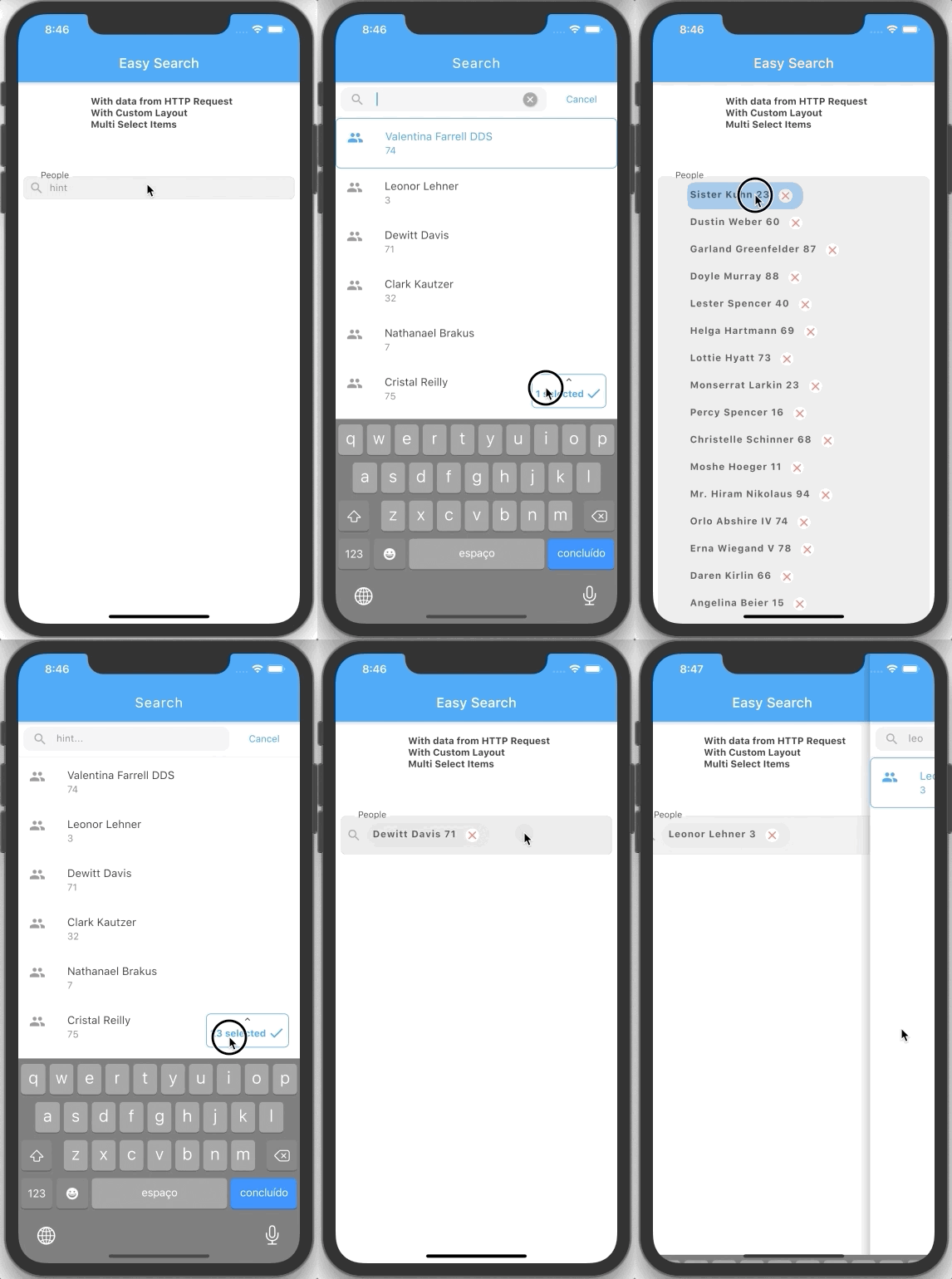
}
import 'package:easy_search/easy_search.dart';

EasySearch(
multipleSelect: true,
onSearch: (text) {
  print('Filter Query: $text');
  return getData(name: text);
},
searchResultSettings: SearchResultSettings(
  padding: EdgeInsets.only(left: 8.0, top: 8.0, right: 8.0),
),
customItemBuilder: (BuildContext context, ModelExample item, bool isSelected) {
  return Container(
    decoration: !isSelected
        ? null
        : BoxDecoration(
            border: Border.all(color: Theme.of(context).primaryColor),
            borderRadius: BorderRadius.circular(7),
            color: Colors.white,
          ),
    child: ListTile(
      selected: isSelected,
      title: Text(item.name),
      subtitle: Text(item.age.toString()),
      leading: Icon(Icons.people),
    ),
  );
},
),

.
.
.

//HTTP request Example
Future<List<ModelExample>> getData({name}) async {
  var response = await Dio().get(
    "https://5f24717b3b9d35001620456b.mockapi.io/user",
    queryParameters: {"name": name},
  );

  var result = ModelExample.fromJsonList(response.data);
  return result;
}For the search to work in an offline list, we need to implement the following items in your model or in your object's data class:
toString, equals and also hashcode
class ModelExample {
  final String name;
  final int age;

  ModelExample({this.name, this.age});

  @override
  String toString() {
    return '$name $age';
  }

  factory ModelExample.fromJson(Map<String, dynamic> json) {
    if (json == null) return null;
    return ModelExample(
      name: json["name"],
      age: json["age"],
    );
  }

  static List<ModelExample> fromJsonList(List list) {
    if (list == null) return null;
    return list.map((item) => ModelExample.fromJson(item)).toList();
  }

  //In this case I customized it so that the search returns everything that contains part of the name or age
  @override
  operator ==(object) => this.name.toLowerCase().contains(object.toLowerCase()) || this.age.toString().contains(object);

  @override
  int get hashCode => name.hashCode ^ age.hashCode;
}This is our current roadmap. Please, feel free to request additions/changes.
| Feature | Progress |
|---|---|
| Offline List | ✅ |
| Http Request Support | ✅ |
| Widget Consume for ChangeNotifier | ✅ |
| Widget consume for NotifierValue | ✅ |
| Just one selected item | ✅ |
| Multiple item selection | ✅ |
| Search after last input | ✅ |
| Cancel to keep old items | ✅ |
| Remove items by touch | ✅ |
| Nice layout default | ✅ |
| Custom layout support | ✅ |
| Progress on search request | ✅ |
| Custom selected animation | ✅ |
| Custom animated action buttons | ✅ |
| Custom message when no data found | ✅ |
| Custom theme colors | ✅ |
| Many other customizations | ✅ |
| Documentation - in progress | 💔 |
Please send feature requests and bugs at the issue tracker.