

Schnipsel – Snippet generation made easy!
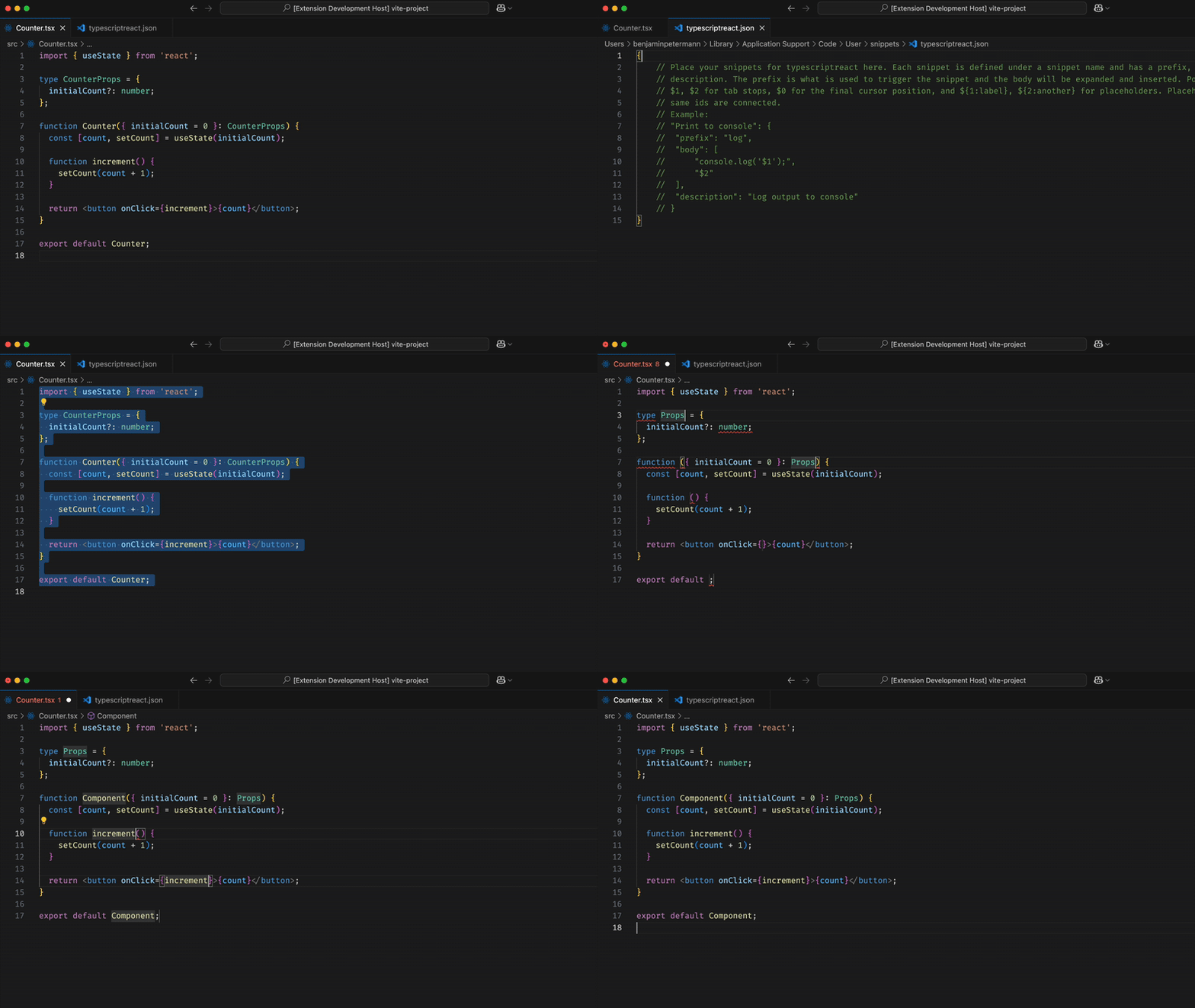
This extension adds the command Copy Code as Snippet to your Command Palette. When run, it converts the selected code, or the entire file if nothing is selected, into a ready-to-use VS Code snippet and copies it to your clipboard.
- Command Integration: Adds
Copy Code as Snippetto the Command Palette. - Intelligent Snippet Generation: Converts code into a snippet while preserving spacing and indentation.
- Smart Tab Stops: Replaces key symbols like function names, interfaces, and types with tab stops for quick editing.
- Configurable Replacement Style: Choose between tab stops or placeholders for snippet generation.
- Select your code: Highlight the code you want to convert. (If no selection is made, the entire file is used.)
- Run the command: Open the Command Palette (
Ctrl+Shift+PorCmd+Shift+P) and search forCopy Code as Snippet. - Paste your snippet: A success message appears. Click
Opento jump to your snippets file and paste it in. - Customize: Edit the snippet’s name, prefix, or body if needed.
- Done! Your snippet is ready to use.
Schnipsel lets you configure how identifiers are replaced in generated snippets:
- Tab Stop mode → Inserts
$1,$2, … for quick navigation. - Placeholder mode (default) → Inserts
${1:MyComponent}so the original name is visible but editable.
You can change this behavior via your VS Code User Settings (settings.json):
true→ Use placeholders (e.g.${1:MyComponent})false→ Use plain tab stops (e.g.$1)
Currently supports:
typescriptreactjavascriptreactjavascripttypescript
No additional setup required. Works out of the box with VS Code’s built-in snippet system.
Note: While not required, this extension works best when your code is well-formatted and free of syntax errors. Using a code formatter like Prettier and a linter like ESLint is highly recommended to ensure the most predictable and accurate results.
v1.2.0
- Adds configuration setting
"schnipsel.placeholder"to choose between TabStop and Placeholder replacement:"schnipsel.placeholder": true→ Uses placeholders (default)"schnipsel.placeholder": false→ Uses plain tab stops
- Replaces default component import in
javascriptreactandtypescriptreact - Changes default keyword replacement to Placeholder
v1.1.0
- Replace class name declarations with tab stops
- Replace arrow function declarations with tab stops
v1.0.1
- Fix readme demo.gif
v1.0.0
- Initial release
- Adds the
Copy Code as Snippetcommand - Generates intelligent snippets with automatic tab stops
- Supports TS, JS, JSX, and TSX files
Input Code:
import { useState } from 'react';
type CounterProps = {
initialCount?: number,
};
export default function Counter({ initialCount = 0 }: CounterProps) {
const [count, setCount] = useState(initialCount);
function increment() {
setCount(count + 1);
}
return <button onClick={increment}>Increment</button>;
}Generated Snippet:
{
"Snippet from Counter": {
"prefix": "Counter",
"body": [
"import { useState } from 'react';",
"",
"type ${1:CounterProps} = {",
" initialCount?: number;",
"};",
"",
"export default function ${2:Counter}({ initialCount = 0 }: $1) {",
" const [count, setCount] = useState(initialCount);",
"",
" function ${3:increment}() {",
" setCount(count + 1);",
" }",
"",
" return <button onClick={$3}>Increment</button>;",
"}"
],
"description": "Auto-generated typescriptreact snippet from Counter"
}
}
Contributions are welcome! Feel free to open an issue or pull request on GitHub.
To check full changelog click here
Happy coding, and may your snippets always be sharp. ✂️
{
  "schnipsel.placeholder": true // default
}