
A quick 'n dirty string viewer and editor for MySims and MySims Kingdom.
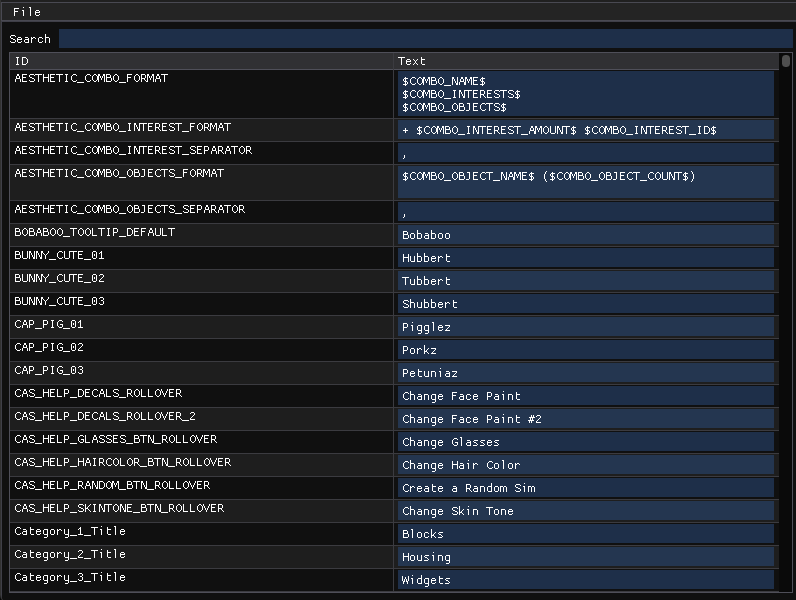
- View, edit, and organize string resources used in the supported MySims titles
- Export modified string tables to STR (game binary format)
- Live search functionality to quickly find strings by their ID or content
- Supports editing complex formatted strings with variables like
$PLAYERNAME$,$COMBO_NAME$,$COMBO_OBJECTS$, and$COMBO_INTERESTS$ - Easily browse UI tooltips, category labels, and character names
- Scrollable and resizable UI for navigating large string tables
- Modify in-game character names (e.g., change "Pigglez" to "Oinkster")
- Update or localize tooltips like
Create a Random SimorChange Glasses - Patch category titles or UI labels for modding or translation purposes
The games in the list below are confirmed to be compatible with MySims String Editor:
- MySims (Cozy Bundle)
- MySims Kingdom (Cozy Bundle)
- MySims (Wii)
- MySims Kingdom (Wii)
- Open an
.strfile from the game data- MySims Cozy Bundle (Steam):
C:\Program Files (x86)\Steam\steamapps\common\MySims\data\GameData\TextEAGLE\pc - MySims Kingdom Cozy Bundle (Steam):
C:\Program Files (x86)\Steam\steamapps\common\MySims Kingdom\data\GameData\TextEAGLE\pc - MySims Cozy Bundle (EA):
C:\Program Files\EA Games\MYSIMS\data\GameData\TextEAGLE\pc - MySims Kingdom Cozy Bundle (EA):
C:\Program Files\EA Games\MYSIMS KINGDOM\data\GameData\TextEAGLE\pc - MySims and MySims Kingdom Wii:
<path to your disk dump>\GameData\Text\wii
- MySims Cozy Bundle (Steam):
- Optionally, open an
.xmlfile from the game data to load readable string keys, found in the same directory as the previous step - Use the search bar to find string keys (e.g.
BUNNY_CUTE_02) or values (e.g.Tubbert) - Edit the
Textfield as desired - Save your changes by exporting the file in
.strformat - Replace the in-game file to apply your edits
NOTE: You can also drop files onto the editor window to open them!
For a list of unique placeholders found in both games' XML files, please see the following documents:
- Clone the repository:
git clone --recurse-submodules https://github.com/bottledlactose/mysims-str-editor.git
- Open the cloned folder in your preferred IDE
- Build and run using MSVC or Clang-cl (recommended).
- Ensure you have the correct dependencies installed:
- GCC + CMake + X11 libraries + GTK3 (needed for NFD):
sudo apt install build-essential cmake libx11-dev libxext-dev libxrandr-dev libxcursor-dev libxi-dev libxinerama-dev libgtk-3-dev
- GCC + CMake + X11 libraries + GTK3 (needed for NFD):
- Clone the repository and compile the code:
git clone --recurse-submodules https://github.com/bottledlactose/mysims-str-editor.gitcd mysims-str-editormkdir build && cd buildcmake .. -DCMAKE_BUILD_TYPE=Releasemake -j
- Run the compiled binary:
./mysims-str-editor
NOTE: Linux is supported, but with no pre-built binary available, you'll need to compile it yourself.
This project is licensed under the MIT License.