Fixed the options dialog. #1
Conversation


|
How can I test this as a noob? |

|
@designchris Just download the code and rename from |
|
Thank you for the quick info! I have just tried it, but it's telling me that it can't be installed because it's not compatible with Thunderbird 68.2.1 |
|
That's weird. I have it installed on my 68.2.1. |
|
Do you install the downloaded XPI file by "Install addon from file"? |
|
In tried dragging the xpi onto the addon list, then using the
menu item you referenced and finally even by dragging the uncompressed folder onto the addon list.
On November 5, 2019 13:24:44 Martin Pecka <notifications@github.com> wrote:
Do you install the downloaded XPI file by "Install addon from file"?
—
You are receiving this because you were mentioned.
Reply to this email directly, view it on GitHub<#1?email_source=notifications&email_token=AB4Y7O3GRZYYWLFPGKIGEXLQSFQYXA5CNFSM4JIBVC7KYY3PNVWWK3TUL52HS4DFVREXG43VMVBW63LNMVXHJKTDN5WW2ZLOORPWSZGOEDCU34A#issuecomment-549801456>, or unsubscribe<https://github.com/notifications/unsubscribe-auth/AB4Y7OZSHCLSE6HECMCUASDQSFQYXANCNFSM4JIBVC7A>.
|
|
Hmm... when I get home, I'll upload here the exact XPI that works for me. |
|
I'm sorry - that seems to be the "Mark Gmail Read" addon... |
|
Oh, my bad... Here we go: |

|
FWIW, I got the same error on the first zip, no error on the second, but it's still not selecting the correct identity for me when I reply. |
|
It's the same here. Installation does work using the zip (xpi), but the correct identity is not being selected.
On November 7, 2019 18:55:35 Doug Breaux <notifications@github.com> wrote:
FWIW, I got the same error on the first zip, no error on the second, but it's still not selecting the correct identity for me when I reply.
—
You are receiving this because you were mentioned.
Reply to this email directly, view it on GitHub<#1?email_source=notifications&email_token=AB4Y7OZBI2CXFNJT547DNJDQSRJBLA5CNFSM4JIBVC7KYY3PNVWWK3TUL52HS4DFVREXG43VMVBW63LNMVXHJKTDN5WW2ZLOORPWSZGOEDNINFA#issuecomment-551192212>, or unsubscribe<https://github.com/notifications/unsubscribe-auth/AB4Y7O6LG4VBIL7W4GQI2ELQSRJBLANCNFSM4JIBVC7A>.
|
|
Do you see anything related in the error console (Ctrl+Shift+J) ? Did you re-check the settings? Some addons got the preference names mangled in my TB, but I thought it was only a local issue... |
|
If I clear the console then click to reply on an email that should pick an identity and isn't, I see only these two items logged (1st an error, 2nd a warning): Settings look ok, although still not appearing to save anything I change. |
|
Now I see. There were some XUL elements in the options window that got removed in TB 68, but I haven't noticed that when upgrading this extension. The elements seemed to work, but not exactly. E.g. the aliases window showed a tall textbox, but it no longer supported entering multiline values, which is how you actually should pass more values to the aliases config. Instead, it was a single-line textbox which divided the aliases by slashes, which the rest of the addon had no chance of parsing. I tested with my profile that if I only put one alias there, it worked even with the previous version, but as soon as I entered more values, it stopped working for that identity. I fixed that in a new commit. The updated XPI is here: Also, please note that TB has sometimes problems with updating addons from files. This procedure works for me:
|
|
Still not saving my changes, still not selecting correct identity. Same two console messages as above |
|
Hmm, I'm really lost here. Could you please share the whole error console output from the start of TB? And what values do you try to fill in the options? |

|
I see the same as @dougbreaux. Full log from start : |
|
Further debugging... the code overrides getIdentityForServer and expects to be passed an optionalHint paramater that contains the recipients (to and cc) of the message being replied to. Actually it now gets the recipients of the reply in that parameter now, which is of course the sender of the incoming message. This email address obviously won't match any of your account addresses, so the code does nothing. The hint comes from the getIdentityForHdr function in MailUtils.jsm (https://dxr.mozilla.org/comm-release/source/mail/base/modules/MailUtils.jsm#476). This looks at the recipients and cc list of a header object that is passed in. Presumably now this is the headers of the reply rather than the headers of the message being replied to. Possibly related to the note about when <script> tags are run - see https://developer.thunderbird.net/add-ons/tb68/overlays To be honest, I'm lost at this point. I can't get the debugger to work, so console.log debugging only :( |
|
Thanks for investigation, I'll have a look at it. What I tested was creating a new email and typing in some of the matching addresses... Does at least that work for you? |
|
yes, if I put email addresses into the 'Detection' tab of the options then it changes the From: address if I put one of those into the To:, so that bit works. For me (and I suspect others) the key feature is the 'attempt to find and use an identity that appears in the recipient list' when replying, which is broken as far as I can tell. I wonder if it is a core thunderbird bug as without the addin in looks like the (incorrect) hint is passed to getBestIdentity() in MailUtils.jsm which seems to look through accounts trying to find one of the addresses in the hint. |
|
I have it... where the code hooks window.getIdentityForServer it should be hooking window.MailUtils.getIdentityForServer instead :) See #2 |
|
For me, is was/is not picking a correct identity from either the actual recipient nor from the additional ones. Nor am I able to edit that list of additional ones and get that to save at all. But hopefully @rwg0 investigation resolves at least the main issue there! |
|
@rwg0 Thanks for #2. However, I still don't seem to get the use-case for the option you mention. Thunderbird does select the proper identity when replying to a message by default, even without this addon. So what is it you want? Can you give me an example email to which you reply and the set of identities and their settings, where you'd expect a different behavior than TB does by itself? |
Not for me, it doesn't. |
|
Then it seems our definitions of correct identity differ :) Try restarting TB with all addons disabled, find an email written to your non-default identity, and see that this non-default identity will be selected when you click reply. This worked even when my identity is only in CC. |
|
"correct identity" means the one the email was sent to, wholly unrelated to the other identities configured under the same account. My default identity is being selected, not the one that received the email. Even with all addons disabled. This is why I've needed this add-on all along. |
|
It's probably relevant that I send this one account's email to another account's Inbox. But this add-on was handling that correctly until TB 68 |
|
Could you please share an example message header with all the identities? You should probably anonymize it by replacing all occurences of each address by e.g. |
My scenario is that I have a single incoming email account that contains email sent to multiple addresses (various forwards bring the different addresses together before it gets to Thunderbird). I have multiple outgoing SMTP servers configured for different addresses and different domains. Without using correct identity, Thunderbird will always reply from my default email address. With it, it chooses the email address the message was sent to as the sending address and then correctly uses the appropriate SMTP server to send that message |
|
@rwg0 What's weird, I use exactly the same scenario. Many different emails are pulled by GMail (or forward mail to that account). And still, my TB recognizes which identity to choose... Until you show some message headers, we apparently can't move on... For example, I receive this email: My TB connects to my@gmail.com where I finally receive the message. But when I hit reply, identity connected with my@work.mail is chosen. What is different in your case? |
|
Headers for a typical incoming message: Setup: Primary account receives all incoming email. Main identity is me@mypersonaldomian.co.uk. Without the addin, a reply will be from me@mypersonaldomain.co.uk, with the reply is sent from support@mycompany.co.uk |

This works, thank you very much. |

That's exactly why I need correct identity too. The AddOn did its work until TB 60. But after installing 68.4.1 correct identity refuses to work as described above, although I tried the last: a) Often recepient-adresses are not recognized and a reply chooses a false sender-identity. b) changes in settings of correct identity are not saved. Opening the settings again, changes are ignored and previous settings are shown. No change of any hook is accepted.
No - it doesn't. I still have no reproducible situation to proof this behaviour, but it seems to be that if there are several identities containing the same name, but different adresses, TB always takes the first one in the list of identities if I reply to a mail. Perhaps I didn't install the latest version of correct identity? Where can I download the latest version with the included corrections described in #2. Yours André Sorry for my bad english, but school is already a long time ago... |
|
@docjochim Just download the repo at the requested commit as a zip and rename to .xpi. |
Hmmmm... If I look here I only find a download-file from 2018-05-18. If I look here there's no download-button. Where can I find the newest files' location, what you call 'the repo at the requested commit'? Perhaps this is a silly question, but it's the first time for me downloading files here in github. Or do I manually have to make the changes that are proposed here? Thanks for your kind help :-) André |

|
@ all: After proceding as above and reinstalling and the restarts, I tried to configure with one adress to test it. It worked perfectly, so I added other two adresses (always in the way: 123@abc.de )but doing this there was no more warning. So I deleted the added adresses... but no warning! I tried to repeat the steps above....uninstalled ... restart ... installed ... restart. No change, it did'nt work agian.
Any idea what I could do? |
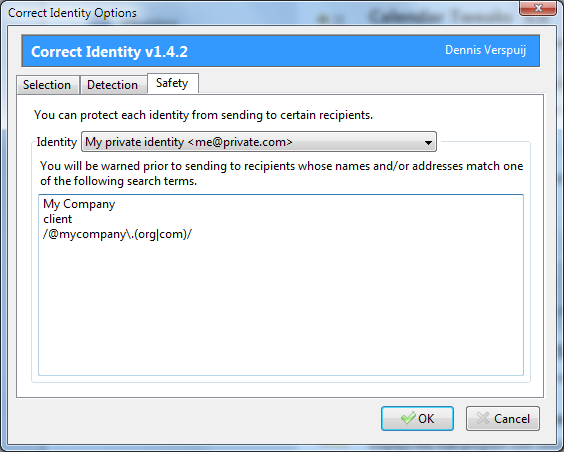
|
@Bumble57 Could you please send a screenshot of config editor with the |
|
@Bumble57 Also, your screenshot says it's version 1.4.2. But what you should use is more like 1.5.0... |
|
Hi peci1: thanks for your quick answer. The screenshot wasn't mine, schould only demonstrate (ist from |
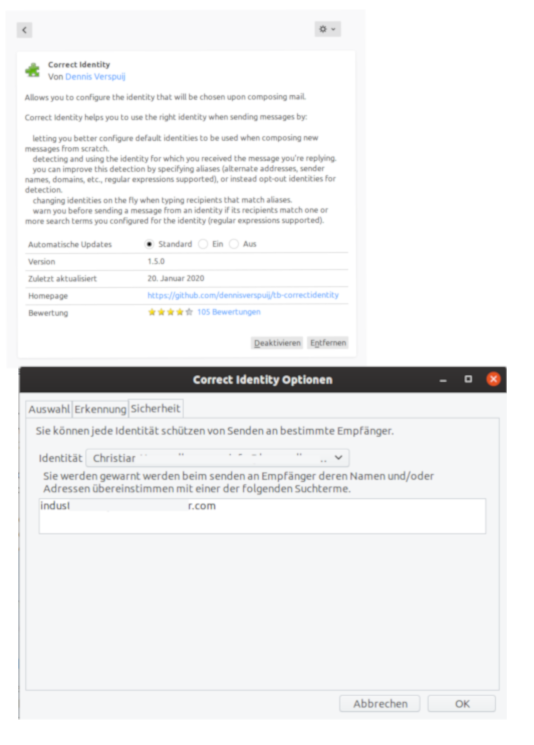
@Bumble57 There's a folder inside the zip-file. It is not enough just to rename the zip into xpi. You first have to extract the inside folder and then rename the extracted folder into *.xpi. Yours André |
|
@docjochim: thnaks for your help. I extracted the file: but get, when trying to install manually, the message: not compatible with TB 68.4.1. |
|
@Bumble57 André |
|
You can also install the unzipped folder by dragging it onto the addons page.
But make sure it is the folder that contains the script files and not just
another folder.
…On January 21, 2020 12:13:55 docjochim ***@***.***> wrote:
@Bumble57
If you extract the
tb-correctidentity-fa0b297732dc7fac1d14534e552b3dccb891373e.zip you obtain
a folder tb-correctidentity-fa0b297732dc7fac1d14534e552b3dccb891373e which
contains another sub folder (same name). This one ist the addon but it is
not zipped anymore.
Try to make a new zip-folder (for example named tb-correctidentity.zip) and
copy the content of
tb-correctidentity-fa0b297732dc7fac1d14534e552b3dccb891373e into this
zipped folder. Then rename the zip into xpi and try again.André
—
You are receiving this because you were mentioned.
Reply to this email directly, view it on GitHub, or unsubscribe.
|
|
@docjochim: thanks a lot for the detailed explanation. I got the installation running (it worked). But it is still shown version 1.5.0. . When trying to define a saftey rule, don't use sender adress abs@cde.aom when sending a mail to info@xyz.com .... it doesn't work. @designchris: tried also your way. Uninstalling correct.... restart, once again restart of T, than drag and drop folder correctidentity.xpi , with the inside:
The same result as above. Sorry guys... I don't know why I don't get the version 2.0.0 , as written by peci1. Don't even know what mistake I'm making. Can't imagine that the reason can be that my OS is Ubuntu 19.10? I think that informations of an older correctidentity installation are stored. That's why after uninstalling and reinstalling, the entries in the safety folder, the rules defined in the older installation, are present. For example: the above rule ... don't use sender adress abs@cde.aom when sending a mail to info@xyz.com ... is just present with the new installation. |
|
Hi,
the link I got here shows 1.5.0 in my system (Win10pro), too. But trying to define a safety rule to get a warning while sending a mail from a certain account to a defined address, doesn't work in my system, too. Instead of giving a warning or blocking any of the defined combinations of sender/recipient, a mail matching a safety rule is simply sent without any message. André Here there are the rules I tried to define Here is what my config-editor shows. Strange graphical letters and mixing up all single rules to a big snake-rule without any separations |
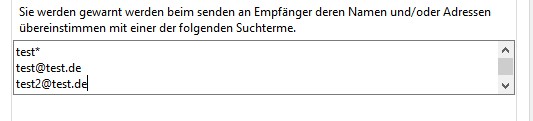
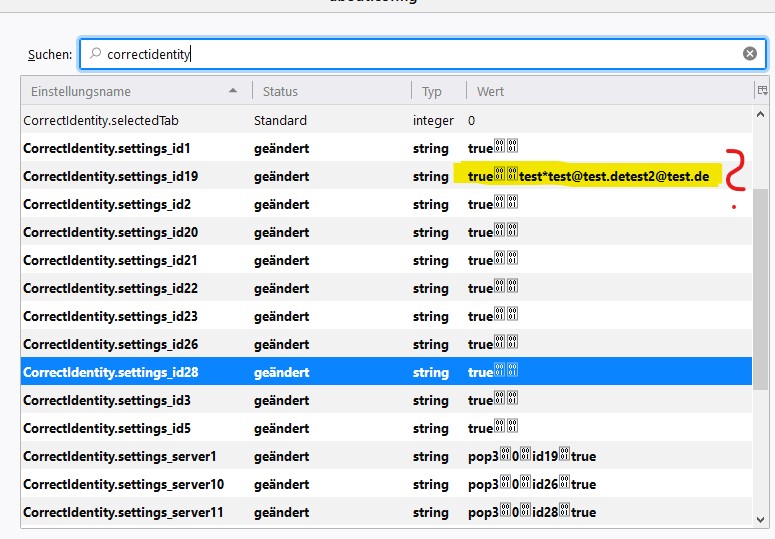
|
I do think this version might be working for me, after the manual download, unzip, rezip, and rename. Wish we could get the PRs accepted... Oh, and maybe for now a Release could be created with an XPI of all of the above steps done? |

|
Most issues seem to have been fixed by this pr together with the other one, which is great! 😄 There is only one cryptic waring in my terminal when I run the verbose mode of Thunderbird. Hopefully these pull requests get accepted up-stream and a new version can get released. |
8 participants


I think if you'll accept this PR, it will automatically update the PR against upstream. I thought this a cleaner way than sending another upstream PR containing your changes.