Added project #24
Added project #24
Conversation


|
I am having trouble using pytest-- I've uploaded my first stab at tests anyway but am not positive I am effectively testing each aspect of my code. I have a few other questions as well:
|

|
Hi Ava, What exactly are you having trouble with regarding pytest? After looking at your tests, I think each unit test should test a function that you define in your main scripts to ensure it is performing as desired. So, for example, an example of a test for a function that drops the 'chrM' column from your data is below. and a test for this would be (located in your testing directory):
but I would define this as a function and apply the function to both files because you end up writing the same code twice for file1 and file2. |
|
Hi Emily, Thank you for your reply- that cleared up a lot! So for this line in your example:
that goes at the beginning of each test, with 'cnv_drop_column' being the name of the function I'm testing? And is it OK to keep the tests in one file or is it better to have one file for each test? In regards to pytest, I am able to import it into my notebook without any issues, but when I go to use it, I get "UsageError: Cell magic |
|
Yes, exactly. And the import of the functions can go at the top of your script and you can import all of the functions you will test from that file at one time. For example: or you could also use: which will import all of the functions from that script. That being said, I think it might be good to keep your tests located in one script, similar to the example that we worked through in class. For the pytest, I believe you need to use: in order to get pytest to run. Let me know if you have any other questions! |
|
Ok, got it! One other thing. I had previously tried to create a function to remove the CNVs as you had suggested I do too, and I realized when I used '.apply()' that it was converting my dataframe into a series:
And when I do '.apply(cnv_remover, axis = 1)', I get this error: Not sure how to bypass either of these issues. |
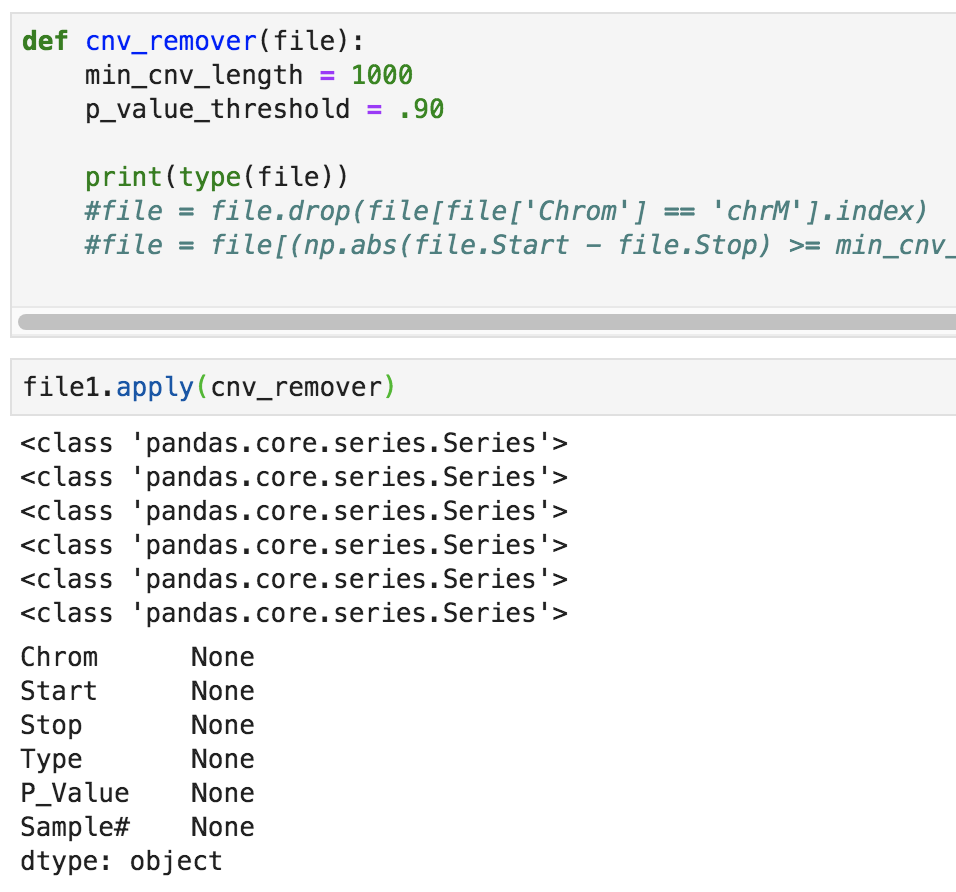


|
Could you potentially try without axis=1? It might be due to the fact that pandas series is a one-dimensional array! |
|
I think my main problem is I'm not sure how to access the rows where 'Chrom' is 'chrM'. For the code I have above, with file.drop(), I get this error message:
Is there a way for me to specify for it to look at the Series with the Chrom values and then drop each index where chrM is found? |
|
Sorry for all of the questions about this, but do I have to use .apply()? Could I instead do Then save the new file this way: |
|
Hi Ava, Yes, that looks good to me! |
|
Great! I'm having another issue with testing now. I have added an init.py file to the same directory as the module, but I keep getting a ModuleNotFoundError. This is what I ran: I've also updated my tests. Is it OK to test the output of my Common_CNV_Finder function is correct by comparing it to a nested for loop output that is reliable (based on test files with which I know the expected outcome)? My thought was to do add this at the end of my test: |


|
@avapapetti, I've submitted a pull request to your branch with some suggested changes. Just to clarify:
Overall you have a nice solution to your problem. You were just lacking significantly in the packaging/modularization/testing side of things. Have a look through the changes to move forward. Merging them into your branch and working from there might be the easiest. Moving forward, the most important thing to do is to complete the test template I have written called test_common_csv_finder. That will suffice to get most of the marks for testing. If you have time after that try to make sure you are passing all the tests (and add more if you can). When completing test_common_csv_finder, think of it as a way to guarantee that if someone pip installs your package, and passes two file paths to common_csv_finder will it produce a result, and is that result correct. Add two small datafilee to tests/data and use them in this call of common_csv_finder |
|
Seems to be getting late for someone to pop into Zoom, so here are my questions:
Thank you. |
|
Sorry, thought you were happily working away.
yes. well done. Especially using pandas built in assertions. Very nice. In the future looking up pytest "fixtures" for supplying data to tests in a slightly cleaner way. What you have done is fine though.
Correct. Your repository is a pip installable python package!
Not really. Local environments change. People's set ups are different. Having online tests allows several people to have an identical system to confirm their tests are working. I'm not certain but I think your tests are passing locally because I'm guessing you have a Mac laptop (which has a case insensitive file system). So when tests_dir is defined as "data" it finds it, even though it is named "Data". The online tests are on a linux system that doesn't make that odd logical jump. Change either in the directory name or the test module and you will pass most of the tests on circleci. You have another test that is failing apart from that. you should see it if you type
Correct. Your version in your repo at noon tomorrow is what will be graded |
|
That one is on me I realize my comment in the Google Doc was misleading, sorry about that! There seems to be discrepancies between what's in the Data directory file locally and what's in the Data directory in my repository. When I try to commit changes, I keep getting things like this: Also, I'm unsure where I should be running |

|
Update: I figured out |
|
That's not a problem.
You should absolutely delete it. It's in your way to getting that glorious green tick beside your pull request. It's also a demonstration that "passing all of the tests" is not necessarily a good thing. |
|
Oh my goodness there's the green check mark! Yay! The sample files I have inside the Data directory are up to date anyway, so there's nothing more I need to do there right? I really appreciate your prompt replies by the way. |
Glorious isn't it? Well done. For the record adding DS_store, .ipynb_checkpoints, egg_info, and pycache to .gitignore is a good idea. And any other superfluous files. not a big deal for this project but worth keeping in mind. But yes, all done. |
|
Thank you! That is good to know, I'll try to do that now. And thanks for all your help and insight! |
|
So sorry it's late but one last thing-- I just tried to pull my repository and I got this: From https://github.com/avapapetti/project_spring_2020 That won't affect anything when you compile my code tomorrow will it? |
|
You are all good. Working tests on circleci are hard to argue with. I think it may be just an issue with the command you ran. Or you ran it from a different git repository perhaps. |
|
Hi Ava, You did a really great job on this project. Pandas is a great tool when working with datasets and you employed it nicely. Also, the unit tests for your dataframes are great as well. In the future, I think it is good practice to add the .ipynb_checkpoints files to your .gitignore file. Overall, very well done! Cheers, Emily |
4 participants


Ava Papetti