Unity attribute that magically seeks out object references. Stay in the flow; stop fiddling around dragging and dropping into with Inspector fields.
| Documentation |
|---|
Tag your serialized fields with a [Get] attribute...
[GetInChildren] public Collider myCollider;...and select the reference you're looking for.
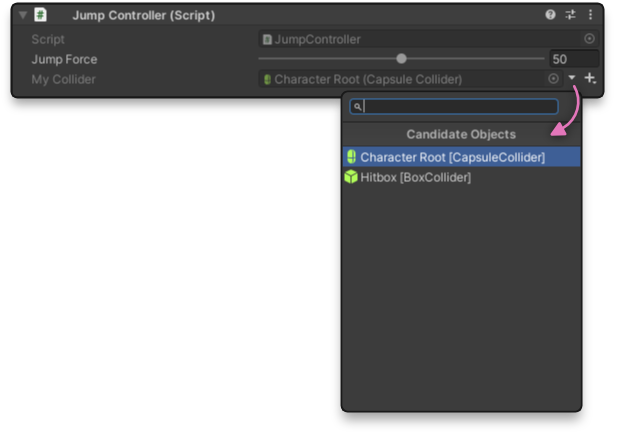
Simply type the attribute before serialized fields.
This works only in-editor, not for objects created at runtime. In other words, it replaces, simplifies, and accelerates the process of selecting references in the Inspector.
using Extra.Attributes;
using UnityEngine;

public class MyBehaviour : MonoBehaviour
{
    // Gets the component from the same GameObject, like GetComponent.
    [Get] public Rigidbody2D rb2d;

    // Gets the component from the same GameObject or its children, like GetComponentInChildren.
    [GetInChildren] public SpriteRenderer spriteRenderer;

    // Gets the component from the same GameObject or its parent, like GetComponentInParent.
    [GetInParent] public Collider2D hitbox;

    // Get the component from the same GameObject, its parent, or its children.
    [GetInChildrenAndParent] public SortingGroup sortingGroup;

    // Gets the component from any GameObject, like FindObjectOfType.
    [Find] public GameManager gameManager;

    // Gets the object from anywhere in AssetDatabase; works with ScriptableObjects.
    [FindAssets] public CardData data;

    // Gets objects that implement this interface.
    // This is a wrapper type that works with any Get attribute. You can implement your own wrapper types.
    [Get] public InterfaceReference<IInteractionHandler> interactable;

    ...
}It's easy!
- Open the Unity Editor. On the top ribbon, click Window > Package Manager.
- Click the + button in the upper left corner, and click "Add package from git url..."
- Enter "https://github.com/bgsulz/Get-for-Unity.git"
- Enjoy!
- Click the big green "Code" button and click Download ZIP.
- Extract the contents of the .zip into your Unity project's Assets folder.
- Enjoy!