Automatically download and apply poster sets from ThePosterDB and MediUX to your Plex Media Server in seconds. This tool streamlines the process of updating your Plex library with high-quality custom posters, supporting both movies and TV shows with season and episode artwork.
Cross-Platform Support: Fully compatible with Windows, Linux (Ubuntu, Debian, Unraid), and macOS. See Linux-specific instructions for Ubuntu/Unraid users.
-
Multiple Source Support
- ThePosterDB sets, single posters, and user uploads
- MediUX sets with full-quality image downloads
-
Flexible Usage Modes
- Interactive CLI with menu-driven interface
- Direct command-line execution
- Modern GUI built with CustomTkinter
- Bulk import from text files
-
Smart Matching
- Automatic media detection and matching
- Support for movies, TV shows, seasons, and collections
- Multiple library support
-
Poster Management & Tracking
- Automatic label tracking for all uploaded posters
- Source-specific tracking (MediUX vs ThePosterDB)
- Visual stats dashboard showing upload counts and library breakdown
- Reset individual items or bulk reset all posters to defaults
- Hierarchical reset for TV shows (show, seasons, and episodes)
- Python 3.8 or higher
- Plex Media Server with API access
- Linux Users: tkinter for GUI support (see Linux-specific instructions below)
-
Clone or download this repository
git clone https://github.com/tonywied17/plex-poster-set-helper.git cd plex-poster-set-helper -
Run automated setup
# Windows:
python setup.py

# Linux/Mac:
python3 setup.py
This will automatically:
- Install all Python dependencies
- Install Playwright browser (Chromium)
- Set up system dependencies for GUI support (Linux/Mac)
-
Configure your Plex connection
Your settings can be modified in the config.json file.
{
  "base_url": "http://127.0.0.1:32400",
  "token": "",
  "bulk_files": [
    "bulk_import.txt",
    "test.txt"
  ],
  "tv_library": [
    "TV Shows"
  ],
  "movie_library": [
    "Movies"
  ],
  "mediux_filters": [
    "poster",
    "backdrop",
    "title_card"
  ],
  "title_mappings": {
    "Pluribus": "PLUR1BUS"
  },
  "max_workers": 4,
  "log_file": "debug.log",
  "scraper_min_delay": 0.1,
  "scraper_max_delay": 0.5,
  "scraper_initial_delay": 0.0,
  "scraper_batch_delay": 2.0,
  "scraper_page_wait_min": 0.0,
  "scraper_page_wait_max": 0.5
}
Configuration Options:
| Option | Description | Example |
|---|---|---|
base_url |
Your Plex server URL and port | "http://127.0.0.1:32400" |
token |
Plex authentication token (How to find) | "aBc123XyZ..." |
bulk_files |
List of bulk import text files | ["bulk_import.txt", "test.txt"] |
tv_library |
Name(s) of your TV Shows library | ["TV Shows"] or ["TV", "Anime"] |
movie_library |
Name(s) of your Movies library | ["Movies"] or ["Movies", "4K Movies"] |
mediux_filters |
MediUX media types to download | ["poster", "backdrop", "title_card"] |
title_mappings |
Manual title overrides for non-matching names | {"Pluribus": "PLUR1BUS"} |
max_workers |
Number of concurrent workers for bulk operations | 4 |
log_file |
Path to log file for debugging | "debug.log" |
| Scraper Performance Settings | ||
scraper_min_delay |
Minimum delay between scraping requests (seconds) | 0.1 |
scraper_max_delay |
Maximum delay between scraping requests (seconds) | 0.5 |
scraper_initial_delay |
Delay before first scraping request (seconds) | 0.0 |
scraper_batch_delay |
Extra delay every 10 requests (seconds) | 2.0 |
scraper_page_wait_min |
Min wait after page load for JavaScript (seconds) | 0.0 |
scraper_page_wait_max |
Max wait after page load for JavaScript (seconds) | 0.5 |
Multiple Libraries: You can specify multiple libraries as arrays to apply posters across all of them simultaneously.
Multiple Bulk Files: The
bulk_filesarray supports multiple text files for organizing different import lists (e.g., movies, TV shows, seasonal updates).
Scraper Performance Tuning: Configure delays via
config.jsonor the GUI Settings tab. Three presets available:
- ⚡ Fast (Risky): All delays minimized - fastest scraping, highest detection risk
- ⚖️ Balanced (Default): Optimized for speed while maintaining safety (0.1-0.5s delays)
- 🛡️ Safe (Slower): Conservative delays for maximum safety (0.5-2.0s delays)
The
scraper_page_wait_*settings control how long to wait after page navigation for JavaScript execution. Set both to0.0for instant scraping (faster but may miss dynamic content).
If you prefer to install dependencies manually or need more control:
-
Clone the repository
git clone https://github.com/tonywied17/plex-poster-set-helper.git cd plex-poster-set-helper -
Install Python dependencies
pip install -r requirements.txt
-
Install Playwright browser
python -m playwright install chromium
-
Linux-specific: Install system dependencies
# Ubuntu/Debian/Unraid:
sudo apt update
sudo apt install python3-tk python3-pip

# Install Playwright system dependencies:
sudo python3 -m playwright install-deps chromium
-
macOS-specific: Install tkinter
# Using Homebrew: brew install python-tk -
Configure your Plex connection (same as Quick Setup step 3)
Note for Unraid Docker Users: Use CLI mode (
python main.py cli) or set up a Docker container with GUI support (see Troubleshooting section).
Run the script without arguments to enter interactive mode:
python main.py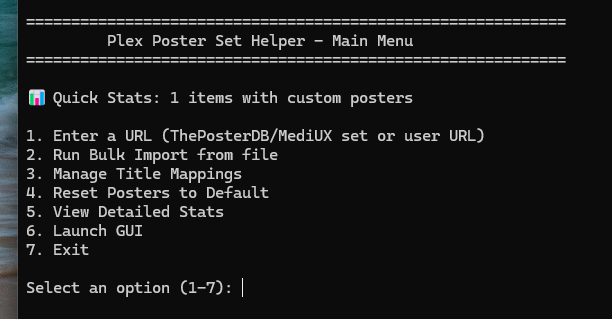
Main Menu Options:
- Enter a URL - Import a single ThePosterDB or MediUX set
- Run Bulk Import - Process multiple URLs from text files
- Manage Title Mappings - Add, remove, or view title overrides
- Reset Posters to Default - Browse and reset uploaded posters
- View Detailed Stats - See comprehensive upload statistics
- Launch GUI - Open the graphical interface
- Exit - Close the application
Single URL:
python main.py https://theposterdb.com/set/12345Bulk Import:
python main.py bulk bulk_import.txtLaunch GUI:
python main.py guiLaunch the graphical interface for a more visual experience:
python main.py gui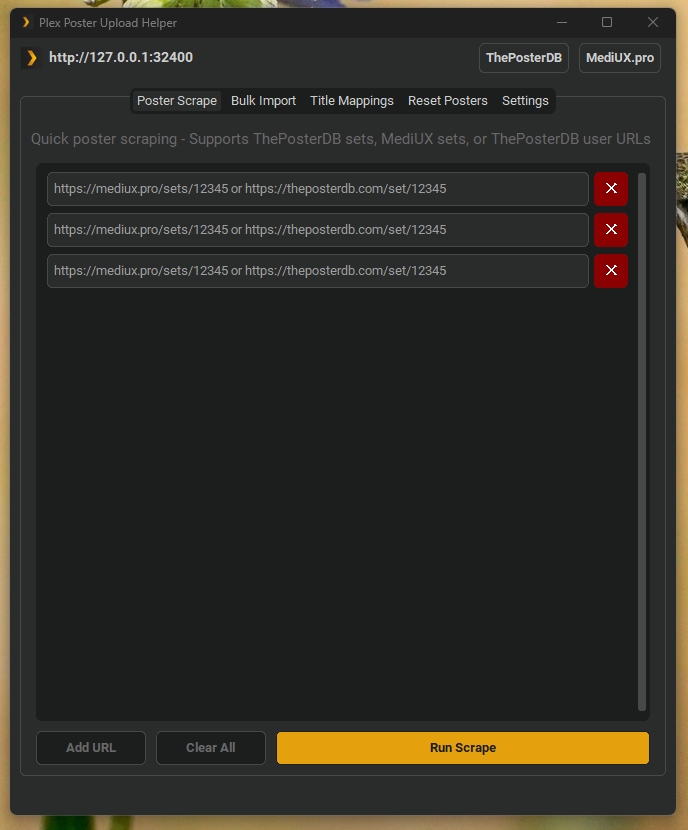
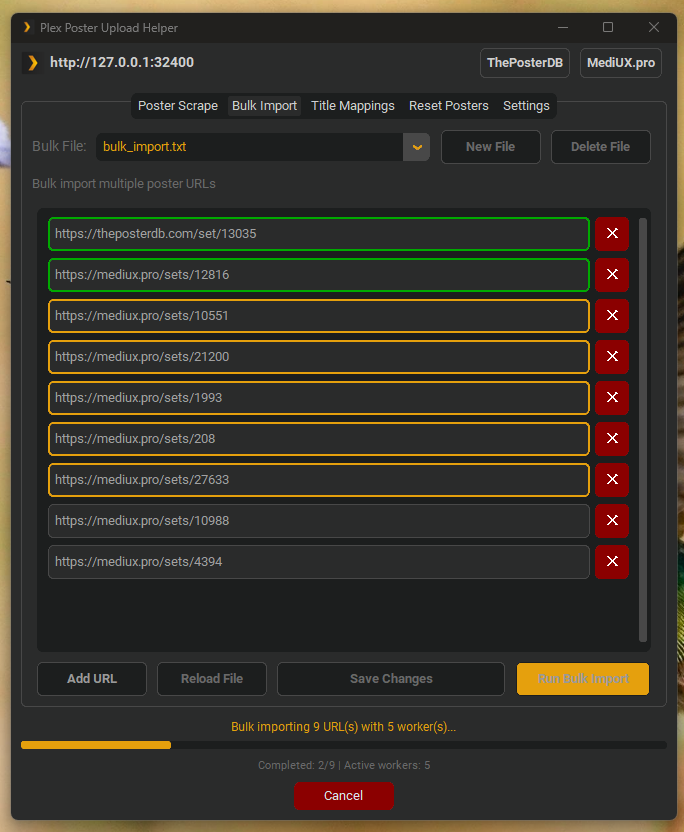
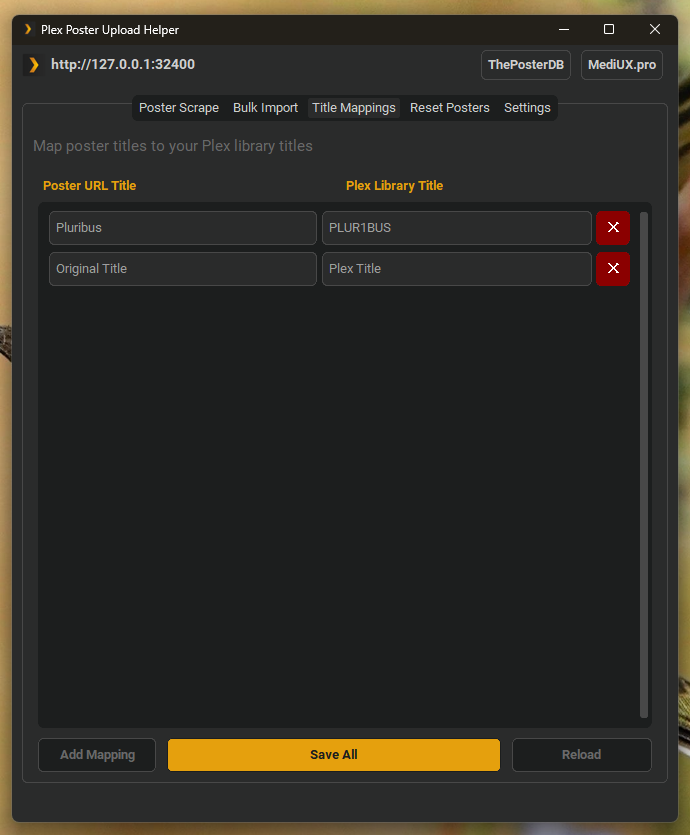
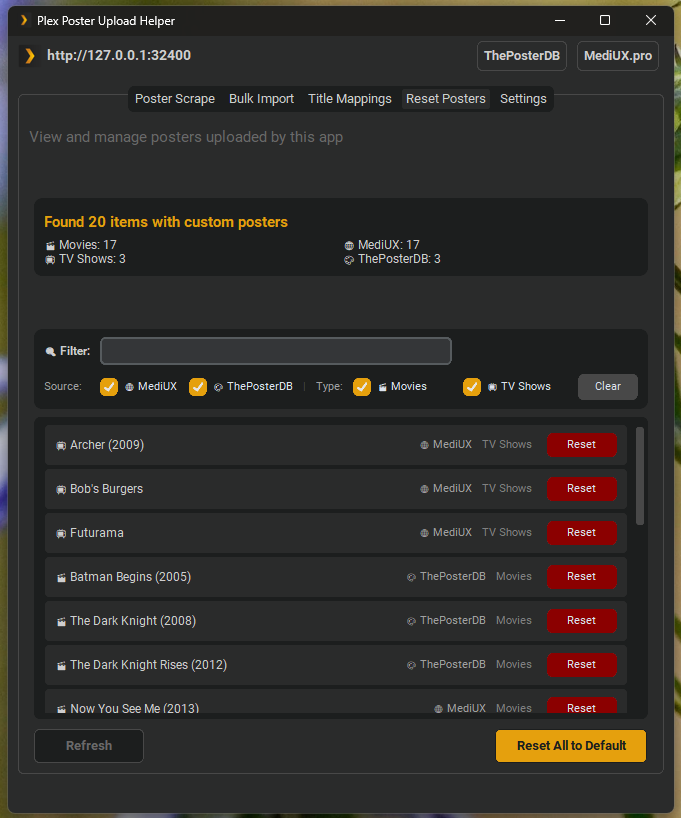
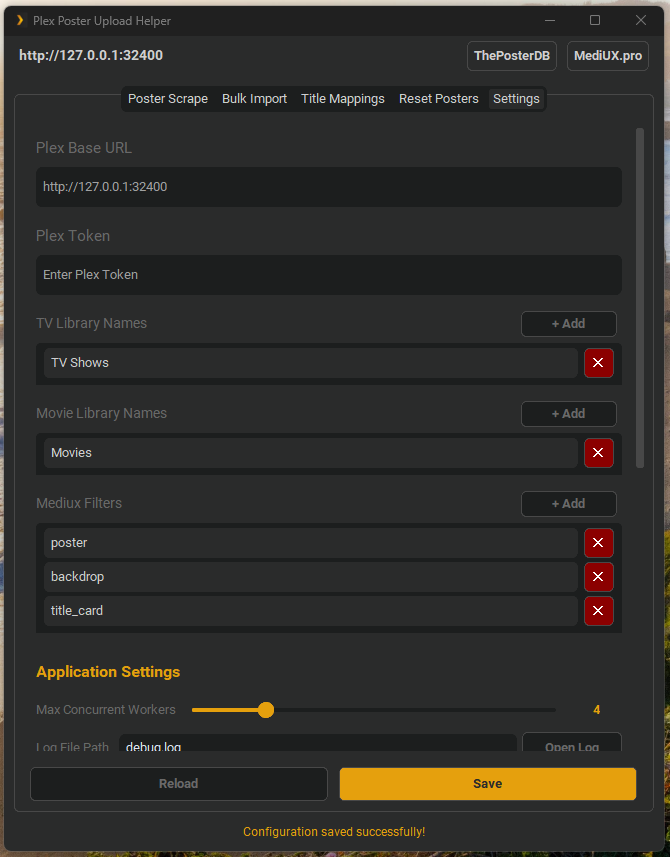
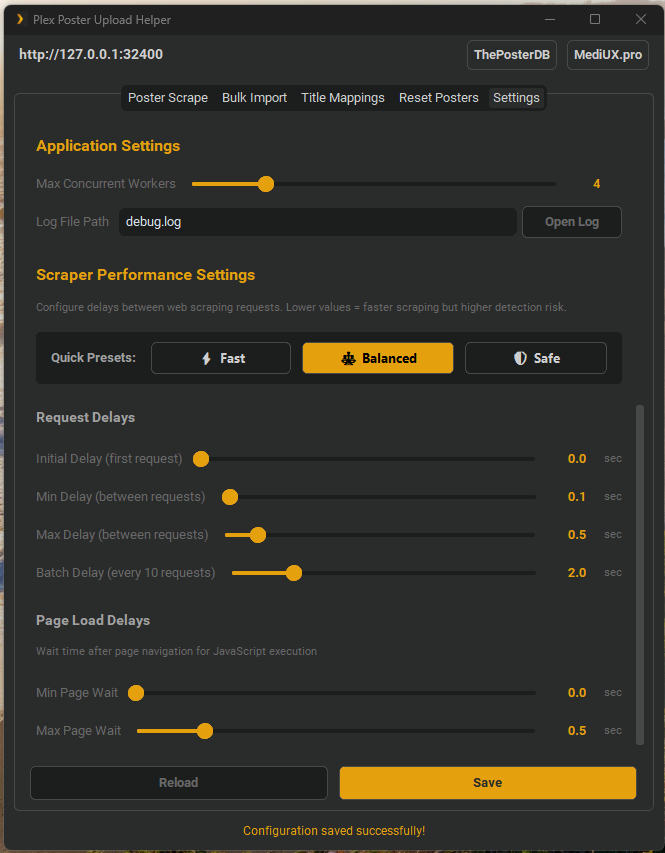
The GUI provides an intuitive interface with multiple tabs:
Poster Scrape Tab:
- Add multiple URLs for concurrent processing
- Real-time visual feedback (orange border = processing, green = completed, red = error)
- Progress bar showing active workers and completion status
- Configurable worker count for parallel processing
Bulk Import Tab:
- Manage multiple bulk import files via dropdown
- Create new bulk files or delete existing ones
- Row-based URL editor with duplicate detection
- Comment support (lines starting with
#or//) - Manual save/reload functionality
Title Mappings Tab:
- Visual editor for title mapping overrides
- Add/remove mappings with dedicated buttons
- Manual save control for all changes
Reset Posters Tab:
- View all media with custom posters uploaded by this app
- Comprehensive stats dashboard showing:
- Total items with custom posters
- Upload source breakdown (MediUX vs ThePosterDB counts)
- Library distribution with type icons (movies/TV shows/collections)
- Each item displays: title, source (🌐 MediUX / 🎨 ThePosterDB), and library
- Reset individual items with dedicated Reset buttons
- Bulk reset all posters to defaults with a single click
- Automatic label management (removes tracking labels on reset)
- TV show support: resets show poster, season posters, episode thumbnails, and backgrounds
Settings Tab:
- Configure Plex server URL and authentication token
- Set up movie and TV show libraries
- Configure MediUX download filters
- Adjust concurrent worker settings (1 to CPU core count)
Advanced Features:
- Concurrent Processing: Process multiple URLs simultaneously with configurable worker threads
- Visual Progress Tracking: See which URLs are currently being processed with color-coded borders
- Cancel Operation: Stop bulk imports or scraping operations at any time with the Cancel button
- Duplicate Detection: Automatically prevents adding duplicate URLs to import lists
- Memory Management: Proper cleanup on window close prevents memory leaks
- Automatic Label Tracking: Every uploaded poster is automatically tagged with:
Plex_poster_set_helper- Main tracking labelPlex_poster_set_helper_mediux- Source-specific label for MediUX uploadsPlex_poster_set_helper_posterdb- Source-specific label for ThePosterDB uploads
- Smart Reset System: Reset posters back to Plex's default metadata agent artwork while removing tracking labels
| URL Type | Example | Description |
|---|---|---|
| Set | https://theposterdb.com/set/12345 |
Downloads all posters in a set |
| Single Poster | https://theposterdb.com/poster/66055 |
Finds and downloads the entire set from a single poster |
| User Profile | https://theposterdb.com/user/username |
Downloads all uploads from a user |
| URL Type | Example | Description |
|---|---|---|
| Set | https://mediux.pro/sets/24522 |
Downloads all posters in a set with original quality |
Note: MediUX downloads use direct API URLs for maximum image quality (~2MB originals instead of ~116KB compressed versions).
The tool supports parallel processing of multiple URLs simultaneously, dramatically improving import speed:
- Configurable Workers: Set worker count from 1 to your CPU core count (default: 3)
- Visual Feedback: Color-coded borders show processing status:
- Orange border - Currently being processed
- Green border - Successfully completed
- Red border - Error occurred
- Progress Tracking: Real-time display of active workers and completion status
- Cancel Anytime: Stop operations mid-process with the Cancel button
Performance Example:
- Single-threaded: 9 URLs ≈ 90 seconds
- 3 workers: 9 URLs ≈ 30 seconds
- Maximum throughput with CPU-based worker scaling
Create a text file with one URL per line:
# Movies
https://theposterdb.com/set/12345
https://mediux.pro/sets/24522

// TV Shows
https://theposterdb.com/set/67890
https://theposterdb.com/poster/11111
Lines starting with # or // are treated as comments and ignored.
Run bulk import:
python main.py bulk my_posters.txtOr use the default file specified in config.json:
python main.py bulkMultiple Bulk Files: The GUI supports managing multiple bulk import files through a dropdown selector:
- Create new bulk files with the "New File" button
- Add existing .txt files (automatically detected and loaded)
- Switch between files without losing unsaved changes
- Delete files you no longer need (minimum 1 file retained)
- All files are tracked in
config.jsonunderbulk_filesarray - Protection against accidentally overwriting existing files
Control which types of media are downloaded from MediUX by editing the mediux_filters in config.json:
"mediux_filters": ["poster", "backdrop", "title_card"]Available filters:
poster- Movie posters, show posters, and season postersbackdrop- Background/backdrop imagestitle_card- Episode title cards
Remove any filter type to exclude it from downloads. If you want only posters and skip backgrounds and title cards, use ["poster"].
The tool uses intelligent matching to find media in your Plex library:
1. Manual Title Mappings (Exact overrides)
For cases where poster source names don't match your Plex library, use title_mappings in config.json:
"title_mappings": {
  "Pluribus": "PLUR1BUS",
  "The Office": "The Office (US)",
  "Star Wars Episode IV": "Star Wars: A New Hope"
}
When the scraper finds "Pluribus", it will automatically look for "PLUR1BUS" in your library.
2. Fuzzy Matching (Automatic fallback) If exact matching fails, the tool automatically tries fuzzy matching with 80% similarity:
- "The Batman" might match "Batman (2022)"
- "Shogun" might match "Shōgun"
The tool will notify you when fuzzy matching is used: ℹ Fuzzy matched 'Title A' to 'Title B'
Apply posters to multiple Plex libraries simultaneously:
{
  "movie_library": ["Movies", "4K Movies", "Kids Movies"],
  "tv_library": ["TV Shows", "Anime", "Kids TV"]
}
The tool will find and update the same media across all specified libraries.
A pre-built Windows executable is available in the dist/ folder. To build it yourself:
-
Install PyInstaller
pip install pyinstaller
-
Build using the spec file
pyinstaller _PlexPosterSetHelper.spec
Tip: Set
interactive_cli = Falsein the main script before building to make the executable launch in GUI mode by default.
Problem: Tool downloads posters but they don't appear in Plex
Solutions:
- Verify library names in
config.jsonmatch exactly (case-sensitive) - Ensure media exists in Plex with matching titles and years
- Check that your Plex token has write permissions
- Confirm the Plex server is accessible at the configured URL
Problem: Cannot connect to scraping sources
Solutions:
- Check your internet connection
- Ensure Playwright browser is properly installed:
playwright install chromium - Check if the source website is accessible in your browser
Problem: Cancel button doesn't immediately stop processing
Solution: The cancel operation stops accepting new tasks and cancels pending futures, but currently running tasks must complete. This is expected behavior with ThreadPoolExecutor. Close the application window for immediate termination with proper cleanup.
Problem: GUI becomes unresponsive during large imports
Solutions:
- Reduce worker count to 1-2 for system with limited resources
- Process URLs in smaller batches
- Close other resource-intensive applications
- The progress indicators and cancel button should remain responsive during normal operation
Problem: Tool reports media not found even though it exists
Solutions:
- Verify the media title and year match between the poster source and Plex
- Check for special characters or formatting differences
- Ensure the media is properly scanned and visible in your Plex library
- Try refreshing metadata in Plex before running the tool
Problem: Error when trying to launch GUI on Linux
Solutions:
# Install tkinter for Python GUI support
sudo apt install python3-tk # Ubuntu/DebianProblem: _tkinter.TclError: no display name and no $DISPLAY environment variable
Solutions:
For headless servers, use CLI mode instead:
python main.py cliProblem: playwright._impl._api_types.Error: Executable doesn't exist
Solutions:
Install Playwright browsers:
# Option 1: Install Playwright browsers (recommended)
python -m playwright install chromium

# Option 2: Install system Chromium (Ubuntu/Debian)
sudo apt install chromium-browser

# Option 3: For Unraid Docker containers
docker exec -it <container-name> python -m playwright install chromium
docker exec -it <container-name> apt-get install -y chromium
If still having issues, install dependencies:
# Ubuntu/Debian
python -m playwright install-deps chromium

# Or manually install required libraries
sudo apt install -y libnss3 libnspr4 libdbus-1-3 libatk1.0-0 \
  libatk-bridge2.0-0 libcups2 libdrm2 libxkbcommon0 libatspi2.0-0 \
  libxcomposite1 libxdamage1 libxfixes3 libxrandr2 libgbm1 \
libpango-1.0-0 libcairo2 libasound2Problem: pip install fails or packages not found
Solutions:
# Ensure pip is installed
sudo apt install python3-pip

# Update pip
python3 -m pip install --upgrade pip

# Install requirements with user flag if permission denied
pip install --user -r requirements.txt

# Or use pip3 explicitly
pip3 install -r requirements.txt
For Docker setup:
1. Create a Dockerfile in the project root directory (same folder as main.py):
FROM python:3.11-slim

WORKDIR /app

# Install system dependencies
RUN apt-get update && apt-get install -y \
    chromium \
    python3-tk \
    && rm -rf /var/lib/apt/lists/*

# Install Python packages
COPY requirements.txt .
RUN pip install --no-cache-dir -r requirements.txt && \
    playwright install chromium

# Copy application
COPY . .

CMD ["python", "main.py", "cli"]
2. Edit your config.json with your Plex server details before building.
3. Build the Docker image:
cd /path/to/plex-poster-set-helper
docker build -t plex-poster-helper .
4. Run the container:
Simple mode (config is copied into container):
docker run -it --rm plex-poster-helperAdvanced mode (config persists on your system):
docker run -it --rm \
  -v $(pwd)/config.json:/app/config.json \
  -v $(pwd)/bulk_import.txt:/app/bulk_import.txt \
  plex-poster-helper
To update the container:
# Pull latest code
git pull

# Rebuild with new changes
docker build -t plex-poster-helper .

# Stop and remove old container
docker stop plex-poster-helper
docker rm plex-poster-helper

# Start new container with same configuration
docker run -d \
  --name plex-poster-helper \
  -v /path/to/config:/app/config.json \
  -v /path/to/bulk_import:/app/bulk_import.txt \
  --restart unless-stopped \
plex-poster-helper- Python 3.8+
- Dependencies: (automatically installed via
requirements.txt)plexapi- Plex API interactionrequests- HTTP requestsbeautifulsoup4- HTML parsingplaywright- Modern web scrapingcustomtkinter- Modern GUI frameworkpillow- Image processing
Contributions are welcome! Please feel free to submit pull requests or open issues for bugs and feature requests.
This project is open source and available under the MIT License.
- ThePosterDB - Community-driven poster database
- MediUX - High-quality media artwork source
- Built with ❤️ for the Plex community