Amongst the eight payloads that the Chandrayaan-2 Orbiter carries, it carries some imaging payloads too. We use them and the abilities of machine learning and artificial intelligence to create a high-resolution map of the moon.
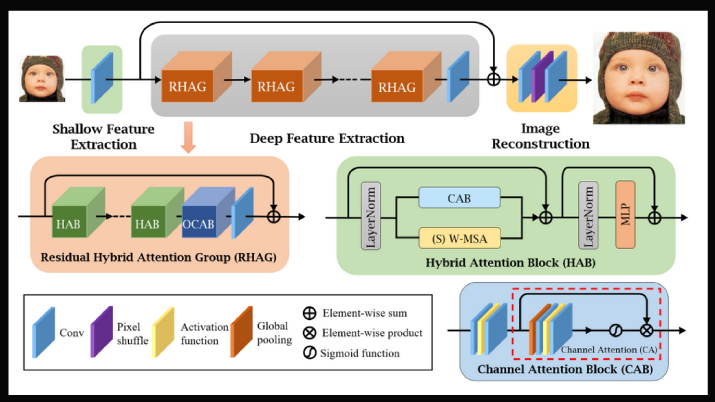
The Hybrid Attention Transformer (HAT) activates more input pixels for reconstruction than non-transformer based approaches. It combines channel attention and self- attention schemes, leveraging their complementary benefits. Furthermore, it employs an overlapping cross-attention module to improve the interaction between neighbouring window features in order to better aggregate cross-window information.
- HAT folder consists of the super-resolution model.
- super_resolved_images consists of pre-existing lower resolution and higher resolution images, which we've upscaled by our model.
- submission.ipynb consists of an inference notebook which would take in a tmc and super-resolve it 16x.
- atlas.ipynb stitches multiple .tif images together to form an atlas.
- atlas folder consists of code to merge multiple .tif files to create an atlas.
- The main code to create an atlas resides in atlas.ipynb
- atlas_final.tif is the sample atlas we've made by merging two tif files. This is a crop version of size 1 deg x 1 deg.
- The tmc images used to make atlas_final.tif are:
- ch2_tmc_ndn_20220708T1115585981_d_oth_d32 and ch2_tmc_ndn_20220708T1314261067_d_oth_d32.
- LAT, LONG = (49.2, 48.3) , (48.2, 49.3)
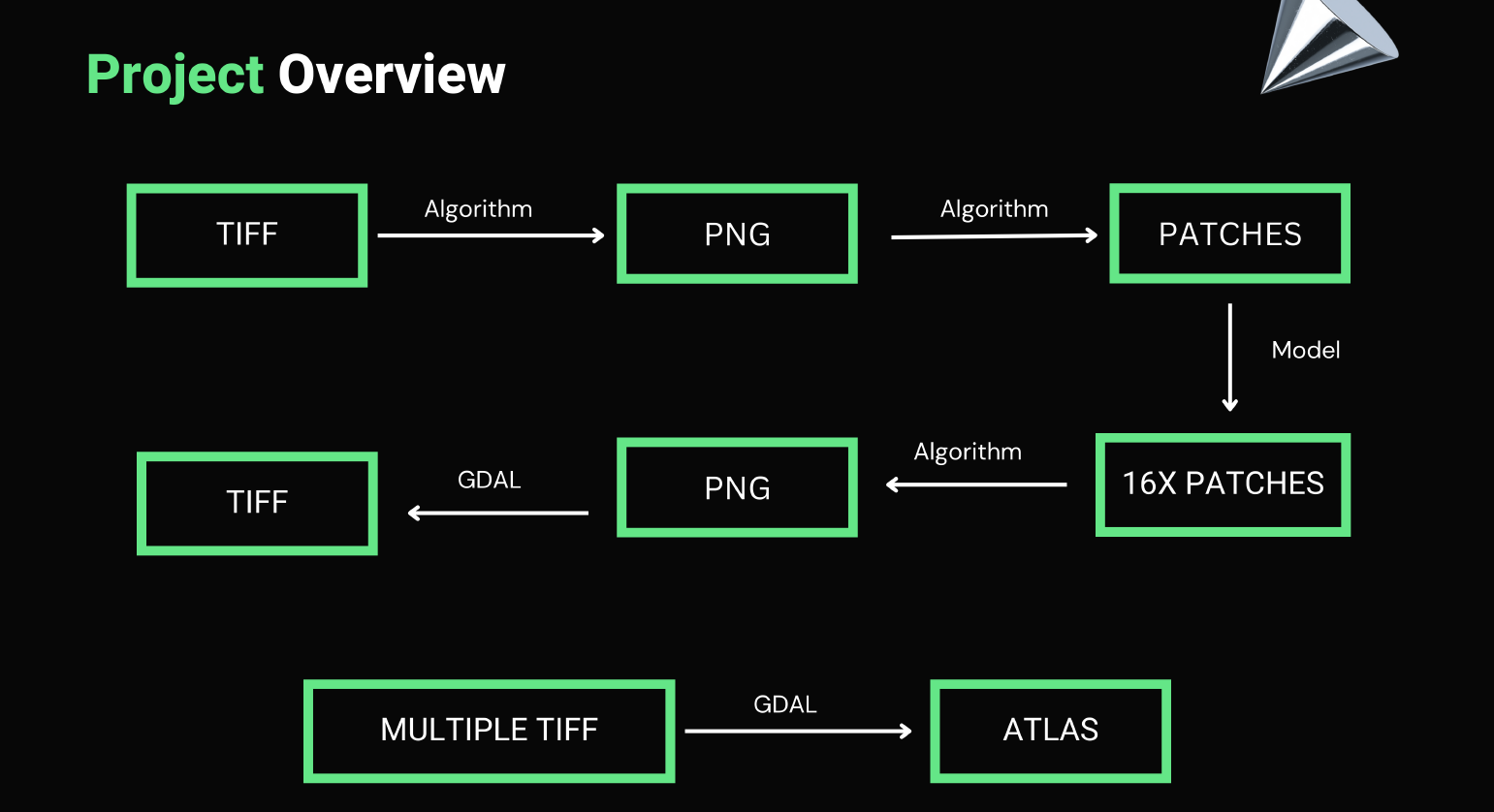
submission.ipynb will take TMC image present in .tif format from 'tmc_input' folder. TMC .tif file will be broken into .png patches of size 16x16 all of which will be super-resolved by our HAT-L model trained from scratch. The upscaled images along with the original .tif data will be used to create the upscaled .tif data which will be found in 'upscaled_output' folder. Once upscaled .tif files are available, place them in 'ATLAS FOLDER' and run 'atlas/atlas.ipynb' which will stitch and create an atlas.
- patchify
- unpatchify
- matplotlib
- numpy
- cv2
- PIL
- skimage
- gdal
- BeautifulSoup4
- Open https://drive.google.com/drive/folders/14xCeZjR1H3LIC7r2LT0nqC1sBFD9nICP?usp=sharing
- Download model weights 'net_g_20000.pth', put it in the folder alongside submission.ipynb.
- Open HAT directory in terminal and run the following commands
- pip install -r requirements.txt
- python setup.py develop
- mv /content/HAT/options/test/HAT-L_SRx4_ImageNet-pretrain.yml /content/HAT/options/test/HAT-L_SRx16_config.yml
- Put the input .tif file and .xml file in the tmc_input folder. Make sure that both of them have the same name before the extension.
- In the second cell, set the variable file name to the name of the input file.
- Run the submission.ipynb cell by cell.
- The super-resolved output image would be found in upscaled_output folder.
- Put all the .tif files inside the input_tiffs folder.
- Run all the cells of the atlas.ipynb.
- See the magic!
The following is a result obtained for 16x super-resolution
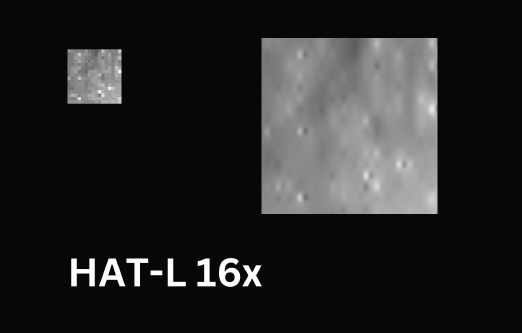
- RMSE = 0.00522
- PSNR = 45.6385
- SSIM = 0.98124
- FSIM = 0.38093 More results can be found at \super_resolved_images\256_hatl16
- Low resolution images are at \super_resolved_images\16
- High resolution images are at \super_resolved_images\256_hatl16
To smoothly blend the images we employ an alpha blending based technique with overlapping regions taking a weighted average of their respective constituent with the weights varying depending on the distance of a pixel from its respective image.
- Wrote python script for it. Ran it on multiple .png files as a proof-of-concept.
- Due to memory constraints, we could not load multiple TMC files to test the concept on .tif files.
We then employed a GDAL based method, where we used python-API for GDAL library to stitch multiple .tif files together. We then used different function of GDAL to crop out a 1 deg x deg patch of lunar surface.
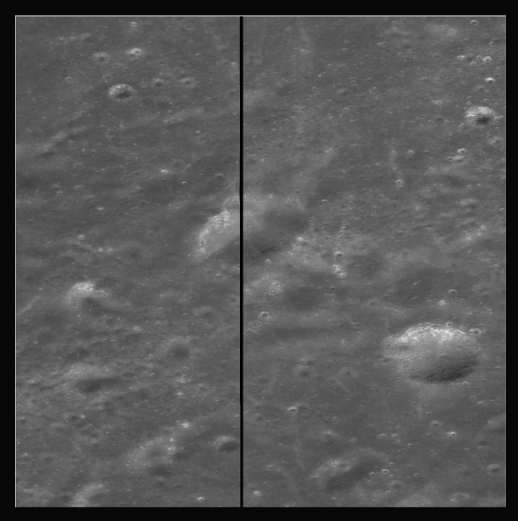
LAT, LONG:
- Top Left: 49.2, 48.3
- Bottom Right: 48.2, 49.3
TMC Images:
- ch2_tmc_ndn_20220708T1115585981_d_oth_d32
- ch2_tmc_ndn_20220708T1314261067_d_oth_d32