Amiga demo effects implemented in an OS friendly way. No direct hardware access (besides sprite dma disable) is used. AmigaOS is not deactivated and kickstart APIs are used to write on screen. Implements the following effects:
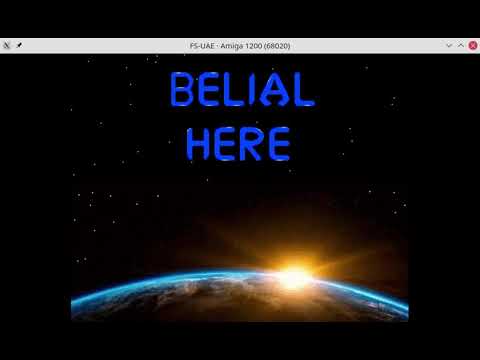
- Shows stars, a planet and an advanced text scroller from right to left. Characters are loaded from a custom font painted by myself ;)
- When text scroller has finished, the screen fades to white
- When the screen is completely white, it fades back and displays a logo
To give you a better impression, the demo can be seen on youtube:
Can be
- crosscompiled with makefile, GCC and vasm
- or install my amiga build
docker container and run
docker-run.sh
Important:
- SAS-C and smake will not work (right now) because I have not added instructions on how to compile the chunky converter assembly
Originally, I started around 2015 to code for my favorite childhood platform. On youtube, the tutorials by Photon of Scoopex helped alot to understand the platform with assembly programming and direct hardware access. Afterwards, I switched from asm to C to fight the rising complexity. ;)
Although AmigaOS was completely deactivated, I used some basic kickstart APIs like WaitTOF(). At this point, I became curious what else could be achieved when using kickstarts abstraction layer instead of hardware registers. Not to mention from a 20xx point of view, using the OS smells like a more modern approach ;). Therefore, I began to code a little Framework to speed up development using AmigaOS graphics.library.
When I started this project, I just had finished my framework and wanted to see how it works in a real world scenario. The results were disappointing. Although google has high ranks for graphics.library programming, it lead to many problems like:
- LoadRGB32() sometimes created a distorted non-PAL resolution while LoadRGB4() worked without a problem
- More than two Viewports could not be displayed. I assume because of some misuse of copper list generation APIs.
At this point, I was just about to give up but luckily found on an Amiga forum the advice to use intuition.library instead. I previously had ignored the intuition.library because my assumption was, it is more meant for high level window creation and not low level programming with higher performance requirements. This was wrong, you can use intuition to set up some basicViewPorts and still use low level graphics.library calls for good performance.
So, my final advice for any AmigaOS programming newbies (like myself) is:
- Read the hardware reference guide because it helps alot to understand why AmigaOS uses Views and ViewPorts as an abstraction layer based on the Copper co-processor.
- Don't set them up yourself. Instead, use intuition.library to create or display some Screens
- Use the graphics.library blitter APIs for fast animations and alot of fun ;)
In main.c, a state machine is implemented which initialises effects, executes them and shuts them down. Each effect contains a sub state machine. E.g. the text scroller has its own state machine which waits until a character sequence was displayed, sets up the next string, scrolls in this string, etc.
The text scroller engine creates two ViewPorts on startup:
- a star field consisting of three bitplanes, a black background and randomly created white dots (dots can be easily painted with RstPort and SetAPen()).
- earth as an eight bitplane image with 24 bit color depth loaded from img/space4_320_125_8.RAW and img/space3_320_148_8.CMAP.
The scrolling text is blitted into the star field. The design decision to split things up into a lightweight and a more heavy ViewPort was in the hope of not to completely block the DMA channel during screen updates. ;) When the ViewPorts are set up, the text scroller engine gets:
- a set of strings
- target coordinates for each string
Afterwards, the text scroller loads a font and its color table from img/charset_final.RAW and img/charset_final.CMAP. The font was created with PPaint, stored as an IFF and extraced with IFFTrasher. The dimensions of each character are hardcoded in getCharData().
Before a character is blitted on screen, the destination area background is saved. Vice versa, before a character is written at its new position, the previsously saved background is restored. The advantage is, only small chunks of data have to be blitted around (and not the whole ViewPort) and DMA bandwith is spared. The scrolling process for each character consists of three phases:
- Write the string character by character from right to left to its destination.
- Display the final string for a few seconds.
- Scroll the string character by character from right to left and until they disappear on the left side of the screen.
The text scroller can be skipped with a mouse click. If the mouse was clicked or the last text was scrolled successfully, the screen fades from its original colors to white. After each iteration of the fade effect, LoadRGB() is called to update the color map. Originally, I called WaitTOF() and did the update but this lead to flickering because of video synchronosation issues. Although the AmigaOS documenation says "the horrors" ;), I switched to WaitBOVP():
- Call WaitBOVP() and wait until the first viewport is painted on screen. Afterwards, savely update its colortable.
- Wait via WaitBOVP() until the second ViewPort was painted on screen. Afterwards, savely update its colortable.
This effect simply displays the demo logo in PAL resolution on a single screen. The interesting part is the switch from the first effect to the logo effect. My main concern here was to avoid any flickering and to get a smooth transition.
Therefore, before the first effect terminates, the second effect creates its Screen in the background.
The image is loaded from file. The colortable is dynamically allocated and initiliased with white
color entries. We will later fade from white to the original colors. They could be easily
achieved as a character array UWORD dawnPaletteRGB4[256] because PPaint has a C source code export mode.
When the Screen is created, it is moved to front via ScreenToFront(). This is done during vertical synchronisation. Therefore, the user does not recognize the transistion. The intuition APIs seem the activate sprite DMA which leads to a visible mouse courser. To disable it again, I had to execute OFF_SPRITE macro. If anybody knows a better way to hide the mouse pointer, please drop me a line. :)
When the logo Screen becomes visible, a fade in effect begins. Each color table entry is decremented until it reaches the corresponding value in dawnPaletteRGB4.
When the demo is compiled with DEMO_DEBUG, log messages are written to ram:starlight-demo.log.