An ESP32 microcontroller project for FOG episodes with Parkinson's patients.

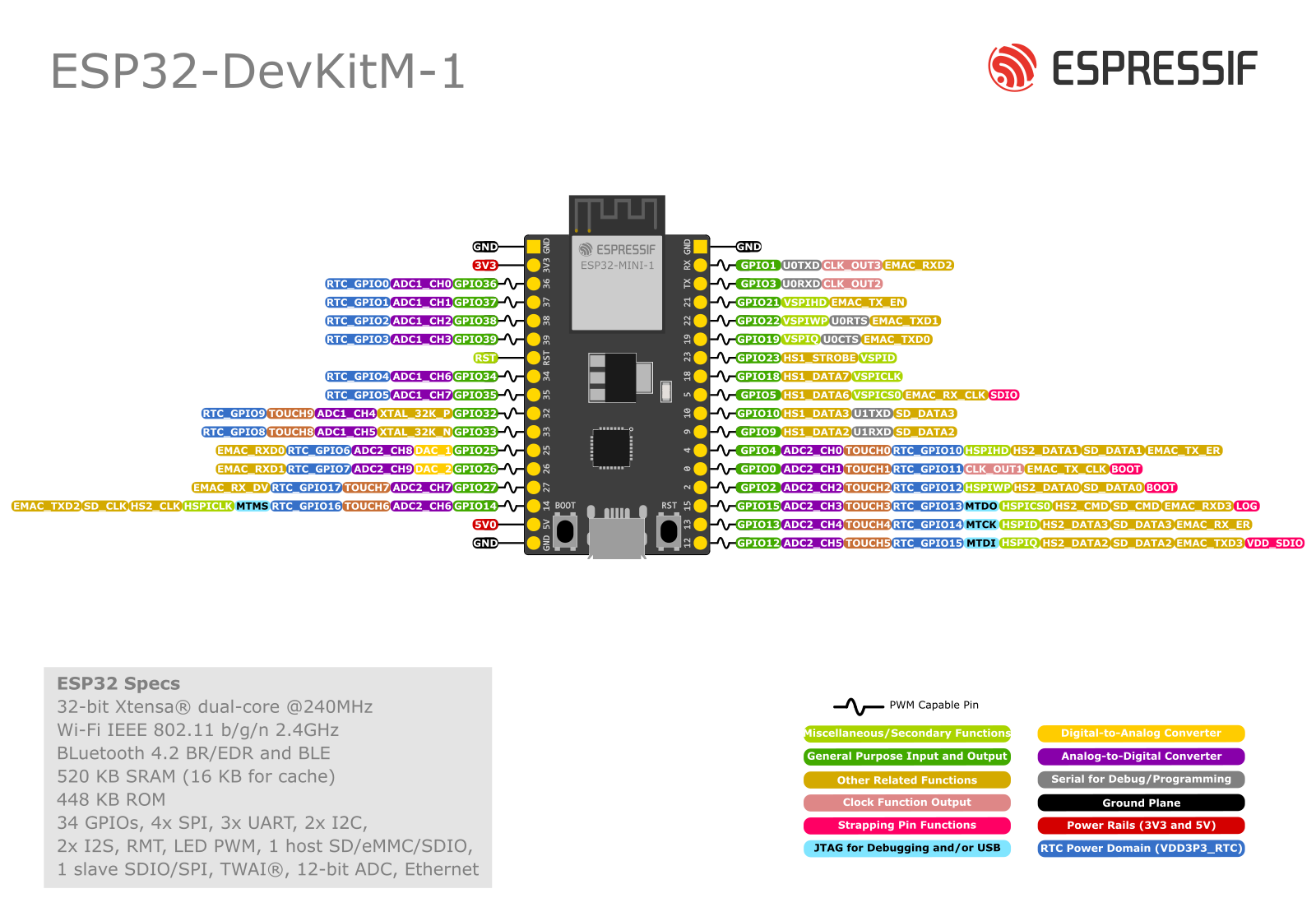
| GPIO pin | function |
|---|---|
| IMU | |
| 22 | SCL |
| 23 | SDA |
| ACTUATOR | |
| 36 | potentiometer in |
| 5 | motor output |
| 25 | DAC out |
- Potentiometer is to control the amount of output voltage for the vibration motor
2 threads are running on the ESP. Threads are a way to make a computer do multiple things asynchronously, meaning "at the same time" - more or less.
- Thread 1 is responsible for reading out the IMU data constantly and calculating the rhythm of the current stride.
- Thread 2 is responsible for giving the actuator feedback to the patient.
├── build
│   ├── ...
├── cmake-build-debug
│   ├── ...
├── managed_components
│   └── ...
├── main
│   ├── CMakeLists.txt
│   ├── HEE-FOG.c
│   ├── idf_component.yml
│   └── Kconfig.projbuild
├── CMakeLists.txt
├── dependencies.lock
├── README.md
├── sdkconfig
└── sdkconfig.old- There are 3 directories that are generated automatically by the esp-idf framework. You do not need to look into these directories. The directories are: build, cmake-build-debug and managed_components.
- Code for the ESP32 goes into the ./main/ directory.
- CMakeLists.txt will probably never need to be updated as the esp-idf takes care of added files. (Might be wrong about this)
- HEE-FOG.c is the c code file where our main code lives :)
- idf_component.yml is a file containing dependencies for the code. Only contains espressif/led_strip because it was part of the example code. Might need to be extended with communication protocols etc.
- Kconfig.projbuild is a file containing configuration to extend the idf.py menuconfig command. Probably not needed for this project.
- .gitignore contains a list of files and folders that do not need to be synced to git (like the folders mentioned in the first bullet point). Adding files or folders to this list is easiest by right-clicking the file/folder and choosing git > add_to_gitignore > .gitignore
- README.md contains documentation.
- The other files do not need to be handled.
The ISP-IDF documentation website
The good people from Jetbrains (the company behind CLion) have made a nice tutorial for you :)
A fatal error occurred: Could not open /dev/ttyUSB0, the port is busy or doesn't exist.
([Errno 13] could not open port /dev/ttyUSB0: [Errno 13] Permission denied: '/dev/ttyUSB0')
esp8266/source-code-examples#26 add the current user to the tty user group:
# all current groups:
groups
# available groups:
compgen -g
# add yourself to the tty and dialout group for tty (usb) access
sudo usermod -a -G tty [username]
sudo usermod -a -G dialout [username]idf docs try: ctrl + alt_gr + ]