Apache Flinkを色々試すためのプロジェクトです。
[Apache Flink] (https://flink.apache.org/)
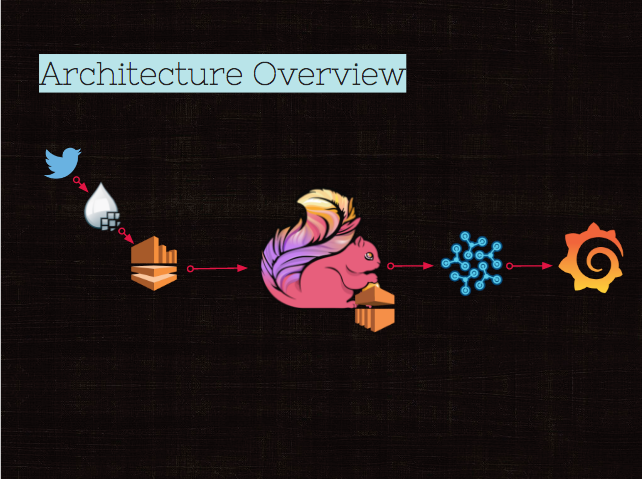
Twitterから取ったデータをFlinkでいいかんじにETLしてGrafanaで可視化
以下を全部つなぐととりあえずデータはプレゼン層まで流れるので、 インストールとかんたんな使い方くらいをまずは調べたい。
- TwitterAPI
- Nifi
- Kafka / Kinesis
- Flink
- EMR
- InfluxDB
- Grafana
参照 https://yonaminetakayuki.jp/twitter-api-key/
https://apps.twitter.com/ から自分のアプリを指定して、"Keys and Access Tokens"
docker でサクッと行きましょう
https://hub.docker.com/r/aldrin/apache-nifi/
docker-compose.ymlを書いたので、さくっと起動
$ docker-compose up -dブラウザアクセス http://localhost:8080/nifi ※DockerForMacじゃない人は、DockerのVMのIPを指定!!だいたい→(http://192.168.99.100/nifi)
ポチポチ設定します
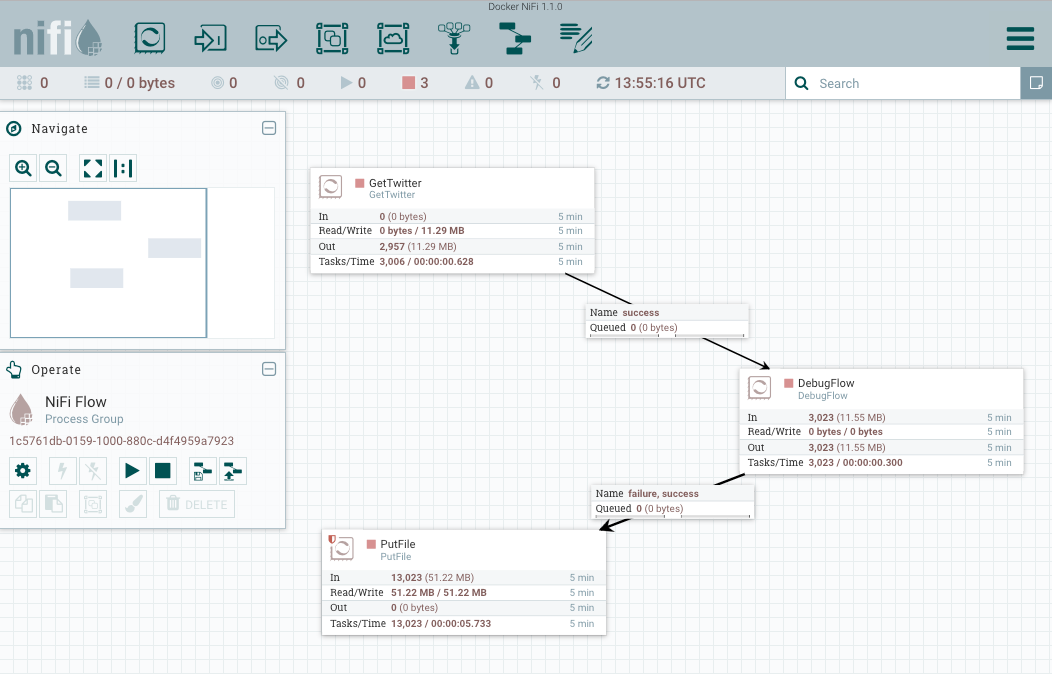
Processorの終端は注意です。「!」がなければだいたい動きます
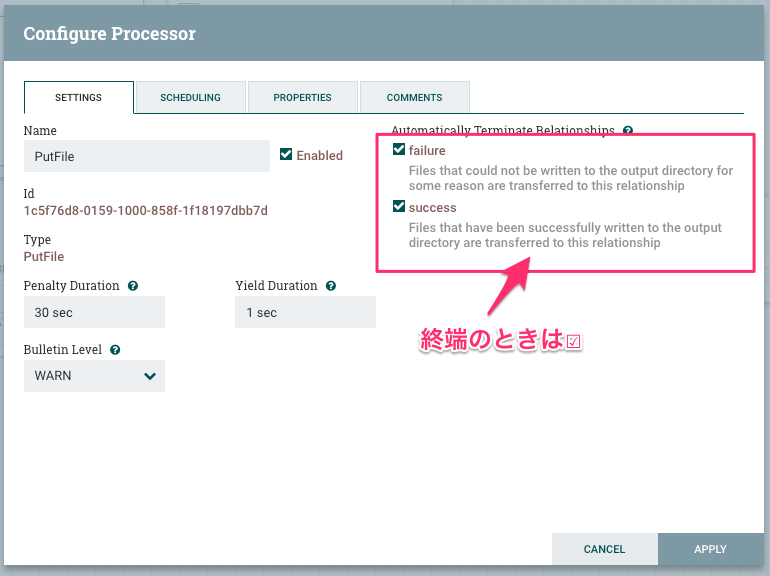
Tweet毎にファイルが作成されますが、、こんな感じで取れました。
nifi@637092c64bd9:/opt/nifi/data/tweets.txt$ cat 4555937600202.json
{"created_at":"Tue Dec 20 14:02:52 +0000 2016","id":811210261939920898,"id_str":"811210261939920898","text":"\u306a\u3093\u304b\u61d0\u304b\u3057\u3044\u3084\u3064\u304d\u305fwwwwww","source":"\u003ca href=\"http:\/\/twitter.com\/download\/iphone\" rel=\"nofollow\"\u003eTwitter for iPhone\u003c\/a\u003e","truncated":false,"in_reply_to_status_id":null,"in_reply_to_status_id_str":null,"in_reply_to_user_id":null,"in_reply_to_user_id_str":null,"in_reply_to_screen_name":null,"user":{"id":990032060,"id_str":"990032060","name":"f u m i k a","screen_name":"yt3_fi7","location":"Tokyo","url":null,"description":"\u7389\u68ee\u3055\u3093\u25e1\u030e\u2727","protected":false,"verified":false,"followers_count":54,"friends_count":62,"listed_count":0,"favourites_count":1123,"statuses_count":23689,"created_at":"Wed Dec 05 02:38:03 +0000 2012","utc_offset":32400,"time_zone":"Tokyo","geo_enabled":false,"lang":"ja","contributors_enabled":false,"is_translator":false,"profile_background_color":"000000","profile_background_image_url":"http:\/\/abs.twimg.com\/images\/themes\/theme1\/bg.png","profile_background_image_url_https":"https:\/\/abs.twimg.com\/images\/themes\/theme1\/bg.png","profile_background_tile":false,"profile_link_color":"FFCC4D","profile_sidebar_border_color":"000000","profile_sidebar_fill_color":"000000","profile_text_color":"000000","profile_use_background_image":false,"profile_image_url":"http:\/\/pbs.twimg.com\/profile_images\/749940152986841089\/8lPOj1CA_normal.jpg","profile_image_url_https":"https:\/\/pbs.twimg.com\/profile_images\/749940152986841089\/8lPOj1CA_normal.jpg","profile_banner_url":"https:\/\/pbs.twimg.com\/profile_banners\/990032060\/1448900020","default_profile":false,"default_profile_image":false,"following":null,"follow_request_sent":null,"notifications":null},"geo":null,"coordinates":null,"place":null,"contributors":null,"is_quote_status":false,"retweet_count":0,"favorite_count":0,"entities":{"hashtags":[],"urls":[],"user_mentions":[],"symbols":[]},"favorited":false,"retweeted":false,"filter_level":"low","lang":"ja","timestamp_ms":"1482242572661"}
ただの削除も入ってくるみたいですね。フィルタリング必要。
nifi@637092c64bd9:/opt/nifi/data/tweets.txt$ cat 4555959607426.json
{"delete":{"status":{"id":229197184271278081,"id_str":"229197184271278081","user_id":84824529,"user_id_str":"84824529"},"timestamp_ms":"1482242573699"}}
なお1minで6000件くらい、~100qpsくらいです。チョロ過ぎますね。
デバッグは超絶しづらいです。 空文字とか改行とかが入るとうまく動かないので注意!Twitterで401出ると思ったら、AccessTokenにタブ入ってました。
docker-composeに追加したので、docker-composeコマンドでかんたんに起動できます
docker-compose up -d kafka4flink
よく忘れるので使い方をMemo
# check topics
$KAFKA_HOME/bin/kafka-topics.sh --describe --zookeeper localhost

# create topic
$KAFKA_HOME/bin/kafka-topics.sh --create --topic tweet_conversation_topic \
 --partitions 10 --zookeeper localhost --replication-factor 1 || true

# consume
$KAFKA_HOME/bin/kafka-console-consumer.sh --zookeeper localhost --topic tweet_conversation_topic --from-beginning
長いのでREADME切り出しました