Changed overflow-x from hidden to auto for AnkiDroid #4501
Conversation


|
Is this related to this report? https://forums.ankiweb.net/t/portrait-mode-deck-editing-checkboxes-cut-off-english-ui-fits/68034 Have you confirmed it fixes that issue by testing in AnkiDroid? You can tweak the property in Chrome Dev Tools: https://github.com/ankidroid/Anki-Android/wiki/Development-Guide#via-chrome-development-tools |

It is indeed related to this, it's been an issue that's existed since 2024 and I initially tried to solve it in ankidroid and after some discussion in the ankidroid-dev channel, found that it was an upstream issue.
I have just tested it, thank you so much for this link, I've been trying to find out how to test if this change would work in the app (I got referred to the backend bridging the two, but ran into some separate problems setting that up). I can confirm that this change to overflow-x gives the option to scroll horizontally in ankidroid when font size is increased. screen-recording-dev-tools.mov |

But, that doesn't look like a good UX. Maybe force the horizontal width to fit by adjusting the font size and allowing certain elements (that are too large) to reflow? |
In that case, should this also be applied to the statistics screen as well? I am only maintaining consistency to this webview as seen from the current released version. Screen_recording_20260118_062206.mp4Have there been any issues raised on the forums or github about this UX choice? |
|
@defkorean Please add your name to the CONTRIBUTORS file to make CI checks pass. I'll merge this for now. You're welcome to look into improving responsiveness of all webview screens in another PR if you're interested! I'll create an issue. |

|
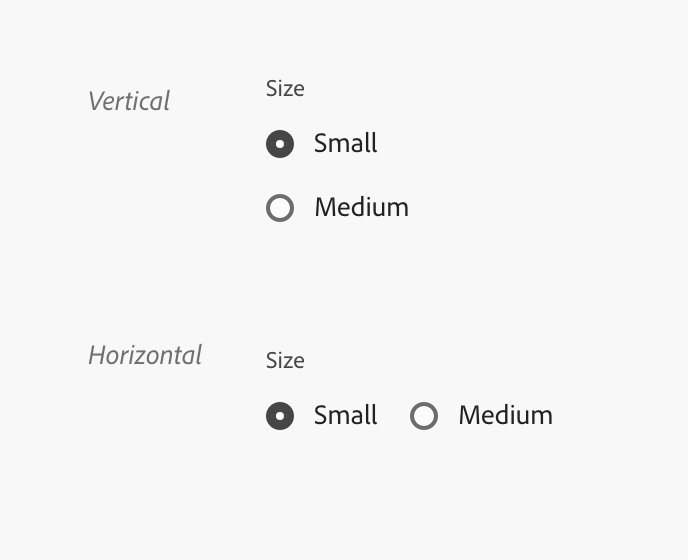
Wouldn't it be much better to cause reflows if the text size is increased? Having to scroll like that looks like bad UX and a bug in my opinion. E.g. from the video above, the "Future Due" graphs description should reflow to the next line once the text exceeds the devices view width. The radio buttons should reflow to be stacked like this:
This would be much better from a design and UX point of view and would also ensure that huge font sizes are properly supported on all platforms, including desktop. The graph itself would need updating as well, e.g. the calenders squares are way to small even for regular users. The touch target should be increased and the labels on graphs (e.g. the axis) needs to be updated to respect big font sizes as well. I actually did attempt something like this in the past but gave up, as my knowledge about ankis codebase was way less than it is now. It also seemed to be only possible to achieve if the svelte screens are rewritten (potentially significantly); they currently aren't great for responsive design. |
4 participants


The purpose for this change is due to content not fitting in AnkiDroid when system-wide font size is increased. In order to address this, I want to enable horizontal scrolling so that the deck options screen has the ability to scroll. Additionally, I noticed that the stats page and image occlusion has this property set to auto and these screens don't have this issue in AnkiDroid. From my research, both the linux and macOS versions opens a separate window so there shouldn't be any changes to the desktop versions.