This project creates a Kubernetes RKE2 cluster and Docker Host with Dockhand. The cloud provider used is Hetzner Cloud but this repo can be easily adapted to another provider or bare metal machines.
The goal of this project is to make truly reproducible infrastructure for any environment, defined in git.
The host OS is NixOS❄️ and managed by a flake with Clan. Whether you're running a homelab or maintaining critical computing infrastructure, Clan will help reduce maintenance burden by allowing a git repository to define your whole network of computers.
Kubernetes Cluster Diagram:

Full Infrastructure Diagram:

RKE2 is Rancher's enterprise-ready next-generation Kubernetes distribution. It has also been known as RKE Government.
It is a fully conformant Kubernetes distribution that focuses on security and compliance within the U.S. Federal Government sector.
Machine Features:
Cluster Features:
CiliumContainer Network InterfaceTraefikIngress ControllerCert-Managerauto TLS CertificatesLonghorn+Hetzner Cloud Volumes+Local Path ProvisionerContainer Storage InterfaceArgoCDGitOps
The Docker host features:
Dockerversion 29.1.5TailscaleVPNTSDProxyVery simple proxy for TailscaleDockhandDocker Web UIlazydockerTerminal UI for both docker and docker-composersyncFast incremental file transfer utility
To display the outputs of the flake.nix file run:
nix flake shownixosConfigurations are the machines this flake builds.
nixosConfigurations
├── mng-0
├── wrk-0
├── proxy
└── docker
apps are predefined scripts that can be run with nix run .#<app-name>.
apps
├── get-config
├── get-token
├── sops-add-user
├── setup-env
├── send-env
└── tmp-pod
devShells are the development shells that provide all the dependencies for the project.
devShells
└── defaultTo use this project, you need either:
Nix package manager+flakesenabled.
or
Docker+Dev ContainersVSCode Extension (Untested)
Static variables are defined in infra.json and used throughout the project. For instance the field meta.domain is used in the Traefik ingress controller configuration and to define ingress routes for the other Web UIs. The top level env variable is used to define the environment of the cluster, ie dev, staging or prod.
- A remote storage box is available to store secrets and config files. This can be any host reachable over ssh. I am using a Hetzner Storage Box
- Tailscale is used as the VPN. Tailscale can be self hosted via Headscale but I am using Tailscale Cloud.
- Cloudflare Origin Certificates are used for mTLS with the Cloudflare Proxy for the domain
meta.domainininfra.json. This ensures that only authorized users can access the cluster Web UIs. - The domain
meta.domainininfra.jsonhas properly configured DNS records pointing to the IPs of the servers, either theproxyor thedockermachine.
Use the Nix development shell to enter the environment with all development dependencies installed. Optionally use direnv to make life easier. direnv drops you into the devShell when it detects a .envrc file and reloads the devShell when it detects a change to the shell. Either download it or use the VSCode extension.
nix developNix devShell works best with bash. If you want to use a different shell see this discussion.
Packages installed:
clan-cliCommand-line interface for Clan.lolhcloudCommand-line interface for Hetzner CloudlazyhetznerTUI for managing Hetzner Cloud resourcesrke2_1_35Rancher Kubernetes Engine (RKE2)kubectlKubernetes CLIkubernetes-helmPackage manager for kubernetesargocdGitOps for KuberneteskubesealKubernetes controller and tool for one-way encrypted Secretsk9sKubernetes CLI To Manage Your Clusters In StylekubefetchNeofetch-like tool to show info about your Kubernetes ClustertailscaleTailscale VPN client
If you are coming to this project to join an existing repo, you can skip this section. ie my team at netsam.com.
Generate an age key pair and place it at $SOPS_AGE_KEY_FILE then change the public key in infra.json and add your user to the secrets backend:
nix run .#sops-add-userGenerate all the secrets for the infrastructure:
clan vars generate mng-0

clan vars generate wrk-0

clan vars generate docker
Ensure the ssh key pair is generated and placed in your user's home directory at ~/.ssh/industrial-host and ~/.ssh/industrial-host.pub
clan vars get mng-0 industrial-host/ssh-key > ~/.ssh/industrial-host
clan vars get mng-0 industrial-host/ssh-key.pub > ~/.ssh/industrial-host.pubTo deploy a machine all it takes is two commands:
clan machines init-hardware-config <machine-name> --target-host <machine-ip>

clan machines install <machine-name> --target-host <machine-ip>
To update a machine:
clan machines update <machine-name>Deploy the machine mng-0 before deploying the other kubernetes machines.
Once mng-0 is deployed, run the following commands to fetch the Join Token and the kubeconfig:
nix run .#get-token

nix run .#get-config
Make sure the var rke2/token matches.
clan vars get wrk-0 rke2/tokenAdding a new type of machine to the cluster is as simple as adding a public IPv6 and private IPv4 address to the networking.public and networking.private objects in infra.json and deploying the new machine with Clan. Make sure to follow the naming convention for the machine type. ie mng-<int>, wrk-<int>, docker and proxy.
Most of the time only the infra.json file needs to be changed to re-define the cluster.
Ensure the ssh key pair is placed in your user's home directory at ~/.ssh/industrial-host and ~/.ssh/industrial-host.pub
To fetch the secrets and config files from the storagebox run:
nix run .#setup-envThis will set up the environment variables for the cluster you are accessing.
nix developEnsure you have placed the ssh key in ~/.ssh/industrial-host. Keep this secret. Anyone with access to this key can access the cluster.
nix run .#setup-envCheck the status of the Tailscale VPN connection:
tailscale statusKUBECONFIG environment variable is set automatically.
Run kubectl commands to interact with the cluster:
kubectl get nodes

kubectl get pods -A

kubefetchk9s is your swiss army knife for kubernetes clusters.
Watch this short video tutorial: K8s Made Easy: Manage Your Clusters with the k9s Terminal UI
k9sDockhand is a powerful, intuitive Docker management platform.
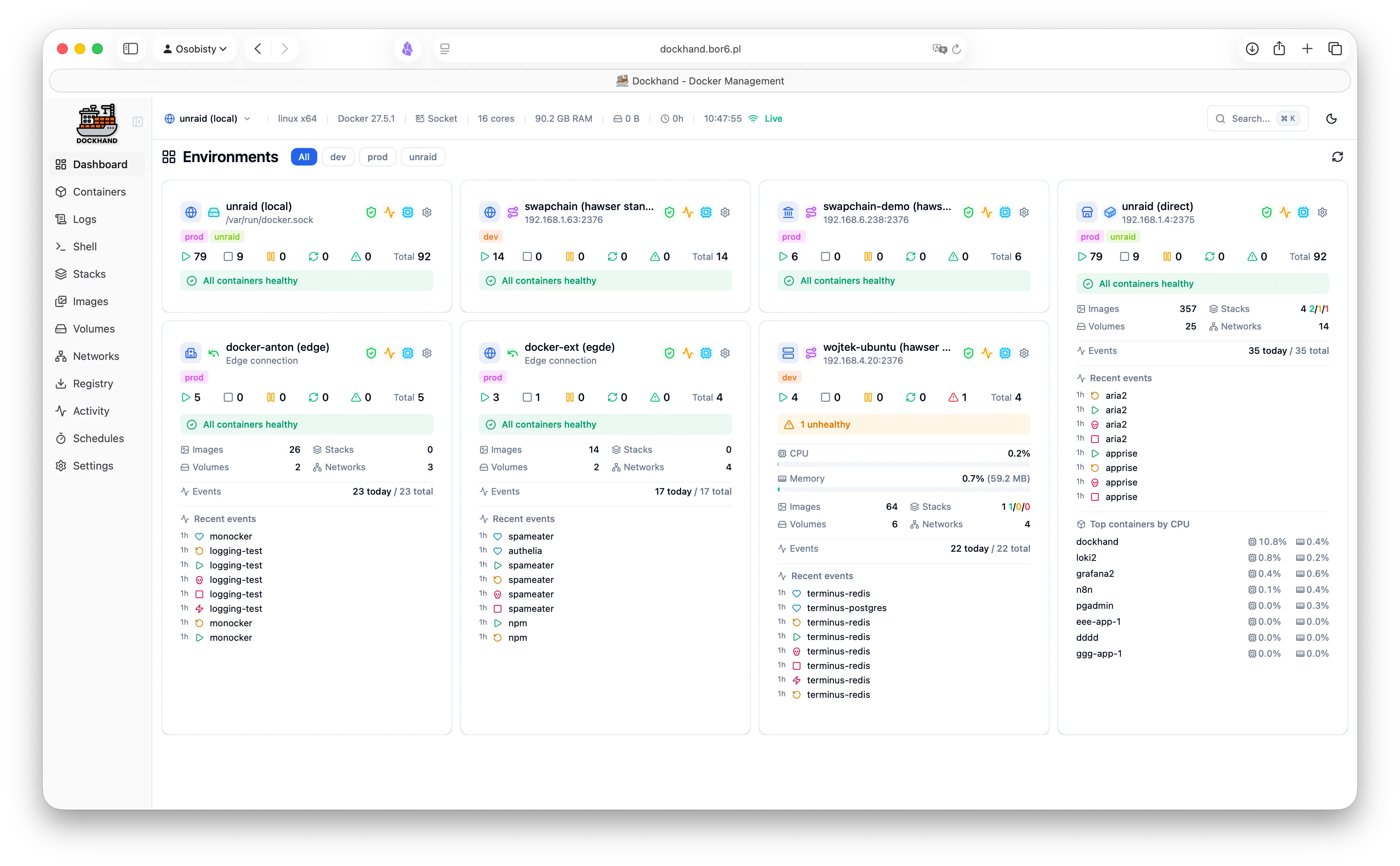
Dockhand has Git Integration for GitOps and an API for CI/CD + Automated Deployments.
Hosting Dockhand next to Kubernetes allows for a seamless transition from Local Development to Docker Dev Environment to Kubernetes Prod Environment. Or any other combination of environments. Heck! Deploy Prod to Dockhand! 🤷 🚀
See my guide for 👉 GitOps with Dockhand and ArgoCD.
TSDProxy is a reverse proxy that automatically adds docker containers to the Tailscale network.
Simply add a container label "tsdproxy.enable=true".
This will add the container as a machine to the Tailscale network. Making an address like <container_name>.armadillo-frog.ts.net available to users on the Tailscale network with https for no browser warnings.