
Detect blocking calls, slow async tasks, and performance bottlenecks in your asyncio applications. Captures stack traces, function arguments, CPU/memory/GC metrics. Generates standalone HTML reports and CSV exports.
pip install loopsentryOR
uv add loopsentryRequires
psutilandrich(installed automatically as dependencies).
import asyncio
from loopsentry import LoopSentry

async def main():
    sentry = LoopSentry(threshold=0.1)
    sentry.start()
    # ... your application
    sentry.stop()

asyncio.run(main())sentry = LoopSentry(
base_dir="sentry_logs", # log output directory
threshold=0.1, # blocking detection threshold (seconds)
async_threshold=1.0, # slow async task threshold (seconds)
capture_args=True, # capture function arguments at block time
detect_async_bottlenecks=True, # track slow async tasks
)| Parameter | Default | Description |
|---|---|---|
base_dir |
"sentry_logs" |
Directory for log output |
threshold |
0.1 |
Seconds before a blocking call is flagged |
async_threshold |
Same as threshold |
Separate threshold for slow async tasks |
capture_args |
False |
Capture local variables from stack frames |
detect_async_bottlenecks |
False |
Monitor async task completion times |
from contextlib import asynccontextmanager
from fastapi import FastAPI
from loopsentry import LoopSentry

@asynccontextmanager
async def lifespan(app: FastAPI):
    sentry = LoopSentry(
        threshold=0.1,
        async_threshold=2.0,
        capture_args=True,
        detect_async_bottlenecks=True,
    )
    sentry.start()
    yield
    sentry.stop()

app = FastAPI(lifespan=lifespan)| Pattern | Type | Example |
|---|---|---|
| Blocking sleep | Block | time.sleep() in async context |
| Sync HTTP | Block | requests.get() instead of aiohttp/httpx |
| Sync DB calls | Block | PyMongo, sqlite3 sync operations |
| Subprocess | Block | subprocess.run() |
| CPU loops | Block | Tight loops without yielding |
| Slow coroutines | Async | Tasks exceeding async_threshold |
| Crashes | Crash | Process killed during a block |
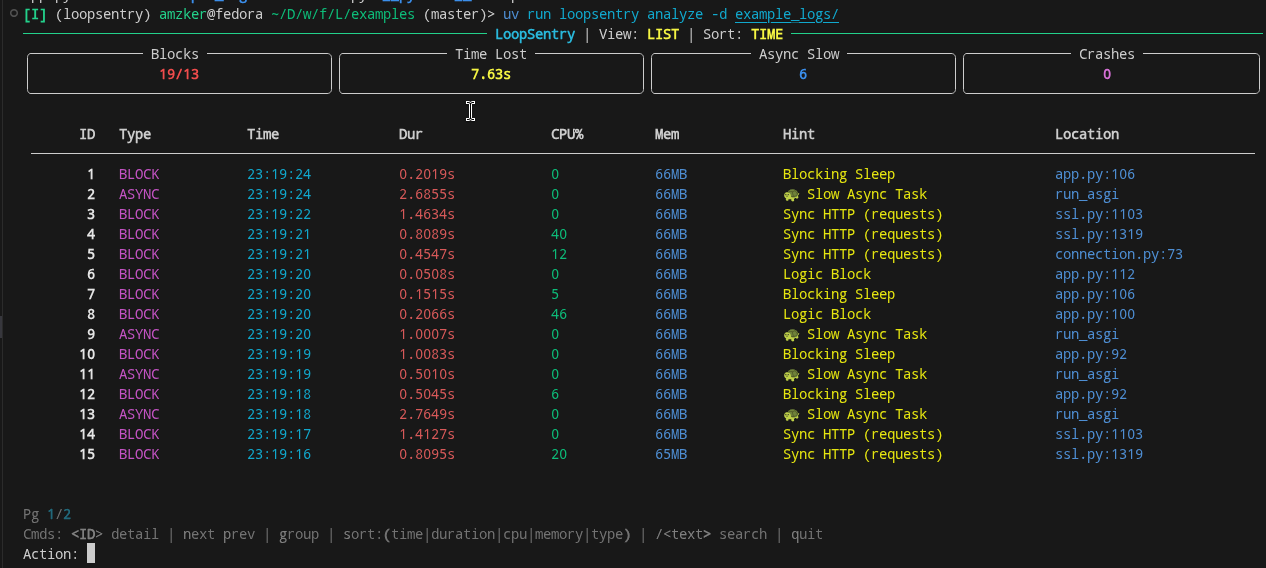
loopsentry analyze                          # auto-select latest logs
loopsentry analyze -d sentry_logs/ # specific directory| Key | Action |
|---|---|
<ID> |
View event detail (stack trace, args, metrics) |
n / p |
Next / Previous page |
g |
Toggle group view (top offenders) |
s |
Cycle sort: time → duration → cpu → memory → type |
s:cpu |
Sort by specific column |
/text |
Search/filter events |
q |
Quit |
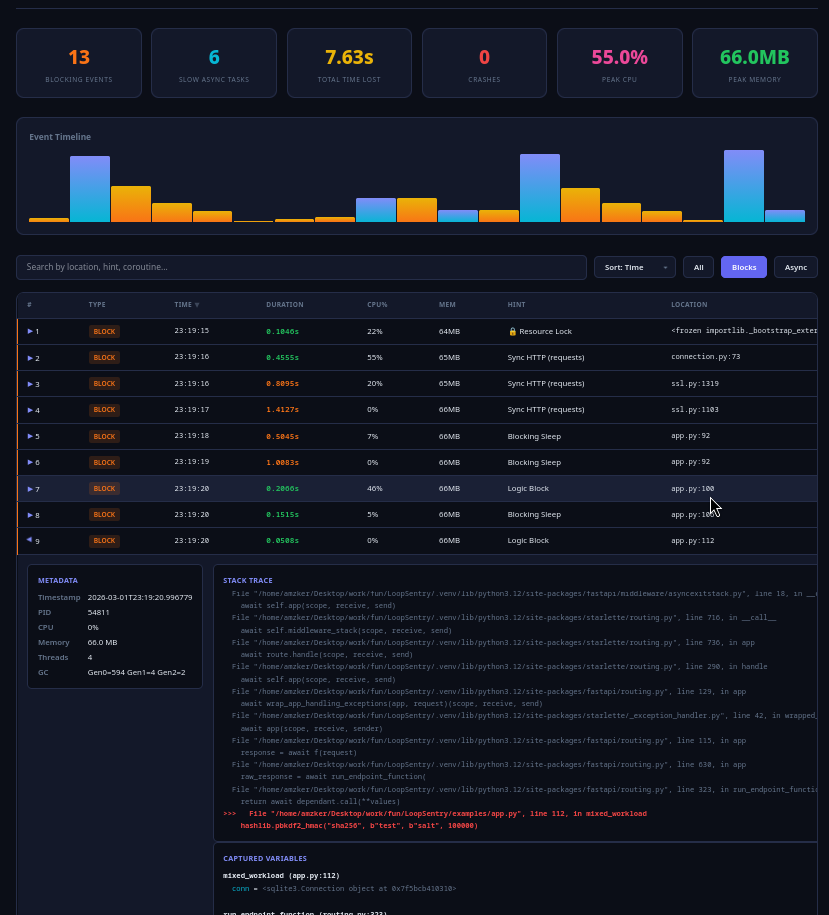
loopsentry analyze -d sentry_logs/ --html
loopsentry analyze -d sentry_logs/ --html -o report.html
Generates a standalone HTML file — no dependencies, no internet required. Open directly in any browser.
loopsentry analyze -d sentry_logs/ --csv
loopsentry analyze -d sentry_logs/ --csv -o data.csvloopsentry --version # Show version
loopsentry analyze [OPTIONS]
-d, --dir DIR Directory to scan
-f, --file FILE Specific .jsonl file to scan
--html Generate standalone HTML report
--csv Generate CSV report
--sort COLUMN Sort by: time | duration | cpu | memory | type
-o, --output PATH Output file path for HTML/CSV
The examples/ directory contains a complete FastAPI application that deliberately triggers every type of blocking pattern LoopSentry detects.
Run the demo:
cd examples/

# Terminal 1 — start the server
uv run app.py

# Terminal 2 — fire test requests
uv run mock_server.py

# Terminal 3 — fire test requests
uv run loadtest.py -d 120 -o example_logs/loadtest

# Terminal 1 — stop server (Ctrl+C), then generate report
loopsentry analyze -d example_logs/ --html
Endpoints in the demo app:
| Endpoint | What it does |
|---|---|
GET /healthy |
Clean async endpoint (no block) |
GET /users/sync |
Sync SQLite query blocking the loop |
POST /hash |
CPU-bound PBKDF2 hashing |
GET /external |
Async HTTP via aiohttp (clean) |
GET /external/sync |
Sync HTTP via requests (blocks loop) |
GET /sleep/{seconds} |
time.sleep() blocking the loop |
GET /compute |
CPU-bound loop (5M iterations) |
GET /mixed |
Sleep + DB + hashing in one request |
blocks smaller than 0.5 sec during high load / stress testing should be ignored. grouped view is just so you can find offender quickly , but in order for you to understand overall health of app , you should switch to timeline mode and see block durations across all events , to get better idea. during heavy load smaller non attention required tasks will also start blocking the event loop , unless those blocks are not associated with massvie cpu usage then you should focus on them later and should focus on blocks where avg block is greater than 0.6-7 seconds. in group view you do not need read each and every separate event , you can just read 1st one and get the idea of blocks.
you also need to take concurrency as variable to mind , check out report_async.html and report.html to understand how to interpret both blocks , also look at their loadtest.html files loadtest_async.html and loadtest.html
async app has proccessed ~11k requests in 2 min , while sync app has around 1k requests in 2min. if you notice in async app there is no block , all of the blocks are from loopsentry itself and that is expected , loopsentry will also have its own blockings given stack frames capture as well as , per core cpu usage etc... processes happens. which is fine given the value it can provide.
MIT