An extension for the OpenFlexure Microscope that adds optical tweezers functionality. The OpenFlexure Project provides open-source, 3D-printed microscopes with precise mechanical positioning - this project extends that capability with laser-based optical trapping.
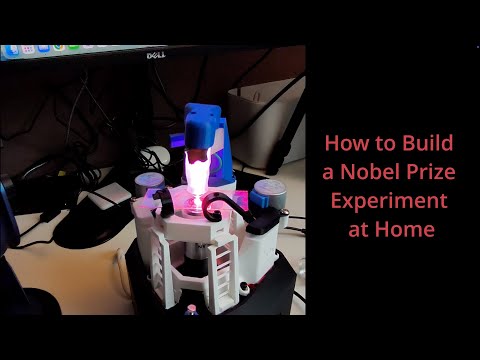
Full assembly walkthrough covering the basics, required parts, and what you need to get started. Click the thumbnail to watch on YouTube.
Experience optical tweezers physics directly in your browser! Click and drag particles, watch them escape the trap, and observe real-time Brownian motion. No installation required - works on any device.

This repo also includes a lightweight, pure-HTML/JS optical tweezers animation that runs in any browser and can be embedded in your own website. You can copy the canvas section and script from the main page and drop it into your site to simulate a trapping effect without any dependencies.
ipt/- Autodesk Inventor (.ipt) and Assembly (.iam) files for modification in Fusion 360 or Inventor- Coupler (
cuppler_ot.ipt) - Laser Holder Assembly (
Laser Holder 3.0 .iam) - Objective Holder (
Objective Holder.ipt) - Cube parts (
Cube .ipt,Part10.ipt) - Main assembly (
OpenFlexure Optical Tweezers.iam)
- Coupler (
stl/- STL and 3MF files ready for 3D printing- Complete assembly:
OpenFlexure Optical Tweezers.3mf - Coupler:
Cuppler.stl - Cube:
Cube.stl - Laser holders:
Laser Holder 12 mm laser.stl,laser Holder 6 mm laser .stl - Lens lid:
Lens Lid.stl - RMS optics module:
RMS optics module OT.stl
- Complete assembly:
openscad/- Parametric designs for customizationalignment_cap.scadandalignment_tool.scad- Helpers for aligning optics and lasercuppler_ot.scad- Coupler between the cube and laser holderlaser_holder_OT.scad- Laser mount with adjustable diametercube_OT.scad- Optical cube housingrms_optics_module_ot.scad- RMS-threaded optics adapter- Supporting library files in
openscad/libs/
Optical Tweezers Simulation/- Interactive physics simulation- Web Version - Run directly in your browser (no installation!)
- Python desktop version with real-time visualization
- Click-and-drag interaction to test trap strength
- Real-time force visualization and Brownian motion
- Educational tool for understanding optical trap dynamics
- Access to a 3D printer
- OpenFlexure Microscope base (see OpenFlexure documentation)
- Laser diode (typically 635nm red laser, adjustable diameter in SCAD files)
- RMS-threaded objective lens
The OpenSCAD files require dependencies from the main OpenFlexure project:
-
Clone the OpenFlexure Microscope repository:
git clone https://gitlab.com/openflexure/openflexure-microscope.git
-
Install the threads library inside this project's OpenSCAD folder:
cd OpenFlexureOT
git clone https://github.com/rcolyer/threads-scad.git openscad/threads-scad- Keep this project's
openscad/folder alongside the OpenFlexureopenscad/files (so shared includes resolve):
your-workspace/
├── openflexure-microscope/
│   └── openscad/               (OpenFlexure base files)
└── OpenFlexureOT/
   └── openscad/               (This project's files + threads-scad/)
      ├── threads-scad/
      ├── libs/
      └── *.scad
-
Open the SCAD files and customize parameters:
laser_diameter- Match your laser diode size (default: 6mm)- Thread dimensions for your specific hardware
- Mounting geometry
-
Render and export STL files from OpenSCAD
- OpenFlexure OpenSCAD files
- threads-scad library by rcolyer
Simply visit https://aliazadbakht.github.io/OpenFlexure_OpticalTweezers/
- No installation required
- Works on any device (desktop, tablet, mobile)
- First load takes 10-30 seconds (downloads Python runtime)
- Fully interactive with click-and-drag
For faster performance and offline use:
cd "Optical Tweezers Simulation"
pip install -r requirements.txt
python opticaltweezers_simulation.py  # Desktop version with mouse interaction
The simulation demonstrates optical trap physics, including:
- Brownian motion - Random thermal fluctuations
- Trap escape dynamics - Drag particles beyond the escape radius
- Force visualization - See trap force magnitude and direction in real-time
- Boltzmann statistics - Compare experimental data with theoretical predictions
This project is supported by Wavefront Principle B.V., a pre-incubator dedicated to transforming innovative ideas into real-world devices.
Special thanks to Mojtaba Nosratloo for his significant contributions to the design and development of this project.
This project is licensed under the CERN Open Hardware Licence Version 2 - Strongly Reciprocal (CERN-OHL-S v2). See the LICENSE file for details.
This license is used because this project incorporates and builds upon OpenFlexure designs and components.


