A simple to use time tracking CLI for macOS.
Track your screen time based on macOS system logs to calculate how many hours you've worked each day.
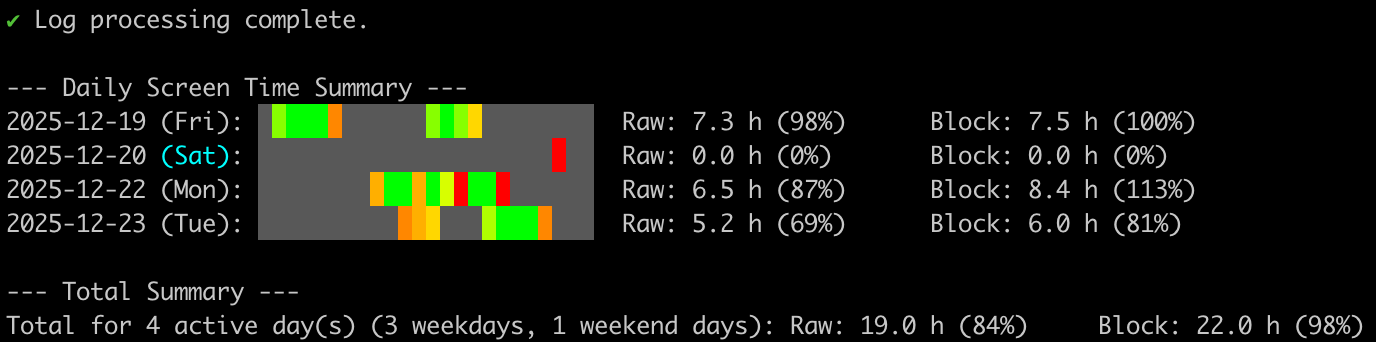
- 📊 Track screen time based on macOS unlock/lock events
- 📅 Calculate time spent per day with hourly breakdown visualization
- 📈 Compare periods with trend analysis (week-over-week, etc.)
- 💾 Smart caching for faster subsequent runs
- 🎨 Colorful terminal output with progress indicators
- 📤 Export data to CSV or JSON for integration with other tools
- 📄 Export data as PDF for easy sharing
- macOS (uses macOS system logs)
- Python 3.7+ (for development)
Before using Time Buddy, you must enable persistent logging for screen lock/unlock events:
sudo log config --subsystem com.apple.loginwindow --mode "persist:info"This command configures macOS to persistently store login window events. Without this, the system may not retain the screen lock/unlock logs needed for accurate time tracking.
Note: You only need to run this once. The setting persists across reboots.
pip install time-buddyIf you don't have Python installed:
curl -fsSL https://raw.githubusercontent.com/alen-z/time-buddy/main/install.sh | bashOr build from source:
git clone https://github.com/alen-z/time-buddy.git
cd time-buddy
make install
make install-binary# Show version
time-buddy --version
# Show screen time for the last 7 days (default)
time-buddy
# Show screen time for the last 30 days
time-buddy --days 30
# Show detailed session information
time-buddy --verbose
# Force refresh (ignore cache)
time-buddy --no-cache
# Include weekends in expected hours calculation
time-buddy --include-weekends
# Clear the cache
time-buddy --clear-cache
# Export data as JSON
time-buddy --days 30 --export json
# Export data as CSV
time-buddy --days 30 --export csv > december.csv
# Export data as PDF
time-buddy --days 30 --export pdf > december-report.pdf
# View 7 days from a month ago
time-buddy --days 7 --offset 30
# Compare with previous consecutive period (default: no gap)
time-buddy --days 7 --compare-offset
# Compare with a week gap (e.g., this week vs 2 weeks ago)
time-buddy --days 7 --compare-offset 7# Install dependencies
make install
# Install locally for testing (editable mode)
pip install -e .
# Run the application
make run
# Create standalone binary
make create-binary
# Test the binary
make test-binary
# Clean build artifacts
make cleanTime Buddy reads macOS system logs for screen lock/unlock events and calculates:
- Raw time: Actual screen-on time between unlock and lock events
- Block time: Sum of time spans for each continuous work session (gaps >1 hour create separate blocks)
The output shows a 24-hour visualization where each block represents an hour, colored by activity intensity.
MIT License