One-Liner: Vril lets anyone become a physical product designer with the help of AI.

Designing physical products is slow, expensive, and requires specialized skills.
Even designing simple items like a mug, water bottle, or shoe box needs:
- 3D modeling software knowledge
- Iteration cycles
- Hours of manual work
Most people with ideas—event organizers, small businesses, artists, non-profits—don't have the expertise or time to create satisfying product designs. Traditional tools prevent everyday people from tapping into their creative potential.
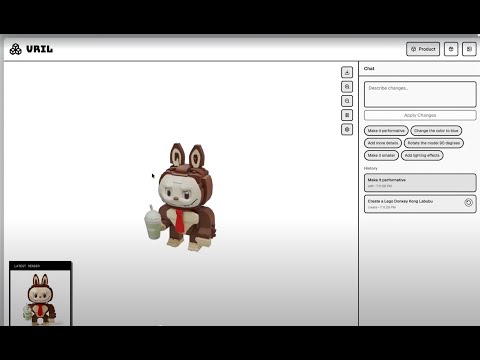
Vril is a product design studio that creates and iterates 3D products + packaging just from plain English.
Step 1: Users describe or upload references, and Vril generates a fully editable 3D product model.
Step 2: A built-in editor with a Cursor-style chatbot lets users iterate the shape, form, and material of the product through simple prompts.
Step 3: Users design packaging with the help of AI. With editable textures, dielines, artwork, and dimensions, all controlled through AI.
Step 4: Vril allows users to export the finished designs in various file formats.
Vril turns anyone into a product designer.
Imagine the Hack Western organizers want to create custom swag, like a Hack Western Cup. But:
- They don't know 3D design
- They don't have time
- Hiring a designer is slow and expensive
With Vril, they simply type:
"Create a ceramic mug with a matte black finish and a Hack Western 12 logo → Make the handle thicker."
Vril instantly generates the 3D mug, lets them iterate the shape and prints, and designs the packaging for it.
They get a real product design in minutes—not days.
Making product design accessible and easy for all.
- Framework: Next.js 14 with TypeScript
- 3D Rendering: Three.js + React Three Fiber for interactive product visualization
- UI: Tailwind CSS with shadcn/ui components
- Key Features:
- Real-time 3D product viewer with material controls
- Interactive packaging editor with live dieline visualization
- AI chat interface for iterative design modifications
- Texture cache system for optimized image loading
- Framework: FastAPI with async support
- AI Integration: Google Gemini for image generation and design iteration
- State Management: Persistent packaging state with atomic updates
- Key Services:
panel_generation.py: Parallelized texture generation for packaging panelspanel_prompt_templates.py: Structured prompt engineering with guardrailsproduct_generation.py: 3D product model creation and iterationdieline_generation.py: SVG dieline generation for packaging templates
vril/
├── frontend/
│   ├── app/                    # Next.js pages and routes
│   │   ├── packaging/          # Packaging design interface
│   │   └── products/           # Product creation interface
│   ├── components/             # React components
│   │   ├── package-viewer-3d.tsx    # 3D packaging preview
│   │   ├── dieline-editor.tsx       # Interactive dieline editor
│   │   └── AIChatPanel.tsx          # Cursor-style AI chat
│   ├── hooks/                  # Custom React hooks
│   │   └── usePanelTexture.ts       # Texture loading and caching
│   └── lib/                    # API clients and utilities
│
├── backend/
│   ├── app/
│   │   ├── endpoints/          # API routes
│   │   │   ├── packaging/      # Packaging generation endpoints
│   │   │   └── products/       # Product generation endpoints
│   │   ├── services/           # Business logic
│   │   │   ├── panel_generation.py          # Texture generation
│   │   │   ├── panel_prompt_templates.py    # Prompt engineering
│   │   │   └── product_generation.py        # 3D model generation
│   │   ├── models/             # Data models and state management
│   │   └── integrations/       # External API integrations (Gemini)
│   └── main.py                 # FastAPI app entry point
│
└── docs/                       # Technical documentation
-
Two-Phase Parallelized Generation:
- Phase 1: Generate single 3D mockup of entire package
- Phase 2: Extract all panel textures simultaneously using
asyncio.gather() - Result: 6x faster generation with consistent design across panels
-
Structured Prompt Engineering:
- Template-based prompts with validation and guardrails
- Context-aware generation for create vs. edit workflows
- Full-bleed edge-to-edge design requirements
-
Persistent State with Atomic Updates:
- Multi-shape state management (box/cylinder)
- Atomic texture updates to prevent race conditions
- Texture persistence during regeneration
-
Interactive 3D Workflow:
- Real-time material and texture preview
- Live dieline editing with dimension arcs
- Texture cache for instant switching between designs
cd frontend
npm install
npm run dev
The frontend will run at http://localhost:3000
Local Development:
cd backend
pip install -r requirements.txt
uvicorn main:app --reload
Docker:
cd backend
docker-compose up --build
The backend API will run at http://localhost:8000
Create a .env file in the backend directory:
GEMINI_API_KEY=your_gemini_api_key_here
FAL_KEY=your_fal_api_key_here
To save all generated models, images, and videos to your local filesystem for demos/presentations:
Option 1: Using Demo Mode Script (Recommended)
# Start backend in demo mode with artifact saving enabled
./backend/start_demo_mode.sh

# All artifacts will be saved to: backend/tests/artifacts/
# Each generation creates timestamped folders:
#   - gemini_create_*/gemini_edit_* (AI images)
#   - trellis_create_*/trellis_edit_* (3D models, videos, state.json)
Option 2: Manual Setup
# Add to backend/.env:
SAVE_ARTIFACTS_LOCALLY=true

# Then restart normally
docker compose -f backend/docker-compose.yml restart
Option 3: One-Off Demo Session
# Docker
SAVE_ARTIFACTS_LOCALLY=true docker compose -f backend/docker-compose.yml up

# Local (uvicorn)
SAVE_ARTIFACTS_LOCALLY=true uvicorn main:app --reload
Artifacts are saved to backend/tests/artifacts/ with timestamps for easy browsing.
- Frontend: Next.js, React, TypeScript, Three.js, Tailwind CSS
- Backend: FastAPI, Python, asyncio
- AI: Google Gemini (image generation)
- 3D: React Three Fiber, Three.js
- State: React hooks, FastAPI state management