Contributors: mdshuvo, addonmaster, mdashikul
Tags: post grid, ajax filter, infinite scroll, pagination, filter
Requires at least: 5.8
Tested up to: 6.8.3
Requires PHP: 7.4
Stable tag: 3.4.17
License: GPLv2 or later
License URI: http://www.gnu.org/licenses/gpl-2.0.html
Gridmaster helps you create beautiful post grids with AJAX filters, pagination, load more, and infinite scroll — all without page reload.
Post Grid Master (Gridmaster) helps you create WordPress post grids with AJAX filter support — including taxonomy filters, pagination, load more buttons, infinite scroll, and more.
You can visually build and customize your post grid using the shortcode generator and place it anywhere — inside posts, pages, or template files. It’s fully compatible with custom post types and any WordPress theme.
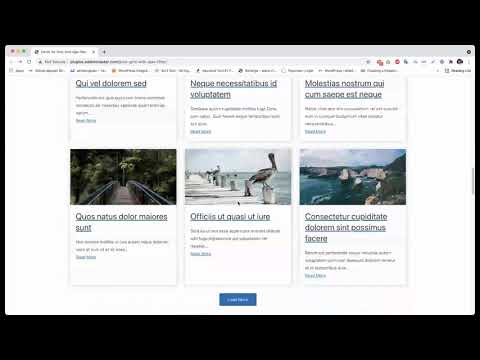
Post Grid Master gives you everything you need to create modern post grids with AJAX filters — visually, easily, and efficiently.
- Shortcode Generator: Generate post grid shortcodes with live preview. Use anywhere — posts, pages, or template files.
- Pre-Built Grid Layouts: Choose from multiple ready layouts or style your own using CSS.
- Custom Post Type Support: Build post grids from any post type — blog posts, portfolios, products, and more.
- Posts Per Page Control: Define how many posts appear per page or display all at once.
- Order & Sort Options: Sort by date, title, author, ID, menu order, random, or comment count.
- Excerpt Length: Control how many words appear in excerpts and whether to use content or excerpt fields.
- Custom “Read More” Button: Toggle visibility, edit the text, and link to full posts.
- AJAX Pagination: Load posts instantly without page reload — choose between classic pagination or load-more button.
- Load More Button: Load more posts dynamically with a single click.
- Infinite Scroll: Automatically load next posts as visitors scroll down the page.
- Animate on Load: Add smooth entry animations when new posts appear.
- Filter Styles: Choose from 3 ready filter layouts or display the grid without filters. Optionally remove the “All” button.
- Custom Taxonomy Filters: Filter posts by taxonomy or category terms — show all or selected terms only.
- Filter Heading Option: Add a custom heading above filters or hide it entirely.
- Toggle Filter Items: Make filter items collapsible under a clickable heading.
- Works with Any Theme: Fully compatible with all modern WordPress themes.
- Clean & Optimized Code: Built with performance and scalability in mind.
- Responsive Design: Looks perfect on desktop, tablet, and mobile.
- Cross-Browser Compatible: Works smoothly on all major browsers.
- Translation Ready: Ready for localization and multilingual websites.
- Comprehensive Documentation: Step-by-step guides for all features.
- Feature-Rich Free Version: Includes all essential grid and filter tools at no cost.
💬 Need Help?
Ask in the support forum or contact us.
We’ll respond as quickly as possible!
Upgrade to Post Grid Master Pro to unlock more advanced tools and layout flexibility.
- Advanced Filter Styles: Access more stylish and interactive filter layouts.
- Premium Grid Layouts: Get exclusive post grid designs and templates.
- Taxonomy Images & Colors: Add category images and color indicators in filters or post items.
- Auto-Select Taxonomy: Automatically highlight the correct taxonomy on relevant pages.
- Custom Taxonomy Terms: Display selected terms instead of all.
- Initial Term on Load: Show posts from a default term when the page first loads.
- Auto-Select Initial Term: Automatically detect and preselect the term on term pages.
- Multiple Term Selection: Allow filtering by multiple taxonomy terms at once.
- Auto Post Type Selection: Automatically detect post types when viewing archive pages.
- Custom Heading Tag: Change post title tags (H1–H6, div, span, or p).
- Heading Font Size Control: Set custom font sizes for titles across devices.
- Column & Row Gap Control: Adjust space between grid items for desktop, tablet, or mobile.
- Items per Row: Define different post counts per row for responsive breakpoints.
- Slider Option: Convert your grid into a fully responsive slider with options for:
- Slides to show
- Slides to scroll
- Prev/Next arrows
- Dots navigation
- Autoplay + speed
- Pause on hover
- Infinite loop
- Center mode
✨ More premium features coming soon!
- Download and unzip the plugin, then upload it to the
wp-content/pluginsdirectory. - Activate it from your WordPress “Plugins” admin page.
- OR, go to Plugins → Add New, search for “Post Grid Master,” then install and activate it.
- Once activated, open the Gridmaster menu in your dashboard to create your first post grid.
-
How to create a post grid?
Go to the Gridmaster menu → “Grid Builder” tab. Select your filter type, grid style, post type, etc. Copy the shortcode and paste it anywhere you want to display the grid. -
Will it work with my theme?
Yes! It works perfectly with all standard WordPress themes. -
Will it work with any page builder?
Absolutely. Just copy and paste the shortcode into your preferred builder section. -
Can I use multiple post grids on the same page?
Yes, multiple grids can be displayed independently on one page. -
Will it slow down my website?
No. It’s lightweight and optimized for fast performance. -
Can I create a post grid with a custom taxonomy?
Yes. It fully supports all registered custom taxonomies. -
How to create a post grid with a custom taxonomy?
In the Grid Builder, enable “Show Filter,” choose your taxonomy, select terms, and copy the shortcode to your desired page. -
Can I create a post grid with a custom post type?
Yes, it works seamlessly with all custom post types. -
Can I hide the filter?
Yes, simply disable the filter option to show only the post grid. -
Is it possible to show the post grid without the "All" button?
Yes, you can hide the "All" button easily from the settings. -
Can I paginate the post grid with the Load More button?
Yes, AJAX “Load More” pagination is built in. -
Can I paginate the post grid with Infinite Scroll?
Yes, enable infinite scroll for automatic post loading. -
Can I change the Read More button text?
Yes, customize it in the grid settings panel. -
I need help with custom features.
Contact us anytime at addonmasterwp@gmail.com. We often add popular requests in updates or pro versions.
- Frontend Preview
- Filter Preview
- Pagination Preview
= 3.4.9 - July 02, 2024 =
- Fixed: Security issues
- Compatible with WordPress 6.5.x
= 3.4.7 - Mar 04, 2024=
- Added: Filter Heading Option
- Added: Toggle Filter Items Option
- Added: No Post Found Filter Hook (gridmaster-no-posts-found)
- Fixed: Translatable "All" text
- Fixed: Minor code changes.
- Detailed Documentation: https://addonmaster.com/post-grid-master-wordpress-post-grid-plugin-updates-mar-04-2024/
= 3.4.6 =
- Feb 14, 2024
- Fixed: Minor code changes.
- Tested up to WordPress 6.4.3
- Minified CSS and JS
= 3.4.0 =
- Aug 6, 2023
- Rebrand: Post Grid with Ajax Filter to Gridmaster
- Rebuild the plugin from scratch
- Added: Shortcode Generator
- Old shortcode support
- Clean & Optimized Code
- Huge Code Refactor
- Added: 2 Grid Layouts
- Added: 3 Filter Layouts
- Added: Backend Preview
- Added: Filter Preview
- Added: Pagination Preview
- Added: Post Grid Preview
- Added: Excerpt Control
- Added: Excerpt Length Control
- Added: Read More Button Text Control
- and many more...
= 3.3.0 =
- March 1, 2023
- WordPress 6.1.1 Compatible
= 3.2.1 =
- Sep 10, 2022
- Added: Static Load on Page Load
= 3.1.5 =
- Sep 06, 2022
- Fixed: Loading Issue on page load
- Tested up to WordPress 6.0.2
= 3.0.4 =
- JUN 11, 2022
- Fixed: Nonce fix
- Tested up to WordPress 6.0
= 3.0.0 =
- Nov 21, 2021
- Added: Load More Button [See latest Shortcodes]
- Added: Infinite Scroll
- Added: Animation Effect on post load
- Added: Posts restrictions by Terms
- Fixed: Code issues
= 2.2.1 =
- March 8, 2021
- Added: Order Parameter
- Added: Orderby Parameter
= 2.2.0 =
- Feb 23, 2021
- WordPress 5.6.2 Compatible
- Added: Show/Hide Specific category terms
- Added: Hide/Show Empty Category Terms
= 2.1.0 =
- Feb 3, 2021
- WordPress 5.6 Compatible
= 2.0.4 =
- March 19, 2020
- Issue Fixed: Draft posts are displayed
= 2.0.2 =
- March 9, 2020
- Ajax pagination
- CSS Improvement
- Ajax Improvement
- Speed Improvement
= 2.0.0 =
- Jan 22, 2020
- Multiple grid support
- Ajax Improvement
- Speed Improvement
- Shortcode Extended:
- posts_per_page - for controlling the number of posts
- btn_all - Show/Hide "All" Button on filter
- show_filter - Show/Hide the filter
= 1.0.4 =
- Jan 21, 2020
- Multiple grid support
- Ajax Improvement
- Speed Improvement
- New Design Layout Added
= 1.0.4 =
- Initial release.