A lightweight visitor statistics service that automatically generates visit and like tracking badges, designed for GitHub READMEs.
中文文档 | English
⚠️ Important Notice GitHub caches badge images via Camo proxy, which may cause a 5-15 minute display delay. Direct API access or local README viewing shows real-time data.
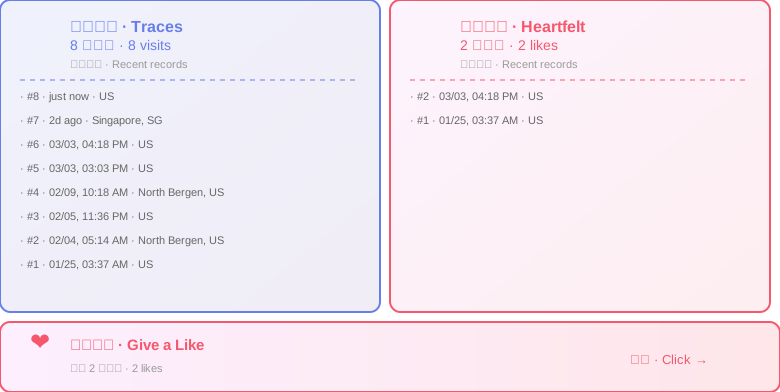
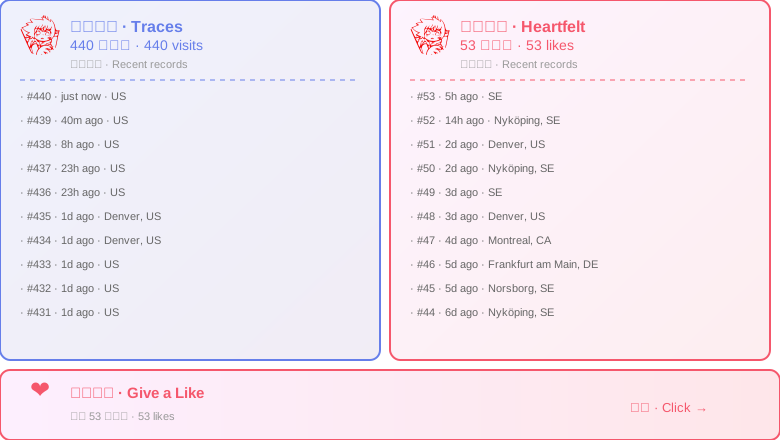
A complete visitor statistics widget that displays:
- Left Panel (Purple): Visitor stats - total visits + recent 10 visit logs + GitHub avatars
- Right Panel (Red): Like stats - total likes + recent 10 like logs + GitHub avatars
- Bottom Button: Clickable like button
Just one line of Markdown:
[](https://api.ailuntz.com/v1/like/your-username/your-repo/add)Example:
[](https://api.ailuntz.com/v1/like/ailuntz/ailuntz/add)Path Parameters:
- First field: GitHub username
- Second field: Project/repository name
Interaction:
- View badge = Auto-increment visit count
- Click badge = Trigger like action (shows success page, auto-redirects)
- Badges in GitHub README may have 5-15 minute cache delay (GitHub Camo proxy)
- Direct API URL access shows real-time data:
https://api.ailuntz.com/v1/your-username/your-repo - Local README viewing also shows real-time data
# Install dependencies
pnpm install

# Start dev server
pnpm dev

# Server runs at http://localhost:3000GET /v1/:namespace/:key- Combined badge (recommended)GET /v1/badge/:namespace/:key- Combined badge (explicit path)GET /v1/visit/:namespace/:key- Visitor stats badgeGET /v1/like/:namespace/:key- Like stats badgeGET /v1/button/:namespace/:key- Standalone like buttonGET /v1/promo- Project promo button
GET /v1/like/:namespace/:key/add- Like action (shows success page, redirects after 1s)
GET /health- Service health check
-
Dynamic Avatars
- Specific users (ailuntz) use local custom avatars
- Other users auto-load avatars from GitHub API (
https://github.com/{username}.png)
-
Geographic Tracking
- Auto-detect visitor's country, region, city based on IP
- Local IPs show as "LOCAL / localhost"
-
Bilingual Interface
- All text displayed in both Chinese and English
- Time format: 刚刚 / just now, X分钟前 / Xm ago
-
Anti-Spam Protection
- Same IP counted only once per 30 seconds (visits and likes)
- Based on IP + namespace + key combination
- In-memory cache with auto-cleanup of expired records
- Can still view badges during cooldown (just won't count)
-
Real-time Updates
- All badges set enhanced anti-cache response headers (
no-cache,Pragma,ETag,Expires) - Direct API access gets latest data
⚠️ 5-15 minute cache delay in GitHub README (GitHub Camo proxy)- Supports URL query params for force refresh (e.g.,
?t=timestamp)
- All badges set enhanced anti-cache response headers (
data/
├── counters.json                # Visit counts (memory cached)
├── likes.json                   # Like counts (memory cached)
├── visits/                      # Visit logs (per-user files)
│   └── {namespace}/
│       └── {key}.jsonl         # One JSONL file per project
└── likes_visits/                # Like logs (per-user files)
    └── {namespace}/
        └── {key}.jsonl
Performance Optimization:
- Each user/project stored in independent files (avoid single large file)
- JSONL format append-only writes (O(1) operation)
- Only load single user file on read (7ms response time)
- Supports 100,000 users × 1,000 records scale
Log Format (JSONL):
{
  "timestamp": "2025-12-30T12:34:56.789Z",
  "namespace": "ailuntz",
  "key": "snow-trace",
  "count": 42,
  "type": "visit",
  "userAgent": "Mozilla/5.0...",
  "ip": "123.45.67.89",
  "country": "CN",
  "city": "Beijing"
}Requirements: Node.js 20+ / Bun
Environment Variables:
Create .env file (or set environment variables):
PORT=3000
BASE_URL=https://api.ailuntz.com  # ⚠️ Change to your actual domain
DATA_DIR=./dataBASE_URL must be set to your actual domain, otherwise like button links will be incorrect!
# Pull latest image
docker pull ailuntz/snow-trace:latest

# Run container
docker run -d \
  --name snow-trace \
  -p 3000:3000 \
  -e BASE_URL=https://api.your-domain.com \
  -v $(pwd)/data:/app/data \
  --restart unless-stopped \
  ailuntz/snow-trace:latest

# Fix permissions (if encountering EACCES errors)
sudo chown -R 1000:1000 ./data
Server Deployment:
# Install dependencies
pnpm install

# Configure environment
cp .env.example .env
# Edit .env to set BASE_URL to your domain

# Production run (use tsx to run TypeScript directly)
pnpm start
Docker Deployment (Local Build):
If you need to build the image yourself:
# 1. Build image
docker build -t snow-trace:latest .

# 2. Run container (set environment variables)
docker run -d \
  --name snow-trace \
  -p 3000:3000 \
  -e BASE_URL=https://api.your-domain.com \
  -v $(pwd)/data:/app/data \
  --restart unless-stopped \
  snow-trace:latest

# 3. Fix permissions (if needed)
sudo chown -R 1000:1000 ./data

# 4. View logs
docker logs -f snow-trace

# 5. Health check
curl http://localhost:3000/health
Docker Compose Deployment (Recommended):
Create docker-compose.yml:
services:
  snow-trace:
    build: .
    image: snow-trace:latest
    container_name: snow-trace
    ports:
      - "3000:3000"
    environment:
      - BASE_URL=https://api.your-domain.com
    volumes:
      - ./data:/app/data
    restart: unless-stopped
    healthcheck:
      test: ["CMD", "node", "-e", "require('http').get('http://localhost:3000/health', (r) => {process.exit(r.statusCode === 200 ? 0 : 1)})"]
      interval: 30s
      timeout: 3s
      retries: 3
      start_period: 5s
Run:
docker-compose up -dDockerfile Features:
- ✅ Multi-architecture support (AMD64 + ARM64)
- ✅ Use tsx to run TypeScript directly (no compilation needed)
- ✅ Based on Alpine Linux (smaller image)
- ✅ Run as non-root user (node, UID 1000)
- ✅ Environment variable configuration support
- ✅ Built-in health check
Data Persistence:
- Data directory
/app/datamust be mounted to host - Container runs as UID 1000, ensure mounted directory has correct permissions (see Troubleshooting)
- Regularly backup
data/directory to prevent data loss
Combined Badge:
- Size: 780×440px (left/right 380px each + 10px gap + 70px bottom button)
- Left panel: Purple gradient (#667eea → #764ba2)
- Right panel: Red gradient (#f093fb → #f5576c)
- Circular avatars: 40×40px
Like Button:
- Size: 780×70px
- Gradient background: Pink → Red
Promo Button:
- Size: 780×60px
- Gradient background: Purple → Deep Purple
- Runtime: Node.js 20+ / Bun
- Language: TypeScript
- Dependencies:
geoip-lite- IP geolocation lookupnode:fs- File system operationsnode:http- HTTP server
Important: Regularly backup the data/ directory to prevent data loss.
Backup Contents:
data/
├── counters.json       # Visit counts (critical)
├── likes.json          # Like counts (critical)
├── visits/             # Visit logs (JSONL format)
└── likes_visits/       # Like logs (JSONL format)
Local Backup Script:
# Create timestamped backup
BACKUP_DIR="backup/snow-trace-$(date +%Y%m%d-%H%M%S)"
mkdir -p "$BACKUP_DIR"
cp -r data "$BACKUP_DIR/"
echo "Backup completed: $BACKUP_DIR"

# Or use tar for compressed backup
tar -czf "snow-trace-backup-$(date +%Y%m%d).tar.gz" data/
Docker Environment Backup:
# Backup data from container
docker cp snow-trace:/app/data ./backup-data

# Or directly backup mounted volume
cp -r ./data ./backup-data-$(date +%Y%m%d)
Restore Data:
# Stop service
docker-compose down  # or kill process

# Restore data
cp -r backup-data/* data/

# Restart service
docker-compose up -d # or pnpm startRecommendations:
- Automate daily backups
- Keep last 7-30 days of backups
- Backup critical data to cloud storage (e.g., S3, OSS)
Symptoms:
Failed to save visit log: Error: EACCES: permission denied, mkdir '/app/data/visits/...'
Failed to save counters: Error: EACCES: permission denied, open '/app/data/counters.json.tmp'
Cause: Container runs as node user (UID 1000), host directory permissions don't match
Solution:
# Method 1: Change directory owner (recommended)
sudo chown -R 1000:1000 ./data

# Method 2: Set permissive permissions (dev only)
sudo chmod -R 777 ./dataSymptoms: Clicking badge redirects to localhost or wrong domain
Cause: BASE_URL environment variable not set correctly
Solution:
# Docker Run method
docker run ... -e BASE_URL=https://api.your-domain.com ...

# Docker Compose method
# Add to environment section in docker-compose.yml
environment:
- BASE_URL=https://api.your-domain.comSymptoms: Badge displays but avatar position is empty
Cause: GitHub API rate limiting or network issues
Solution:
- GitHub avatars use
https://github.com/{username}.png - Check if server can access GitHub
- Specific users can configure local avatars in
src/utils/render.ts
Symptoms: No files generated in data directory after accessing badge
Cause:
- Permission issues (see Issue 1)
- Data directory not mounted correctly
- BASE_URL misconfiguration causing wrong endpoint access
Solution:
# Check container logs
docker logs snow-trace

# Check mounts
docker inspect snow-trace | grep -A 5 Mounts

# Test access
curl http://localhost:3000/v1/test/demoMIT License - Free to use, attribution required
- 🎨 Beautiful gradient badges with real-time statistics
- 🌍 Geographic tracking with IP-based location detection
- 🛡️ Built-in anti-spam protection (30-second cooldown)
- 📊 Scalable JSONL-based storage architecture
- 🐳 Docker support with multi-architecture images
- 🌐 Bilingual interface (English/Chinese)
- ⚡ Fast response times (7ms average)
- 🔒 Non-root container execution for security
- 📈 Supports 100K+ users with 1K+ records each
Contributions welcome! Please feel free to submit a Pull Request.
If you encounter any issues or have questions:
- Open an issue on GitHub
- Check the troubleshooting section above
- Review the Docker logs:
docker logs snow-trace
Made with ❤️ by ailuntz