
A modular system for in‑vivo joint‑mechanics testing in small animals including rats and mice
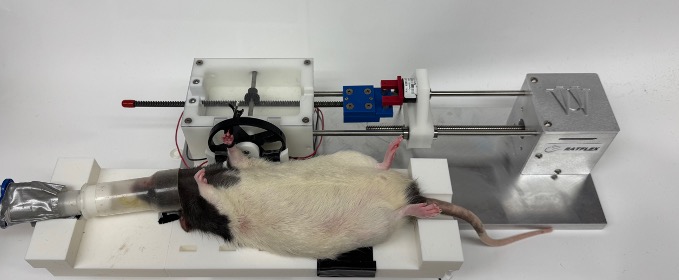
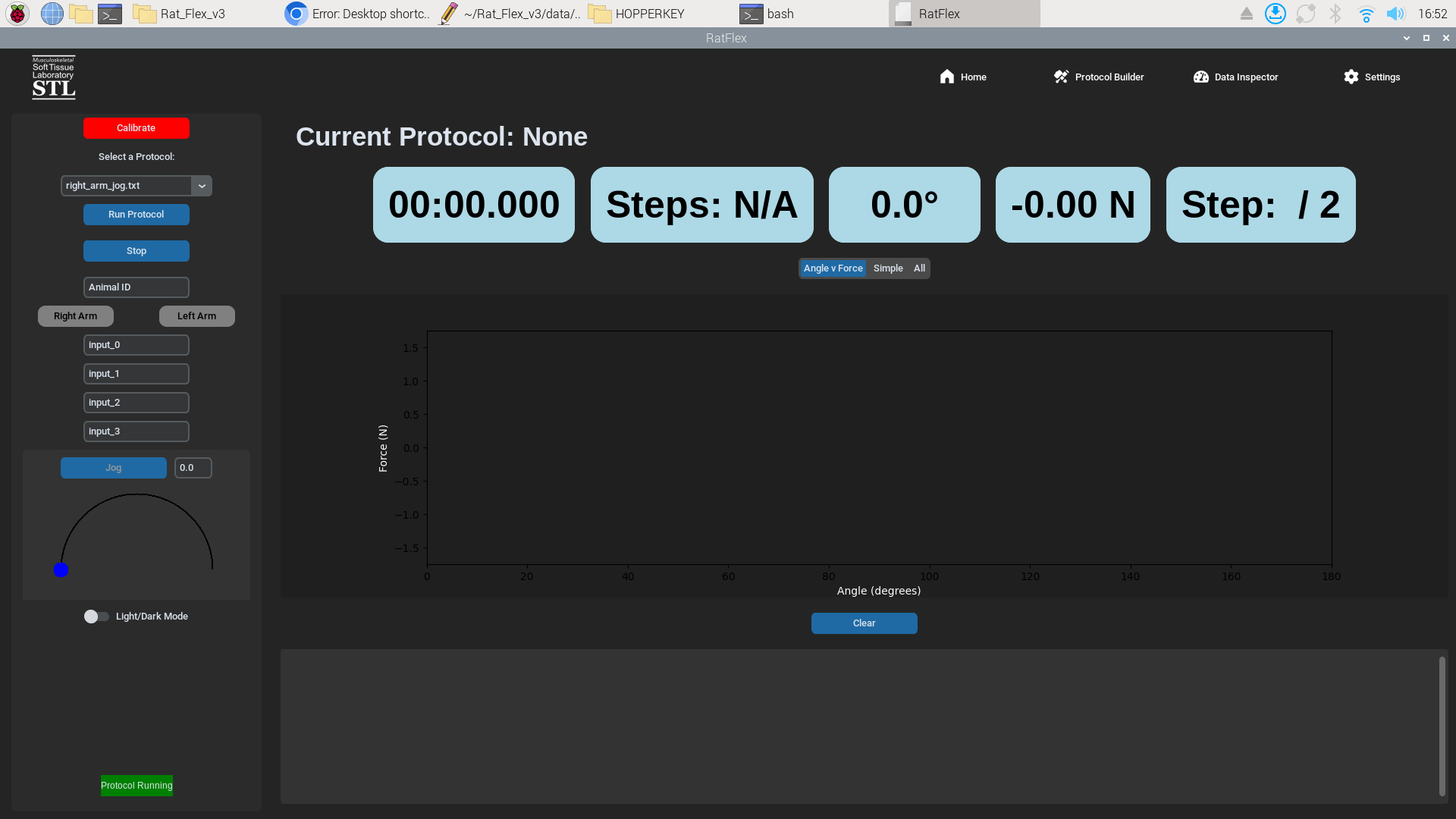
Rat Flex ("RATFLEX") is an open‑source hardware‑and‑software platform engineered to characterise joint mechanics—range‑of‑motion (ROM), torque, and stiffness—in rats and other small animals with sub‑degree precision. Developed in the Lake Lab at Washington University in St Louis, Rat Flex integrates 3‑D‑printed fixtures, a high‑torque stepper actuator, and a Python GUI that logs, plots, and exports data in real time.
Key capabilities
| Capability | Details |
|---|---|
| Anatomies supported | Hind‑limb ankle & knee joints (rat & mouse) with swappable fixtures |
| Angle resolution | ±0.1 ° (calibrated) |
| Torque range | 0–10 N·cm (load‑cell‑limited) |
| Modes | Static ROM sweep • Quasi‑static stiffness curve • Cyclic fatigue • Custom scripted protocols |
| Data export | CSV files + live Redis stream for closed‑loop experiments |
- Getting Started
- Hardware Build Guide
- Software Installation
- Calibration & Validation
- Protocol Builder & Library
- Device Usage Guide
- Troubleshooting
- TODO / Roadmap
- Contributing
- License
Tip: Detailed guides, photos, and templates live in the Wiki. This README is your launch pad.
# Clone and enter repo
git clone https://github.com/agadin/Rat_Flex_v3.git
cd Rat_Flex_v3

# Activate packaged virtual‑env (base) then install deps if needed
source base/bin/activate
pip install -r requirements.txt           # first time or after updates

# Run the interactive GUI in one terminal
python main.py

# In a second terminal run scripted protocols
python protocol_runner.py --protocol example_protocol.txt
Why two terminals? Keeping
main.py(GUI) andprotocol_runner.pyin separate shells isolates logs and makes debugging easier during development.
- Double‑click the RATFLEX app icon on the desktop.
- Click Execute when prompted.
- The application launches full‑screen with the Home dashboard.
No command line required.
A step‑by‑step, image‑rich tutorial is available in the Device Usage wiki page. Below is the condensed flow:
-
Select or create a protocol • Use the drop‑down to pick a
.txtprotocol that was scanned at boot from theprotocols/folder. • Need a new sequence? Follow the Protocol guide to hand‑edit a file (or, soon, generate one with the visual Protocol Builder). -
Calibrate Click Calibrate and follow on‑screen prompts. Calibration derives the step‑to‑angle ratio and zeros the load‑cell.
-
Enter metadata Fill in Animal ID plus up to four optional variables (e.g., weight, treatment group) in the left‑hand panel.
-
Run Click Run. Progress bars, live plots, and a scrolling log appear on the right. Data and logs save automatically to
data/YYYY‑MM‑DD/ANIMAL_ID/.
| Symptom | Likely Cause | Fix |
|---|---|---|
protocol_runner.py** exits immediately** |
Malformed protocol .txt file. |
Open the most recent *.log in the repo root for the parser error. Validate with the soon‑to‑be‑released Protocol Builder. |
| UI window is tiny on a 4 K display | High‑DPI scaling not set | Launch with --dpi 2 or set dpi_scaling = 2 in preferences.conf. |
| Motor stalls / clicks | 12 V supply < 1 A • Driver current too low | Verify PSU, then raise driver_current in config.yaml. |
| Desktop shortcut only starts the first Python file | Exec string stops after first command |
Chain with &&, e.g. lxterminal -e 'bash -c "python protocol_runner.py && python main.py; exec bash"'. |
RedisConnectionError** on launch** |
Redis not running | sudo systemctl start redis and enable on boot. |
| Load‑cell reads ‑1023 g at rest | Tension‑compression flipped | Reverse wiring or set invert_loadcell: true in config.yaml. |
See the Troubleshooting wiki for an expanded FAQ.
Active tasks live on the TODO page. Upcoming items include:
- TMC2209 motor driver upgrade for silent micro‑stepping
- Live torque overlay in the GUI plot
- Drag‑and‑drop visual Protocol Builder
Pull requests are welcome! Review CONTRIBUTING.md for coding standards and branch policy. Lab members: please use the private fork when working with live‑animal data.
Rat Flex is distributed under the MIT License.
Gadin A., Lake S.P. (2025) Rat Flex: An open‑source platform for in‑vivo rodent joint‑mechanics testing. *bioRxiv*. https://doi.org/10.1101/2025.04.04.089215
Create an Issue or email ratflex‑****support@wustl.edu.
Made with ❤️ by the Lake Lab Biomechanics Group