Put your status on many platforms at once :3
(I'm also shipping some new work on this to Fudge Fudge Fudge, another Hack Club event :3c)
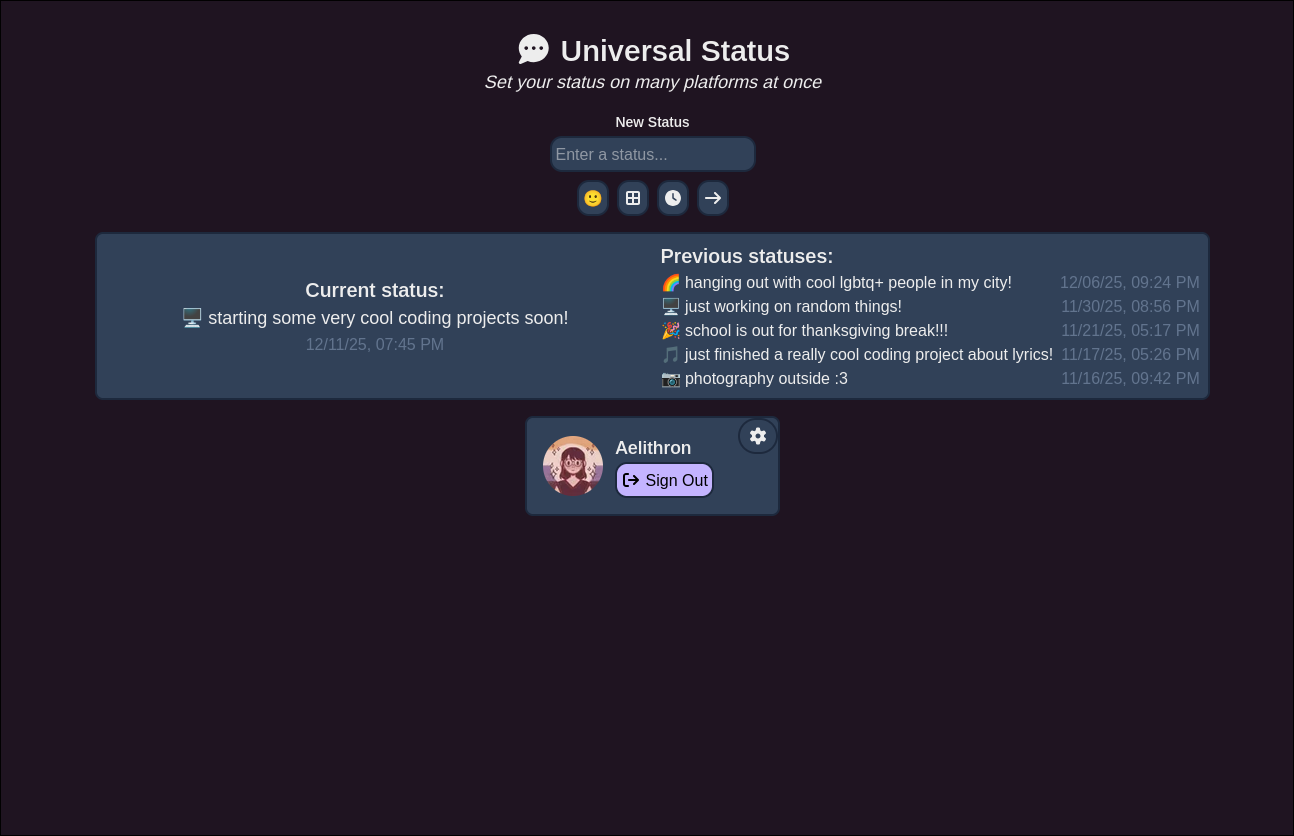
- Status history
- Expiring statuses
- Minimalist user interface
- Updates your status on other platforms
- Slack (via OAuth)
- GitHub (via OAuth)
- Status.Cafe (via direct authentication)
- Coming soon platforms:
- Discord (via Rich Presence)
- possibly others
- Simple APIs for reading and writing statuses (both REST and GraphQL)
The app is quite easy to use! Go to status.novatea.dev and sign in with either Discord (suggested), GitHub, or (only if you are in Hack Club) Slack. Then, if you want to store status updates on other platforms, go to the Settings page and authorize accounts on other platforms.
Selfhosting the app is a bit more complex, but can be done! I suggest using Docker, and these instructions are for a Docker image.
- Set up the following environment variables:
MONGODB_URI: A MongoDB connection string to your database server.MONGODB_DB: The name of your database. Make sure it contains a collection calledstatuses!AUTH_SECRET: A random string to secure user sessions. You can generate this with the commandopenssl rand -base64 33on Linux.AUTH_URL: The URL of your app, formatted ashttps://[domain].[tld]. You can add a subdomain if your instance is on one, and DO NOT add an extra slash at the end.DISCORD_IDandDISCORD_SECRET: Optional, a Discord OAuth ID and Secret. This will enable Discord login. You can configure this on the Discord Developers panel, make sure to create an application and follow their setup. Your OAuth2 Redirect ishttps://[domain].[tld]/api/auth/callback/discord.SLACK_IDandSLACK_SECRET: Optional, a Slack OAuth ID and Secret. This enables Slack login, as well as the ability to set statuses on Slack. You can create a Slack app and add its ID and secret here. No links are provided, as it's a complicated process to set up. Your redirect URLs arehttps://[domain].[tld]/api/auth/callback/slackandhttps://[domain].[tld]/api/provider/slack(add both to the box).GITHUB_IDandGITHUB_SECRET: Optional, a GitHub App ID and Secret. This enables setting statuses on GitHub, as well as login. You can create a GitHub OAuth app and add its ID and secret here. Configure an app on the GitHub developer portal, and your redirect URL ishttps://[domain].[tld]/api. Note that GitHub Apps will not work, you must create an OAuth App instead.
- You can use either of the below methods to quickly deploy. Make sure to fill in the empty quotation marks with the environment variables from step 1! Also, optional variables are commented out, but you can uncomment them to use them. Finally, make sure you enable at least one authentication method!
Copy the following Compose file to your server or computer, and name it compose.yaml:
services:
  universal-status:
    image: ghcr.io/aelithron/universal-status:latest
    container_name: universal-status
    restart: unless-stopped
    environment:
      MONGODB_URI: ""
      MONGODB_DB: ""
      AUTH_SECRET: ""
      AUTH_URL: ""
      # DISCORD_ID: ""
      # DISCORD_SECRET: ""
      # SLACK_ID: ""
      # SLACK_SECRET: ""
      # GITHUB_ID: ""
      # GITHUB_SECRET: ""
    ports:
      - 3000:3000
Then, simply run docker compose up -d in the directory of the file!
Run the following command on your server or computer:
docker run -d \
  --name universal-status \
  -p 3000:3000 \
  -e MONGODB_URI="" \
  -e MONGODB_DB="" \
  -e AUTH_SECRET="" \
  -e AUTH_URL="" \
  # -e DISCORD_ID="" \
  # -e DISCORD_SECRET="" \
  # -e SLACK_ID="" \
  # -e SLACK_SECRET="" \
  # -e GITHUB_ID="" \
  # -e GITHUB_SECRET="" \
  --restart unless-stopped \
ghcr.io/aelithron/universal-status:latest- Note: If you want to use something else (like Kubernetes), the Docker image can be found on the Packages tab (or simply pulled as
ghcr.io/aelithron/universal-status:latest). Make sure to include the environment variables!
- Inspired by EchoFeed and Status.Cafe
- Icons from Font Awesome