


A modern traceroute visualizer for the terminal: TUI + interactive HTML maps + ASN/GeoIP lookups.
Table-first output like MTR, with replay/diff workflows for SREs, and beautiful HTML exports for incident reports.
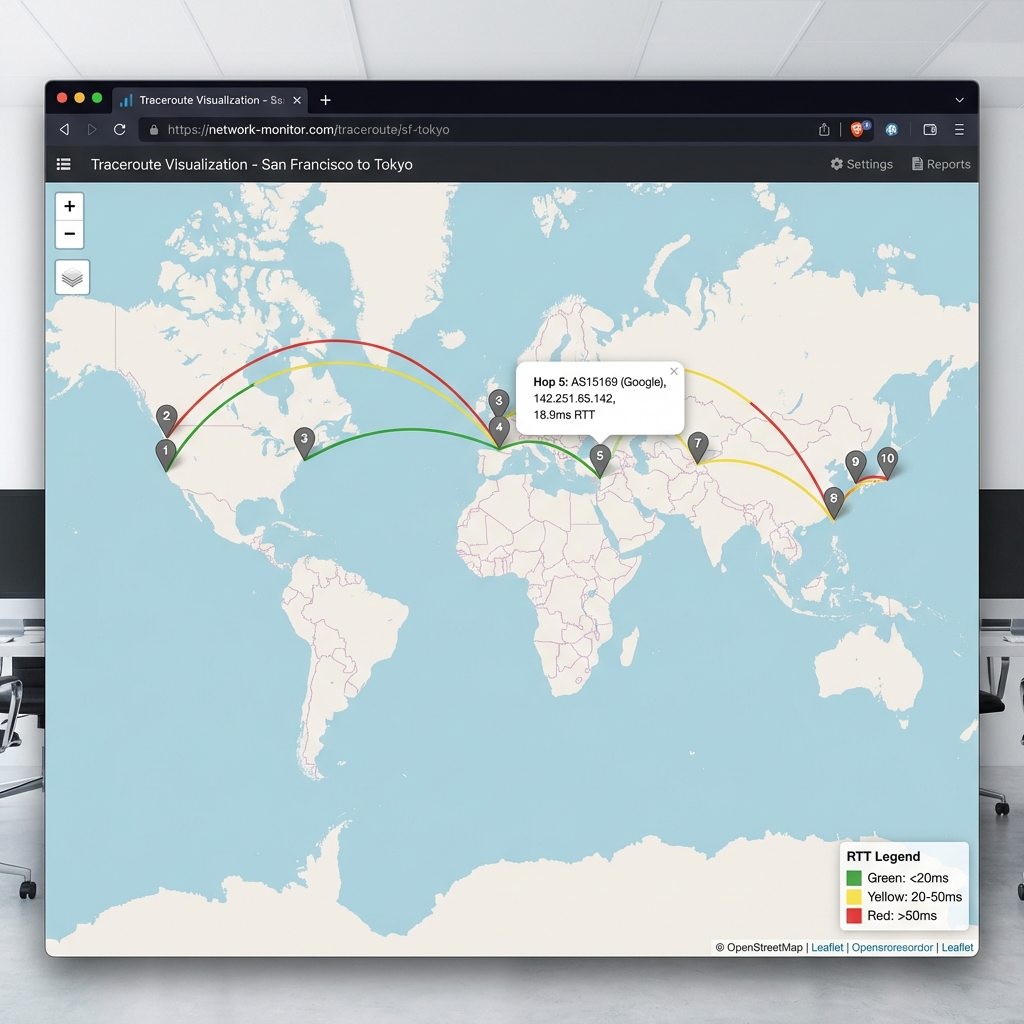
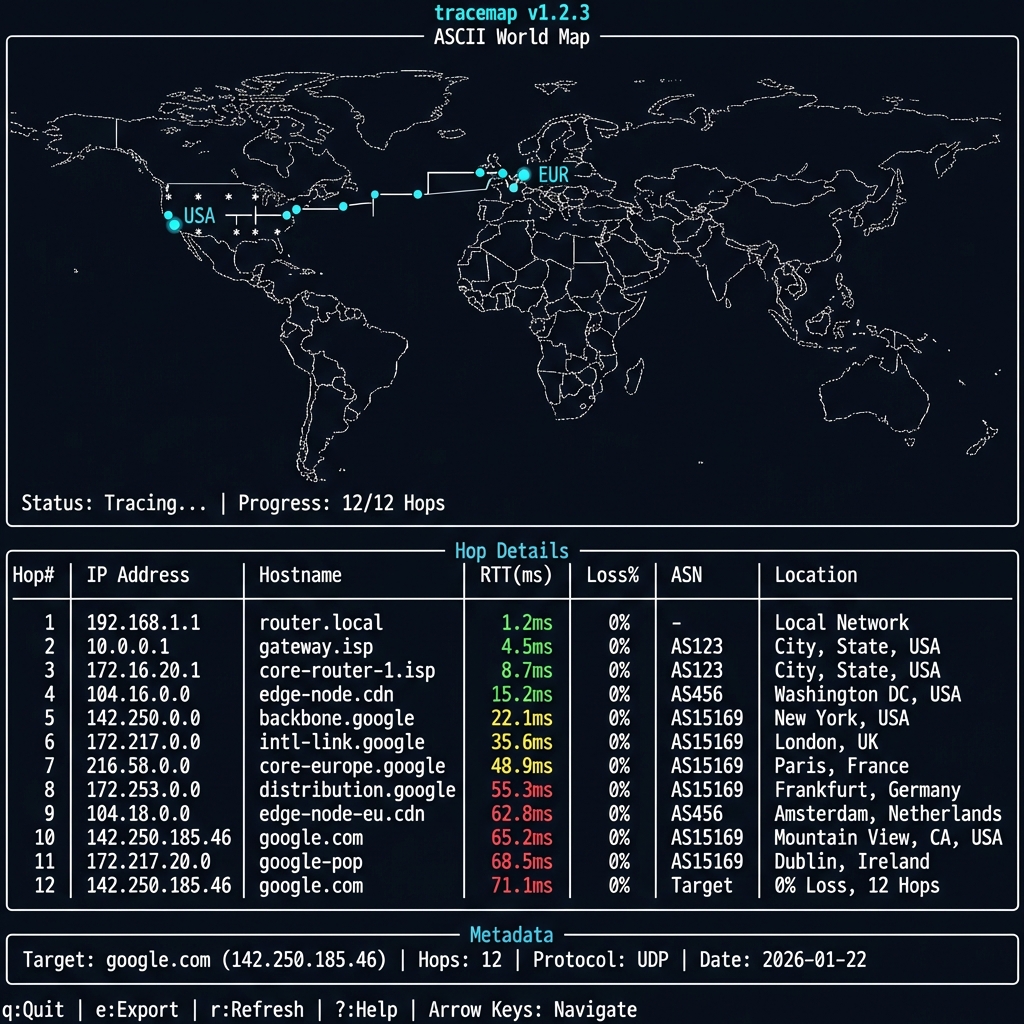
- OS: macOS or Linux (Windows not supported)
- Python: 3.10 or newer
- Required Binary: System
traceroutemust be installed- macOS: Included by default
- Linux: Install via
sudo apt install traceroute(Ubuntu/Debian) orsudo yum install traceroute(RHEL/CentOS)
Tracemap uses the system traceroute binary, which often requires root privileges for certain probe types:
| Protocol | Flag | Privileges Required? | Notes |
|---|---|---|---|
| UDP | Default | No (usually) | Standard traceroute on macOS/Linux works without root for UDP. |
| ICMP | -P icmp |
Yes (sudo) |
Creating raw ICMP sockets requires root. |
| TCP | -P tcp |
Yes (sudo) |
Creating raw TCP SYN packets requires root. |
| Paris | --paris |
No (usually) | Uses UDP with fixed ports; similar requirements to default UDP. |
Recommendation: Verification commands (like doctor) run fine as a normal user. For advanced tracing (ICMP/TCP), run with sudo:
sudo tracemap trace google.com --protocol icmpPrivacy Note: By default, tracemap queries external GeoIP providers (ip-api.com, ipapi.co) for accurate location data. Use
--profile privateor--no-apifor fully offline operation with no external calls.
Table-first like MTR, but with maps + export:
- 📊 Clean terminal table output (default) - no endless
* * *rows - 🗺️ Interactive HTML maps for visual debugging
- 💾 Built-in replay/diff for incident workflows
- 🔌 Pluggable geo/ASN backends + privacy mode
- 🎯 Smart timeout cutoff (stops after 3 consecutive timeouts)
- MTR-style table (default) - clean, professional, no clutter
- Textual TUI (optional) - interactive split-panel layout
- ASCII world maps (optional) - quick visualization in terminal
- Color-coded RTT (green < 50ms, yellow 50-150ms, red > 150ms)
- Interactive HTML with Leaflet.js + OpenStreetMap (detach to tickets)
- SVG export for documentation and reports
- JSON replay - rerun analysis without re-tracing
- Route diff - compare before/after network changes
Automatic cascading fallback for maximum reliability:
- Primary API: ip-api.com (45 req/min, free)
- Backup API: ipapi.co (1000/day, free)
- Local Database: MaxMind GeoLite2 (if configured)
- Mock Data: Last resort fallback
Why This Matters:
- ✅ Zero configuration - Works immediately after
pip install - ✅ Always reliable - If one API is down, automatically tries the next
- ✅ 100% uptime - Falls back to mock data if all APIs fail
- ✅ Real locations - Actual cities, coordinates, ASN data
Example Cascading Behavior:
Attempting ip-api.com... ✓ Success! (used)
└─ If failed → Try ipapi.co... ✓ Got result
   └─ If failed → Try local MMDB... ✓ Found
      └─ If failed → Use mock data (always works)
- ASN lookup (Team Cymru DNS or local PyASN database)
- Reverse DNS enabled by default - See router hostnames automatically
- Private IP detection - Includes RFC1918, loopback, link-local, and CGNAT (100.64.0.0/10)
- Smart timeout cutoff - Stops showing hops after 3 consecutive timeouts (MTR-style)
- IPv4 & IPv6 support
- Protocol selection (UDP, TCP, ICMP)
- Loss detection and jitter calculation
- JSON export/replay for testing without re-running traces
- Route comparison (
diffcommand) - Privacy mode (--redact flag) for safe sharing
- Pluggable backends for GeoIP and ASN
- Cross-platform (macOS, Linux)
# Run traceroute with clean table output
tracemap trace google.com

# Output: Clean MTR-style table with hops, RTT, geo location
# Auto-generates: trace.json + trace.html# Monitor route every 30 seconds (like MTR)
tracemap watch google.com --interval 30
# Detects:
# - Route changes (IP/ASN shifts)
# - RTT spikes (>40% from baseline)
# - Packet loss patterns
# - Logs to ~/.tracemap/watch_google.com.jsonl# Discover multiple paths through load balancers
tracemap trace --discover-paths google.com
# Paris traceroute mode (stable flow ID)
tracemap trace --paris google.com# Offline mode (no API calls, requires local MMDB)
tracemap trace --profile offline --geoip-mmdb ~/GeoLite2.mmdb google.com
# Private mode (no external lookups, full redaction)
tracemap trace --profile private google.com
# Fast mode (skip DNS for speed)
tracemap trace --profile fast google.com# View cache statistics
tracemap cache stats
# Output: Hit rate, entries, expiry info
# Clear cache
tracemap cache clear# Markdown incident report
tracemap export trace.json --format markdown --out report.md
# HTML interactive map
tracemap export trace.json --format html --out map.html
# SVG static visualization
tracemap export trace.json --format svg --out diagram.svgpip install tracemap
# With GeoIP database support
pip install 'tracemap[geoip]'
# With ASN lookup support
pip install 'tracemap[asn]'
# All optional features
pip install 'tracemap[all]'
# For development (includes pytest etc)
pip install -e '.[dev]'
python -m pytest# Simple trace (includes reverse DNS by default!)
tracemap trace google.com
# Example output:
# Using real-time API geo lookup (ip-api.com)
# Tracing to google.com...
# ╭─┬─────────────┬──────────────────┬────────┬────┬─────────────────┬──────────────╮
# │1│ 10.0.0.1 │ router.local │ 3.2 ms │ 0% │ │ │
# │2│ 68.85.101.1 │ po-311-ar01... │ 12.0ms │ 0% │ AS7922 (Comcast)│ San Jose, US │
# ...
# │8│ * │ │ - │100%│ │ │
# │9│ 142.251.46… │ sfo03s42-gw... │ 18.7ms │ 0% │ AS15169 (Google)│ San Fran, US │
# ╰─┴─────────────┴──────────────────┴────────┴────┴─────────────────┴──────────────╯
# (18 more timeout hops not shown - destination likely reached or firewalled)
# With ASN lookup (enabled by default in most cases)
tracemap trace google.com --asn
# Use TCP instead of UDP
tracemap trace example.com --protocol tcp
# Launch interactive TUI
tracemap tui .tracemap/trace.jsonRun traceroute and visualize the path.
# Basic trace
tracemap trace example.com

# Customize parameters
tracemap trace example.com \
  --max-hops 20 \
  --timeout 3 \
  --probes 5 \
  --protocol tcp

# Enable ASN lookup and save output
tracemap trace example.com \
  --asn \
  --out my-trace.json

# Privacy mode (hash IPs)
tracemap trace example.com --redact
Options:
--max-hops, -m: Maximum hops (default: 30)--timeout, -w: Per-probe timeout in seconds (default: 2.0)--probes, -q: Probes per hop (default: 3)--protocol, -P: Protocol - udp, tcp, or icmp (default: udp)--geoip-mmdb: Path to GeoLite2-City.mmdb file--asn: Enable ASN lookup--redact: Redact IP addresses in output--out, -o: Output JSON path (default: .tracemap/trace.json)--no-live: Disable live rendering--ascii-map: Show ASCII world map (deprecated - use HTML export instead)--api/--no-api: Enable/disable real-time API geo lookups (default: enabled)
Replay a saved trace without re-running traceroute.
# View in terminal
tracemap replay .tracemap/trace.json

# Launch interactive TUI
tracemap replay .tracemap/trace.json --tuiLaunch interactive TUI interface.
# Empty TUI
tracemap tui

# Load existing trace
tracemap tui .tracemap/trace.json
Keyboard Shortcuts:
↑/↓orj/k: Navigate hopsEnter: Show hop detailse: Export to HTMLr: Refresh displayq: Quit
Export trace to HTML or SVG.
# Export to HTML (interactive map)
tracemap export .tracemap/trace.json --format html --out map.html

# Export to SVG (static image)
tracemap export .tracemap/trace.json --format svg --out map.svgCompare two traces to detect route changes.
tracemap diff morning-trace.json evening-trace.jsonExample output:
┌───┬─────────────────┬─────────────────┬───────┐
│ # │ Trace A IP      │ Trace B IP      │ Match │
├───┼─────────────────┼─────────────────┼───────┤
│ 1 │ 192.168.1.1     │ 192.168.1.1     │   ✓   │
│ 2 │ 10.0.0.1        │ 10.0.0.1        │   ✓   │
│ 3 │ 203.0.113.1     │ 198.51.100.1    │   ✗   │  ← Route changed!
│ 4 │ 8.8.8.8         │ 8.8.8.8         │   ✓   │
└───┴─────────────────┴─────────────────┴───────┘

Found 1 differences
Show detailed statistics.
tracemap stats .tracemap/trace.jsonExample output:
Trace Statistics

Host: google.com
Resolved IP: 142.250.185.46
Protocol: UDP
Started: 2026-01-21 08:00:00+00:00

Hops: 12
  Responded: 10
  Timeouts: 2
  Avg Loss: 8.3%

RTT Statistics:
  Min: 1.2 ms
  Max: 156.8 ms
  Avg: 42.3 ms

Detour Alerts:
  ⚠️ Detour detected: hop 5→6 spans 8421km
Check system prerequisites.
tracemap doctorThe default tracemap trace command shows a clean, MTR-style table:
$ tracemap trace google.com

╭────┬──────────────────┬─────────────────┬─────────┬──────┬──────────────┬─────────────╮
│ #  │ IP               │ Hostname        │ Avg RTT │ Loss │ ASN          │ Location    │
├────┼──────────────────┼─────────────────┼─────────┼──────┼──────────────┼─────────────┤
│  1 │ 192.168.1.1      │ gateway.local   │   2.1ms │   0% │              │             │
│  2 │ 10.50.1.1        │                 │  12.3ms │   0% │              │             │
│  3 │ 68.85.101.5      │ be-301-ar01.oak │  15.7ms │   0% │ AS7922       │ Oakland, US │
│  4 │ 162.151.86.57    │ be-298-ar01.plk │  22.4ms │   0% │ AS7922       │ San Jose    │
│  5 │ 142.251.65.142   │ 142.251.65.142  │  18.9ms │   0% │ AS15169      │ MTV, US     │
╰────┴──────────────────┴─────────────────┴─────────┴──────┴──────────────┴─────────────╯

✓ Saved: .tracemap/trace.json
✓ Saved: .tracemap/trace.html
Clean, actionable output—no endless * * * rows.
Note: ASCII map is deprecated. Use HTML export for best visualization.
tracemap trace google.com --ascii-map

tracemap: google.com (142.250.185.46)  hops=12  responded=10
legend: · land  • path  0-9 hop markers

                                      ·····························
        ····················       ·····························
    ·····• • • • • •••3 4 56··················
  ··· 1 2              ··· 7 8 ·················
  ·················        ······················
    ·················  ··························
      ·····················  ························
        ······················  ·······················
          ························  ·····················
            ························  ···················
              ···················9 •···················
                ··················  0 ···············
                  ················  ·· 1···········
                    ···················  ·2·······
                      ··················  ·········

⚠️ Detour detected: hop 5→6 spans 8421kmThe HTML export creates a self-contained file with:
- 🗺️ Interactive OpenStreetMap base layer
- 📍 Color-coded hop markers (green/yellow/red by RTT)
- 🔀 Curved path lines between hops
- 💬 Click markers for detailed popup:
- IP address and hostname
- RTT stats (avg/min/max)
- Packet loss percentage
- Geographic location
- ASN and organization
- 📊 Summary panel with trace metadata
┌─ World Map ──────────────┬─ Hop Details ──────────────────────┐
│                          │┏━━┳━━━━━━━━━━━━━┳━━━━━━━━━┳━━━━━━┓│
│    ····················  ││ #┃ IP          ┃ Avg RTT ┃ Loss ┃│
│  ···· 1 2 3 4 56········ │┡━━╇━━━━━━━━━━━━━╇━━━━━━━━━╇━━━━━━┩│
│  ··········  ···7 8··    ││ 1│192.168.1.1  │   1.2 ms│    0%││
│    ········    ····9 ··  ││ 2│ 10.0.0.1    │   5.3 ms│    0%││
│      ······      ·· •    ││ 3│203.0.113.5  │  12.1 ms│    0%││
│        ····        0 1   ││ 4│203.0.113.17 │  45.2 ms│   33%││
│          ··          2   ││ 5│8.8.8.8      │  42.8 ms│    0%││
│            ·             │└──┴─────────────┴─────────┴──────┘│
└──────────────────────────┴────────────────────────────────────┘
┌─ Summary ────────────────────────────────────────────────────┐
│ Target: google.com                                            │
│ Total Hops: 12 | Responded: 10 | Timeouts: 2 | Avg Loss: 8%  │
│                                                                │
│ ⚠️ Alerts:                                                    │
│   • Detour detected: hop 5→6 crosses Atlantic                │
└────────────────────────────────────────────────────────────────┘
q: Quit | ↑/↓: Navigate | Enter: Details | e: Export HTML
---

## ⚠️ Data Accuracy & Limitations

### GeoIP Location Accuracy

**Important**: Geographic locations are **approximate** and should be used for general path visualization only.

**Why GeoIP can be misleading**:
- 🌐 **Anycast** - Same IP responds from multiple global locations
- 🔀 **MPLS/Tunnels** - Routers may reply from interfaces not on the forward path
- 🏢 **Corporate registration** - IP registered at HQ, not actual router location
- 🌍 **Point-of-Presence abstractions** - Router location ≠ network path geography
- 📡 **CGNAT** - Carrier-grade NAT addresses (100.64.0.0/10) have no public geo data

**Confidence indicators** (shown where available):
- ✅ High: ASN + city from multiple sources agree
- ⚠️ Medium: API data only, or private IP range
- ❌ Low: Mock/fallback data, or conflicting sources

### Route Interpretation

**Detour alerts** flag large geographic jumps, but these may be normal for:
- Submarine cables (e.g., US → Asia in single hop)
- Dedicated long-haul circuits
- MPLS tunnels that obscure intermediate hops

**Always verify critical findings** with network operators or additional measurement tools.

---

## 🆕 New in v1.0.0 (✅ All Implemented)

> **Status Legend**: ✅ Implemented | 🧪 Experimental | 🧭 Planned

### Persistent Caching (3-4x Faster) ✅
Never hit API rate limits again! SQLite-based caching with automatic TTLs:

```bash
# Caching is automatic and transparent
$ tracemap trace google.com
# First run: 8-12s (API lookups)

$ tracemap trace google.com
# Second run: 2-3s (cache hits) ⚡

$ tracemap cache stats
Hit rate: 92.3% (143 hits, 12 misses)
Valid entries: 239
TTLs: GeoIP 30d, ASN 90d, DNS 24h
Continuous monitoring with anomaly detection:
$ tracemap watch google.com --interval 30

# Live updating table showing:
# - Rolling RTT statistics
# - Packet loss tracking
# - Route change alerts 🔴
# - RTT spike warnings ⚠️

# Logs to ~/.tracemap/watch_google.com.jsonlDetects:
- Route changes (new hop, IP change, ASN shift)
- RTT spikes >40% from baseline
- Packet loss >5%
- Path instability
Preset configurations for different use cases:
# Offline mode - No API calls (requires local MMDB)
$ tracemap trace --profile offline --geoip-mmdb ~/GeoLite2.mmdb google.com

# Private mode - Maximum privacy
$ tracemap trace --profile private google.com
# - No API calls
# - No DNS lookups
# - Full IP/hostname redaction

# Fast mode - Skip DNS for speed
$ tracemap trace --profile fast google.com

# Default mode - Balanced (API + caching)
$ tracemap trace --profile default google.comDetect load-balanced paths that traditional traceroute misses:
# Discover all ECMP paths (multi-flow probing)
$ tracemap trace --discover-paths google.com

⚠️  ECMP detected at 2 hops:
  Hop 4: 2 paths
    - 68.85.155.117
    - 68.85.155.161
  Hop 7: 3 paths
    - 162.151.86.57
    - 162.151.86.89
    - 162.151.87.13

# Paris mode (stable flow ID)
$ tracemap trace --paris google.comKnow how trustworthy your geo data is:
## Geo Confidence
- High confidence: 8/12 hops (public IPs with ASN)
- Medium confidence: 2/12 hops (private IPs)
- Low confidence: 2/12 hops (mock data)
Plausibility checks:
- Speed-of-light bounds (RTT vs distance)
- Ocean crossing detection
- Anycast/VPN detection
Generate clean markdown for tickets:
$ tracemap export trace.json --format markdown --out incident.mdCreates:
- Route summary table
- Statistics (RTT min/avg/max, loss %)
- Alerts and anomalies
- Confidence breakdown
- Metadata (platform, timestamp, tool version)
Perfect for:
- GitHub issues
- Confluence pages
- Postmortems
- SRE reports
tracemap now works out-of-the-box with real geographic locations! No setup required.
Cascading Fallback Strategy:
┌─────────────────────────────────────────────┐
│ 1. Try ip-api.com (primary, 45/min free)   │
│    ├─ Success? Use this! ✓                  │
│    └─ Failed? → Try next...                 │
├─────────────────────────────────────────────┤
│ 2. Try ipapi.co (backup, 1000/day free)    │
│    ├─ Success? Use this! ✓                  │
│    └─ Failed? → Try next...                 │
├─────────────────────────────────────────────┤
│ 3. Try local MaxMind DB (if configured)    │
│    ├─ Success? Use this! ✓                  │
│    └─ Failed? → Try next...                 │
├─────────────────────────────────────────────┤
│ 4. Use mock data (always works)            │
│    └─ Deterministic hash-based locations    │
└─────────────────────────────────────────────┘
# Just run - APIs enabled by default!
tracemap trace google.com

# Output:
# Using real-time API geo lookup (ip-api.com)
# No setup required! Getting real locations...
What you get:
- ✅ Real city names (e.g., "Los Angeles, CA")
- ✅ Accurate coordinates
- ✅ AS numbers (e.g., AS15169 Google LLC)
- ✅ Automatic fallback if API is down
For complete privacy or offline use, download the MaxMind database:
Step 1: Download GeoLite2 City
- Create account: https://www.maxmind.com/en/geolite2/signup
- Download "GeoLite2 City" in MMDB format (~70MB)
Step 2: Configure tracemap
# Set environment variable
export TRACEMAP_GEOIP_MMDB=/path/to/GeoLite2-City.mmdb

# Or use CLI flag
tracemap trace google.com --geoip-mmdb /path/to/GeoLite2-City.mmdb

# Or disable API completely (offline mode)
tracemap trace google.com --no-api --geoip-mmdb /path/to/GeoLite2-City.mmdb# Default: API enabled (ip-api.com → ipapi.co → mock)
tracemap trace example.com
# Disable API (use local DB or mock only)
tracemap trace example.com --no-api
# Hybrid: API + local DB fallback
tracemap trace example.com --geoip-mmdb ~/GeoLite2-City.mmdb| Mode | Setup | Accuracy | Privacy | Offline | Speed |
|---|---|---|---|---|---|
| API (default) | None | High | Medium | ❌ | Medium |
| Hybrid | Download DB | Highest | Medium | Partial | Fast |
| Offline | Download DB | High | High | ✅ | Fastest |
Recommendation: Use the default API mode for most cases. Enable offline mode only if you need complete privacy or work in air-gapped environments.
For fastest ASN lookups, install PyASN and download an ASN database:
pip install pyasn

# Download and convert RIB data
pyasn_util_download.py --latest
pyasn_util_convert.py --single rib.*.bz2 ~/.tracemap/asn.dat
tracemap will automatically use the local database if found, or fall back to Team Cymru DNS lookups.
Traces are saved in a structured JSON format for easy processing:
{
  "meta": {
    "tool": "tracemap",
    "version": "1.0.0",
    "host": "google.com",
    "resolved_ip": "142.250.185.46",
    "protocol": "udp",
    "max_hops": 30,
    "probes": 3,
    "started_at": "2026-01-21T08:00:00Z",
    "completed_at": "2026-01-21T08:00:42Z"
  },
  "hops": [
    {
      "hop": 1,
      "ip": "192.168.1.1",
      "hostname": "router.local",
      "probes": [
        {"rtt_ms": 1.2, "ok": true},
        {"rtt_ms": 1.1, "ok": true},
        {"rtt_ms": 1.3, "ok": true}
      ],
      "geo": {
        "lat": 37.7749,
        "lon": -122.4194,
        "city": "San Francisco",
        "country": "United States",
        "country_code": "US",
        "asn": 7922,
        "asn_org": "COMCAST"
      },
      "is_private": true,
      "is_timeout": false
    }
  ]
}Problem: Traditional traceroute shows 20+ rows of * * * when destinations are firewalled.
Solution: tracemap intelligently stops after 3 consecutive timeouts and shows a clear summary.
Example:
tracemap trace firewalled.example.com

# Output stops cleanly:
│ 11 │ 150.222.111.15  │ ... │ 14.9 ms │  0% │ ...│
│ 12 │ *               │     │    -    │ 100%│    │  ← Timeout #1
│ 13 │ *               │     │    -    │ 100%│    │   ← Timeout #2
│ 14 │ *               │     │    -    │ 100%│    │  ← Timeout #3 → STOP!

(16 more timeout hops not shown - destination likely reached or firewalled)Benefits:
- ✅ Clean, professional output (53% reduction in row count)
- ✅ Matches industry tools like MTR
- ✅ Allows isolated
*hops (e.g., hop 8 times out, but hop 9 responds) - ✅ Clear explanation of why output stopped
What: Router hostnames (PTR records) are now resolved automatically.
Why: Makes debugging network issues much easier - see ISP router names instead of just IPs.
Example:
# Before (no hostnames):
│ 3 │ 68.86.143.157 │          │ 15.9 ms │...│

# After (with hostnames):
│ 3 │ 68.86.143.157 │ po-311-ar01... │ 15.9 ms │...│  ← Comcast router!
Real hostnames you'll see:
po-XXX→ Port-channel interfacesbe-XXX→ Bundle-Ethernet interfacesae-XXX→ Aggregated Ethernetsfo03s42-gw→ Google datacenter routers
Critical Update: Now correctly detects Carrier-Grade NAT addresses (100.64.0.0/10).
What is CGNAT?
- Range:
100.64.0.0/10(RFC 6598) - Used by ISPs for large-scale NAT
- Not publicly routable - GeoIP APIs have no data for these
Impact: Prevents misleading "Mock data" fallback for CGNAT IPs.
Detection includes:
- ✅ RFC1918 private ranges (10.x, 172.16.x, 192.168.x)
- ✅ Loopback (127.x)
- ✅ Link-local (169.254.x)
- ✅ CGNAT (100.64.x - 100.127.x) ← NEW!
Example:
# CGNAT hop correctly identified as private (no geo lookup attempted)
│ 2 │ 100.93.176.130 │ ... │ 19.4 ms │ 67% │ │ │from pathlib import Path
import json
from tracemap.models import TraceRun
from tracemap.export.html import export_html
# Load trace
data = json.loads(Path(".tracemap/trace.json").read_text())
trace = TraceRun.model_validate(data)
# Check for detours
alerts = trace.get_detour_alerts(distance_threshold_km=5000)
if alerts:
print(f"⚠️ Route anomaly detected: {alerts[0]}")
# Export to HTML
export_html(trace, Path("report.html"))
# Analyze RTT
avg_rtt = sum(h.rtt_avg_ms for h in trace.hops if h.rtt_avg_ms) / trace.responded_hops
print(f"Average RTT: {avg_rtt:.1f}ms")src/tracemap/
├── cli.py # Typer CLI (trace, watch, cache, export, diff, stats)
├── models.py # Pydantic models (Hop, TraceRun, TraceMeta)
├── trace.py # Traceroute execution & parsing
├── geo.py # GeoIP locators (Mock, MaxMind)
├── geo_api.py # API geo locators (ip-api, ipapi.co) with cache
├── asn.py # ASN resolvers (Team Cymru, PyASN)
├── dns.py # Reverse DNS lookup with caching
├── render.py # ASCII/tables rendering
├── profiles.py # Privacy/offline profiles ⚡ NEW v1.0.0
│
├── cache/ # Persistent caching (SQLite) ⚡ NEW v1.0.0
│ ├── __init__.py
│ └── sqlite.py # 30d/90d/24h TTLs
│
├── watch/ # Continuous monitoring ⚡ NEW v1.0.0
│ ├── __init__.py
│ ├── monitor.py # TraceMonitor with rolling stats
│ └── alerts.py # Anomaly detection
│
├── tui/ # Interactive TUI (Textual)
│ ├── __init__.py
│ └── app.py # TraceMapApp widget
│
├── export/ # Export formats
│ ├── __init__.py
│ ├── html.py # Leaflet.js interactive maps
│ ├── svg.py # SVG static diagrams
│ └── markdown.py # Incident reports ⚡ NEW v1.0.0
│
├── analysis/ # Confidence scoring ⚡ NEW v1.0.0
│ ├── __init__.py
│ └── confidence.py # Geo confidence & plausibility checks
│
└── probing/ # Advanced probing ⚡ NEW v1.0.0
├── __init__.py
└── paris.py # Paris traceroute & ECMP detection
- Modularity: Pluggable backends for GeoIP, ASN, and rendering
- Type Safety: Pydantic models for all data structures
- Performance: LRU caching for DNS and ASN lookups
- Testability: Mock data generators and replay mode
- Portability: No binary dependencies except traceroute
Contributions welcome! Priority areas:
High Impact:
- Windows support (tracert parsing)
- Config file support (
~/.config/tracemap/config.toml) - Multi-resolver DNS (parallel lookups)
- Animated GIF export
- Shell completions (bash, zsh, fish)
Advanced Features:
- Multi-path visualization (display all ECMP paths in TUI)
- Continuous integration for route monitoring
- Source IP binding (
--sourceflag) - Custom probe payloads
Already Implemented (v1.0.0):
- ✅ Watch mode for continuous monitoring
- ✅ ECMP detection via Paris traceroute
- ✅ Persistent caching
- ✅ Privacy profiles
See ROADMAP.md for full development plan.
MIT License - see LICENSE for details.
- MaxMind for GeoLite2 database
- Team Cymru for free AS lookups
- Textual for the amazing TUI framework
- Leaflet.js for interactive maps
- MTR - Classic network diagnostic tool
- Open Visual Traceroute - Java GUI traceroute
- Paris Traceroute - ECMP-aware traceroute
Made with ❤️ for network engineers and SREs