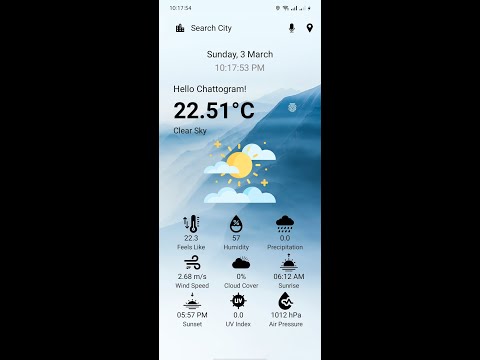
LoCast is an Android application that provides users with real-time weather updates for their current location and any other desired location they choose. LoCast a name that combines “location” and “forecast” to highlight the app’s GPS feature. Utilizing the web-based API like OpenWeatherMap and the phone's built-in GPS sensor, LoCast delivers accurate and relevant weather information, empowering users to make informed decisions about their daily activities.
This project employs a user-centric approach to deliver real-time weather information. The development for the IoT-based location weather app encompasses a systematic approach covering project planning, research, design, development, testing, deployment, and iteration. The methodology leverages a combination of location based services and user interaction to provide hyper-localized weather data. The application utilizes GPS sensors for initial location acquisition, while a search bar and Bangla language support cater to user-specified locations. Fingerprint authentication offers a secure option. Data retrieval is facilitated by the Open Weather API, ensuring access to reliable weather information. Finally, the app integrates a real-time date and clock for seamless timekeeping alongside weather updates.

References: OpenWeather API: https://openweathermap.org/
implementation ("com.android.volley:volley:1.2.0")
  String apiKey = "abcdef"; // OpenWeatherMap API key
        String apiUrl = "https://api.openweathermap.org/data/2.5/weather?lat=" + latitude + "&lon=" + longitude + "&appid=" + apiKey + "&units=metric";
        JsonObjectRequest jsonObjectRequest = new JsonObjectRequest
                (Request.Method.GET, apiUrl, null, new Response.Listener<JSONObject>() {
                    @Override
                    public void onResponse(JSONObject response) {
                        try {
                        // Parse weather data
                            JSONObject main = response.getJSONObject("main");
                            double temperature = main.getDouble("temp");
                            JSONArray weatherArray = response.getJSONArray("weather");
                            JSONObject weatherObject = weatherArray.getJSONObject(0);
                            String description = weatherObject.getString("description");
                            } catch (JSONException e) {
                            e.printStackTrace();
                            errorHandling();
                            locationTextView.setText("Check your Internet Connection!");
                        }
                    }
                }, new Response.ErrorListener() {
                    @Override
                    public void onErrorResponse(VolleyError error) {
                        error.printStackTrace();
                        errorHandling();
                        locationTextView.setText("Check your Internet Connection!");
                    }
                });
        // Add the request to the RequestQueue
        RequestQueue queue = Volley.newRequestQueue(this);
        queue.add(jsonObjectRequest);
- Splash Screen
- Search Bar
- Voice Search
- Cross platform
- Fingerprint Authentication
- GPS Sensor
- Open Weather API
- Realtime Date and Clock
- Bangla Search Support
Development Environment: Android Studio
Programming Language: Java
API Integration: OpenWeatherMap
Location Services GPS Sensor
User Interface Design: Material Design Principles
Testing: Unit Testing, Integration Testing, User Testing