Spring Boot
Spring Boot makes it very easy to create a Spring-powered application with a minimum amount of work. An application created with Spring Boot can be:
- Created without a single line of XML configuration.
- Created without any requirement of an application server because Spring Boot provides an application server (Embed Tomcat, Jetty or Undertow).
- Largely autoconfigured with some sensible defaults and opinionated starter POMs to simplify your Maven configuration.
- Provide production-ready features such as metrics, health checks, and externalized configuration.
Spring Boot consists of several (optional) modules
- Spring Boot CLI
- Spring Boot Core
- Spring Boot Autoconfigure
- Spring Boot Actuator
- Spring Boot Starters
- Spring Boot Tools
A command line interface, based on Groovy, for starting/stopping Spring Boot created applications.
By uisng CLI you can compile and run Spring scripts are written in Groovy by using the run command.
-
Running Applications with the CLI:
hello.groovy.@RestController class WebApplication { @RequestMapping("/") String home() { "Hello World!" } }
To compile and run the application, type the following command:
$ spring run hello.groovy
Groovy script is the main() method that calls
SpringApplicationand the@EnableAutoConfigurationannotation.
We automatically create the Spring@Configurationthat you would otherwise need to write
We start up an embedded servlet container and handle incoming requests on port 8080 -
Running Applications with the java:
hello.java.@RestController @EnableAutoConfiguration class WebApplication { @RequestMapping("/") String home() { "Hello World!" } public static void main(String[] args) throws Exception { SpringApplication.run(WebApplication.class, args); } }
To compile and run the application, type the following command:
$ javac WebApplication.java
$ java WebApplication
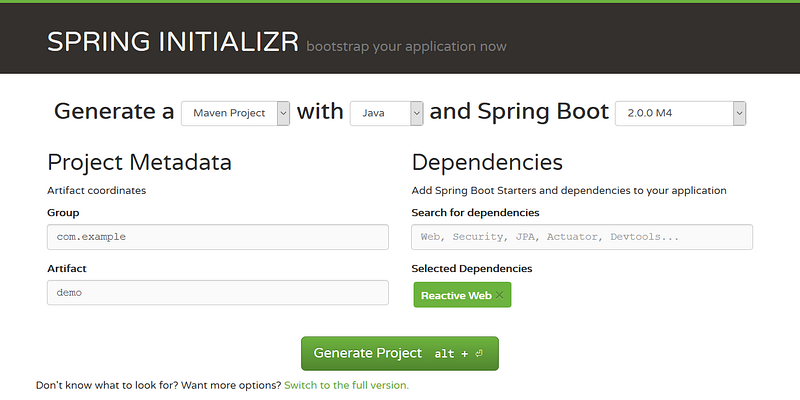
SPRING INITIALIZR bootstrap your application now Example
The base for other modules, but it also provides some functionality that can be used on its own, eg. using command line arguments and YAML files as Spring Environment property sources and automatically binding environment properties to Spring bean properties (with validation).
Module to autoconfigure a wide range of Spring projects. It will detect the availability of certain frameworks (Spring Batch, Spring Data JPA, Hibernate, JDBC). When detected it will try to automatically configure that framework with some sensible defaults, which in general can be overridden in an application.properties/.yml file.
Spring based applications have a lot of configuration. When we use Spring MVC, we need to configure component scan, dispatcher servlet, a view resolver, web jars(for delivering static content) among other things. Spring Boot comes with very little Spring configuration
This project, when added, will enable certain enterprise features (Security, Metrics, Default Error pages) to your application. Like the auto configure module it uses autodetection to detect certain frameworks/features of your application.
Different quickstart projects to include as a dependency in your Maven or Gradle build file. It will have the needed dependencies for that type of application. Currently, there are starter projects for a web project (Tomcat and Jetty based), Spring Batch, Spring Data JPA, Spring Integration, Spring Security exist. In the (near) future more may be expected.
Spring Boot Starters are just JAR Files. They are used by Spring Boot Framework to provide “Auto-Dependency Resolution”.
The Maven and Gradle build tool, as well as the custom Spring Boot Loader (used in the single executable jar/war), is included in this project.
Spring Boot Actuator is a sub-project of Spring Boot. Which includes a number of additional features to help you Monitor and Mangae your application when it's pushed to production.
You can choose to Manage and Monitor your application using HTTP Endpoints, with JMX or even by Remote SHELL(SSH or TELNET). Auditing, Health and Metrics gathering can be automatically applied to your application.