Advanced UI module based on skia-python, pyopengl and glfw.
Still under developing...
versions under dev are provided for evaluation purposes.
python3 -m suzaku
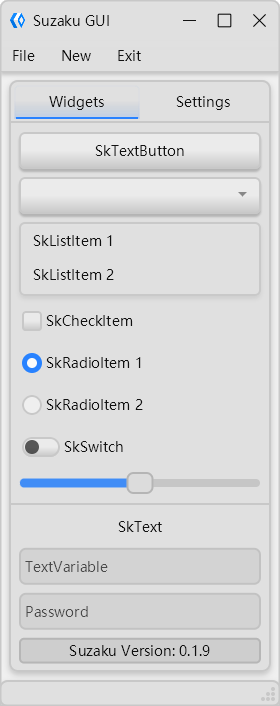
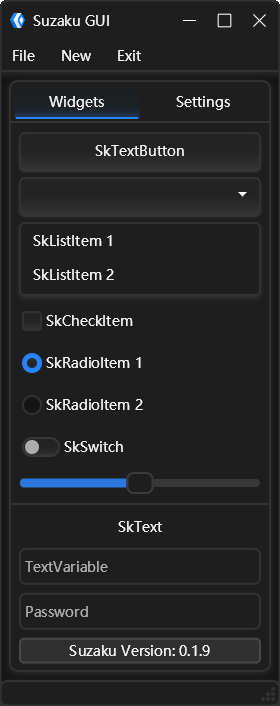
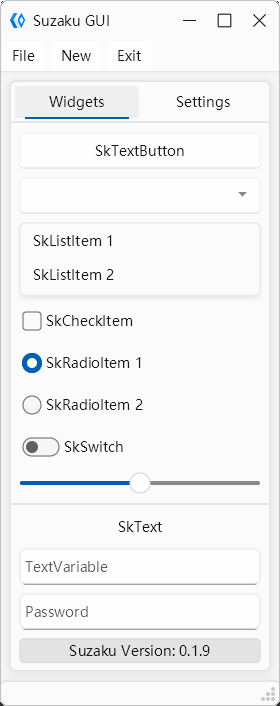
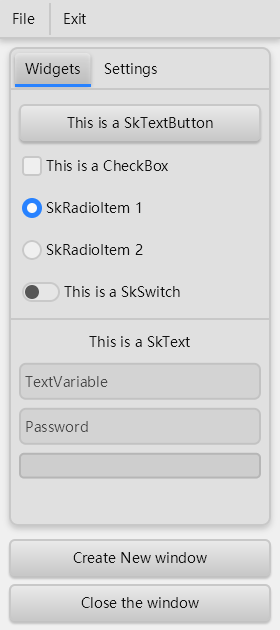
pip install suzakugit clone https://github.com/yourusername/suzaku.git
cd suzaku
pip install -e .- Modern UI: Beautiful, modern UI components with customizable themes
- Easy Layout: Simple box-based layout system, similar to tkinter
- Cross-platform: Works on Windows, macOS, and Linux
- Hardware Accelerated: Uses OpenGL for rendering via skia-python
- Event-driven: Comprehensive event handling system
- Themable: Supports custom themes and built-in light/dark themes
- Rich Component Set: Wide range of UI components available
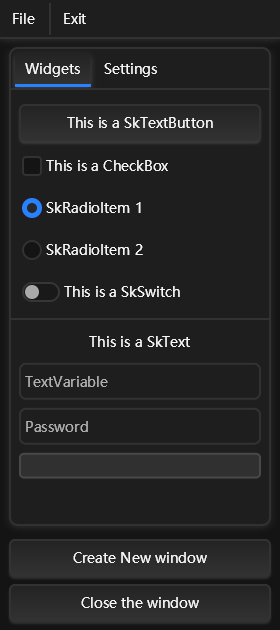
| Component | Description | Status |
|---|---|---|
| SkApp | Application base | ✅ |
| SkWindow | Main window | ✅ |
| SkButton | Clickable button | ✅ |
| SkCard | Card container | ✅ |
| SkCheckBox | Checkbox | ✅ |
| SkCheckItem | Checkable menu item | ✅ |
| SkComboBox | Dropdown menu | ✅ |
| SkContainer | Base container | ✅ |
| SkEmpty | Empty placeholder | ✅ |
| SkEntry | Single-line input | ✅ |
| SkFrame | Frame container | ✅ |
| SkImage | Image display with color processing | ✅ |
| SkLabel | Text label | ✅ |
| SkLineInput | Line input | ✅ |
| SkListBox | List container | ✅ |
| SkListItem | List item | ✅ |
| SkMenu | Menu | ✅ |
| SkMenuBar | Menu bar | ✅ |
| SkMenuItem | Menu item | ✅ |
| SkMessageBox | Message box | ✅ |
| SkMultiLineInput | Multi-line input | ⛔ |
| SkPopup | Popup window | ✅ |
| SkPopupMenu | Popup menu | ✅ |
| SkRadioBox | Radio button group | ✅ |
| SkRadioItem | Radio button | ✅ |
| SkSeparator | Separator line | ✅ |
| SkSizeGrip | Window resize grip | ✅ |
| SkSlider | Slider control | ✅ |
| SkStack | Stack container | ✅ |
| SkSwitch | Toggle switch | ✅ |
| SkSwitchBox | Switch group | ✅ |
| SkTabBar | Tab bar | ✅ |
| SkTabButton | Tab button | ✅ |
| SkTabs | Tab container | ✅ |
| SkText | Text display | ✅ |
| SkTextButton | Text button | ✅ |
| SkTitleBar | Window title bar | ✅ |
| SkTreeView | Tree view | ⛔ |
| SkWidget | Base widget | ✅ |
Each component can use layout methods to arrange itself using, for instance, widget.box(), which is similar to how things work in tkinter. Comparing to other solutions used in Qt or other UI frameworks, we believe this approach is more simple and user-friendly.
每个组件都可以使用布局方法来布局自己,例如widget.box(),类似于tkinter,我觉得这样更简洁易用点。
It can be considered a simplified version of tkinter.pack—with side, expand, padx, pady, ipadx, and ipady attributes.
Each container can only choose one layout direction. For example,
you cannot use both widget.box(side="left") and widget.box(side="right") simultaneously.
可以被称为tkinter.pack的简易版,包含side、expand、padx、pady、ipadx和ipady属性。
每个容器只能选择一种布局方向,例如,不能同时使用widget.box(side="left")和widget.box(side="right")。
The default layout is vertical.
默认为垂直方向布局。
widget.box()widget.box(side="left")
widget2.box(side="right")widget.box(padx=10, pady=5, ipadx=2, ipady=2)widget.box(expand=True)Grid layout allows you to arrange widgets in a grid pattern.
widget.grid(row=0, column=0)
widget2.grid(row=0, column=1)
widget3.grid(row=1, column=0, columnspan=2)
Fixed layout allows you to position widgets at specific coordinates.
widget.fixed(x=10, y=10, width=100, height=30)- Uses
glfwas window management library - Uses
pyopenglas rendering backend - Uses
skia-pythonfor 2D graphics rendering - Event-driven architecture for handling user interactions
使用glfw作为窗口管理库,使用pyopengl作为渲染后端,使用skia-python作为2D图形渲染库,采用事件驱动架构处理用户交互。
Suzaku supports multiple themes, including:
- Light theme
- Dark theme
- Special themes (SV Light, SV Dark)
from suzaku.styles.theme import SkTheme

# Load a theme
theme = SkTheme.load("path/to/theme.json")

# Apply theme to window
window.apply_theme(theme)# Bind a function to a widget event
widget.bind("click", lambda evt: print("Clicked!"))
# Bind to keyboard events
window.bind("key_press", lambda evt: print(f"Key pressed: {evt['key']}"))
# Bind to mouse events
widget.bind("mouse_enter", lambda evt: print("Mouse entered!"))
widget.bind("mouse_leave", lambda evt: print("Mouse left!"))click: Mouse clickdouble_click: Double clickmouse_enter: Mouse enters widgetmouse_leave: Mouse leaves widgetmouse_press: Mouse button pressedmouse_release: Mouse button releasedkey_press: Key pressedkey_release: Key releasedfocus_gain: Widget gains focusfocus_loss: Widget loses focusresize: Widget resizedconfigure: Widget configuredupdate: Widget updatedscroll: Mouse wheel scrolled
from suzaku import *

app = SkApp()

window = SkWindow(title="My App", size=(400, 300))

# Create a button
button = SkButton(window, text="Click Me")
button.box(padx=10, pady=10)
button.bind("click", lambda evt: print("Button clicked!"))

# Create a label
label = SkLabel(window, text="Hello, Suzaku!")
label.box(padx=10, pady=5)

window.update_layout()
app.run()Suzaku is one of the four mythical beasts in ancient China, representing the south and the element of fire. It symbolizes vitality, growth, and transformation.
suzaku是中国古代的四大神兽之一,代表南方和火元素,象征着生命力、成长和变革。
Contributions are welcome! Please feel free to submit a Pull Request.
MIT License
- Support for more frameworks (SDL2)
- Additional UI components
- Improved layout system
- Enhanced theme support
- Documentation improvements
- More examples and tutorials
- skia-python - Skia Python bindings
- glfw - Window management
- pyopengl - OpenGL bindings for Python
If you encounter any issues or have questions, please open an issue on the GitHub repository.
Enjoy using Suzaku!