SPXQuery is a Python package designed to automate SPHEREx spectral image data query, download, and time-domain analysis for astronomical sources.
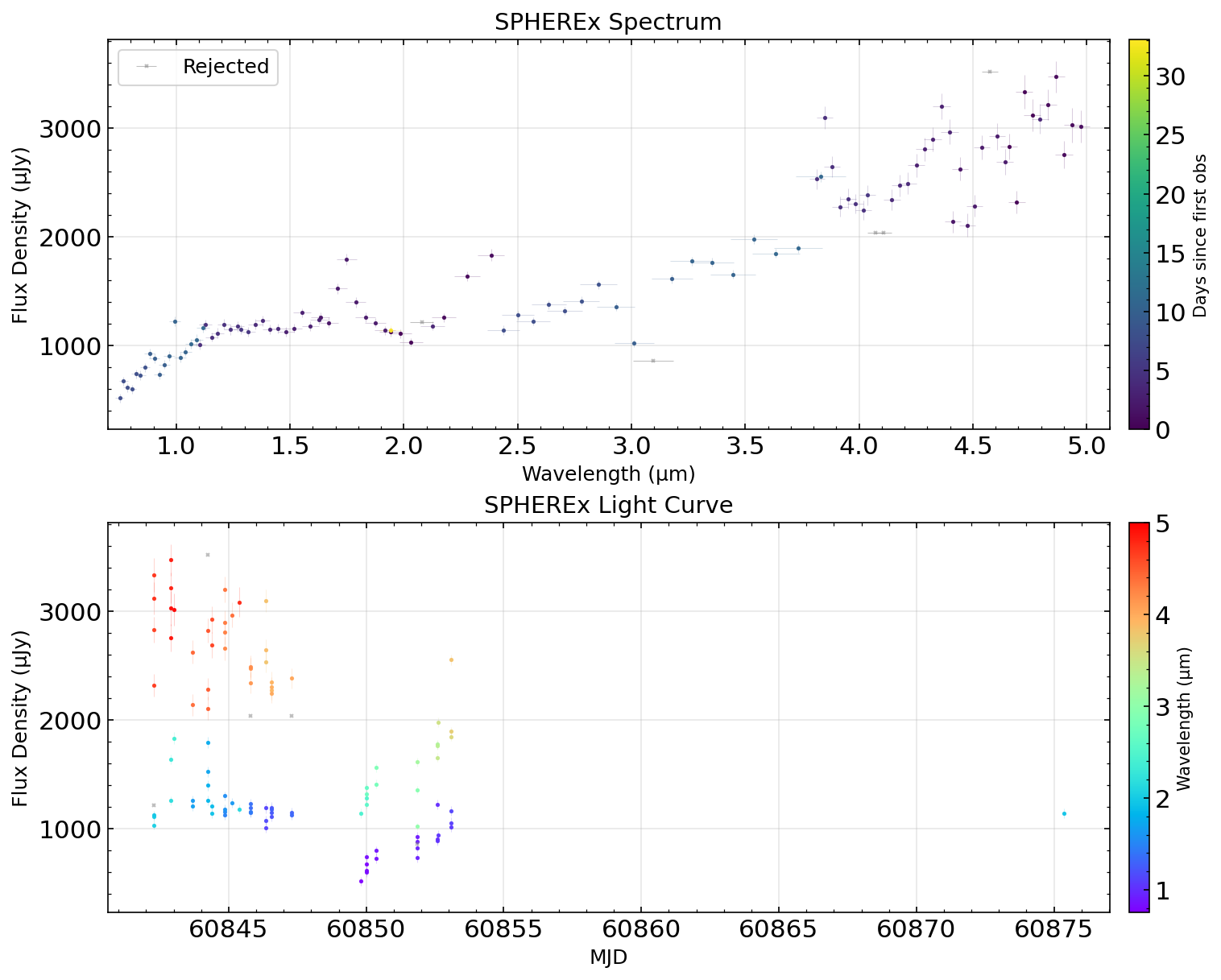
Automated spectral and temporal analysis of the Cloverleaf quasar (z=2.56) showing SPHEREx's multi-wavelength time-domain capabilities.
- Automated data pipeline: Query → Download → Photometry → Visualization
- Flexible photometry: FWHM-based adaptive apertures and dual background methods (annulus/window)
- Image cutout support: Download only regions of interest (99% storage reduction)
- Parallel processing: Fast downloads and photometry extraction
- Resumable execution: Automatic state persistence for interrupted runs
- Quality control: Built-in filtering with visual inspection of rejected data
- Publication-ready plots: Combined spectral and time-series visualization
- Python 3.11 or later (supports Python 3.11-3.13)
pip install spxqueryVerify installation:
python -c "import spxquery; print(spxquery.__version__)"For the latest development version:
git clone https://github.com/WenkeRen/spxquery.git
cd spxquery
pip install .If you want to contribute to SPXQuery or manage dependencies with Poetry:
# Install Poetry
curl -sSL https://install.python-poetry.org | python3 -

# Install with Poetry
poetry install
For detailed installation instructions and troubleshooting, see INSTALL.md.
from spxquery.core.pipeline import run_pipeline

# Run complete pipeline for Cloverleaf quasar (z=2.56)
run_pipeline(
    ra=213.9427080,
    dec=11.4953890,
    output_dir="output",
    source_name="cloverleaf",
    aperture_diameter=2.0,
    cutout_size="60px"
)from spxquery import Source, QueryConfig, SPXQueryPipeline
# Configure your analysis for Cloverleaf quasar
source = Source(ra=213.9427080, dec=11.4953890, name="cloverleaf")
config = QueryConfig(
source=source,
output_dir="output",
aperture_diameter=2.0,
cutout_size="60px"
)
# Run the pipeline
pipeline = SPXQueryPipeline(config)
pipeline.run_full_pipeline()pipeline.run_query() # Query IRSA archive
pipeline.run_download() # Download FITS files
pipeline.run_processing() # Extract photometry
pipeline.run_visualization() # Create plots# Automatically resume from saved state
pipeline = SPXQueryPipeline(config)
pipeline.resume()For detailed examples including quality control settings, band selection, and advanced features, see example/quickstart_demo.ipynb.
The pipeline creates an organized output directory:
output_dir/
├── data/                    # Downloaded FITS files (by band)
├── results/
│   ├── lightcurve.csv       # Photometry time-series (all measurements)
│   ├── combined_plot.png    # Spectral + temporal visualization
│   ├── query_summary.yaml   # Query metadata
└── {source_name}.yaml       # Pipeline state (for resume)
The lightcurve.csv contains all photometry measurements with columns including MJD, flux, wavelength, band, quality flags, and SNR.
| Band | Wavelength Range | Resolving Power |
|---|---|---|
| D1 | 0.75-1.09 μm | R=39 |
| D2 | 1.10-1.62 μm | R=41 |
| D3 | 1.63-2.41 μm | R=41 |
| D4 | 2.42-3.82 μm | R=35 |
| D5 | 3.83-4.41 μm | R=112 |
| D6 | 4.42-5.00 μm | R=128 |
- Installation Guide: Detailed installation instructions and troubleshooting
- Quick Start Notebook: Interactive tutorial with examples
- API Reference: Source code with docstrings
Image Cutouts: Download 200×200 pixel cutouts (~0.7 MB) instead of full 2040×2040 images (~70 MB) for 99% storage reduction. Specify cutout_size="200px" or use angular units like "3arcmin".
Quality Control: All measurements are saved to CSV. Visualization applies configurable filters (sigma_threshold, bad_flags) to show good measurements (filled circles) and rejected data (gray crosses) for inspection.
Resume Capability: Pipeline automatically saves state after each stage. Use pipeline.resume() to continue from interruptions without re-downloading data.
Overly Conservative Source Masking: The pipeline uses official SPHEREx image masks to avoid bad pixels during background subtraction. However, the official pipeline tends to provide overly large source masks. If your target is located in an extended nebula or near bright stars, the photometry extraction may fail because no clean pixels are available for background estimation. Solution: Use the window background method (background_method='window' in advanced configuration) which estimates background from a rectangular region instead of an annulus, or manually adjust mask parameters.
This package is provided as-is for SPHEREx data analysis.
Based on SPHEREx data from NASA/IPAC Infrared Science Archive (IRSA).