Foodify is a Flask-based food delivery platform designed to help you discover and explore amazing food options near you using the TomTom API. Built with MySQL and Flask, it provides real-time order tracking, location-based delivery, secure user authentication, and a restaurant review system.
- Features
- Project Structure
- Models Overview
- Console
- Setup Instructions
- Usage
- Technologies Used
- Frontend Architecture
- Security Considerations
- API Notes
- Contributors
- License
- Restaurant Management: Browse and order from local restaurants
- Client Model: Manages key fields such as username, email, address, latitude, longitude, phone
- Menu System: Dynamic menu items with availability tracking
- Order Processing: Real-time order status and tracking
- User Reviews: Restaurant ratings and feedback system
- Location Services: TomTom API integration for delivery
- Secure Authentication: Session-based user management (transition to JWT planned for future)
Foodify/
├── AUTHORS                     # Project contributors list
├── README.md                   # Project documentation
├── app.py                      # Flask application entry point
├── console.py                  # CLI for database management
├── requirements.txt            # Python dependencies
├── .env.example               # Environment variables template
├── .gitignore                 # Git ignore rules
|
│
├── database/                  # Database files
│   └── foodify_backup.sql    # MySQL database dump
│
├── docs/                      # Documentation
│   ├── API_DOCUMENTATION.md  # REST API specifications
│   └── DATABASE_DOCUMENTATION.md  # Database schema and queries
│
├── models/                    # Database models
│   ├── __init__.py          # Models initialization
│   ├── base_model.py        # Base model class
│   ├── client.py            # Client model
│   ├── menu_item.py         # MenuItem model
│   ├── order.py            # Order model
│   ├── order_item.py       # OrderItem model
│   ├── restaurant.py       # Restaurant model
│   ├── review.py          # Review model
│   └── engine/            # Database engine
│       ├── __init__.py    # Engine initialization
│       └── db_storage.py  # MySQL storage implementation
│
├── routes/                   # Route handlers
│   ├── __init__.py         # Routes initialization
│   ├── contact.py         # Contact page routes
│   ├── delivery.py        # Delivery management
│   ├── login.py          # Authentication routes
│   ├── order.py          # Order processing
│   ├── payment.py        # Payment handling
│   ├── restaurant.py     # Restaurant pages
│   ├── signup.py         # User registration
│   ├── user_setting.py   # User settings
|   ├── welcome.py        # Home page routes
│   └── config.py         # Route configuration
|
|
│
├── static/                   # Static assets
│   ├── css/               # Stylesheets
│   │   ├── shared/       # Shared styles
│   │   │   └── cart.css  # Shopping cart styles
│   │   ├── login.css
│   │   ├── payment.css
│   │   ├── welcome.css
│   │   └── ...
│   ├── js/              # JavaScript files
│   │   ├── script.js    # Core functionality
│   │   ├── payment.js   # Payment handling
│   │   ├── search.js    # Search functionality
│   │   └── ...
│   └── images/         # Image assets
│       ├── menu_items/  # Restaurant menu images
│       └── Team/        # Team member photos
│
├── templates/              # HTML templates
│   ├── 403.html          # Error pages
│   ├── 404.html
│   ├── 500.html
│   ├── contact.html      # Contact page
│   ├── delivery.html     # Delivery page
│   ├── login.html        # Login page
│   ├── order.html        # Order management
│   ├── payment.html      # Payment page
│   ├── welcome.html      # Home page
│   └── ...
│
└── tests/
    └── unit/
    ├── test_console/
    │   └── test_console_commands.py       # Tests for console command interface
    │
    ├── test_models/
    │   ├── test_base_model.py            # Tests for base model functionality
    │   ├── test_client.py                # Tests for Client model
    │   ├── test_menu_item.py             # Tests for MenuItem model
    │   ├── test_order.py                 # Tests for Order model
    │   ├── test_restaurant.py            # Tests for Restaurant model
    │   ├── test_review.py                # Tests for Review model
    │   └── test_engine/
    │       └── test_db_storage.py        # Tests for database storage
    │
    └── test_web_flask/                   # Tests for Flask web routes
        ├── test_contact.py               # Tests for contact endpoints
        ├── test_delivery.py              # Tests for delivery endpoints
        ├── test_login.py                 # Tests for login/auth endpoints
        ├── test_order.py                 # Tests for order endpoints
        ├── test_payment.py               # Tests for payment endpoints
        ├── test_restaurant.py            # Tests for restaurant endpoints
        ├── test_signup.py                # Tests for signup endpoints
        ├── test_user_setting.py          # Tests for user settings endpoints
        └── test_welcome_page.py          # Tests for welcome page endpoints
-
Client (
clientstable):- Fields:
id,username,email,password,address,latitude,longitude,phone,delivery_instructions,created_at,updated_at - Handles authentication, profile data, and location info
- Fields:
-
Restaurant (
restaurantstable):- Fields:
id,name,city,logo_url,created_at,updated_at
- Fields:
-
MenuItem (
menu_itemstable):- Fields:
id,restaurant_id,name,price,is_available,image_url,created_at,updated_at
- Fields:
-
Order (
orderstable):- Fields:
id,client_id,status,order_date,total_price,created_at,updated_at
- Fields:
-
OrderItem (
order_itemstable):- Fields:
id,order_id,menu_item_id,quantity,created_at,updated_at
- Fields:
-
Review (
reviewstable):- Fields:
id,client_id,restaurant_id,rating,comment,created_at,updated_at
- Fields:
Use console.py for database management:
# Create new client
python console.py
(foodify) create Client username="imad" email="imad@mail.com" password_hash="123_456" address="hay_alnajah_N15_Rabat"

# Create restaurant
(foodify) create Restaurant name="Pizza_Hot" city="Rabat"

# Create review
(foodify) create Review client_id="[uuid]" restaurant_id="[uuid]" rating=4 comment="Good_meals"Make sure you have the following installed:
- Python 3.8+
- pip (Python package manager)
- MySQL (or any other compatible database)
1.Create a .env file
cp .env.example .env2.Configure Environment Variables
# Flask
FLASK_SECRET_KEY=your_flask_secret_key

# Database
FOOD_MYSQL_USER=your_database_user
FOOD_MYSQL_PWD=your_database_password
FOOD_MYSQL_HOST=127.0.0.1
FOOD_MYSQL_DB=foodify_db

# TomTom API
TOMTOM_API_KEY=your_tomtom_api_key3.Generate Flask Secret Key
python -c "import secrets; print(secrets.token_hex(24))"4.Obtain TomTom API Key
- Sign up at TomTom API
- Add your API key to
.env
- Create and activate virtual environment
python -m venv venv
source venv/bin/activate  # Linux/Mac
# or
venv\Scripts\activate # Windows2.Install dependencies
pip install -r requirements.txt- Create Database
CREATE DATABASE foodify_db;2.Load Sample Data (Optional)
mysql -u <username> -p foodify_db < database/foodify_backup.sqlRefer to docs/DATABASE_DOCUMENTATION.md for schema details.
python app.py- Register or log in to explore restaurants and place orders.
- Customize location data via the TomTom API (configure your
TOMTOM_API_KEY). - Modify code in
routesfor additional endpoints or logic.
- Python 3 - Primary programming language
- Flask - Web framework for building the REST API
- MySQL - Primary database system
- SQLAlchemy - Object-Relational Mapping (ORM)
- MySQL-Connector-Python - Database connector
- Flask-Login - User session management
- Flask-Bcrypt - Password hashing
- Flask-WTF - Form handling and CSRF protection
- WTForms - Form validation
- python-dotenv - .env file management
- Blueprint - Flask modular routing
- TomTom API - Location services integration
- Requests - HTTP library for API calls
- Flask-Session - Server-side session handling
- pip - Package installer
- requirements.txt - Dependency management
- HTML5: Semantic markup with accessibility features
- CSS3: Custom styling and responsive design
- JavaScript: Vanilla JS for core functionality
- Bootstrap 5.1.3: UI components and grid system
- Font Awesome 6.0.0: Icon system
- TomTom Maps SDK 6.23.0: Location services
-
Navigation System
- Responsive navbar with dynamic cart updates
- User authentication state management
- Dropdown menus for user settings
-
Cart Management (
static/js/script.js)- Real-time cart updates
- Local storage persistence
- Animated notifications
-
Location Services (
static/js/delivery.js)- TomTom Maps integration
- Address autocomplete
- Geolocation support
-
Search System (
static/js/search.js)- Dynamic menu item filtering
- Restaurant-based filtering
- Pagination implementation
static/css/
├── shared/
│   └── cart.css          # Shared cart styling
├── welcome.css           # Home page styles
├── login_signup.css      # Authentication styles
├── payment.css           # Payment page styles
├── delivery.css          # Delivery page styles
└── contact.css          # Contact page styles
static/js/
├── script.js            # Core functionality
├── search.js            # Search & filtering
├── delivery.js          # Location handling
├── payment.js           # Payment processing
├── contact.js           # Contact form handling
└── login_signup.js      # Authentication
- Mobile-first approach
- Breakpoints:
/* Mobile */
@media (max-width: 480px) { ... }

/* Tablet */
@media (max-width: 768px) { ... }

/* Desktop */
@media (min-width: 769px) { ... }- Dynamic script loading
- Image optimization
- Local storage for cart data
- Debounced search input
- Images stored in
images/ - Restaurant logos in
menu_items/ - Team photos in
Team/
- Modern browsers (Chrome, Firefox, Safari, Edge)
- Fallback styles for older browsers
- Polyfills where necessary
- CSRF protection on forms
- Input sanitization
- Secure session handling
- Protected API endpoints
- CSRF Protection: Enabled via Flask-WTF. Ensure
CSRFProtect(app)is used inapp.py. - Session-Based Login: @login_required for protected routes.
- Rate Limiting: Recommended at 50 requests/min per user.
- Future: Transition to JWT-based authentication is planned; see
API_DOCUMENTATION.mdfor details.
- Refer to docs/API_DOCUMENTATION.md for detailed endpoint usage and examples.
- Hybrid endpoints (HTML + JSON) will be deprecated in favor of REST/JSON in v2.0.
- To enable TomTom location-based services, provide
TOMTOM_API_KEYin your.env.
Common issues and solutions:
-
ModuleNotFoundError: No module named 'flask' Ensure virtual environment is activated and dependencies are installed
-
Database Connection Errors Verify credentials in
.envand database server status -
TomTom API Issues Check API key validity and request limits
- Abubakr Elgandy - Backend Developer | Frontend Developer
- John Samy - Backend Developer | Frontend Developer
- Ahmed Bentabet - Backend Developer | Database Manager
- Tariq Omer - Backend Developer | project manager
This project is licensed under the MIT License. See the LICENSE file for details.
We welcome contributions! Please:
- Fork the repository
- Create a feature branch
- Submit a pull request
For detailed API documentation, see docs/API_DOCUMENTATION.md.
Run the test suite using pytest:
python -m pytest tests/ -vKey test files:
test_create.py: Tests model creationtest_update.py: Tests model updatestest_delete.py: Tests model deletion
Our MySQL database follows this structure:
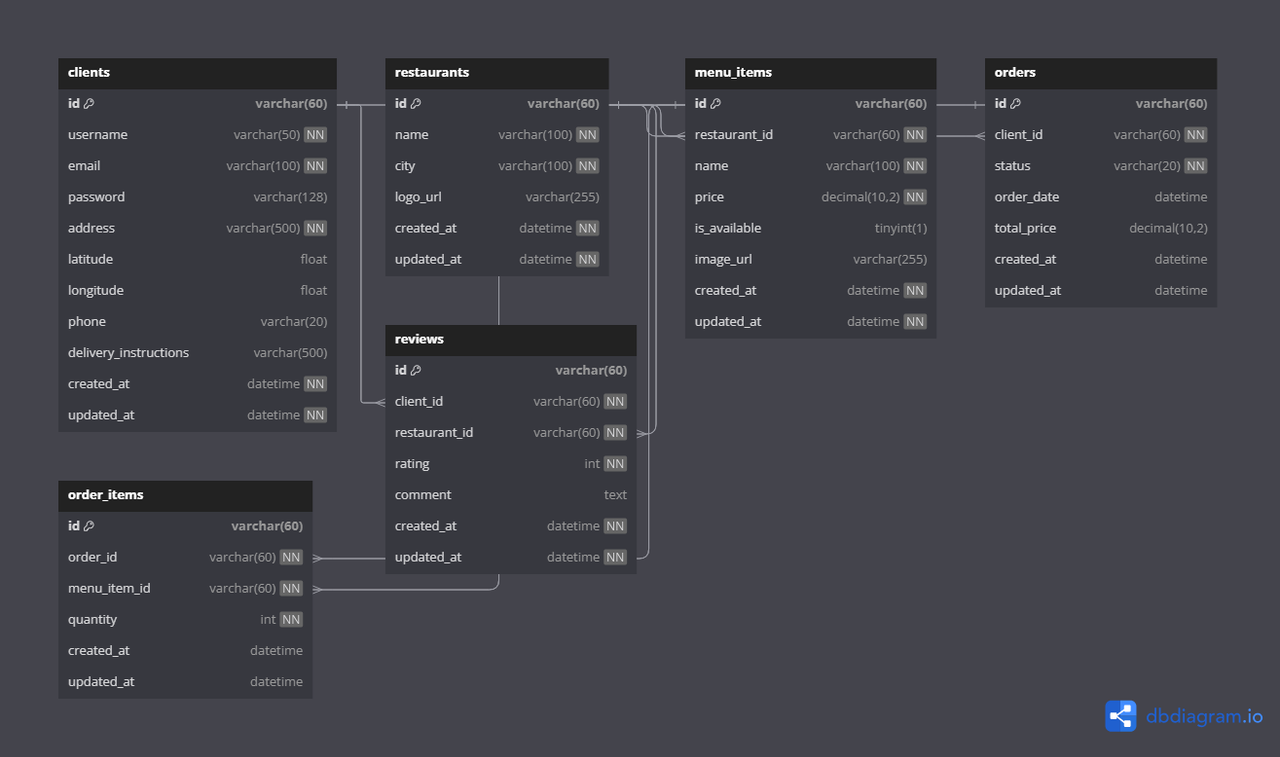
Key indexes for performance:
CREATE INDEX idx_orders_client ON orders(client_id);
CREATE INDEX idx_orders_status ON orders(status);
CREATE INDEX idx_order_items_order ON order_items(order_id);
CREATE INDEX idx_order_items_menu_item ON order_items(menu_item_id);
See database/foodify_backup.sql for complete schema.
- API Documentation: See docs/API_DOCUMENTATION.md
- Database Schema: See docs/DATABASE_DOCUMENTATION.md
- Sample Data: See database/foodify_backup.sql
Warning
API Deprecation Notice:
- Hybrid endpoints (HTML+JSON) will be removed in v2.0 (Q4 2024)
- Use pure REST endpoints from API_DOCUMENTATION.md
- Rate limiting (50 req/min) will be enforced on all API endpoints