This app has been developed within the scope of Mobile course belonging to Metropolia Unviersity Of Applied Sciences.
- Giao Ngo
- Tai Nguyen
- Shayne Kandagor
The app is an Android standalone herb reference book that provides plenty of information about nutrition value, health benefits, warnings and food suggestion of different types of plant to users. Besides that, there is area for users to add notes, update and delete their notes for future reference.
To enrich user's interaction and experience with the app, we added a custom-built camera with the help Android's Camera X Api, and created a specialised gallery for storing plant's images. The purpose of having camera and gallery is for those who would like to capture every images of plant they find interesting on the spot/at that moment and collect those images to the collection for keepsake.
- Coding language: Java
- Min sdk : 21, target sdk: 32
- The app targets at Android users
- For healthy eaters who are curious of the benefits of specific plant items
- For adventurous travellers (mountain hikers, bikers, campers, forest explorers) to know which plants are edible and which are poisonous before touching/eating them
- For patients seeking for natural remedies and for medical students.
- Download the our application apk file called herb_reference_guide.apk
- Our application logo can be recognized with green leaves logo and our application name is Herb Reference Guide.
Plant
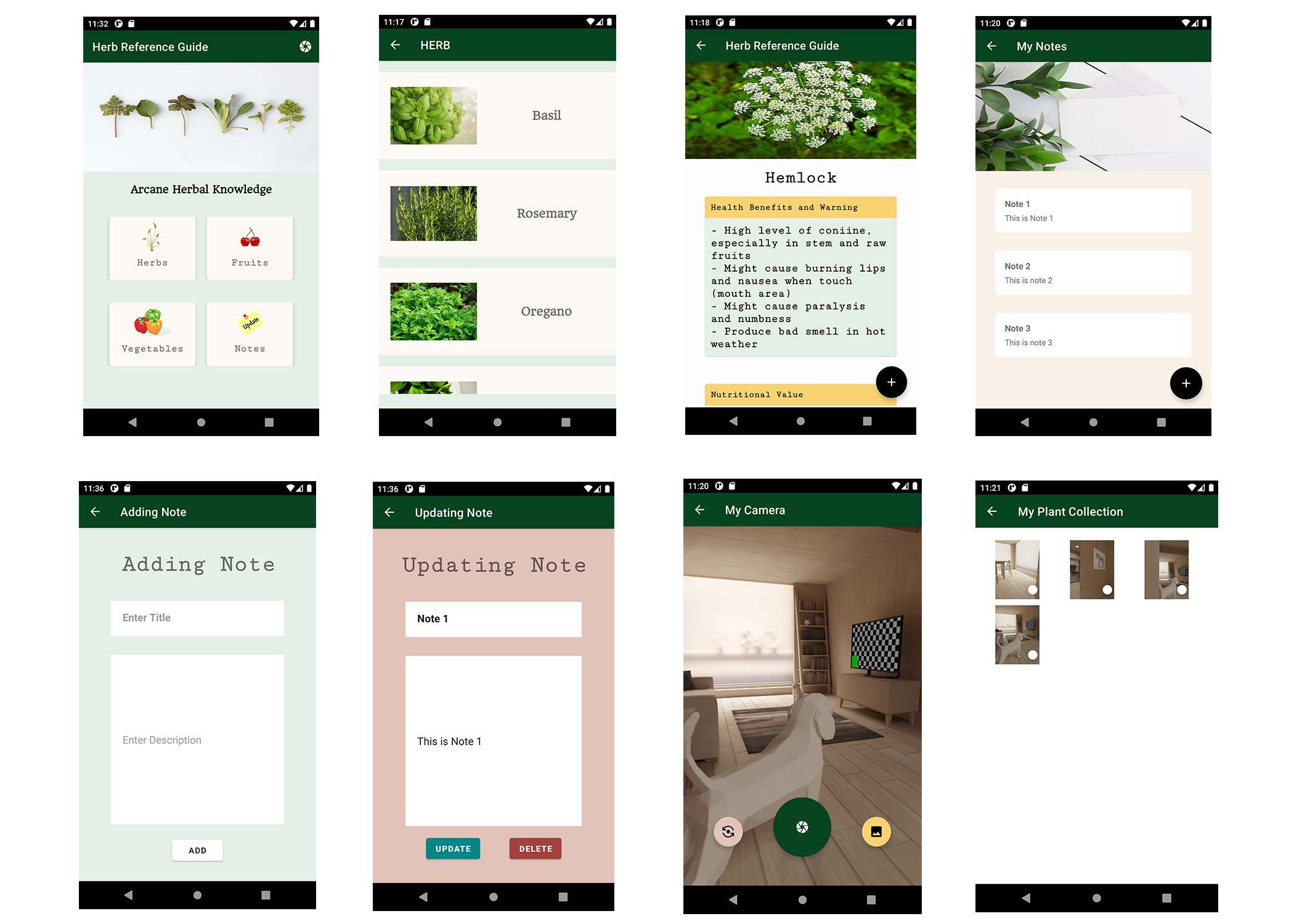
- Click on the app icon. In the main Activity there are four options of the Herbs, Fruits,Vegetables and Notes.
- When you click either the Herbs, Fruits or Vegetables you find the different types together with their images.
- Maybe if for example you click Herbs then click Basil as a type of Herb.
- After clicking Basil there are the Health Benefits, Warnings, Nutritional Values and Food Suggestions.
- At the bottom right of the activity there is a floating Action button which will take you to the note Activity.
Note
- In the Notes activity there is the list of many notes that the user has and if there are no notes then its blank.
- If you want to add your notes then click on floating action button at the bottom right of the Activity.
- Here you can have the title and the description of your note and press the add button to add the note to the list.
- In the Note Activity screen you can click in one of the notes and this will enable you to Update(to add what you left out or to edit) and delete the whole note if you want to.
Camera
- If you have installed the app for the first time you have to allow the app to use your device camera and also to store the images in the application.
- The Camera has three floating buttons. The capture button, the flipping the camera lens button and the button that will take you to the gallery where all the images that you have captured with the camera are.
- Once you capture an image there is a toast message that will inform you that the image is saved successfully in the local shared storage.
- In the My Plant collection activity which is the gallery there is a floating action button on the bottom right of each image.
- If you click the floating button of a specific image a message at the bottom will pop up asking if you want to delete the photo.
- If you click the button on the right of the message (DELETE) then you will delete the selected photo.
- For users who go for picnics, hiking in mountains and forests explorers you can use our app to find useful information about a fruit, herb or vegetable you have noticed and decided whether it can be of beneficial health-wise and whether to take it.
- For doctors and students in the medical and nutritional sector you can use our app to increase your knowledge on the important herbs, fruits and vegetables that can be recommended to patients.
- For grocery shoppers you can use our app in the market places when you notice a strange type of herb, fruit or vegetable and decide whether you can purchase it after you have scrolled through our app and gotten the Health Benefits and warnings, Nutritional Values to our bodies and the food suggestions that include the type of plant.
- For patients you can get information on how you can help cure, prevent and maintain certain diseases by the knowledge of the herbs, fruits and vegetables that our app provides.
Layout and UI components
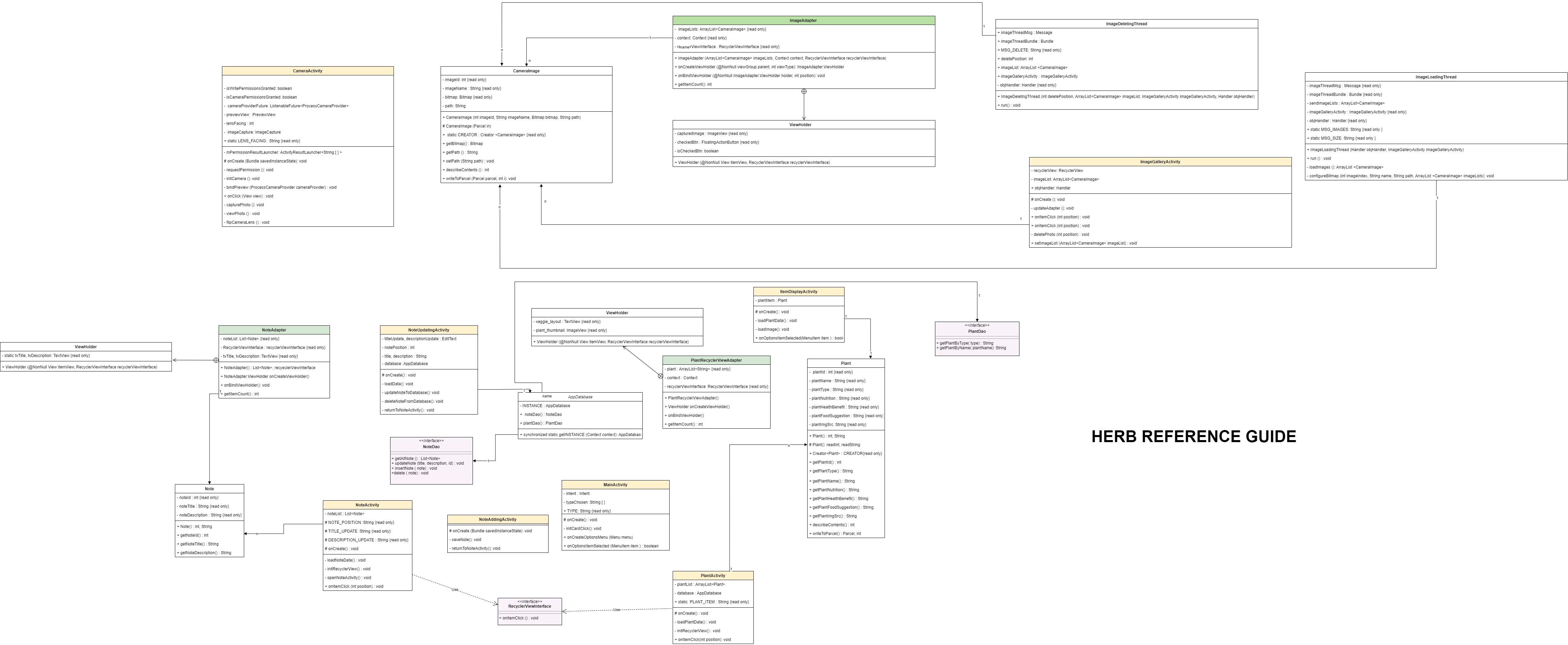
- RecyclerView & RecyclerView Adapter
- RecyclerView click listener (best performance)
- Adding Card View with a textbox
- Floating Action Button
- Set menu on toolbar and menu item click listener
- App Launch Icon
- Snackbar
Fonts, Icon and Image sources used in app
- Font: HeadlandOne-Regular by Google Fonts designed by Gary Lonergan. And Serif Monospace by Android.
- Icons : Unlimited usage of icons without author's permission and attribution. PublicDomain Vectors.com
- Images: Unlimited usage of images without author's permission and attribution:
Backend
- Prepopulate Room Database
- Launching an activity for result
- Send an object from one activity to another by intent
- Android Studio Parcelable
- Retrieve image path form assets folder
- Navigation 2 parents point to 1 child activity
- Camera X in Java
- Camera X - Implement a preview
- Camera X - Image Capture
- How to request multiple permissions in android studio
- ImageCapture.OutputFileOptions.Builder
- Content Provider
- Access media files from shared storage
- Environment.getexternalstoragedirectory() deprecated in API level 29 java
- How do I rotate bitmap in Android
- Android media store tutorial
- Java convert Date to String
- Date format
- Running Android tasks in background thread
- Creating a thread in Java
- Handler object
- Programmatically relaunch/ recreate an activity
- RecyclerView - Android Studio Tutorial Part 1
- RecyclerView - Android Studio Tutorial Part 2
In-app displayed plant's information sources
- 12 Best Bell Pepper Benefits + Nutritional Facts & Side Effects (stylesatlife.com)
- Bell Peppers 101: Nutrition Facts and Health Benefits (healthline.com)
- Herbs Encyclopaedia
- 9 Impressive Health Benefits of Cabbage (healthline.com)
- 12 Proven Health Benefits & Uses of Cabbage | Organic Facts
- Cabbage Nutrition Facts and Health Benefits (verywellfit.com)
- 10 Health Benefits of Carrots – Carotene
- Carrot Nutrition Facts and Health Benefits (verywellfit.com)
- Organic facts Health Benefits
- Lettuce: Health Benefits, Nutrients, Preparation, and More (webmd.com)
- Health benefits of basil
- 24 Fresh Basil Recipes
- Everything you need to know about rosemary
- Calories in fresh rosemary
- What are the health benefits of oregano?
- Is mint good for you
- Cowbane
- Hemlock
- Poisonous mushrooms
- Strawberries 101: Nutrition Facts and Health Benefits
- Strawberry recipes
- Nutritional benefits of the strawberry
- Blueberries
- Health benefits of pineapple
- 19 ways to add pineapple to your dinner
- 10 Incredible Health Benefits of Bananas
- 25 Recipes for Ripe and Overripe
- The health benefits of mango